Best Visitor Management Systems in 2026: 7 Tools + Pricing
Tamara Zhostka
Content Marketing Specialist
–
Last updated on Oct 01, 2026
Most visitor management tools look the same on a features page. They all do check-in, host notifications, badge printing, NDAs. The differences show up in pricing structure, which features are in the base plan versus locked behind Enterprise, the visitor experience at the kiosk, and whether the product is a dedicated VMS or one module on a broader platform.
I went through demos, documentation, product videos, customer case studies, and hundreds of G2 and Capterra reviews to put this together. I looked at real pricing where I could find it, because "$$$" doesn't help anyone build a budget.
7 best visitor management systems get full reviews. 5 more get shorter mentions at the end. These aren't ranked; they're organized roughly by use case fit and how well-known each tool is.
One note on pricing: Eptura, Robin, and Sine don't publish it publicly. I noted this in their sections.
TL;DR: Best visitor management software at a glance
The right tool depends on your compliance floor, your budget, and whether you need visitor management alone or as part of something bigger:
If you're…
Go with
A regulated enterprise needing ID verification and access control
Envoy or Eptura
In manufacturing or logistics with ITAR or C-TPAT requirements
FacilityOS or SwipedOn
A hybrid office that also needs desk and room booking in one platform
elia or Archie
Looking for the most customizable check-in workflow at the lowest price
Greetly
Just need a digital log and nothing else
LobbyTrack
Pricing ranges from free (LobbyTrack, Envoy Basic) to $4,000+/year per location for top tiers, with most mid-market tools landing between $100 and $500/month.
1. Envoy
Envoy is probably the first name that came up when you started researching this. It's been around longer than most tools on this list and became the benchmark that corporate offices compare everything else against.
It targets regulated, security-conscious environments: data centers, manufacturing, finance, life sciences. The compliance depth and the access control integration list reflect that. The reputation is earned, but so is the price tag.
G2: 4.7/5Capterra: 4.8/5
Standout:Up to 50 separate sign-in flows, one per visitor type, each with its own logic, questions, documents, and badge templates. The most granular sign-in setup available.
Limitation:The features that make it worth the price are mostly Enterprise-only, which means a custom quote before you know what you're spending.
Features
Separate sign-in flows per visitor type (up to 50)
Pre-registration with QR code: visitors scan at the kiosk, skip the form
Host notifications via email, SMS, Slack, Teams, push, or phone call
NDA and legal document signing before arrival or at the kiosk
Visitor photo capture
Badge printing with custom templates; expiring badges that go VOID after 24 hours
Blocklist and watchlist screening with admin alerts
ID scanning via Veriff (230+ countries, 48 languages). Enterprise only, 500 scans/year included
Access control integrations for temporary visitor access and automatic credential provisioning. Enterprise only
Emergency notifications with visitor safety confirmation. Enterprise only
Training quizzes and safety videos inside the sign-in flow
Global multi-location dashboard
Analytics and scheduled CSV/PDF exports
Static QR codes for touchless sign-in without an iPad
Pros
The sign-in flow customization is one of the best I found. Up to 50 visitor types, each with its own questions, documents, and badge templates, with conditional logic on top.
Pre-registration with QR codes works well under real pressure. Illumina Ventures used it for a 600-person event with 3 iPads and 3 printers running simultaneously. Check-in dropped from 3 minutes per guest to 1 minute.
The access control integration list is longer than most: Kisi, Brivo, LenelS2, Avigilon, Gallagher. For facilities where physical access needs to connect with visitor sign-in, this is where Envoy pulls ahead of the competition.
Host notifications work across every channel you'd use: email, SMS, Slack, Teams, push, and phone call. People in regulated industries consistently single out the audit trail as a reason they stay.
Cons
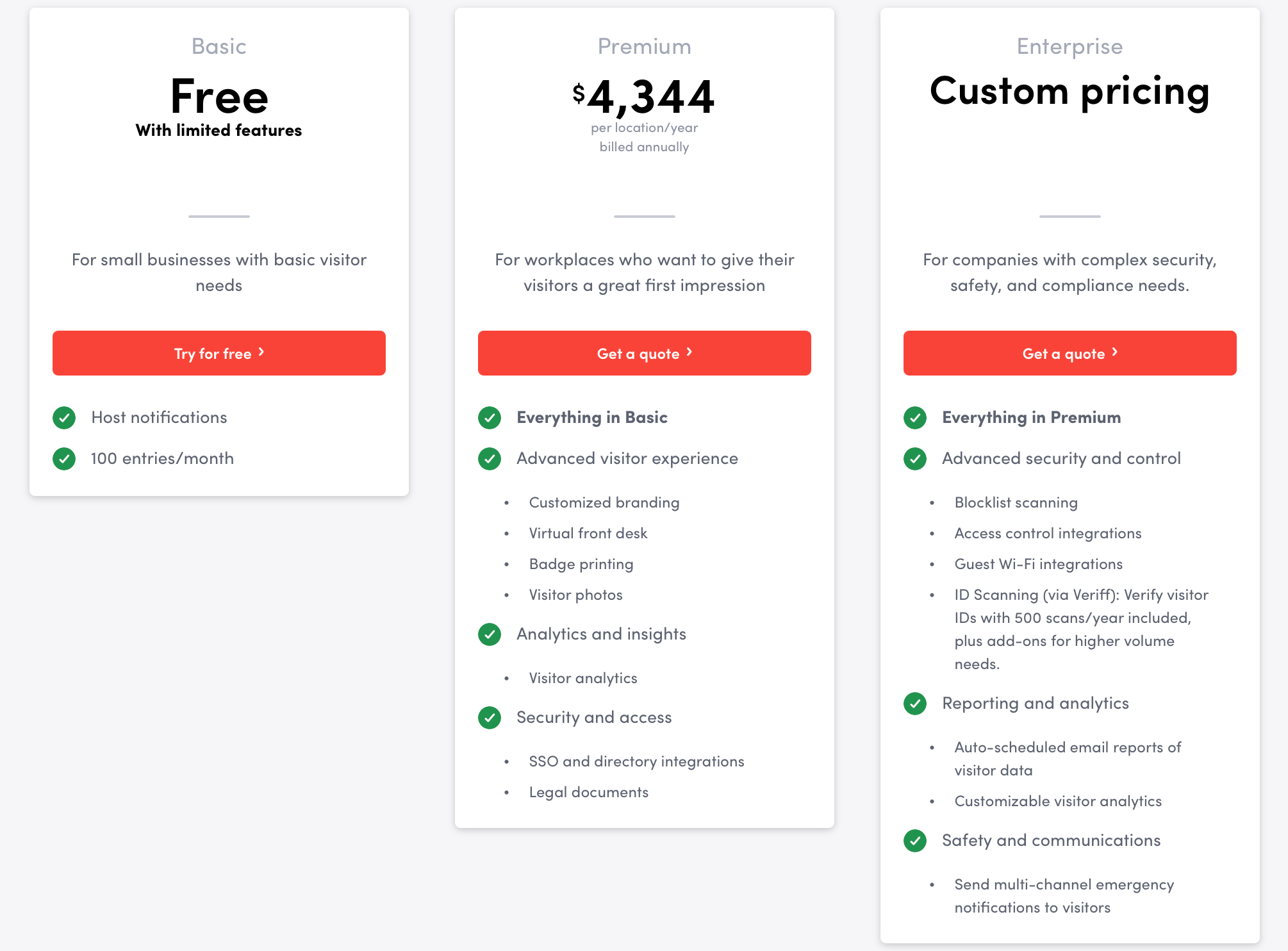
The price jump from free to paid is steep. Basic caps at 100 entries per month and 50 employees. Premium is $4,344 per location per year. There's nothing in between, which makes Envoy a hard sell for smaller teams.
The features most enterprise buyers need are all Enterprise-only. Blocklist, ID scanning, access control, and emergency notifications require a custom quote. Multiple enterprise teams have flagged this in reviews.
The kiosk app is iPad-only. No Android option. If you want to use existing hardware or keep device costs down, that's a constraint.
Bluetooth printer connectivity gets flagged across enough reviews to be a pattern worth knowing about before you commit to wireless badge printing.
Devices
iPad (kiosk only, no Android)
Neat Frame (via static QR code)
iOS and Android (Envoy Mobile for employees)
Web dashboard
Integrations
Communication: Slack, Microsoft Teams, Webex, Zoom
Calendar: Google Calendar, Outlook
Identity and SSO: Okta, Azure AD/Entra ID, SCIM
Access control systems: Kisi, Brivo, LenelS2, Avigilon, Gallagher
CRM: Salesforce
Wi-Fi: Aruba ClearPass, Cisco Meraki
File storage: Google Drive, Box, Dropbox, OneDrive, Egnyte, DocuSign
Enterprise: Custom. Blocklist, ID scanning, access control, emergency notifications, full multi-location.
Priced per location.
Source: Envoy
Best for
Mid-to-large companies (200+ employees) in regulated industries where compliance records, ID verification, and access control integrations are actual requirements.
If price is the main factor, there are tools on this list that cover the basics for a lot less. For a focused comparison, see our Envoy alternatives roundup.
2. elia
Visitor management is one module within a broader platform that also covers desk booking, room booking, hybrid scheduling, and occupancy. It's actually one of the most common entry points for new clients: teams come in with a front desk problem, then find the rest of the platform.
Over 100,000 users across ~200 organizations use elia, mostly in Canada and the US. Typical profile: 200+ employees, dynamic or hybrid workplace, a buying committee that usually includes Facilities, HR, and IT.
Capterra: 4.7/5Best Ease of Use 2026
Standout:Teams go live without IT support or a training session. Most are up and running the same day.
Limitation:The VMS integration list is smaller than some of the tools here. No access control or ID scanning. Built for growing teams.
Features
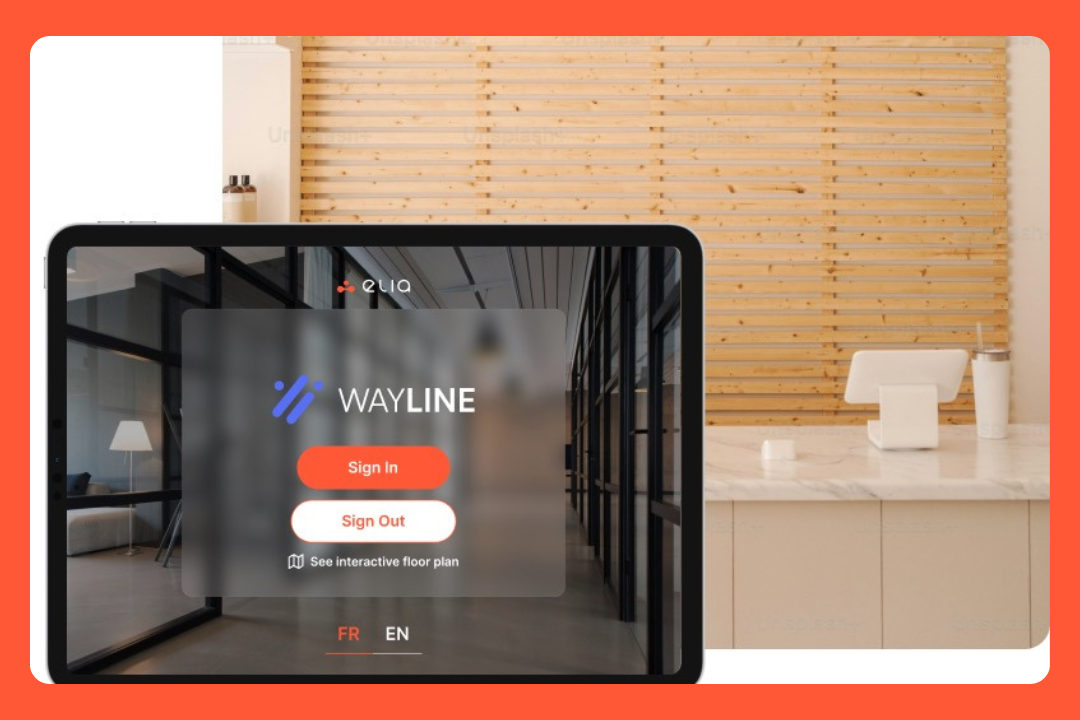
Self-service tablet kiosk check-in
QR code/touchless check-in on visitor's own device
Customizable visitor categories that capture different visitor details per type
Host notifications via email, Slack, and Microsoft Teams
NDA and document signing
Visitor photo capture
Badge printing
Audit-ready visitor log with CSV export
Pre-registration for expected visitors
Customizable workflows per visitor type and location
Emergency evacuation alerts and first responder tracking on floor plan
Multilingual kiosk support
Multi-site management
Interface personalized to your branding
Pros
The easiest to set up and use. Capterra gave elia "Best Ease of Use" for 2026 across every category the tool is listed in, including visitor management. It matches what I hear from customers too: no training needed, teams adopt it immediately.
Support is a differentiator. Software Advice gave elia "Best Customer Support" for 2026. People mention it specifically around the rollout period when most tools create the most friction.
All-in-one platform. Visitor management, desk booking, rooms, hybrid scheduling, and safety management all come with the same plan. Most platforms on this list price each product separately.
ISO 27001 certified, with data hosted on AWS Canada. For Canadian organizations, the domestic hosting matters for compliance. For anyone working within PIPEDA or GDPR constraints, the certification is relevant.
Cons
The VMS integration list is limited. Teams, Slack, Outlook, Google Calendar. There’s no access control hardware, ID scanning, or blocklists (yet!). If those are requirements, you may need a different tool.
It has deep Canadian roots. That's where elia has its track record. Teams outside Canada will find fewer third-party references to evaluate.
Visitor management is one of several modules, not the core product focus. That's a pro if you want the broader platform. It's a con if you want a VMS specialist that has spent years building specifically around visitor workflows.
The optional kiosk hardware is $5,000. You can use the tablets you already own and that works fine. But worth knowing the full cost if you're budgeting for the hardware ecosystem.
Devices
Tablet (kiosk app)
Touchscreen kiosk (43" display, optional, $5,000)
iOS and Android mobile app
Web dashboard
Integrations
Communication: Slack, Microsoft Teams
Calendar: Google Calendar, Microsoft Outlook
Identity and SSO: Microsoft 365, Google Workspace, SAML v2.0
Customers
Québecor, Cascades, Agropur, Canadian Cancer Society, Beneva, Promutuel, Cima+, Lavery Avocats, Fasken, ROBIC, Eddyfi Technologies, Globco, plus multiple Quebec government ministries and healthcare networks (CISSS/CIUSSS).
Pricing
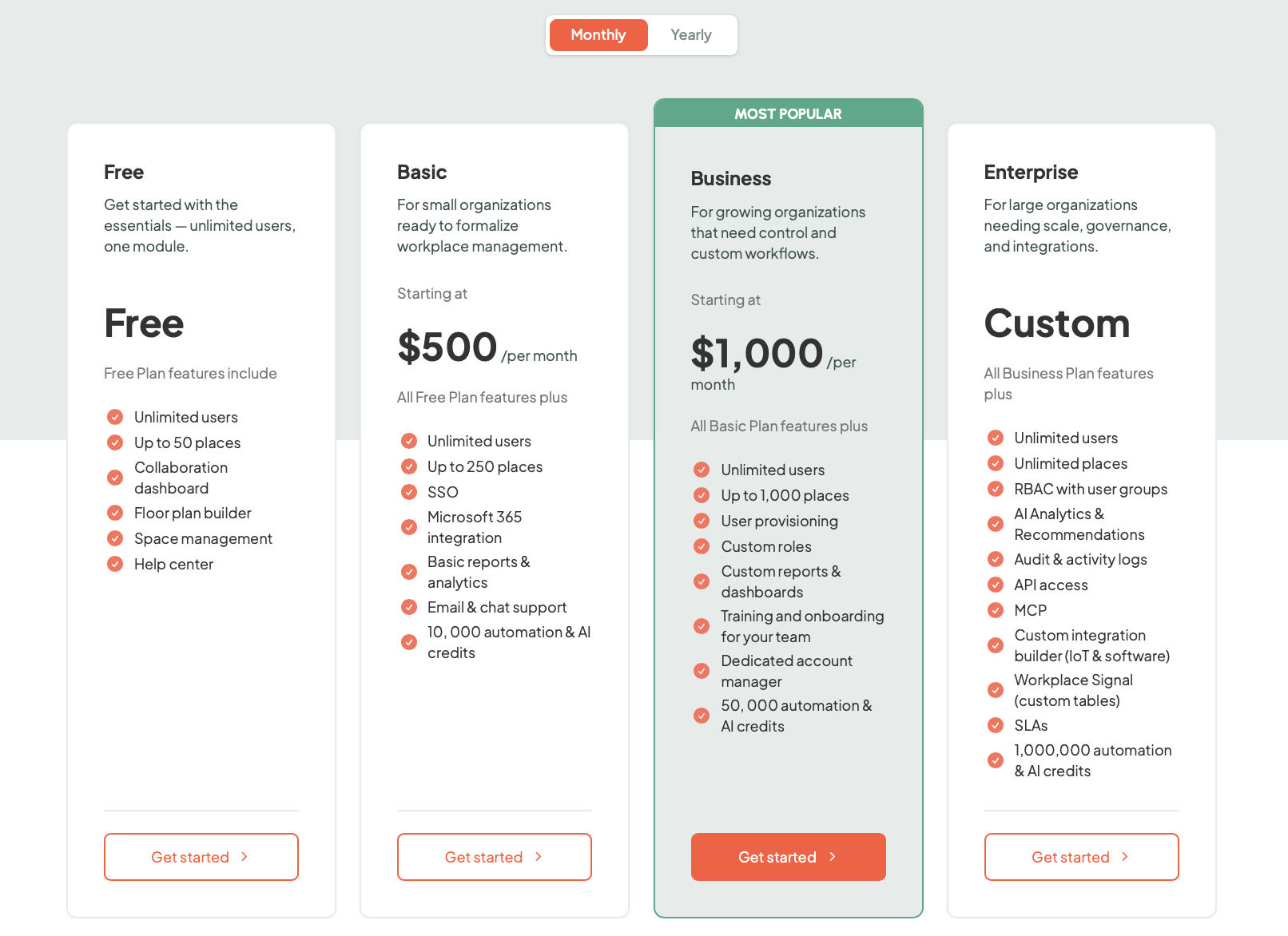
Free: $0. Up to 50 places, unlimited users, one module.
Basic: from $500/month. SSO, Microsoft 365 integration, basic reports & analytics, email & chat support, up to 250 places, 10,000 automation & AI credits.
Business: from $1,000/month. User provisioning, custom roles, custom reports & dashboards,dedicated account manager, up to 1,000 places, 50,000 automation & AI credits.
Enterprise: Custom. RBAC, AI analytics, audit logs, API access, MCP, unlimited places, 1,000,000 automation & AI credits.
Software only by default. Hardware add-ons are optional and priced separately.
Source: elia
Best for
Growing companies and hybrid workplaces that need visitor management, desk booking, and room booking together. elia bundles all three in one plan; most platforms on this list charge separately for each. Strong fit for Canadian and US organizations.
If you need access control integrations, ID verification, or advanced security screening, look at Envoy or Eptura.
3. Eptura Visitor
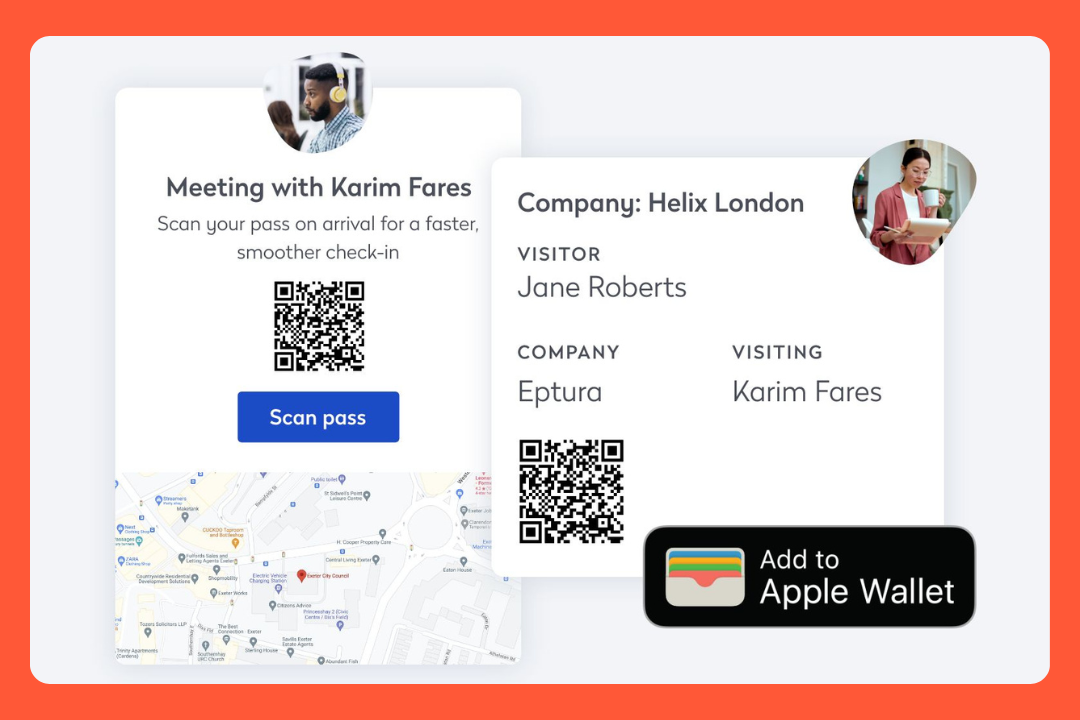
You might know this one as Proxyclick. Same product, rebranded in 2023 when it got folded into the Eptura suite alongside facilities, room booking, and asset management tools.
What didn't change: it's one of the most thorough VMS products on the market. The pre-screening and security features go deeper than most.
Standout:You can pre-screen visitors before they arrive, ask them questions, make them watch a safety video, and deny their access automatically if they fail.
Limitation:No pricing on the website. Both plans need a sales call.
Features
Customizable visitor types: Guest, Contractor, Employee, Customer, plus your own
Kiosk check-in on iPad and Android
Pre-registration with remote screening flow, smart rules, and automatic access denial
QR code check-in: single-use for pre-registered visits, permanent codes for returning contractors
Host notifications via email, SMS, Slack, Teams, Webex, or the Proovr mobile app
NDA and document signing before arrival or at the kiosk; validity periods configurable
Visitor photo capture
Badge printing with custom templates and a CSS editor; conditional printing rules
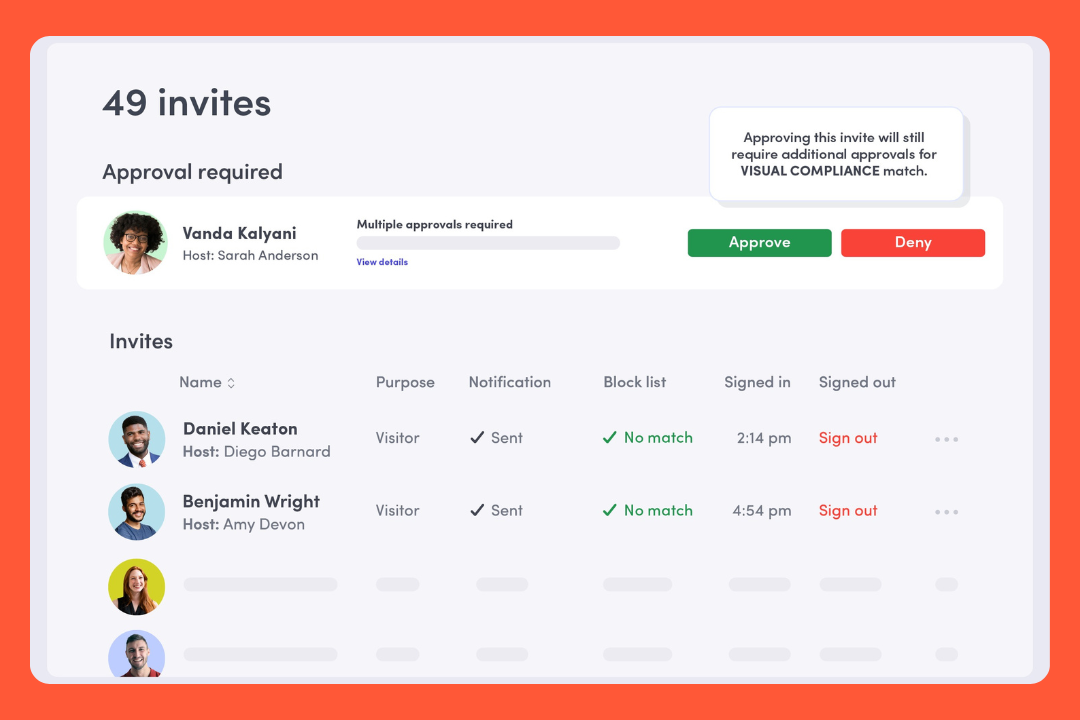
Internal watchlists and third-party screening via Visual Compliance integration
Access control integrations for visitor credentials. Power tier only
Emergency management with live roll call via the Proovr mobile app
Delivery management
Employee presence tracking and occupancy management
Global admin dashboard for centralized multi-location settings
GDPR data retention controls
Visitor analytics
Pros
The pre-arrival screeningis deep. You can build a flow that asks questions, plays a safety video, and auto-denies access if someone's answers don't pass. That happens before they arrive on site.
Android kiosk support. Many tools on this list are iPad-only. Eptura works on both. I think this gets overlooked, but if you're not trying to buy a fleet of iPads, it's a real difference.
The emergency roll call surprised me. During an evacuation, security personnel run a live roll call through the Proovr app: they tap people as safe, it syncs in real time across every device.
Contractor managementis nice: permanent QR codes for frequent visitors, pre-screening before site access, and document validity periods so the same NDA doesn't get signed every single visit.
Cons
No public pricing. You need a demo before you know what either plan costs.
The Proxyclick-to-Eptura transition wasn't clean. Some features disappeared or moved to a pricier tier. If your team remembers the old Proxyclick, set expectations accordingly.
Reporting is weaker than you'd expect given the rest of the feature set. People using it have asked for more analytics. It works, but it doesn't impress.
Front desk loginis code-based rather than a standard username and password. Front desk staff flag it as confusing during shift changes. Small, but it adds up.
Devices
iPad and Android (both supported for kiosk)
iOS and Android (Proovr mobile app for employees and emergency management)
Web dashboard
Integrations
Communication: Slack, Microsoft Teams, Cisco Webex
Calendar: Microsoft Outlook (add-in), Google Calendar, Apple Calendar
Identity and SSO: Microsoft Entra ID / Azure AD, SAML 2.0
Access control: Multiple systems via Power tier (LenelS2, S2, Avigilon and others)
Watchlists: Visual Compliance
File storage: Dropbox, OneDrive, Box, Google Drive
Customers
Comcast, NBCUniversal, Zoom, PepsiCo, Slack, Nasdaq, Starbucks; plus an events center processing 3M+ annual visitors (99% faster check-in) and LSE.
Pricing
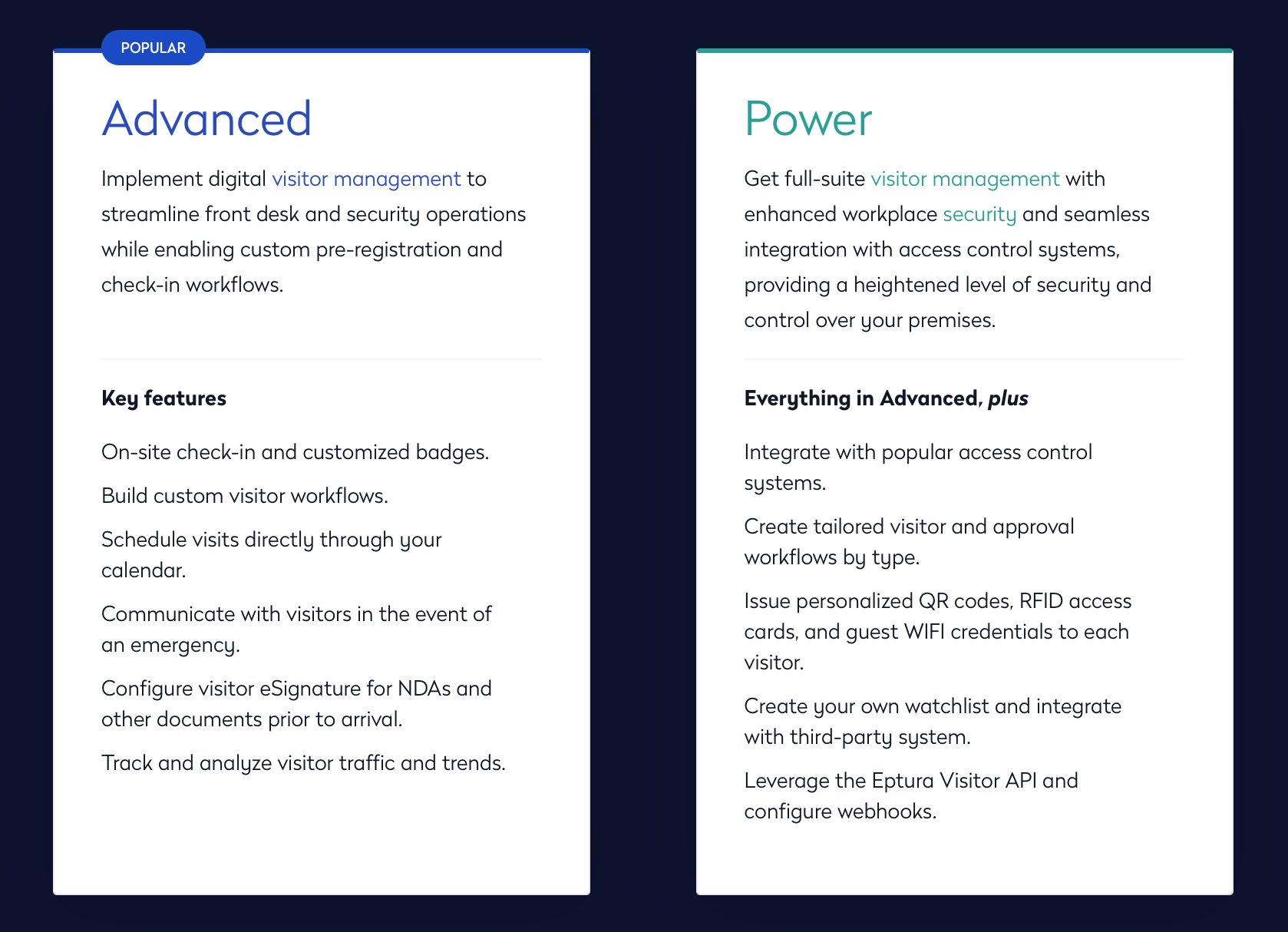
Two tiers: Advanced and Power. Advanced covers core check-in, custom workflows, NDAs, calendar integration, and emergency communications. Power adds access control integrations, QR/RFID credentials, watchlist screening, and API access.
Source: Eptura
Best for
Mid-to-large enterprises in regulated industries where visitor pre-screening, contractor management, access control, and multi-location oversight are non-negotiable.
Of the three tools on this list targeting regulated industries (Eptura, FacilityOS, SwipedOn), Eptura is the strongest on pre-screening and software depth. FacilityOS is the choice when managed hardware matters. SwipedOn is lighter and Android-friendly.
If you came from Proxyclick, verify your feature set before assuming everything carried over.
4. Greetly
Greetly is more affordable than a lot of other tools on this list and has more features than you'd expect at the price. The pricing is listed on the website, which is already refreshing after Eptura.
It's used by 22 Fortune 500 companies and has processed 10M+ check-ins across 24 countries. For a tool at this price point, that's a real signal.
G2: 4.8/5Capterra: 4.9/5
Standout:The workflow builder does more than its price tag suggests. You can build custom check-in flows with logic conditions, branching questions, and automated actions, no code required. Most tools don't come close to this level of customization at $99/month.
Limitation:Driver's license scanning is US-only. Multi-kiosk support requires the Pro plan. If either of those matter to you, check before buying.
Features
Self-service visitor registration and kiosk check-in on iPad and Android
Pre-registration with QR codes
Instant host notifications via email, SMS, Slack, Teams, Google Chat, and voice call
NDA and document signing (eSignature)
Visitor photo capture
Watchlist and blocklist with custom alerts
Emergency evacuation notifications and tracking
Returning visitor check-in with visitor history and profile memory
Two-way texting between host and visitor (Pro)
Visitor badge printing (Pro)
Government-issued ID verification, US driver's license scanning (Pro, US only)
Digital Mailroom for package tracking (Pro)
No-code workflow builder with logic conditions and smart rules
Multi-language support
Queue management
SOC 2 and GDPR compliant
Pros
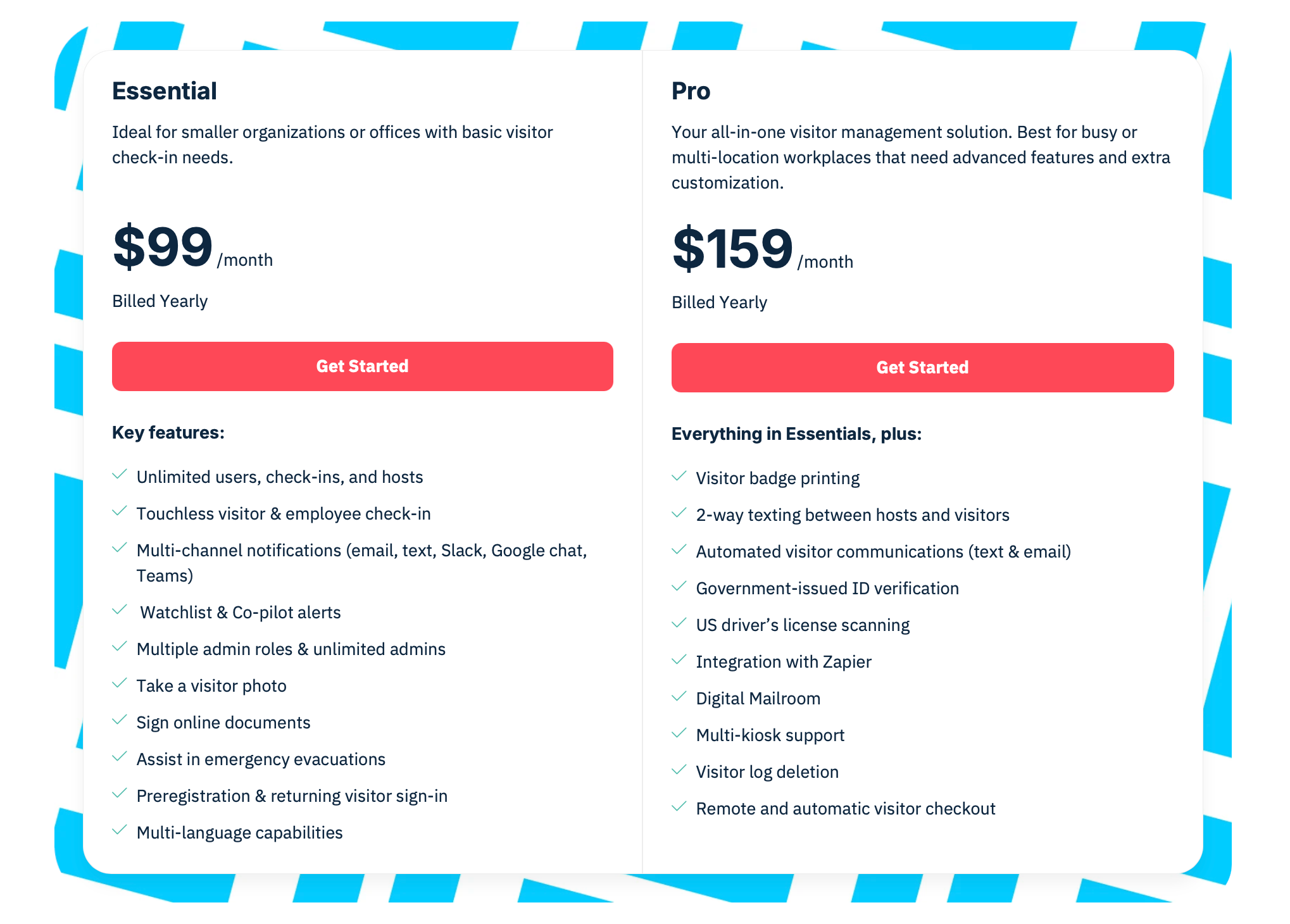
Transparent, affordable pricing. $99/month for the Essential plan covers unlimited check-ins, pre-registration, watchlists, NDA signing, emergency evacuations, and multi-channel notifications. At Envoy you'd pay $362/month for a smaller feature set, with watchlists requiring Enterprise on top of that.
The workflow builder does more than its price tier suggests. You can build entirely different sign in processes for different visitor types, add branching logic based on answers, play safety videos, and set access rules that auto-deny entry. All without touching code.
Two-way texting between host and visitor. The host gets a check-in notification and can text back directly. The visitor sees the response on the kiosk or their phone. Most tools send a one-way alert and stop there.
Notification channels are broad: email, SMS, Slack, Teams, Google Chat, and voice call. The voice call option is unusual and helpful for organizations where staff don't check messages constantly.
Cons
Driver's license scanning is US-only. International ID types (passports, EU driver's licenses, national IDs) aren't supported.
Multi-kiosk support is Pro only. If you have more than one entry point at the same location, the Essential plan won't cover it. You'll need to step up to Pro at $159/month.
Android support works but the experience is uneven based on user feedback. The product recommends iPad, and that's clearly where the polish is.
No standalone mobile admin app. Admins manage everything through a browser.
Devices
iPad (recommended, iOS 16+)
Android tablets (Android 12+, supported but users note it can be inconsistent)
Web browser for admin (no standalone mobile admin app)
Integrations
Communication: Slack, Microsoft Teams, Google Chat
Calendar: Google Calendar, Microsoft Outlook
Identity and SSO: Azure AD, Google Workspace, SAML 2.0
Directory: Azure AD, Google Workspace, Rippling, Active Directory/LDAP
Automation: Zapier (Pro plan), API, webhooks
File storage: Dropbox, Box, Google Drive (for signed documents)
Pro: $159/month (billed yearly). Everything in Essential plus badge printing, two-way texting, ID scanning (US only), Digital Mailroom, Zapier, multi-kiosk.
Source: Greetly
Best for
Companies that want a highly customizable visitor management system without paying enterprise prices. Also a good fit for organizations that need flexible workflow logic, delivery management, or a broader set of notification channels.
Not the right fit for organizations outside the US that need ID verification, or teams needing multi-kiosk support at the Essential price.
5. FacilityOS
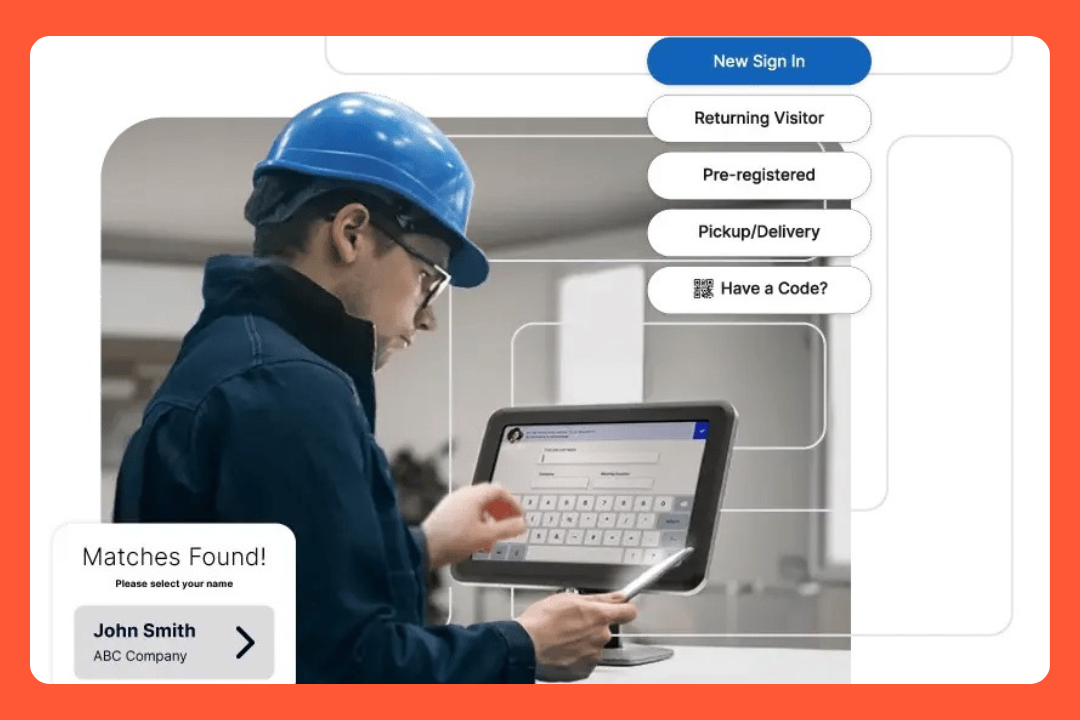
It was previously known as iLobby. It's used by 30% of the Fortune 500, runs in 7,000+ facilities across 70 countries, and has processed 60M+ visitors and 18M+ contractors.
This isn't a typical office VMS. FacilityOS targets manufacturing, food production, pharma, airports, and government. If you need ITAR compliance, contractor safety inductions, or emergency roll calls at scale, this is the category it's built for.
Visitor management is one module. It connects to facility management, emergency response, contractor compliance, logistics, and access control, all in the same platform.
G2: 4.7/5Capterra: 4.6/5Winner in 40+ G2 categories
Standout:They ship you pre-configured iPads and manage the hardware. Your IT team doesn't have to buy or troubleshoot devices at dozens of sites.
Limitation:Per-kiosk pricing. Key security features like watchlists, ID scanning, and visitor approval are add-ons or Enterprise-only.
Features
Preconfigured iPad kiosks shipped ready to use
Self-service check-in with customizable workflows per visitor type
Pre-registration with QR codes
Host notifications via SMS, email, Teams, Slack
Visitor photo capture
Badge printing (black and white or color printer options)
ID scanning (driver's license, passport, Green Card)
Watchlist screening and third-party watchlist integration
Visitor approval and deny workflows
NDA and document signing with configurable re-acknowledgment cadences
Touchless sign-in via QR code
Repeat visitor recognition
Real-time analytics and centralized dashboard
Emergency management module (EmergencyOS)
Contractor compliance management (ContractorOS)
ITAR compliance support
Pros
The managed hardware model is unique. iPads and printers arrive pre-configured. FacilityOS handles replacements and troubleshooting.
Setup is fast. Teams say they were operational in hours. Pre-configured kiosk, plug in, go.
Customer support gets mentioned in almost every review. Specific people get named. That's unusual and it's a good sign.
ITAR compliance is supported. The customer base skews toward aerospace, defense, government, and manufacturing – industries where ITAR is important.
Cons
Slowness at shift start. It comes up across feedback: buffering when lots of employees check in at once.
Per-kiosk pricing gets expensive fast. Each visitor entry point is a separate license. A facility with 5 doors could approach $1,000/month at Corporate tier, and exceed it at Enhanced.
Key features are add-ons or Enterprise-only. Watchlists, ID scanning, visitor screening, and Slack/Teams notifications all cost extra or require the top tier. "A la carte" is how one reviewer described it.
Admin portal navigation takes time to learn. A few people mention clicking around to find modules.
Devices
iPad (preconfigured and managed by FacilityOS)
Web dashboard
Integrations
Communication: Slack, Microsoft Teams (both add-ons on Corporate/Enhanced, included on Enterprise)
Calendar: Microsoft Outlook (Enhanced and above)
Identity/SSO: Active Directory integration, SSO (included on all plans)
Screening: Checkr Trust (global watchlists, criminal databases, and US sex offender registries)
Other: 100+ integrations listed; API access available on Enterprise; industry-specific integrations via Professional Services
Customers
UC Davis ($179K saved, 98% of manual processes eliminated), Greater Toronto Airports Authority, Vanderbilt University (50% cut in package turnaround), Ingersoll Rand, Valmet, State of Louisiana, Litehouse, SMTC.
Pricing
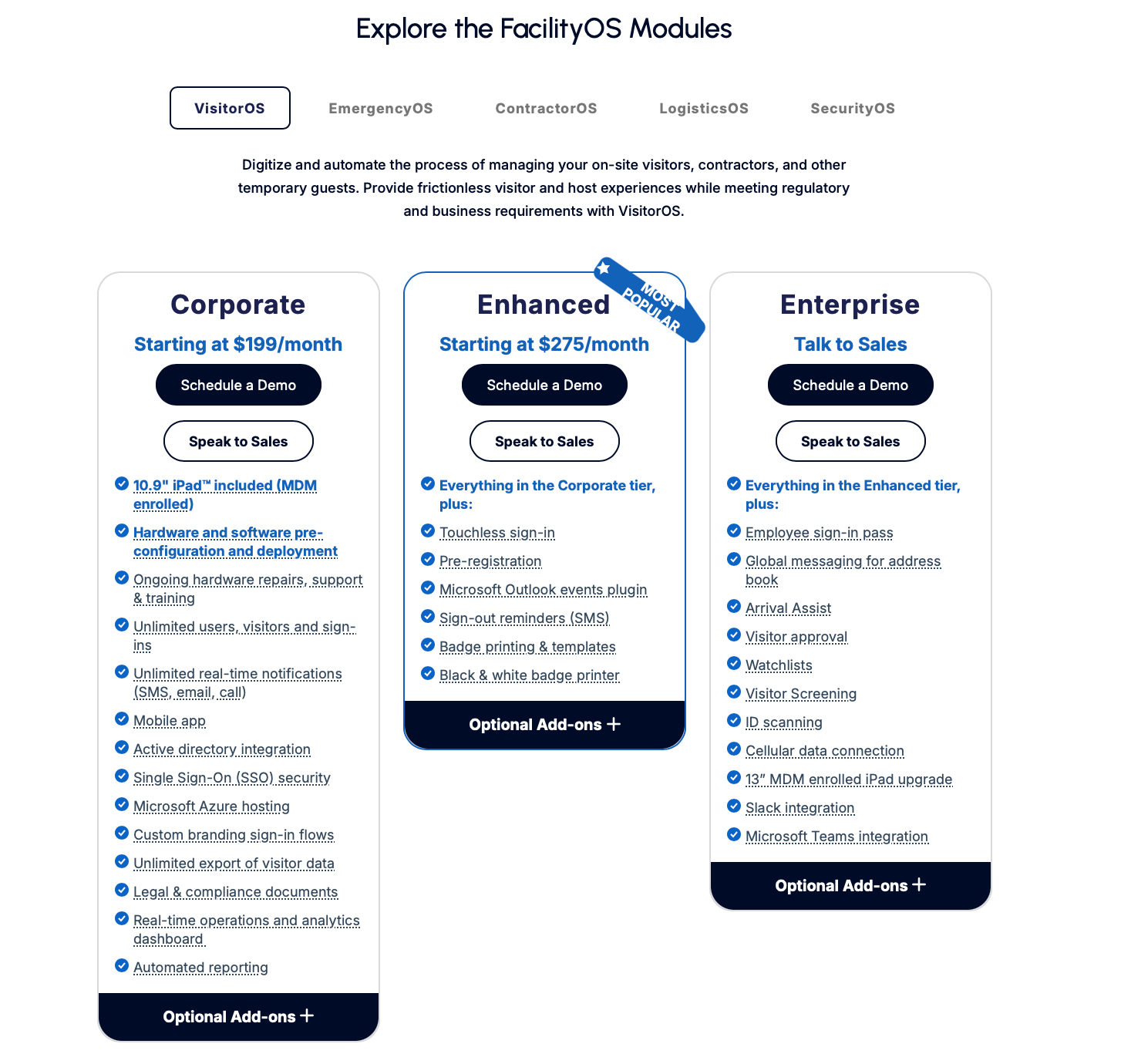
Corporate: From $199/month per kiosk. iPad and hardware included, unlimited sign-ins, SSO, Active Directory, custom branding, analytics.
Enhanced: From $275/month per kiosk. Everything in Corporate plus touchless sign-in, pre-registration, Outlook plugin, badge printing.
Enterprise: Talk to sales. Everything in Enhanced plus watchlists, ID scanning, visitor screening, Slack/Teams, visitor approval, cellular data.
Priced per kiosk. Multiple entry points multiply the cost. Hardware is included and managed, which is part of why it costs more than software-only tools.
Source: FacilityOS
Best for
Manufacturing, food production, pharmaceuticals, airports, and government facilities with real compliance requirements, especially where managed hardware across multiple sites matters.
Of the three tools here targeting regulated industries (FacilityOS, Eptura, SwipedOn), FacilityOS is the choice when pre-configured hardware at scale is the priority. For software depth and pre-screening, look at Eptura. For a lighter, Android-friendly option, look at SwipedOn.
If you're running a standard office, there are cheaper options on this list.
6. SwipedOn
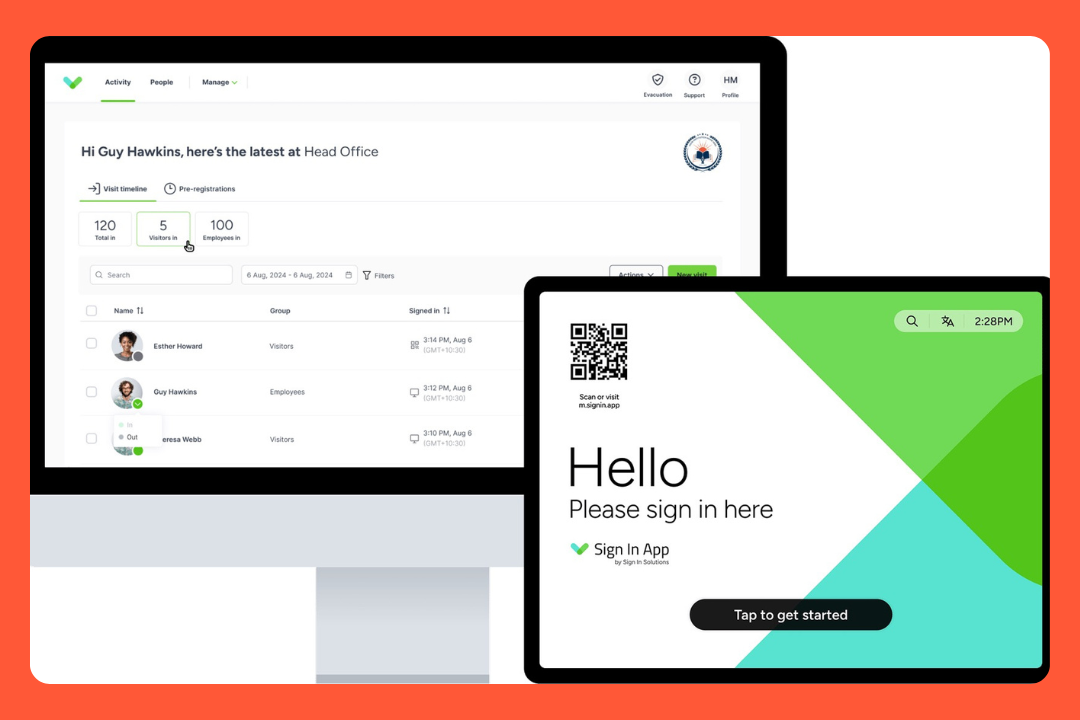
SwipedOn has been around for years. 9,000+ workplaces, 70 countries. Manufacturing, food production, construction. That's the crowd.
One thing worth knowing before you buy: SwipedOn and Sign In App recently merged and are building a brand new platform together. It's not out yet. The current product works, but you're buying something mid-transition.
G2: 4.8/5Capterra: 4.7/5
Standout:Evacuation mode works offline. You grab the iPad, it shows everyone signed in, you do a roll call. No Wi-Fi needed. That's actually rare.
Limitation:Reporting is on the weaker side and the product is mid-transition to a new platform. Both worth knowing before you sign.
Features
iPad and Android kiosk (both)
Pre-registration with email invitations
Host notifications via email, SMS, Slack, Teams, push
Visitor photos
Badge printing, plus visitors can scan their badge to sign out
NDA and document signing
Different sign-in flows per visitor type
QR code contactless sign-in
Employee sign-in and out tracking
Offline evacuation mode with roll call
Delivery management (bundled with Enhanced+)
Pre-visit inductions (Preboarding add-on)
Multi-location
Active Directory and Azure AD sync
SOC 2 and ISO 27001
Pros
Android kiosk support. If you have Android tablets sitting around, this works.
Visitors scan their badge to sign out. Small thing but it keeps coming up in reviews. It's just faster.
Employee in and out tracking is included. Not just visitors. A lot of companies in regulated industries use it for both.
ITAR and C-TPAT compliance. If you know what those are, you know why they matter. If you don't, you probably don't need them.
Cons
Reporting is on the weaker side. People in manufacturing, construction, and logistics all say the same thing. If you need analytics beyond basic exports, you'll hit walls.
The employee mobile app has reliability problems. The geofencing sign-in doesn't always work. One user said they gave up after trying for a long time to get it to work.
60-day cancellation notice. Read the fine print.
The product is mid-transition. New platform with Sign In App is being built but not released yet. Worth asking sales what that means for your contract.
Devices
iPad and Android (kiosk)
iOS and Android (Pocket app for employees)
Web dashboard
Integrations
Communication: Slack, Microsoft Teams
Directory: Active Directory, Azure AD
Identity: SSO (Pro), MFA on all plans
Customers
gategroup (200+ airports), Hyundai Auto Canada, Voortman Bakery, Skyscanner, Lush Cosmetics, Siemens Engine Business, Graham Construction, FUJIFILM NZ.
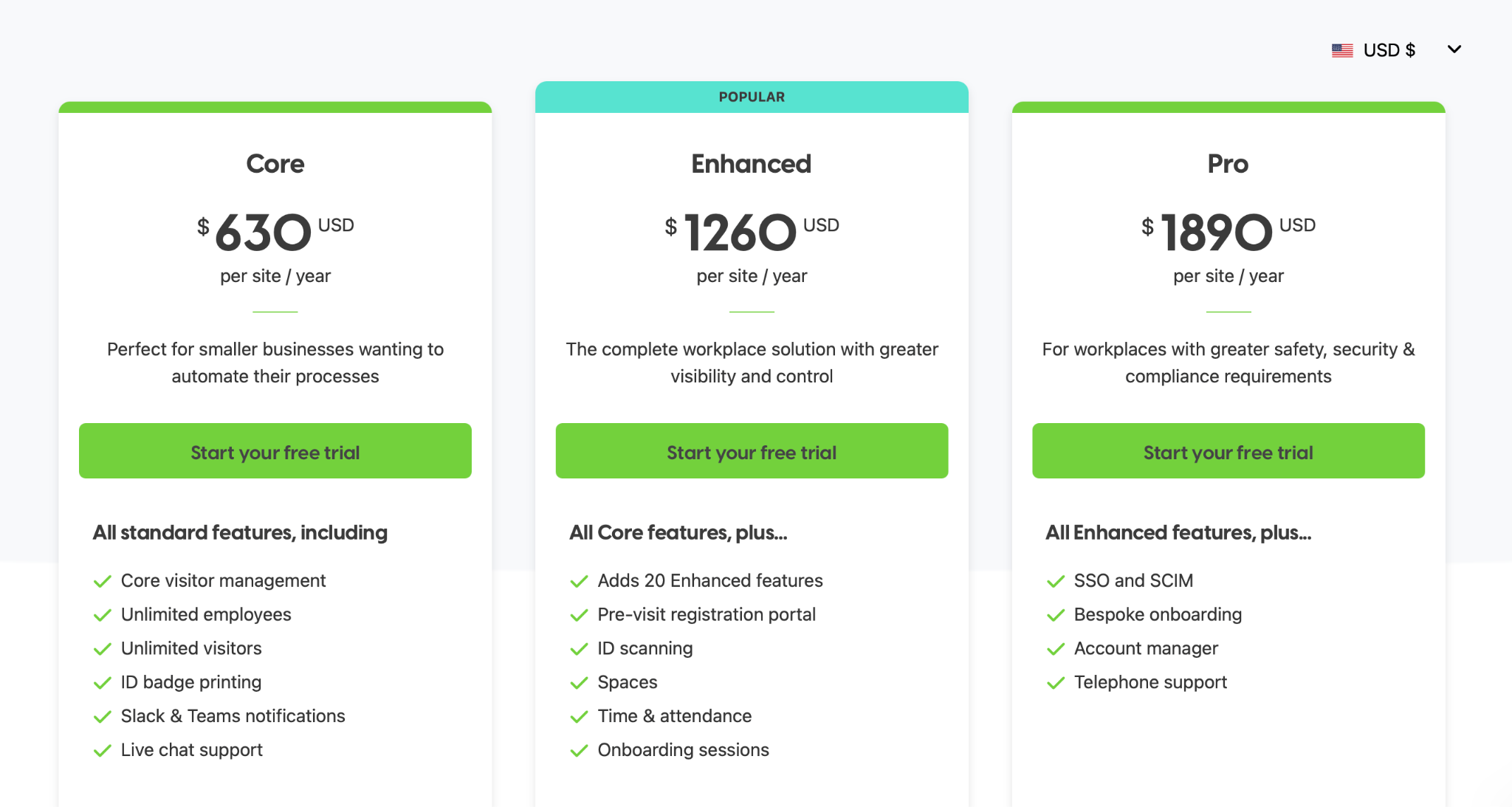
Enhanced: $1,260/site/year (~$105/month). Everything in Core plus pre-registration portal, ID scanning, spaces, time and attendance.
Pro: $1,890/site/year (~$157/month). Everything in Enhanced plus SSO/SCIM, account manager, phone support.
Per site.
Source: SwipedOn
Best for
Manufacturing, food production, construction, and logistics where ITAR or C-TPAT compliance matters, especially if Android kiosks or employee tracking are already part of the setup.
Of the three tools targeting regulated industries (SwipedOn, Eptura, FacilityOS), SwipedOn is the lightest and most affordable. Eptura goes deeper on pre-screening. FacilityOS includes managed hardware.
Ask the sales team specifically about the Sign In App merger before signing.
7. Archie
Archie has the highest rating on this list. The UI is clean and teams adopt it without training. Support shows up consistently across reviews in a way that's less common at this price point.
It does visitor management plus desk booking and room scheduling. Worth knowing: those are priced separately. $109/month covers visitor management. If you want desks and rooms too, that's on top.
G2: 4.9/5Capterra: 4.9/5
Standout:The highest-rated VMS on G2. The ease of use is what drives it: reviewers come from tools like Envoy and say the experience felt like an upgrade.
Limitation:No ID scanning. Block list is Enterprise-only. If those are hard requirements, this isn't the right tool.
Features
Self-service kiosk on iPad and Android
Pre-registration with QR codes
Host notifications via email, SMS, Slack, Teams
NDA and document e-signatures
Badge printing
Visitor photo capture (Pro)
Custom forms and screening questions (Pro)
Emergency evacuation notifications (Pro)
Recurring visits
Delivery management
Block list (Enterprise only)
Real-time visitor log
Visitor analytics (Pro)
Custom branding (Pro)
Access control integration
Touchless sign-in via QR code
Pros
All-in-one if you also need desk booking and room scheduling. Same platform, same login. If you're managing a hybrid office, they can be a good fit.
Customer support is good. One customer got a custom feature built within 30 days of signing. That kind of responsiveness is hard to fake.
Transparent, competitive pricing. $109/month for Starter. You know what you're paying before you talk to anyone.
Microsoft integrations are solid. You can manage desk bookings and get visitor notifications without leaving Teams. Outlook calendar sync is praised across reviews.
Cons
Block list is Enterprise-only. You can't flag or deny specific individuals on Starter or Pro.
Google Calendar sync has had issues. Outlook gets better reviews. Worth testing before committing if Google Calendar is your primary tool.
Some admin settings are hard to find at first. Flexible means more configuration options, and a few admins say certain settings are buried.
Desk booking and room scheduling are priced separately. The $109/month covers visitor management only.
Devices
iPad and Android (both for kiosk)
iOS and Android mobile app
Web dashboard
Integrations
Communication: Slack, Microsoft Teams
Calendar: Microsoft Outlook, Google Calendar
Identity and SSO: SAML 2.0, SCIM
Access control: Kisi, DoorFlow and others
WiFi: Guest network sharing built in
Other: Zapier, open API, Brother QL badge printers
Customers
Avison Young (3,500+ employees), Crew Collective, The Bureau (Paris), LANDR, CFE Fund, Le Devoir, Montreal Cowork.
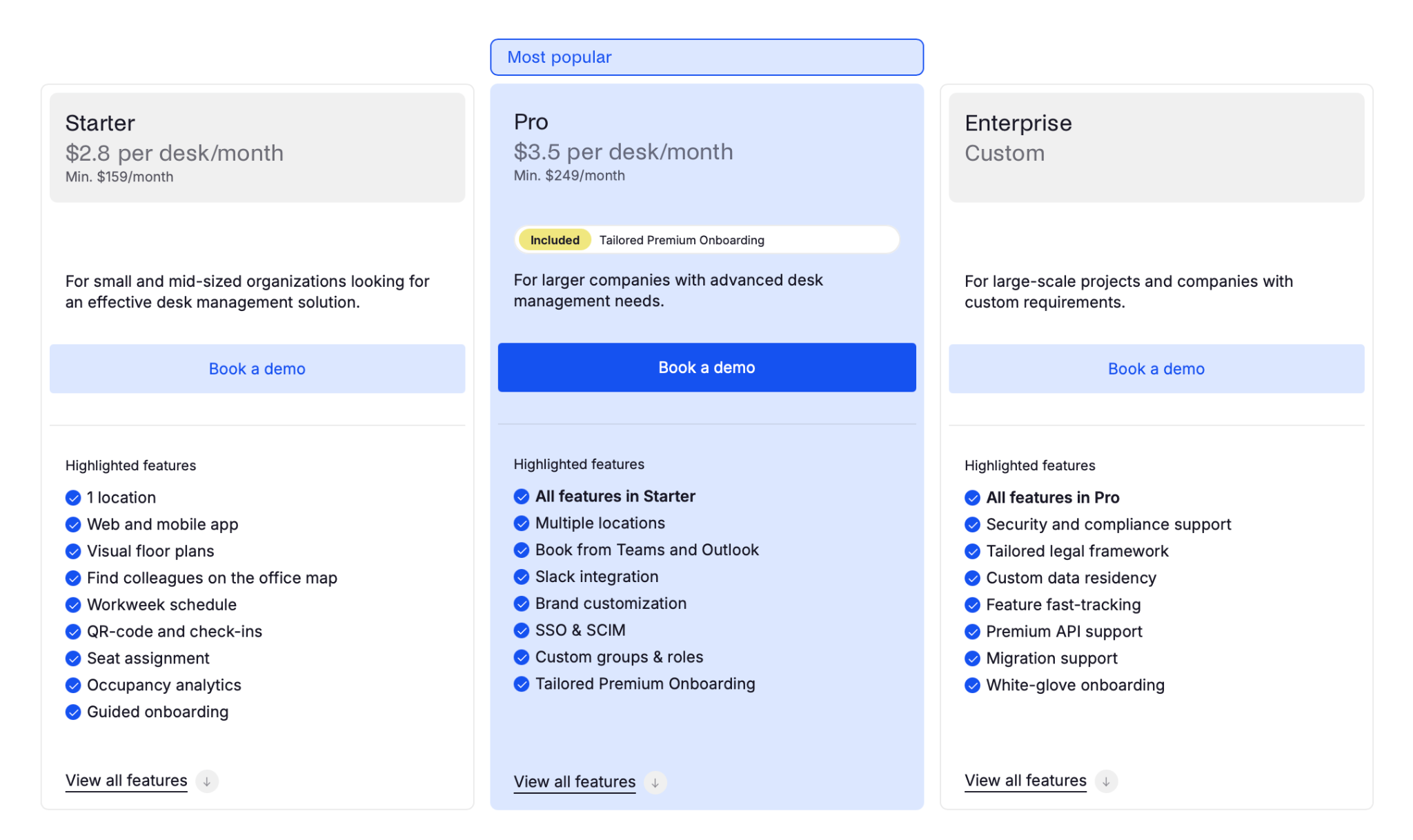
Pro: $185/location/month. Everything in Starter plus photo capture, custom forms, analytics, branding, SMS, emergency evacuations, SSO/SCIM, Slack/Teams.
Enterprise: Custom. Everything in Pro plus block list, compliance support, custom data residency, API support.
Visitor management only. Desk booking and room scheduling are separate products with separate pricing.
Source: Archie
Best for
Small to mid-sized companies that want a modern, easy visitor management system, especially if they also need desk and room booking in the same platform.
Not the right fit if you need ID scanning, lower-tier watchlists, or advanced security screening.
A few more visitor management systems worth knowing about
These didn't make the full list but come up often enough to mention.
Robin
Robin is a big workplace platform: desk booking, rooms, visitor management, analytics. The VMS works and has proper arrival displays, NDA signing, badge printing, and bulk CSV invites. Legal document signing is Enterprise-only though. No public pricing, and some reviewers have specifically called it expensive. If you're already using Robin for desk and room booking and don't want another tool, it's worth looking at.
Teamgo
Teamgo is worth looking at if GDPR compliance and audit-ready reporting are the main reasons you're looking for a VMS. Deep compliance focus: data retention controls, real-time visitor screening. Not the flashiest product but it ticks the boxes for regulated industries.
EVA Check-in
EVA Check-in is built specifically for healthcare and education. Has built-in health screening and contactless check-in. If you're in a clinic or school and compliance-focused visitor workflows are the priority, this is worth looking at alongside Teamgo.
LobbyTrack
LobbyTrack is the budget option. Basic visitor sign-in, host notifications, badge printing, visitor logs. Gets the job done. Free plan exists with limited features. If you're a small team that just needs a digital log and nothing fancy, LobbyTrack probably covers you without the cost of anything else on this list.
Sine by Honeywell
Sine is owned by Honeywell, which is the main reason to consider it. If you're already running Honeywell access control products (LenelS2, Gallagher, Inner Range), Sine connects natively. Strong contractor compliance features and used widely in Australia, construction, and government. iPad-only for the kiosk. No public pricing. If you're not in the Honeywell ecosystem, the tools above probably serve you better.
How to choose a modern visitor management system?
Here are the questions that do the most work. Most buyers end up filtered by two or three of them.
1. How many multiple locations are you managing?
Single-site buyers have more options at lower cost. Multi-site changes the math fast.
Per-location pricing (Envoy at $362/month, Archie's VMS, desks, and rooms billed as separate products) compounds quickly across multiple offices. Per-kiosk pricing (FacilityOS at $199 to $275 per kiosk) compounds even faster if you have several entry points at each site. elia prices by plan (a flat monthly fee based on the number of places, with unlimited users) and SwipedOn prices per site. Both tend to be more predictable at scale than per-location or per-kiosk models.
If you're managing five or more locations, run the actual numbers before booking any demos.
2. Do you need access control integrations?
If yes, the list gets short.
Envoy, Eptura, FacilityOS, and Archie (via Kisi and DoorFlow) support it. The systems to check against your existing stack: Kisi, Brivo, LenelS2, Avigilon, Gallagher. Confirm your specific system is supported before you demo anything.
3. What's your compliance floor?
ITAR and C-TPAT bring FacilityOS and SwipedOn to the front. GDPR is broadly supported. SOC 2 and ISO 27001 are third-party audited certifications. SwipedOn and Greetly have SOC 2. elia has ISO 27001:2022. FacilityOS has both. Several tools describe strong security practices without those certifications, so it's worth checking directly.
4. Do you need visitors to complete screening before they arrive?
Not every tool can do this. What it looks like in practice: visitors fill out forms, watch a safety video, and sign documents before they arrive on site. If their answers don't pass, access is denied automatically. Envoy and Eptura both have this. Eptura's pre-arrival screening is the most developed I found, with auto-denial based on questionnaire responses built into the remote registration flow.
5. Do you need emergency management?
The differences between tools are specific:
SwipedOn's evacuation mode works offline.
Eptura runs live roll calls through the Proovr app with real-time sync.
FacilityOS includes an EmergencyOS module in the platform price.
elia includes emergency alerts and first responder tracking via its Health and Safety module.
Greetly has evacuation notifications at $99/month.
The question is which setup matches how your facility handles emergencies.
6. VMS only, or a full workplace platform?
There are three distinct models, not two.
Tools that do VMS only, no desk or room booking: Greetly, SwipedOn, LobbyTrack. If desk booking matters, you'll need a separate product.
Tools that offer a full platform with each module priced separately: Envoy, Eptura, Archie, Robin. Desk booking and room scheduling exist on the same platform, but each module carries its own pricing and minimums. Total cost depends on how many you need.
Tools where everything is bundled in one plan: elia. Visitor management, desk booking, rooms, and hybrid scheduling are all included at the same price.
If all you're solving is the front desk, dedicated VMS tools will give you more VMS functionality per dollar. If you need a full workplace platform, the real question is whether you'd rather buy modules separately or have them bundled.
7. What's your real budget?
Not the one you'd like. The one that's been approved.
$100 to $500/month: elia Basic, FacilityOS Corporate, Archie with all modules.
$500+ or custom: elia Business and Enterprise, Envoy Premium and Enterprise, Eptura, FacilityOS Enhanced and Enterprise.
Most buyers get filtered by two or three of these questions, not all seven. Answer the access control question and the compliance floor question, and you've already done most of the work. Pair your system with a clear visitor policy template so the rules are set before day one.
How I chose and evaluated best visitor management solutions
Selection criteria
Every tool had to clear these filters before making the list:
G2 or Capterra score of 4.5 or higher, with at least 50 reviews at the time of selection. Below that threshold, you might just be seeing the early adopters or friends of the brand. Ratings shown are as of May 2026.
Active product development. Every tool here had a documented update or new feature in 2025 or 2026.
Verified pricing. I checked each company's website directly. Where pricing wasn't public, I said so. I didn't use //$/$$$ symbols.
How I evaluated each tool
Went through product documentation, help centers, and demos (live or recorded)
Read customer case studies looking for specific results with real numbers
Spent time on G2 and Capterra looking for patterns across industries and company sizes. Not individual ratings, but what came up repeatedly in what people liked and what frustrated them
Checked which features are in the base plan versus paywalled, because the marketed feature list and what you get at standard pricing are often different
What I focused on
Scoring formulas in this category usually make tools look comparable when they aren't. A tool that scores 4.2 on 'integrations' and another that scores 3.9 might serve completely different buyers, and the score hides that. So I evaluated each tool against the use case it's built for, and called out where the fit is real or wrong throughout the article:
Whether visitor management is the core product or a module added on
How complete the feature set is for the stated use case
Pricing transparency
What users say about the product once they're using it day to day
Disclosure
I'm a content marketer at elia. One of our modules is visitor management, which means elia is in this list and I have skin in the game. I've tried to hold our tool to the same standards as everything else. You can judge whether I succeeded.
The bottom line
There's no universal winner:
If you're a regulated enterprise, start with Envoy or Eptura.
Manufacturing or logistics with compliance requirements: FacilityOS or SwipedOn.
Hybrid office wanting a single platform: elia or Archie.
If you're a Canadian or US company with 200+ employees running a hybrid office, desk booking and room scheduling in the mix, and Facilities or IT involved in the buying decision, book a demo if you want to see how elia fits.
If your needs point somewhere else in this article, follow the article 🙂
Welcome visitors better
Make every guest feel expected before they even reach reception.
is a Content Marketing Specialist at elia. With 10+ years in content marketing, she writes about workplace trends and the tools that help teams work smarter. Part strategist, part storyteller, Tamara brings equal amounts of data, creativity, and a little Moon Prism Power to every piece she creates. 🌙✨
Share
Contents
Subscribe to our newsletter
Subscribe to the elia newsletter for exclusive product updates and industry best practices. You can unsubscribe at any time.
Thank you! You're subscribed.
Oops! Something went wrong while submitting the form.
Visitor management system FAQ
Answers to Your Common Queries
What are the core features of a visitor management system?
What visitor data do these systems collect, and how is it stored?
Can visitor management software integrate with existing security systems?
Can a VMS issue temporary access credentials?
What happens when a visitor arrives without a pre-registration?
Can a VMS handle multiple visitors arriving at once?
What's the difference between a visitor management system and reception management software?


.png)







.svg)

%20(1).png)