7 Best Envoy Alternatives in 2026: Pricing, Features & Fit
Tamara Zhostka
Content Marketing Specialist
–
Last updated on Aug 20, 2026
Envoy is easy to misread.
People might think they’re comparing a visitor management tool. They usually aren’t. They’re comparing a visitor tool that grew into a workplace platform, with desks, rooms, parking spaces, compliance workflows, emergency notifications, and enough operational logic to make a simple shortlist weirdly complicated.
Do you want a front-desk system, a workplace system, a security system, or one product trying to be all three? That’s the point where buyers start comparing all the features tied to broader workspace management, not just visitor check-in.
This list compares the best Envoy alternatives for 2026 across the parts that change the decision:
visitor management and front-desk workflows
workplace booking
security, compliance, and emergency readiness
analytics and reporting
integrations
pricing once the modules start stacking up
TL;DR: Top Envoy alternatives at a glance
Tool
Best for
Why it stands out
elia
Teams running the office
Stronger on workplace operations, requests, occupancy visibility, visitors, and the practical layer around desks and rooms
Skedda
Control over shared space
Strong on rules, approvals, permissions, and space logic once the problem is less reception and more internal booking control
Robin Powered
Turning workplace data into decisions
Deeper on analytics, planning, neighborhoods, and workplace intelligence than most booking-led tools
Archie
Everyday office coordination
Good balance of desks, rooms, visitors, emergency workflows, and hybrid office visibility
Kadence
Coordinating office days around people
Stronger on team overlap, attendance patterns, neighborhoods, and getting the right people in at the right time
Tactic
All-in-one pricing clarity
Broad workplace coverage with public pricing that’s much easier to read
WorkInSync
Parking-first workplace management
One of the few platforms where parking looks like a real strength, alongside desks, rooms, scheduling, and kiosks
What is Envoy?
Envoy started life at reception and then got ambitious.
It’s still best known for visitor management, but it hasn’t stayed in its lane. At this point, Envoy sits somewhere between visitor flows, workplace software, and security/compliance infrastructure, with workplace management features that reach into office space planning, conference room scheduling, parking management, emergency notifications, maps, and more.
For some teams, that breadth is a strength. For others, it can feel broader than they need.
Key features
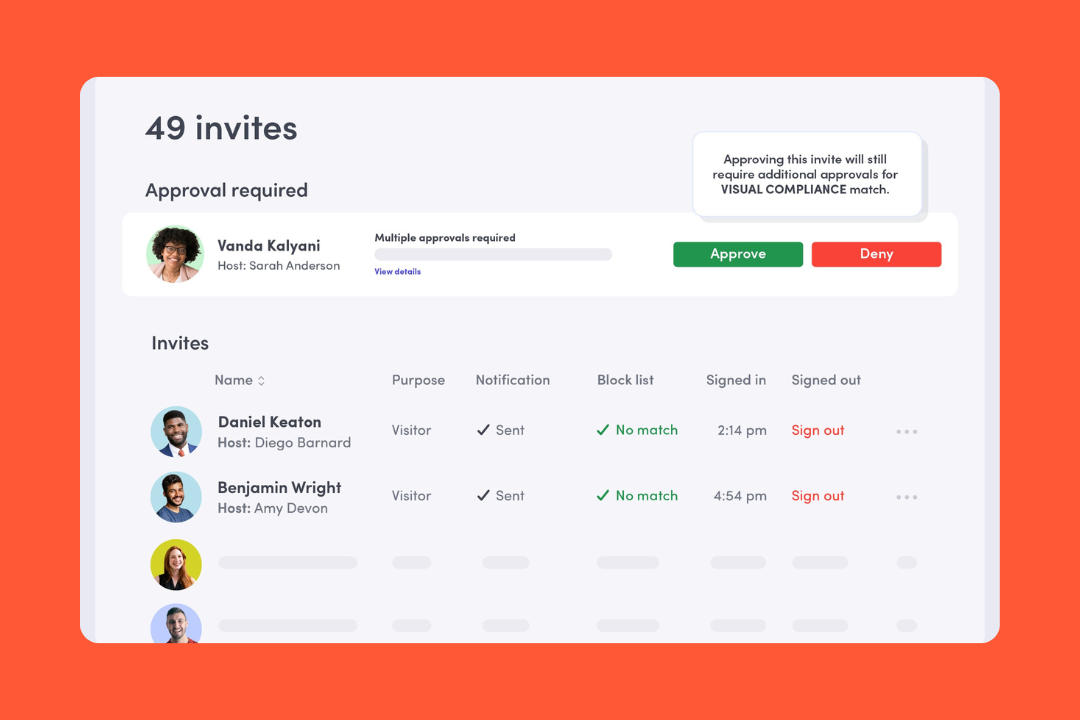
Visitor management: Pre-registration, custom sign-in flows, kiosks, host notifications, approvals, badge printing, NDAs, assessments, and audit-ready records.
Booking: Desks, rooms, and parking, with maps, check-ins, reminders, and auto-release.
Security and compliance: ID checks, watchlists, blocklists, legal documents, access control integrations, and event logs.
Emergency notifications: Multi-channel alerts, roll call, device takeovers, and real-time status updates during incidents.
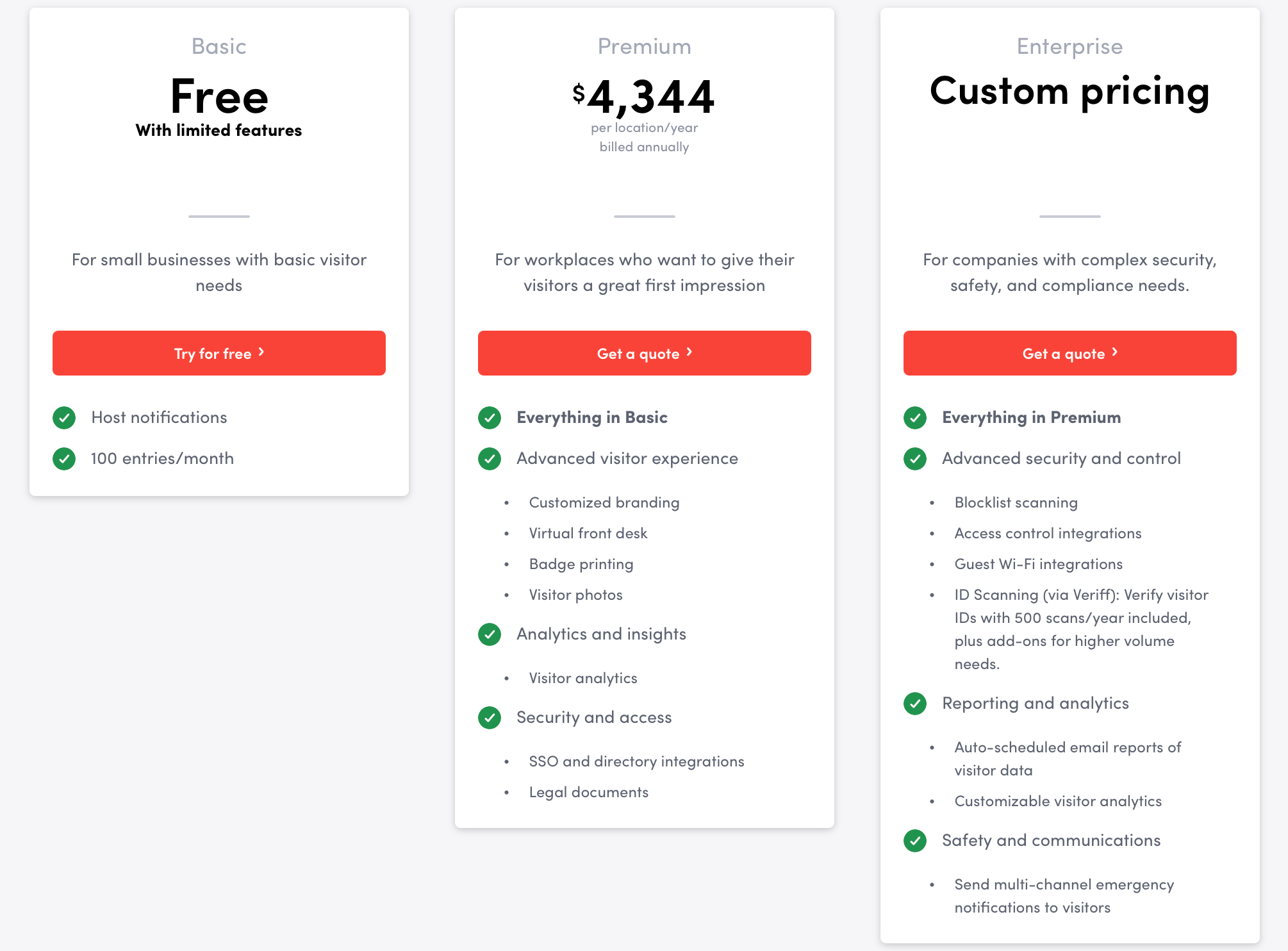
Envoy pricing is public, which is nice. It’s also one of those pricing models where the real total can expand faster than the headline suggests.
Current public starting prices are:
Visitors: free version on the Basic plan, then paid annual plans by location ($4,344 per location/year)
Reservations: $60 per bookable resource/year
Emergency notifications: $24 per user/year
Screens: $144 per device/year
Deliveries: $3,000 per delivery location/year
Enterprise: custom pricing
Source: Envoy
The catch is that not everything is priced the same way, and some listed prices exclude a platform fee. So you can get a starting number, but that doesn’t automatically tell you what the full setup will cost once you’ve added locations and enterprise extras.
What people like
It’s easy to use: Reviews often describe Envoy as intuitive for both admins and visitors.
The visitor flow feels professional: Pre-registration, host notifications, badges, and check-in make the front desk feel more organized, especially for teams managing visitors across busy office days.
Custom sign-in flows are genuinely useful: This comes up a lot with teams that need NDAs, compliance steps, different visitor types, or contractor workflows.
Logs and exports save people time: Teams like having a searchable digital record instead of chasing paper sign-ins and vague memories.
Multi-site visibility is a plus: For companies with more than one location, being able to manage things centrally gets mentioned often.
Why people look for Envoy alternatives
Envoy usually makes the shortlist for a reason. But it also gets second-guessed for a reason. The same thing that makes it appealing is also what makes some teams start looking elsewhere:
They want something lighter: Envoy can feel like a lot if all you really need is a straightforward visitor or booking tool.
They want booking to matter more than visitors: Some teams care a lot more about desks and rooms than front-desk workflows and compliance controls.
They want simpler pricing: Envoy’s modular pricing can get expensive fast once you start combining products, locations, users, and resources.
They don’t need the security/compliance angle: Envoy leans pretty hard into screening, audit trails, and emergency workflows. Not every office needs that.
They want an easier rollout: Envoy’s visitor app runs on iPad, and once printers, SSO, access control, mobile apps, or other third-party systems enter the mix, it can start to feel like a more complex setup than teams expected.
How we evaluated Envoy alternatives
We looked at these tools the way real buyers do once the shortlist stops being hypothetical: product pages, pricing pages, help-center docs, integration docs, public customer stories, and recent user reviews on Capterra and G2. Then we checked those sources against each other.
Analytics and reporting: Visitor records, occupancy visibility, attendance data, exports, dashboards, and whether the reporting looks useful in real life.
Ease of rollout: How hard it is to get started, how much setup falls on admins or IT, and how messy things get once hardware and third-party systems show up.
Pricing: Whether pricing is public, how the model works, what gets gated, and how quickly the real cost starts drifting away from the headline number.
Scalability: Multi-location support, admin controls, SSO, SCIM, APIs, and other enterprise features larger teams care about.
Integrations: Microsoft, Google, Slack, HRIS, access control, Wi-Fi, APIs, and whether the ecosystem is actually useful or just a long list of disconnected office tools.
User feedback: What people praise, and what keeps irritating them.
The goal was to compare these tools the way an actual team would compare them after two demos, six tabs, and one increasingly skeptical budget conversation.
Best Envoy alternatives: comparison
Tool
Best for
Pricing
Visitors
Booking
Security
Analytics
Pricing clarity
elia
Teams running the office
Free / from $500/mo
Good
Strong
Good
Strong
Strong
Skedda
Control over shared space
From $249/mo
Limited
Strong
Limited
Good
Strong
Robin Powered
Turning workplace data into decisions
Quote
Good
Strong
Limited
Strong
Limited
Archie
Everyday office coordination
From $109/mo visitors / $2.8 desk/mo
Good
Strong
Limited
Good
Good
Kadence
Coordinating office days around people
Quote
Good
Strong
Limited
Good
Limited
Tactic
Broad workplace coverage with simpler pricing
From $3/workspace
Good
Strong
Limited
Good
Strong
WorkInSync
Parking-first workplace management
From $2.50/user/mo
Good
Strong
Good
Good
Strong
Envoy
Visitor-led workplace control
From $4,344/location/year + modules
Strong
Strong
Strong
Good
Good
1. elia: best for teams running the office
elia starts with the obvious features: desks, rooms, maps, mobile booking. But the reason it gets more interesting is that it also pulls in the operational layer: visitor check-ins, service requests, occupancy sensors, health and safety workflows, room displays, kiosks, and automations. It feels less like a hybrid work app and more like software for people who have to run the office.
That’s what makes elia a strong Envoy alternative. Not because it copies Envoy feature for feature, but because it solves a similar kind of problem from a different angle. Envoy leans more visitor/security/compliance. elia leans more workplace operations.
Key features
Interactive desk and room booking: Employees can reserve desks and rooms through visual floor plans, with calendar sync and real-time availability.
Visitor management: elia handles self-service check-in, host notifications, digital visitor logs, badge printing, and touchscreen kiosk experiences.
Request management: Teams can submit IT, catering, maintenance, and setup requests directly from the workplace map.
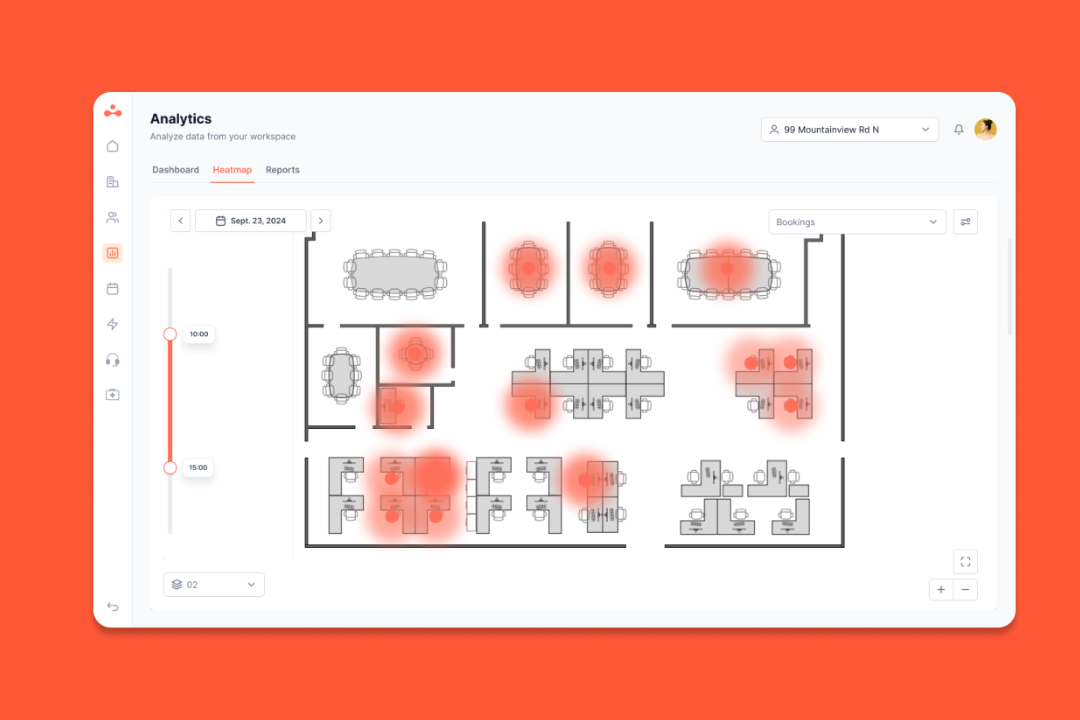
Occupancy analytics: elia combines booking data with desk and room sensor data to show how space is used.
Health and safety workflows: The platform includes first responder tracking, incident reporting, and compliance-friendly records.
Software + hardware ecosystem: elia also offers kiosks, displays, sensors, and gateways, so the platform can extend into the physical workplace.
Integrations: It integrates with Microsoft, Google, and Slack, with calendar sync included. It also has iOS and Android apps for booking spaces and using the office map.
Pricing
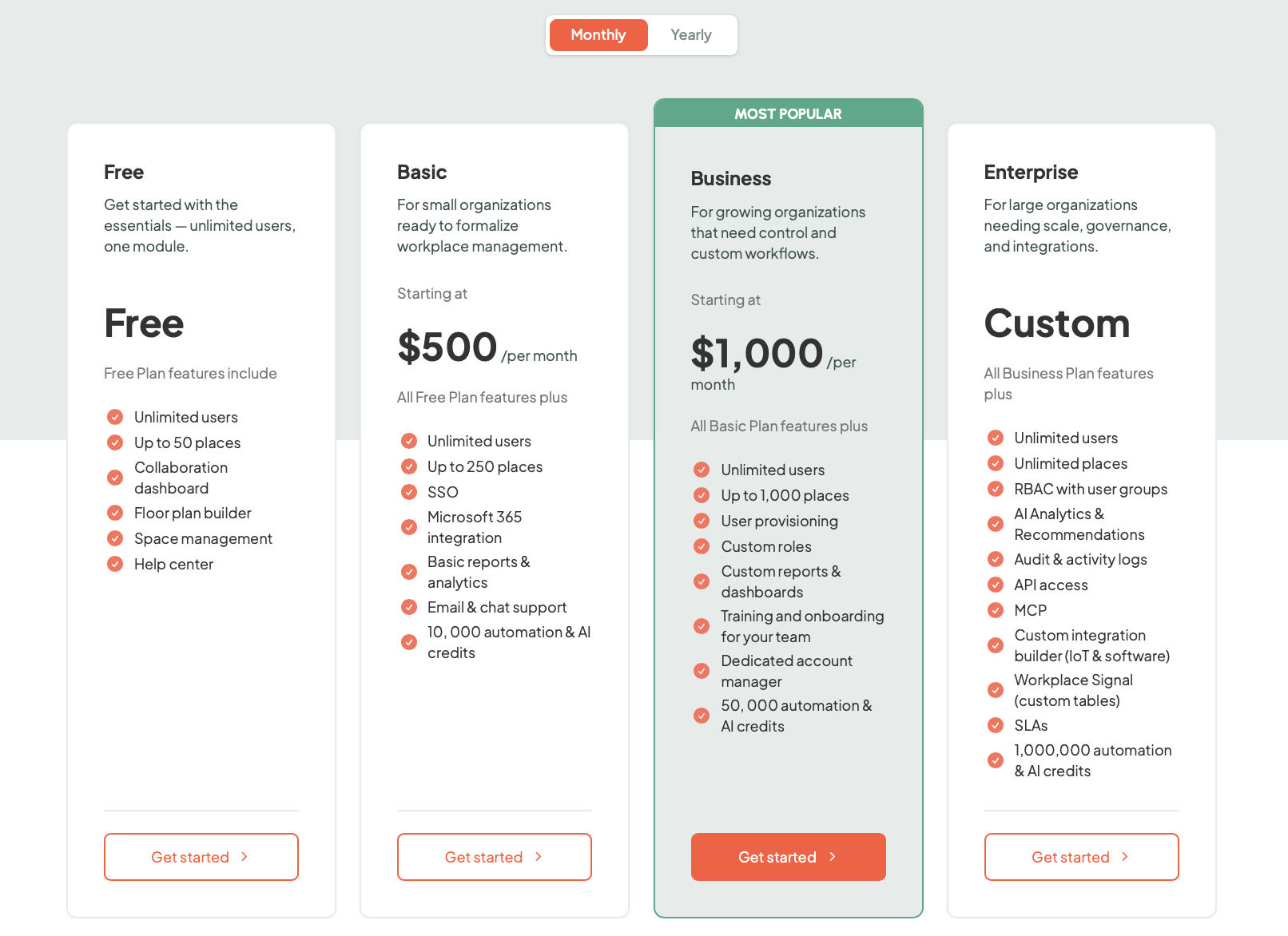
elia’s pricing is public, which already makes life easier:
Free: $0
Basic: from $500/month
Business: from $1,000/month
Enterprise: custom pricing
Source: elia
Hardware is priced separately. The important thing here is that elia isn’t priced like a pure per-user tool. It’s more plan-based, with hardware added only if you want the fuller workplace intelligence angle.
What people like
People get it fast: A lot of reviewers say it’s easy to get up and running, with very little hand-holding.
The map does real work: The floor plan makes booking more visual and easier to understand.
It helps people find each other: A lot of the day-to-day value comes from knowing who’s in and where they’re sitting.
Rollout looks smooth: For standard setups, elia seems easier to roll out than a lot of heavier workplace platforms.
It fits Microsoft-heavy offices: Teams and Microsoft Outlook seem to slot in without adding extra friction.
It goes beyond the basics: elia looks comfortable once the workplace gets more complicated, especially when booking, visitors, and occupancy data start overlapping.
What to consider
The best analytics story depends on hardware: The occupancy side gets much stronger once sensors are part of the setup.
It may be more than some teams need: Smaller offices that just want simple desk booking may find it broader than necessary.
It’s less security-heavy than Envoy: If your shortlist is mostly about approvals, ID checks, and compliance-heavy visitor workflows, other tools may feel more specialized.
Feature
elia
Envoy
Best for
Teams that want to run the office, not just manage the front desk
Teams that want stronger visitor control, compliance workflows, and security-led workplace
Starting price
Free, or from $500/month
Free plan, then from $4,344/location/year plus additional modules
Pricing model
Plan-based + custom
Modular pricing across locations, resources, users, and devices
Desk booking
Yes
Yes
Room booking
Yes
Yes
Visitor management
Yes
Yes
Interactive floor plans
Yes
Yes
Request management
Built in
Less central
Health and safety workflows
Built in
More security/compliance-led than operations-led
Security depth
Present, but not the main pitch
One of the clearest product strengths
Emergency readiness
More workplace-safety oriented
Much stronger and more developed
Occupancy tracking
Stronger once sensors are part of the setup
More presence, booking, and workplace visibility-led
Analytics
Strong workplace intelligence and occupancy angle
Stronger on visitor records and operational visibility
Hardware ecosystem
Native kiosks, displays, sensors, and gateways
iPad-based visitor setup plus broader partner ecosystem
Microsoft / Google
Yes
Yes
Mobile app
Yes
Yes
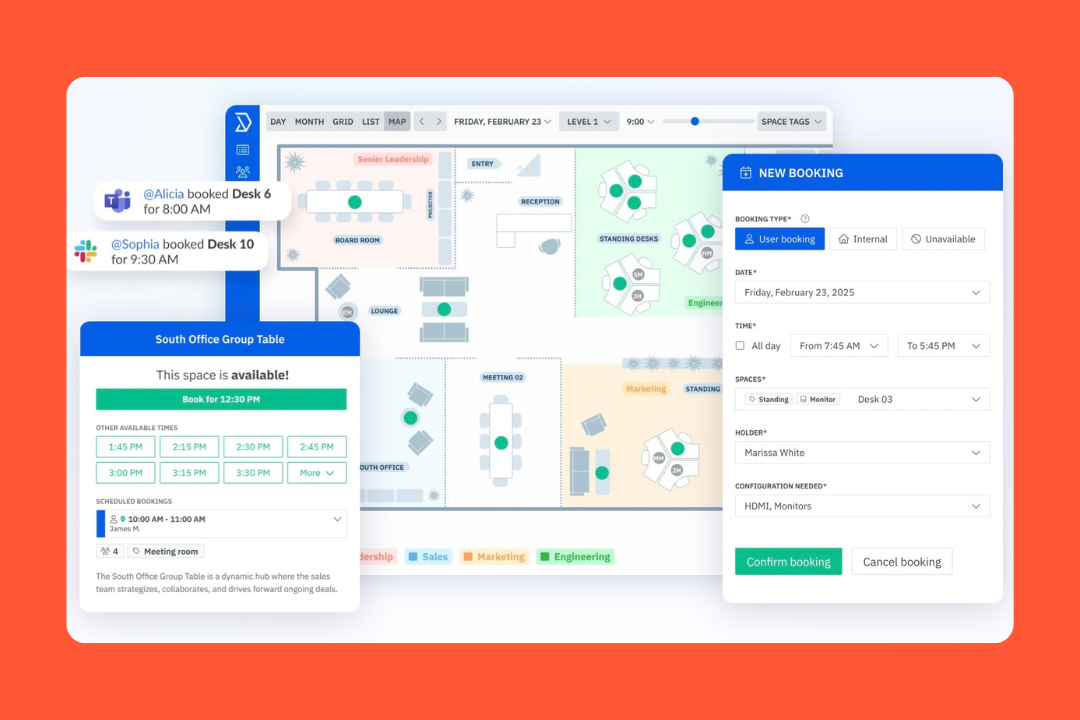
2. Skedda: best for control over shared space
Skedda isn’t trying to be everything. It's very clearly a space management product first. Desks, meeting rooms, parking, shared resources, usage data, approvals, permissions, check-ins, and floor plans are the heart of it. Visitor management is there, but it isn’t the main event. The main event is putting boundaries and structure around shared space.
If Envoy feels stronger at the front door, Skedda feels stronger once the problem becomes internal space control, especially for teams that want full control over specific resources and stricter custom booking rules.
Key features
Interactive floor plans: Skedda turns office layouts into live booking maps, so people can see where they’re booking instead of guessing from a list.
Desk, room, parking, and resource booking: It covers the core workplace booking layer well.
Serious rules engine: Booking windows, quotas, buffer times, approvals, access rules, recurring bookings, and custom fields are part of the setup.
Check-ins and auto-release: Skedda supports QR, app, email, Slack, Teams, and Wi-Fi-based check-ins, plus automatic release for no-shows.
Usage reporting and insights: The analytics get into utilization trends, busiest times, top spaces, and occupancy-backed reporting.
Integrations: It connects with Microsoft 365, Outlook, Google Workspace, Teams, Slack, Zoom, SSO providers, webhooks, Zapier, and booking-adjacent hardware.
Visitor management: It includes visitor invites, self check-in/out, host notifications, and tablet-based sign-in, though this isn’t its deepest area.
Pricing
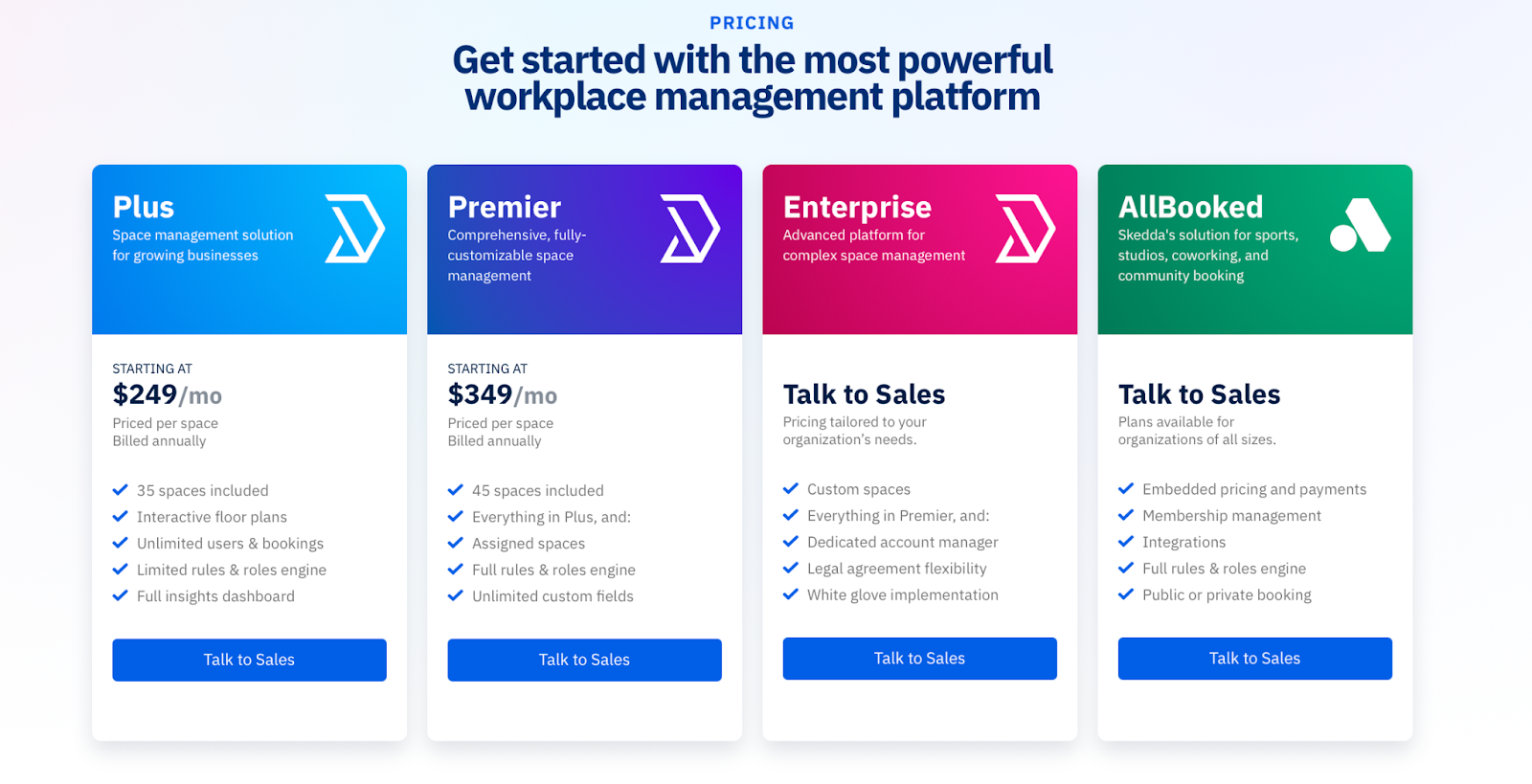
At least with Skedda, pricing isn’t a total black box:
Plus: starts at $249/month
Premier: starts at $349/month
Enterprise: custom pricing
Source: Skedda
The model is priced per space, not per user, and workplace plans include unlimited users and bookings. That makes the pricing easier to follow than some modular workplace tools, though total cost can still climb if you manage a lot of spaces or need the higher-tier controls.
What people like
Maps make booking feel obvious: The visual layout is one of the big draws.
Admins get real control: Teams with more complicated policies tend to like how much they can shape.
Support seems fast: People keep calling out fast replies, useful walkthroughs, and actual hands-on help.
The reporting is useful: For teams trying to understand usage or whether they can shrink space, reporting seems to be one of the reasons Skedda sticks.
It handles more than just desks: Rooms, parking, resources, and mixed space types make it feel more versatile than a basic desk-booking tool.
What to consider
Visitor management isn’t the main reason to buy it: Skedda can handle guests, but it doesn’t look as deep as Envoy on front-desk workflows or security-heavy visitor controls.
Setup is easy, but not effortless: The product is flexible, but that also means someone needs to think through spaces, permissions, rules, and edge cases.
Some customization seems vendor-touched: A few reviews suggest certain edits or adjustments aren’t always as self-serve as admins would like.
Pricing climbs with space count: Public pricing helps, but it’s still priced by space, so the math can change pretty quickly.
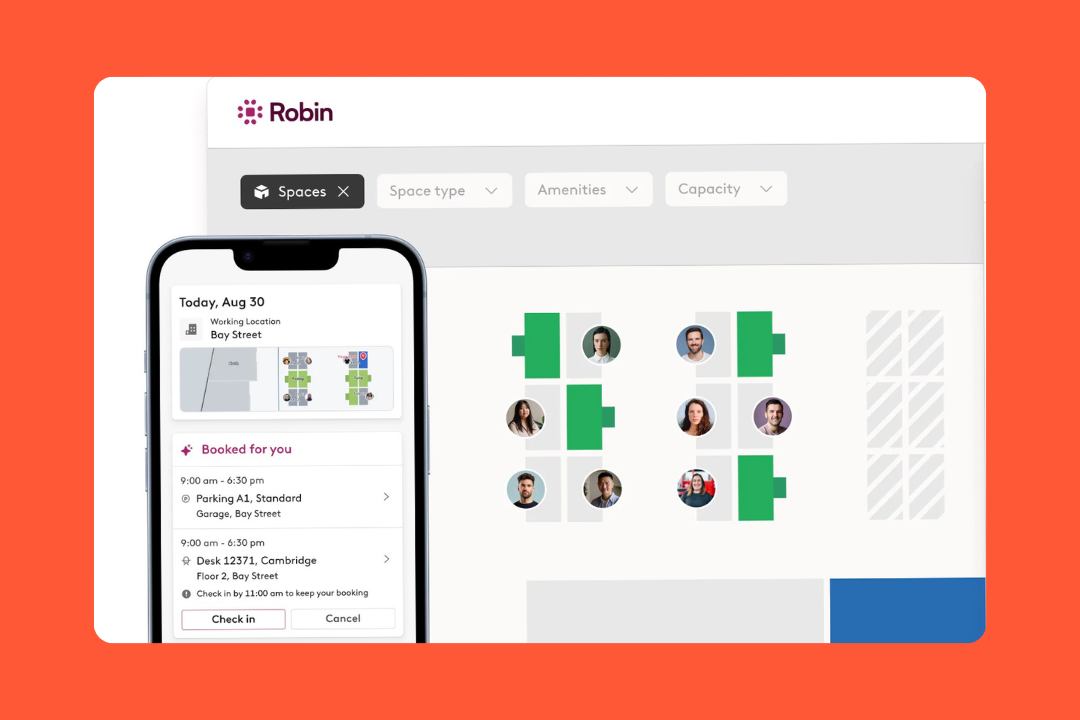
3. Robin Powered: best for turning workplace data into decisions
Robin is one of the tools that keeps pushing workplace operations as a real discipline. You can see that in the analytics, in the planning tools, and in the way it talks about collaboration patterns, occupancy, policy tracking, and future space decisions.
It shifts the conversation away from reception, check-in flows, and compliance controls, and toward planning, resource management, and workplace intelligence that helps organizations optimize the overall workplace experience.
Key features
Desk, room, parking, locker, and custom resource booking: Robin covers the full resource-booking layer, not just desks and meeting rooms.
Interactive maps and wayfinding: Employees can book from live office maps, see who’s in, find teammates, and navigate the workplace.
Advanced analytics: Robin goes well beyond basic utilization reports, with dashboards for bookings, cancellations, check-ins, and office density.
Space planning and neighborhoods: Teams can draft layouts and make assignment changes without rebuilding everything from scratch.
Meeting and workplace services: Catering, AV, issue reporting, room setup requests, and other operational workflows can sit alongside reservations.
Visitor management: Robin includes pre-registration, custom visit types, legal documents, badges, host notifications, arrival displays, delivery tracking, and visit logs.
Integrations: It connects with Microsoft 365, Outlook, Teams, Google Workspace, Google Calendar, Slack, Zoom, SCIM, SSO providers, and analytics APIs.
Pricing
Robin doesn’t publish straightforward public pricing, so you have to go through sales for an actual quote.
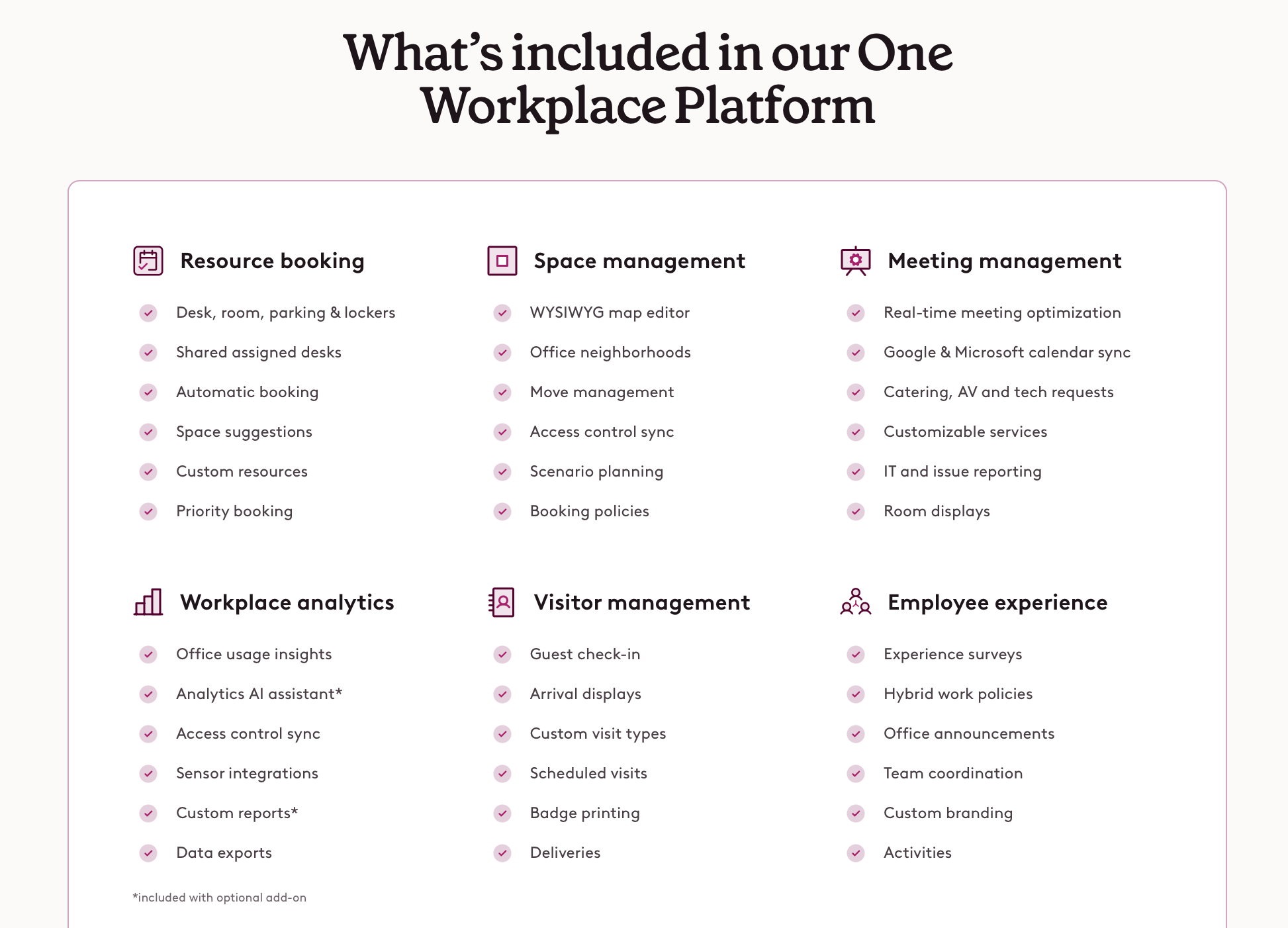
What is public is the general packaging: resource booking, space management, meeting management, visitor management, employee experience, and workplace analytics all sit inside the platform, with some analytics capabilities called out as optional add-ons.
Source: Robin Powered
What people like
It brings a lot into one place: Robin is appealing when desks, rooms, parking, maps, and office workflows all need to live in the same system.
Booking experience is easy: End users seem to get comfortable with it quickly, especially for desks and meeting rooms.
It works well for hybrid coordination: A big part of the value is helping people plan office days with less back-and-forth and less guessing.
Analytics go deeper: Robin stands out when teams want to go beyond bookings and look at usage, attendance and cancellation patterns.
It fits bigger offices better: Robin is a good choice when you have multiple locations and several teams involved in running the workplace.
What to consider
Pricing is hard to size up early: You can understand the product shape, but not the real cost, without talking to sales.
It’s more platform than point solution: If all you need is a lightweight desk-booking tool, Robin can feel like a lot.
Some admin areas seem heavier: End users usually seem fine, but admins can run into more complexity around setup, permissions, and maps.
A few rough edges still show up: Reviews mention occasional refresh lag, confusing admin labels, and smaller issues that don’t ruin the product but do pop up.
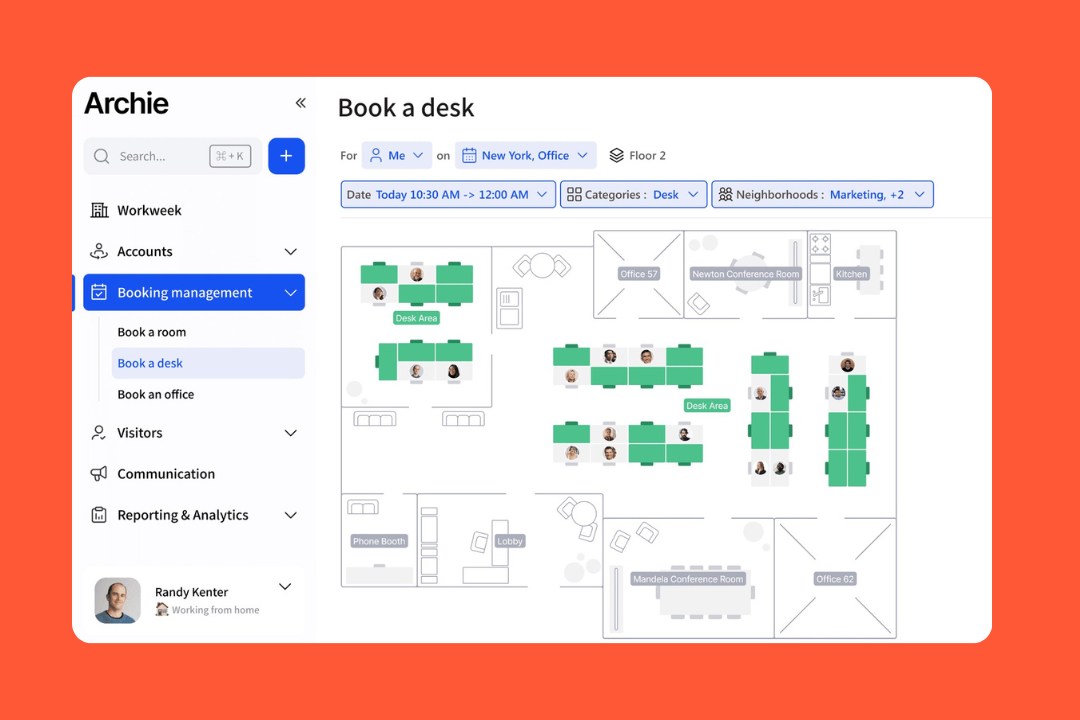
4. Archie: best for everyday office coordination
Archie makes the most sense when the real problem is office sprawl. Too many desks, too many rooms, too many half-used systems, too many people asking the same questions in slightly different ways: who’s in, where can I sit, what’s free, where’s my meeting, has my guest arrived, which conference room is open, and are there any parking spots left?
That makes Archie a good Envoy alternative for teams that don’t necessarily want a heavier security-first platform, but do want a system that can handle the everyday mechanics of a hybrid office.
Key features
Interactive desk and room booking: Archie supports desks, meeting rooms, offices, parking, and other bookable resources.
Hybrid coordination: Employees can see who’s coming in, where coworkers are sitting, which teams are onsite, and how space is being used across the office.
Visitor management: Archie includes pre-registration, host notifications, QR sign-in, kiosks, badge printing, e-signatures, photo capture, visitor logs, and delivery handling.
Emergency workflows: The platform also includes evacuation alerts, live onsite visibility, safe-status tracking, and post-event reporting.
Analytics and reporting: Archie covers occupancy, attendance, desk and room usage, peak days, onsite presence, scheduled reports, and CSV exports.
Integrations: It connects with Microsoft 365, Teams, Outlook, Google Workspace, Slack, Zoom, SSO, SCIM, door access tools, Wi-Fi, payments, Zapier, and APIs.
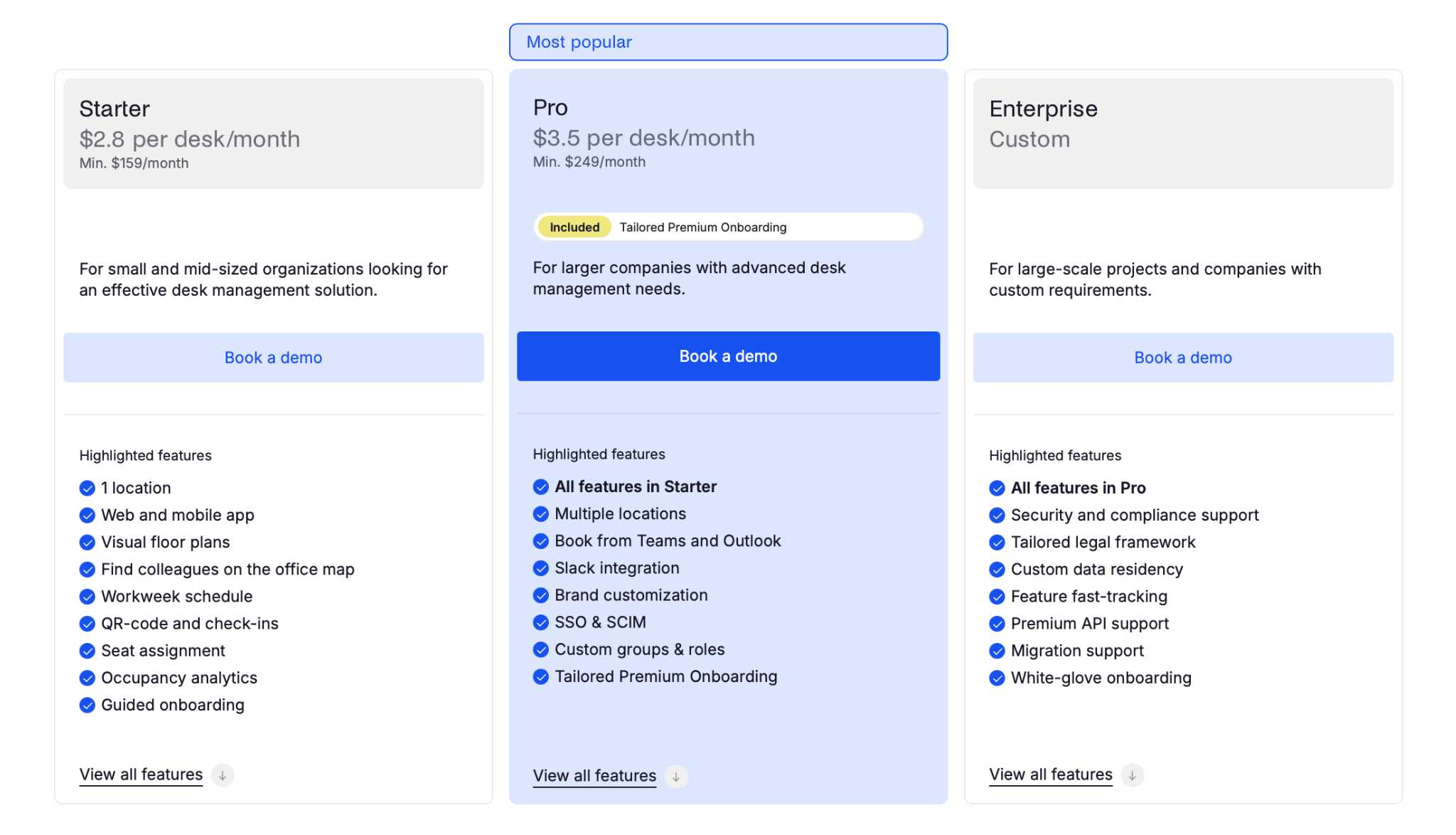
Pricing
Archie’s pricing is public, which is already a point in its favor:
Desks: from $2.8 per desk/month, with a $159/month minimum
Visitors: from $109 per location/month
Rooms: from $8 per room/month, with a $159/month minimum
Coworking: from $165/month
Enterprise: custom pricing
Source: Archie
That said, Archie is still modular. Desks, rooms, visitors, and coworking are all priced differently, so the starting number is helpful, but it’s not the whole number.
What people like
It has a low learning curve: Archie doesn’t seem to ask for a big behavior change from employees.
The map sells it: People keep mentioning floor plans and being able to book a desk near coworkers without guesswork.
Booking feels quick: Desk and room seem to do what it should without turning it into a task.
Visitor workflows look strong: Pre-registration, host alerts, branded check-in, and badges make the front desk feel more organized.
It makes hybrid days less chaotic: Knowing who’s in and which areas are busy solves a lot of the low-level office friction people get tired of.
What to consider
It’s less security-led than Envoy: Archie has visitor management and emergency workflows, but it looks less specialized for compliance-heavy environments.
Setup still takes work: The user experience may be light, but maps, policies, visitor workflows, and integrations still need real thought.
Some UI friction still shows up: Reviews suggest there are still smaller friction points around map navigation and certain settings.
A few convenience features are missing: Things like faster repeat booking or smoother shortcuts still seem to be on some users’ wish lists.
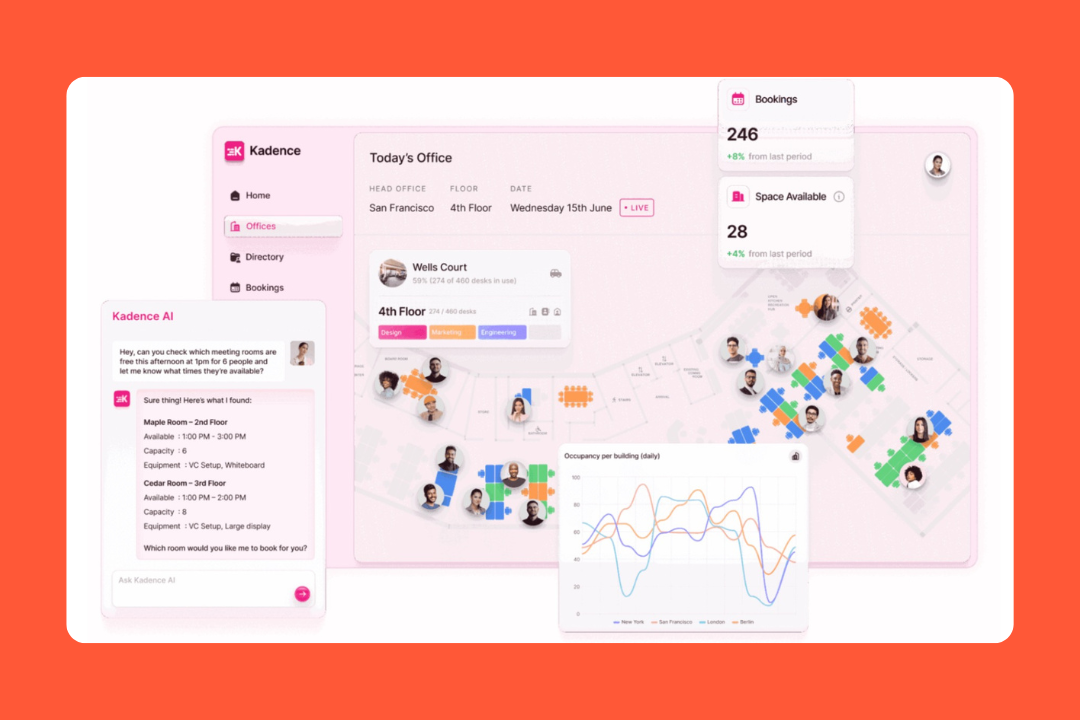
5. Kadence: best for managing hybrid offices
Kadence’s pitch is more like this: if people are only going to commute when it feels worth it, the office needs to stop running on guesswork. That changes the shape of the product a bit. It’s built around the idea that office demand is something you can coordinate and plan around.
The difference is really about where the product puts its energy. Kadence leans harder into timing, team coordination, attendance patterns, and space planning than into security-heavy visitor control.
Key features
Desk and room booking: Kadence supports desks, rooms, private offices, pods, lockers, parking, and onsite bookings, with interactive floor plans and booking rules.
Team coordination: Employees can see who’s coming in, follow teammates, get booking suggestions, coordinate team days, and book near coworkers.
Neighborhoods and team-based planning: Admins can group resources into neighborhoods, assign team access, and use those setups to manage demand.
Automatic check-ins: Kadence Agent can auto-check people in based on trusted office IP ranges, with optional automatic bookings when someone arrives without one.
Analytics and reporting: Kadence covers space utilization, attendance tracking, collaboration patterns, cancellations, occupancy trends, and custom dashboards.
Visitor management: It now includes visitor kiosks, QR check-in, badge printing, host notifications, digital documents, centralized visitor logs, and multi-location governance.
Integrations: It connects with Microsoft Teams, Outlook, Google Calendar, Slack, directory providers, SSO providers, ticketing systems, LiquidSpace, and APIs.
Pricing
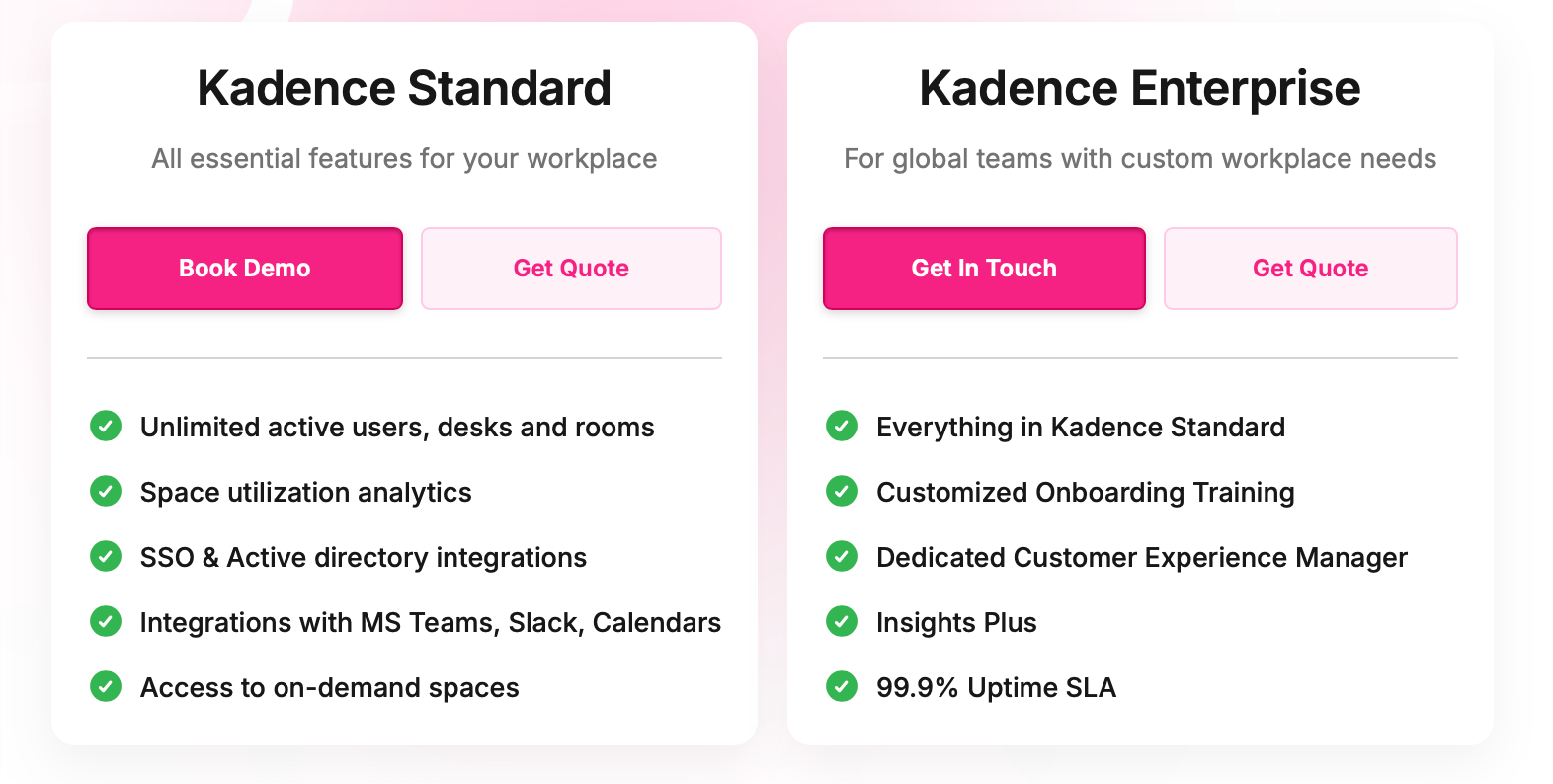
Kadence doesn’t publish clean self-serve pricing. The site talks about Kadence Standard and Kadence Enterprise, but the actual commercial details are still demo-led rather than broken out into public numbers.
Source: Kadence
What people like
The interface clicks fast: A lot of the praise is pretty simple. People find it easy to use and roll out.
Teams integration is a big plus: This comes up again and again, especially for companies that want booking to happen inside existing workflows.
The visual setup helps: Users like being able to see where others are sitting and grab a nearby desk.
Support gets mentioned a lot: Account managers, onboarding help, and general responsiveness show up often in positive feedback.
It makes office days less random: Visibility into coworkers, seating, and attendance patterns seems to be one of the biggest day-to-day wins.
What to consider
Pricing isn’t transparent: You can understand the product shape, but the actual cost usually takes a demo.
Auto check-in isn’t flawless There’s clear value there, but also enough feedback about setup friction and inconsistency.
Reporting still feels uneven: Some teams like the insights side, while others want cleaner exports or more flexible reporting tools.
Some admin changes still appear support-dependent: A few reviews point to configuration tasks that feel less self-serve.
6. Tactic: best for broad workplace coverage with simpler pricing
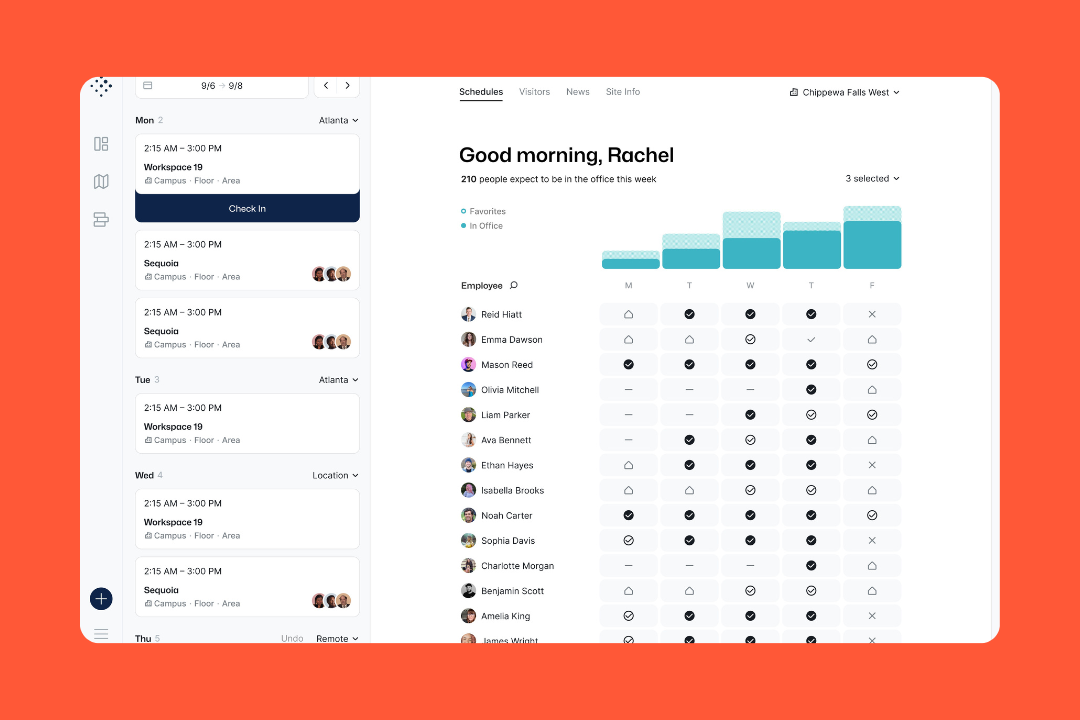
Tactic is one of those products that gets interesting once you stop looking at it as desk booking software. It’s also trying to pull the rest of the office mess into the same place: visitor check-in, floor plans, attendance, workplace requests, room tablets, booking rules, automated notifications, and reporting.
It belongs here because some buyers start with Envoy, then realize they aren’t only buying a visitor tool. They’re trying to sort out the whole office. Tactic is a better fit for that kind of buyer if they want broad coverage without getting hit with a complicated pricing model.
Key features
Desk and room booking with real operational logic: It supports desk and room reservations through interactive maps, recurring bookings, and assigned spaces.
Attendance and team visibility: Employees can see who plans to be onsite, where teammates are sitting, and what the office looks like before they show up.
Visitor management: It includes pre-registration, tablet check-in, host alerts, badges, logs, and signed forms like NDAs.
Workplace requests: Facilities, catering, AV, IT, and similar requests can be submitted and tracked in the same platform.
Space reporting and planning: Attendance, utilization, reservation data, visitor reporting, exports, and planning visibility are all part of the package.
Workflow integrations: Tactic integrates with Slack, Microsoft Teams, Google Calendar, Outlook, room calendars, SSO providers, SCIM / directory sync, and more.
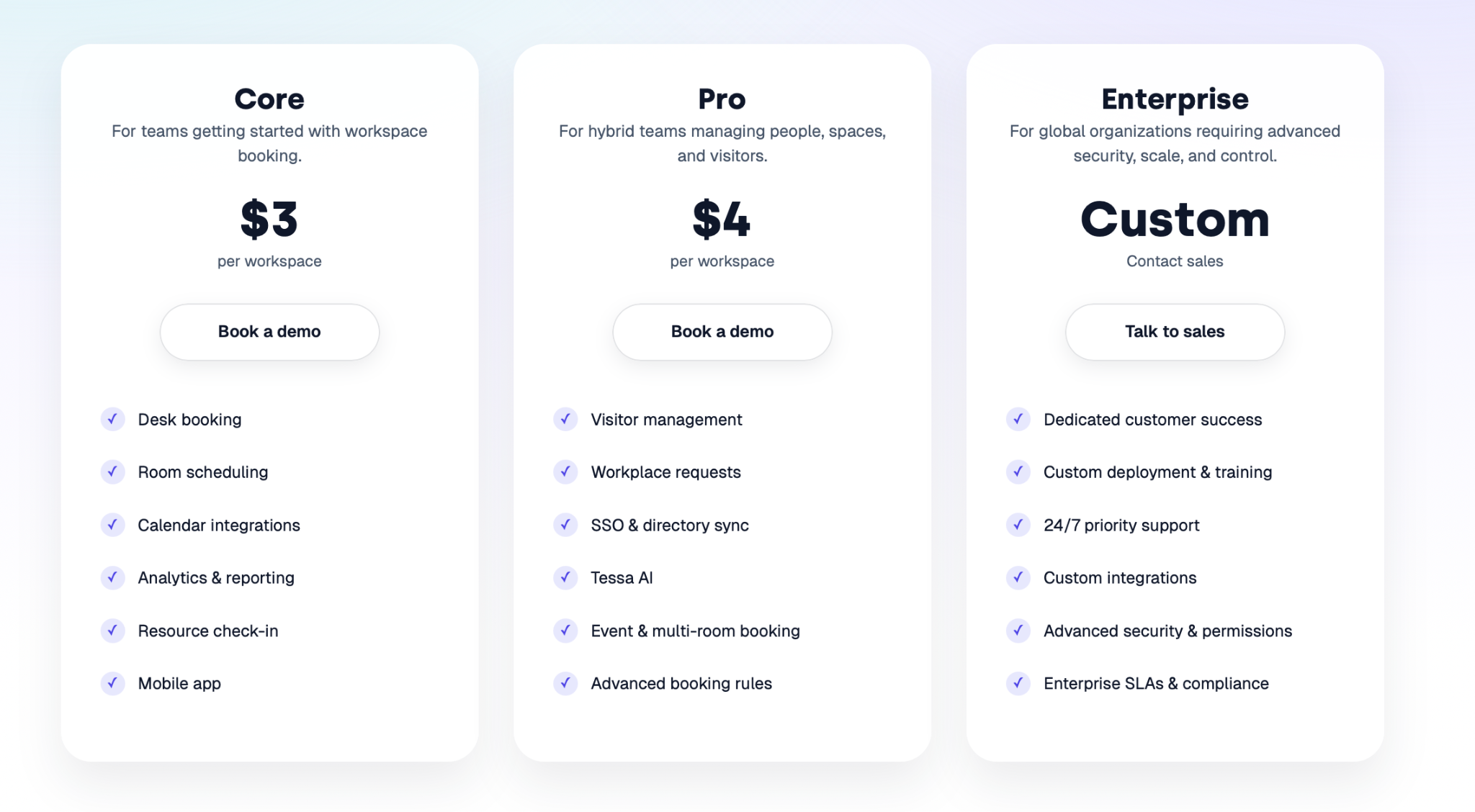
Pricing
Tactic’s pricing is public:
Core: $3 per workspace
Pro: $4 per workspace
Enterprise: custom pricing
Source: Tactic
That’s a real advantage here because it’s much easier to read than Envoy’s multi-part pricing setup.
What people like
Booking doesn’t feel like a chore: Reviews often describe the reservation flow as quick, especially for desks and meeting rooms.
Support leaves a good impression: People regularly mention fast replies and a team that seems present during onboarding and setup.
It fits into existing workflows: Slack, Teams, Outlook, and Google integrations come up often.
The rollout seems fairly calm: Several reviewers talk about getting started without a huge amount of training.
Pricing is easy to grasp: Compared with more tangled workplace pricing models, Tactic looks simpler to explain early on.
What to consider
Visitor management isn’t the main reason to buy it: The visitor tools are there, but the product still looks more workplace-led than security-led.
Some admin tasks seem heavier: The employee-facing side looks smooth, but setup and configuration can get more hands-on.
Map updates don’t seem very self-serve: A few reviews suggest that layout changes or similar edits aren’t always something admins can handle freely.
There are some performance complaints: Mobile lag, map loading delays, and the occasional slowdown appear often enough in reviews to count as a pattern.
7. WorkInSync: best for parking-first workplace management
WorkInSyncdoes a lot, but it doesn’t read like a company that kept bolting things on just because it could. Desks, rooms, visitors, scheduling, analytics, kiosks, and AI all show up in the product story, but the thing that keeps standing out is parking. Not as a throw-in module buried somewhere in the nav, but as a real part of how the platform is sold and used.
That’s really the comparison angle. Envoy pulls the buying conversation toward visitors, security, compliance, and front-door control. WorkInSync pulls it toward the day-to-day machinery of the office.
Key features
Desk, room, and parking booking in one platform: WorkInSync covers desk reservations, meeting room booking, parking allocation, and employee scheduling.
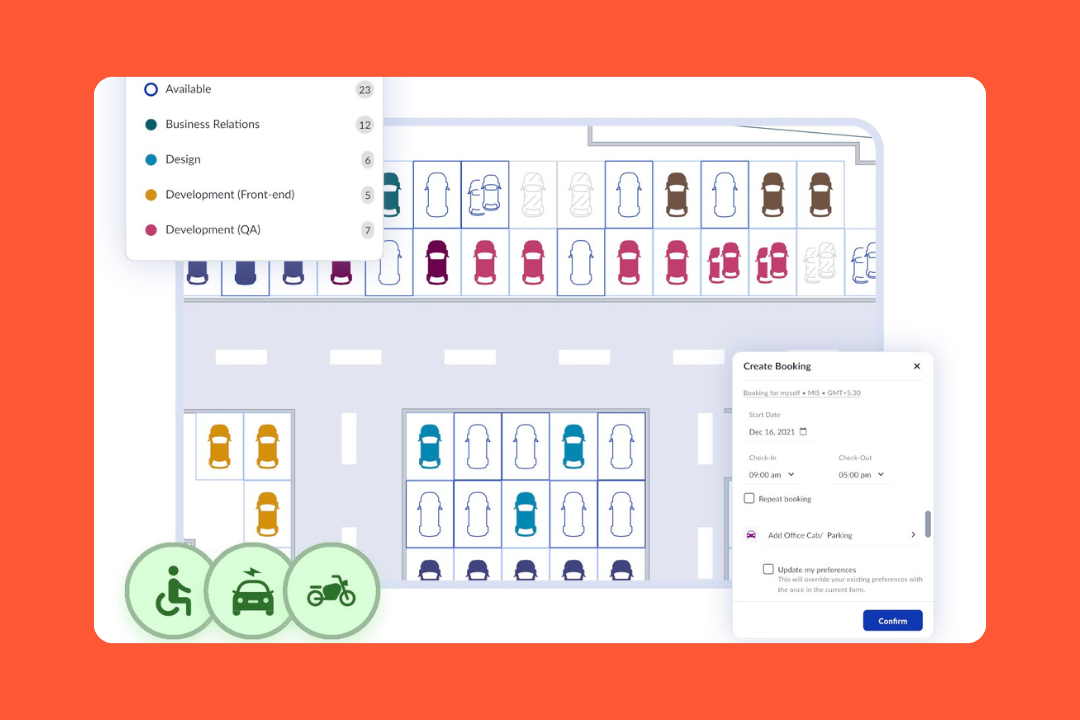
Parking is a real module: Live slot visibility, booking rules, waitlists, eligibility controls, and utilization reporting all suggest this is one of the more developed parking stories.
Visitor management: It includes pre-registration, QR-based entry, self-check-in kiosks, digital signing, photo capture, badge assignment, and digital visitor logs.
Interactive kiosks and wayfinding: Floor kiosks, live maps, colleague search, navigation, and real-time availability push the product further into workplace operations.
Workplace analytics and utilization reporting: Occupancy dashboards, heatmaps, sensor integrations, and desk and room utilization are all part of the package.
Integrations: SSO, SCIM, Active Directory sync, role-based access controls, open APIs, Microsoft and Google support, and custom workflows show up across higher tiers.
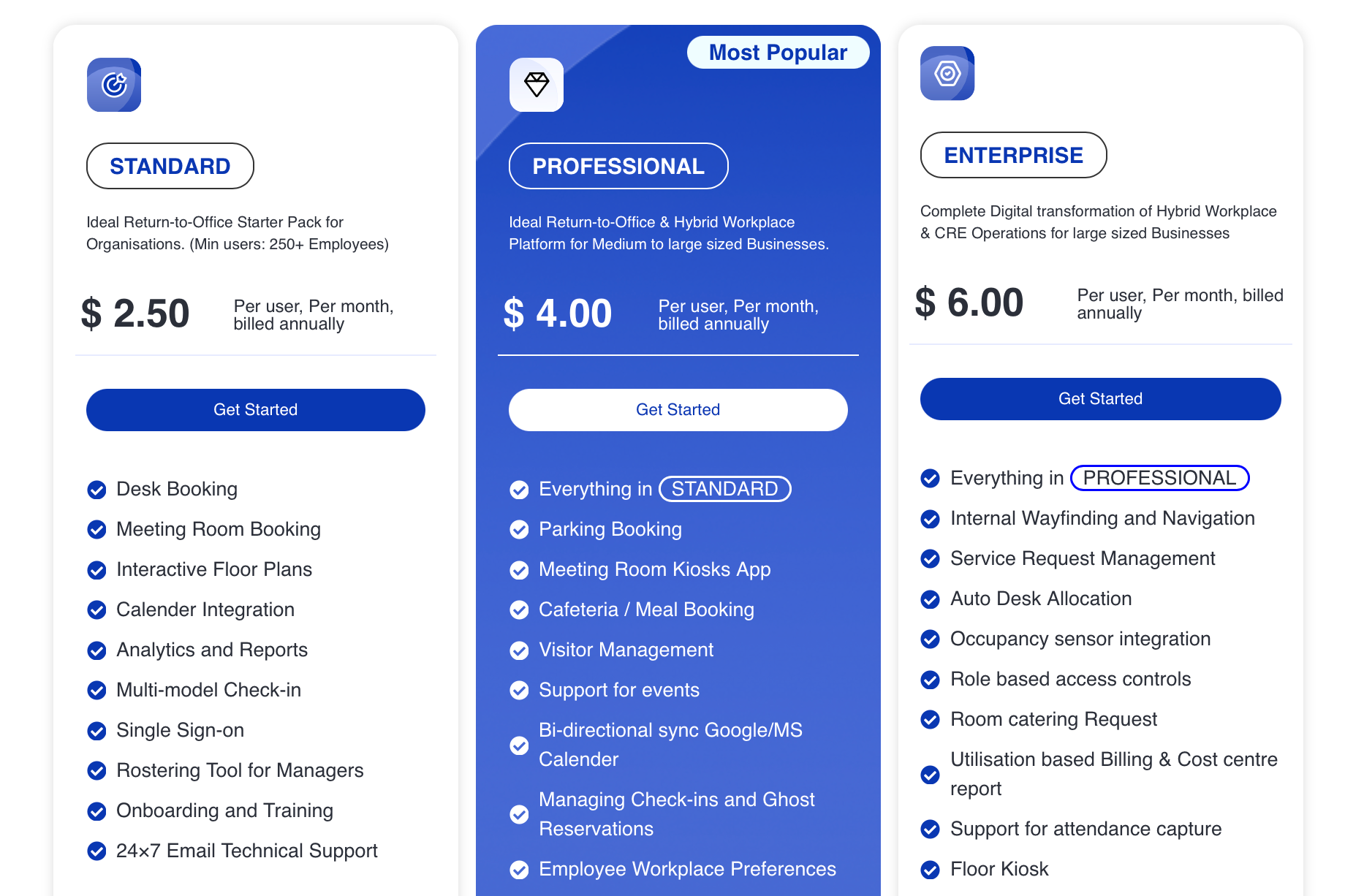
Pricing
WorkInSync’s pricing is public:
Standard: $2.50 per user/month
Professional: $4.00 per user/month
Enterprise: $6.00 per user/month
Source: WorkInSync
There’s also a minimum size on the Standard tier, and the higher tiers unlock a lot of the broader workplace modules. Still, compared with Envoy, this is a much easier pricing model to read early on.
What people like
Parking keeps coming up: A lot of reviews call it out first, which isn’t something you see with most workplace platforms.
It cuts down the office scramble: Desks, rooms, and parking in one place seem to remove a lot of low-level daily friction.
Meeting room booking gets strong feedback: Reviews regularly mention room reservations as one of the better parts of the product.
Seeing who’s coming in helps: The office visibility side seems to matter in real life, not just on the homepage.
The all-in-one angle lands: People do seem to value having several office tasks handled inside one app.
What to consider
The integration story looks stronger in product copy: There are comments about HRMS gaps, incomplete integrations, and feature requests for channels like WhatsApp.
The interface sounds a bit crowded: Some users mention too many options on the home screen or navigation that could be cleaner.
Some flexibility still seems missing: Buffer times, booking swaps, smarter reminders, easier edits, and similar workflow details show up more than once.
A few features seem tier-gated: Some users specifically mention wanting reporting or booking controls that sit behind higher plans.
How to choose the right Envoy alternative
Once Envoy is on the shortlist, the decision usually stops being “Which tool has visitor check-in?” and becomes “What kind of workplace software are we buying?” That is the part worth getting clear on first.
Start with the real center of gravity
Most tools on this list can cover desks, rooms, and visitors in some form. The real split is what they are built around.
Some are still mostly about booking. Some are better understood as workplace operations software. Envoy sits in a different spot: it now spans visitors, reservations, emergency notifications, screens, deliveries, and more, and positions itself as a workplace platform built around security and compliance.
So before comparing features, figure out which of these is driving the purchase:
visitor management and front-desk control
desks, rooms, and parking
compliance and auditability
emergency readiness
workplace analytics
a broader all-in-one platform
a lighter tool with fewer layers
That sounds obvious, but it’s where a lot of teams get lost. They think they’re comparing visitor tools when they’re really comparing very different ideas of what office management software should do.
Decide how much platform you want
Envoy is appealing partly because it does a lot. That’s also why some buyers keep looking.
If all you need is a clean booking flow or a simpler visitor setup, a broad workplace platform can feel heavier than the job. Envoy’s own product lineup now stretches well beyond reception into reservations, emergency communications, screens, deliveries, and workplace data.
That doesn’t make it the wrong choice. It just means you should be honest about whether you want:
one larger system with more operational range
or a narrower tool that stays in its lane
Look at pricing the way finance will
This category gets slippery fast once pricing stops being a headline and starts becoming a model.
Envoy publishes pricing, which helps, but it’s still split across different units depending on the product: locations, resources, users, devices, and more. So when comparing alternatives, ask:
what is the pricing unit: user, desk, room, location, resource, or plan
what happens when you add parking, visitors, kiosks, or analytics
which features are parked in higher tiers
whether enterprise controls are included or custom-priced
whether the model still looks reasonable once your rollout gets real
A tool can look cheaper right up until you start counting the parts that matter.
Check whether the integration story holds up in real life
Everybody has an integrations page. The harder part is whether those integrations fit how your workplace runs: Microsoft-heavy, Google-heavy, Slack-heavy, security-heavy, or stitched together with internal systems and APIs.
Envoy has a broad ecosystem and strong coverage across workplace and security-related systems. But this is still a category where “integrates with” and “works the way we hoped” are not always twins.
So the right question is, does it reduce work once connected?
Ready to move beyond Envoy?
To wrap it up: Envoy is solid, no doubt. But if you’re running a hybrid office, growing quickly, or managing medium-sized teams, there are better fits out there.
elia brings together the best of desk booking, meeting room scheduling, and visitor management in a powerful Envoy alternative designed for modern teams. Plus, it’s built for flexibility: custom rules, interactive floor plans, advanced analytics, and smart resource management features baked in.
Ready to see it in action? Book your free demo with elia today and discover why it’s the best Envoy alternative for your workplace.
Tamara Zhostka
is a Content Marketing Specialist at elia. With 10+ years in content marketing, she writes about workplace trends and the tools that help teams work smarter. Part strategist, part storyteller, Tamara brings equal amounts of data, creativity, and a little Moon Prism Power to every piece she creates. 🌙✨
Share
Contents
Subscribe to our newsletter
Subscribe to the elia newsletter for exclusive product updates and industry best practices. You can unsubscribe at any time.
Thank you! You're subscribed.
Oops! Something went wrong while submitting the form.
Frequently Asked Questions
Answers to Your Common Queries
What are the primary reasons companies look for alternatives to Envoy?
How does Envoy's pricing compare to its competitors?
Can I find a solution that combines desk booking, meeting room scheduling, and visitor management?
Do alternatives offer more flexibility in visitor management features?


.png)
.png)
.png)
.png)