Microsoft Teams Desk Booking: Classic Setup vs Microsoft Places vs Integrated Solutions
Tamara Zhostka
Content Marketing Specialist
–
Last updated on Aug 06, 2026
Only about a third of us are in the office full time now, but the admin work has gone through the roof. Sorting out who sits where has turned into a job in itself.
If your company runs on Microsoft Teams, you already have some of the infrastructure in place for booking desks. The real question is whether the classic Microsoft setup is enough on its own, whether Microsoft Places closes the gap, or whether you need some dedicated desk booking app on top to make the whole thing work better.
This guide looks at all three options:
how desk booking in Microsoft Teams works using Exchange resource mailboxes and workspaces
what Microsoft Places adds in 2026 (and why it's still a bit of an IT project)
how integrated tools like elia can make desk booking easier directly inside Teams
which setup makes the most sense depending on your office size and ownership model
The OG Microsoft setup: resource mailboxes and workspaces
You don’t need to build a booking system from scratch in Microsoft 365. The foundation is there. It’s just not especially elegant once you start trying to manage more than a small office.
At the heart of the classic setup are resource mailboxes tied to spaces or assets rather than people. So instead of belonging to an employee, a dedicated mailbox can belong to any shared resource that people need to book.
Microsoft splits these into two main types:
room mailboxes for fixed spaces like meeting rooms or boardrooms
equipment mailboxes for shared assets like projectors or company cars
Setting it up isn’t rocket science
If you want to get this working, it’s pretty straightforward:
Assign it as a conference room, workspace, or other shared resource, whatever makes sense for your office.
Set the booking permissions and availability, so people know when they can use the space.
Let them reserve it through Outlook, Microsoft Teams calendar, or Room Finder.
That gives you a bookable resource inside the Microsoft ecosystem, and for room bookings, that’s usually enough. Desks are where it gets more complicated.
So, 200 desk mailboxes for 200 desks?
To handle desks without having to create a new desk mailbox for every single seat, many organizations use the workspace model (Microsoft also calls this a desk pool). Instead of treating each desk as its own resource, they create one big shared workspace or neighborhood with a set capacity.
For example, a “Marketing neighborhood” might be able to fit 30 people in it. 30 people can book it. Anyone who tries to book it a 31st time gets rejected.
From an admin perspective, that makes keeping track of desks a lot easier. But it also shows where the classic setup starts to fall over. At that point, you aren’t really getting a bookable desk but rather a permission to park themselves in a zone. You can’t easily:
see who’s sitting at nearby desks
pick a specific desk
coordinate with your team so you can all sit together
That's the trade-off with how reserving desks happens in Microsoft natively. It works, and it's fine for smaller offices or simple desk pools. But once the workplace starts to get more complicated (especially when you get to managing multiple offices), the same limits show up pretty quickly.
Pros
Cons
Built into Microsoft 365
Manual setup for every space
Works in Outlook and Teams calendar
No visual floor maps
Familiar for employees
Weak desk-level choice
Calendar syncing is built in
No easy check-ins or automation
Fine for smaller setups
Harder to manage at scale
Microsoft clearly knows this is a gap because they are trying to close it with Microsoft Places.
Microsoft Places: a better model with a heavy admin side
Microsoft Places is an AI-powered app inside Teams and Outlook that’s designed to make hybrid workplaces feel less… improvised.
This is different from the mailbox-and-workspace setup. Places is still Microsoft, and it still lives inside the Microsoft ecosystem, but it’s a dedicated tool with its own configuration and admin model.
Places doesn’t see a desk as just another calendar item in Exchange. It understands it more like an actual space inside a workplace. A desk is a desk. A floor is a floor. A building is a building. And once that structure exists, Microsoft can layer better booking and more intelligence on top.
Compared to the older resource-mailbox model, Places is a step forward. You get:
work plans so teams can coordinate which days they'll be in the office
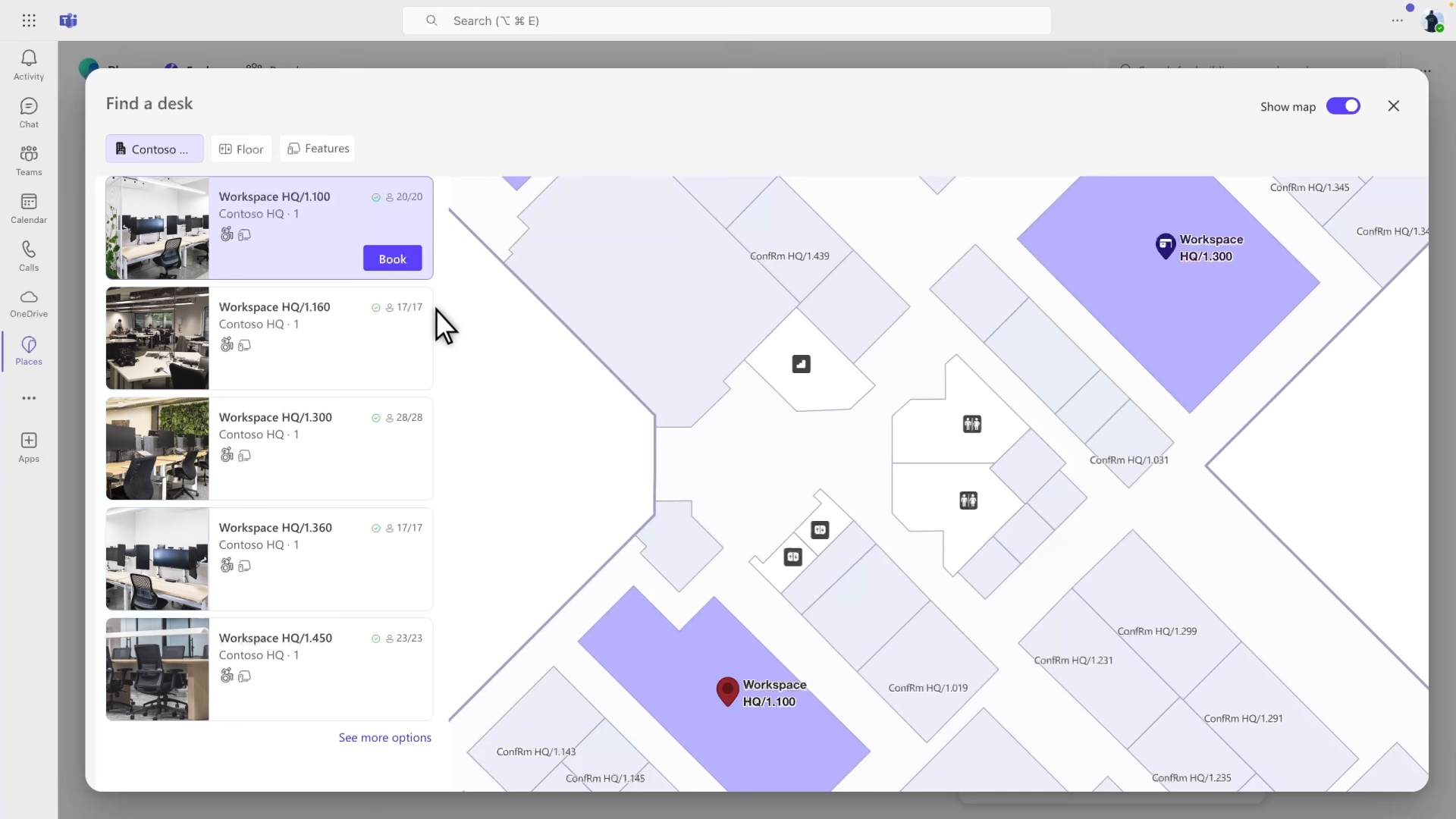
Places Finder to help you book rooms and desks from your calendar
Places Explorer for a bird's-eye view of buildings and floor layouts
individual desk booking
desk modes like reservable, drop-in, assigned, or unavailable
desk metadata and tags, such as wheelchair accessible, height adjustable, near a window, or equipped with specific devices
presence and wayfinding to help you find your way around on a mobile app
space inventory management and utilization analytics
Bookable Desks are part of Microsoft’s newer Places desk-booking story.
With them, employees can reserve a desk in Teams. Microsoft can also recognize a desk when you plug in your peripheral devices (like a monitor or a dock), which helps with desk reservations and getting a better read on how the space is being used.
Microsoft’s own setup flow includes:
creating desk pool or managing individual desks
associating monitors and other peripherals with desks or desk pools
enabling extra features like automatic work location updates
testing the employee experience in Teams
reviewing desk usage reports
That's a far cry from the old one-big-workspace approach to space management. This new system lets Microsoft support both wanting just any seat in the area & being super specific about wanting a particular desk.
But on the flipside, it does complicate things a bit. You’re juggling Exchange resource accounts, Microsoft Places, Pro Management Portal, peripherals, booking policies, reports, and keeping track of all your space data.
The cost story isn’t as simple as it seems
Microsoft Places might seem cheap because it's just another tool in the same Microsoft world you're probably already using. But the more advanced desk-booking stuff isn't automatically free just because you've already got Teams.
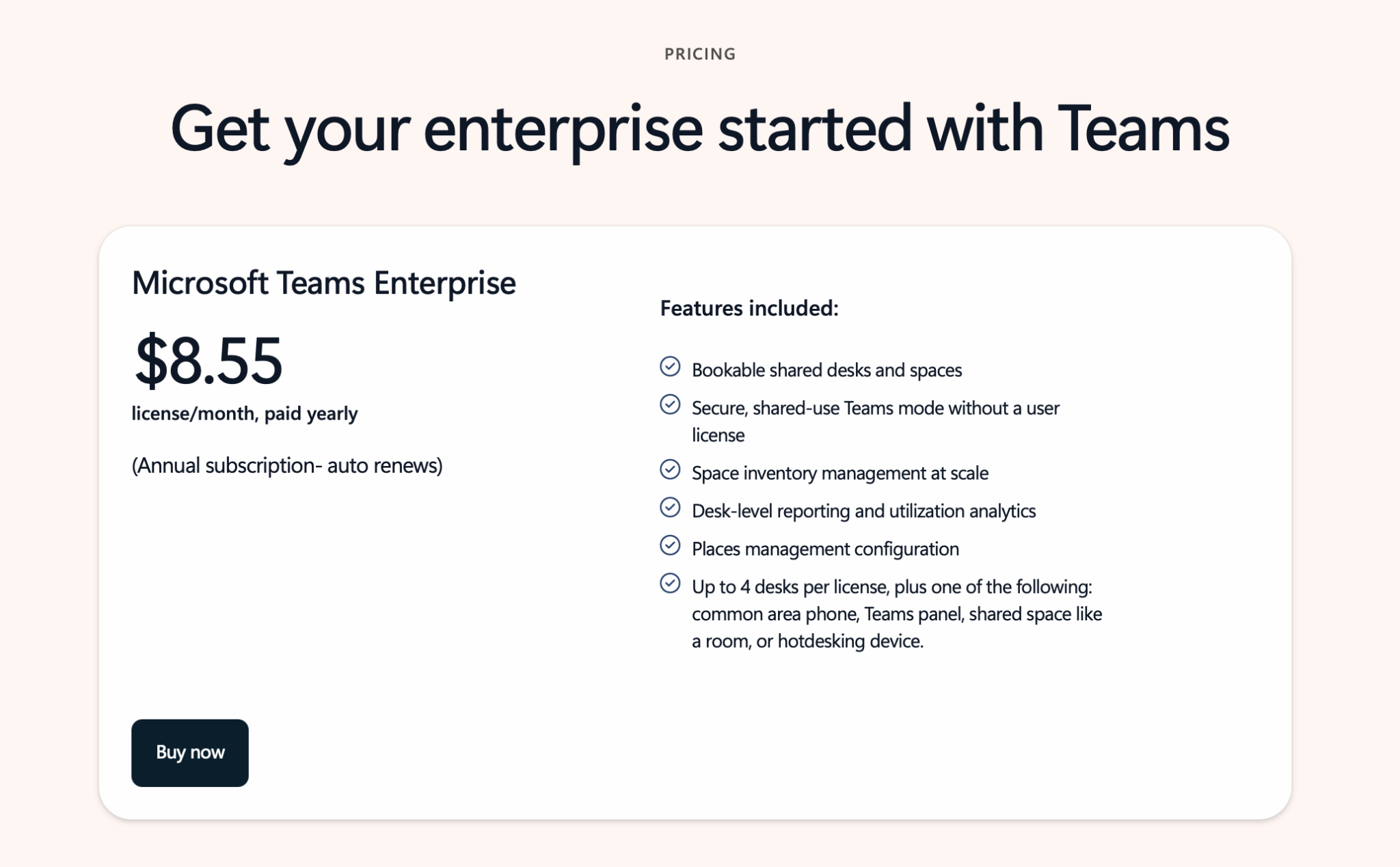
As of April 2026, the pricing list shows that Microsoft Teams Enterprise will cost you $8.55 per license/month, paid yearly. It’s worth noting that this license (formerly the Teams Shared Device license) now covers up to 4 desks. This is a massive point for a manager trying to keep an eye on the budget. If you have 200 desks, that's 50 extra licenses to worry about and pay for.
Why the Microsoft-only route still gets harder at scale
So yeah, this is Microsoft moving in the right direction here. It does a good job of addressing a few long-standing problems of the old model, and in 2026, it’s more than just a vague promise. However, workplace booking still isn't as easy as it could be for office managers to just set-and-forget:
Admin headache is still a major issue: Microsoft’s booking tools are built for IT admins, and not for workplace managers. And much of the booking process still has to go through IT. Want to add a new booking rule? Can’t just drag and drop it, it usually requires an IT ticket and a PowerShell script.
The map debt is real: To get those nice visual floor plans in Places, your office maps and workplace hierarchy need to be configured properly. Microsoft supports IMDF-based floorplans, which can make layout changes much more technical than a simple drag-and-drop edit.
Occupancy data is limited: Microsoft is getting stronger on the analytics side of things, but to get accurate usage reports, you have to configure peripheral signals or badge-in systems. Hardware sensors are also not part of the default story; if you want real-time data on no-shows without relying on people manually checking in, you'll still need to integrate third-party hardware.
Want desk booking in Teams without the PowerShell gymnastics? See how elia works inside Microsoft Teams.
What Microsoft Places Promises
What it means
Everything stays inside Microsoft
You still need IT setup and more ongoing admin overhead
It feels like the natural Teams path
Individual desks need Shared Space licenses ($8.55/mo per 4 desks)
Employees already know Teams
If the booking experience feels too rigid, adoption tanks
Better space data and analytics
Insights depend on getting IMDF maps set up, desk metadata, and usage signals
More desk-level control
Day-to-day layout changes still need IT or admin-level involvement
Desk booking systems integrated with Microsoft Teams
The main question workplace managers ask is: "Why should employees leave Teams to fix an office problem that lives inside Teams?"
Well, they don't have to 🙂
Integrated tools keep Microsoft running in the background while giving your team an intuitive interface. And there are a few platforms in this category, including tools like elia, Robin, Envoy, and YAROOMS built for workplace teams (and not just IT admins).
What integrated desk booking tools usually offer
They tend to answer more practical questions: Where’s my team sitting? Which desks are used? How do we update a floor plan without getting an IT ticket? How do we handle no-shows or catering requests without bouncing between systems?
That changes the experience a fair bit.
Typical capabilities include:
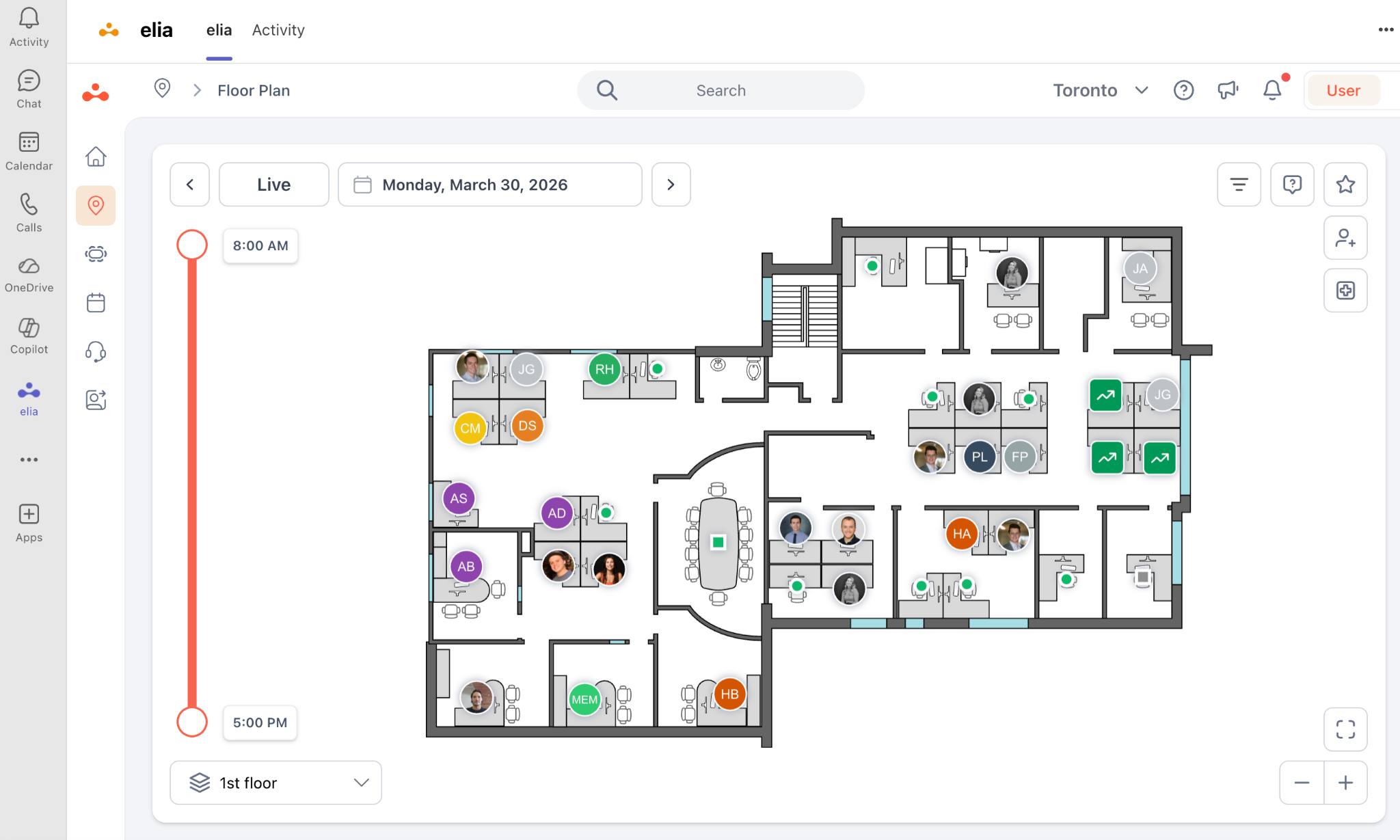
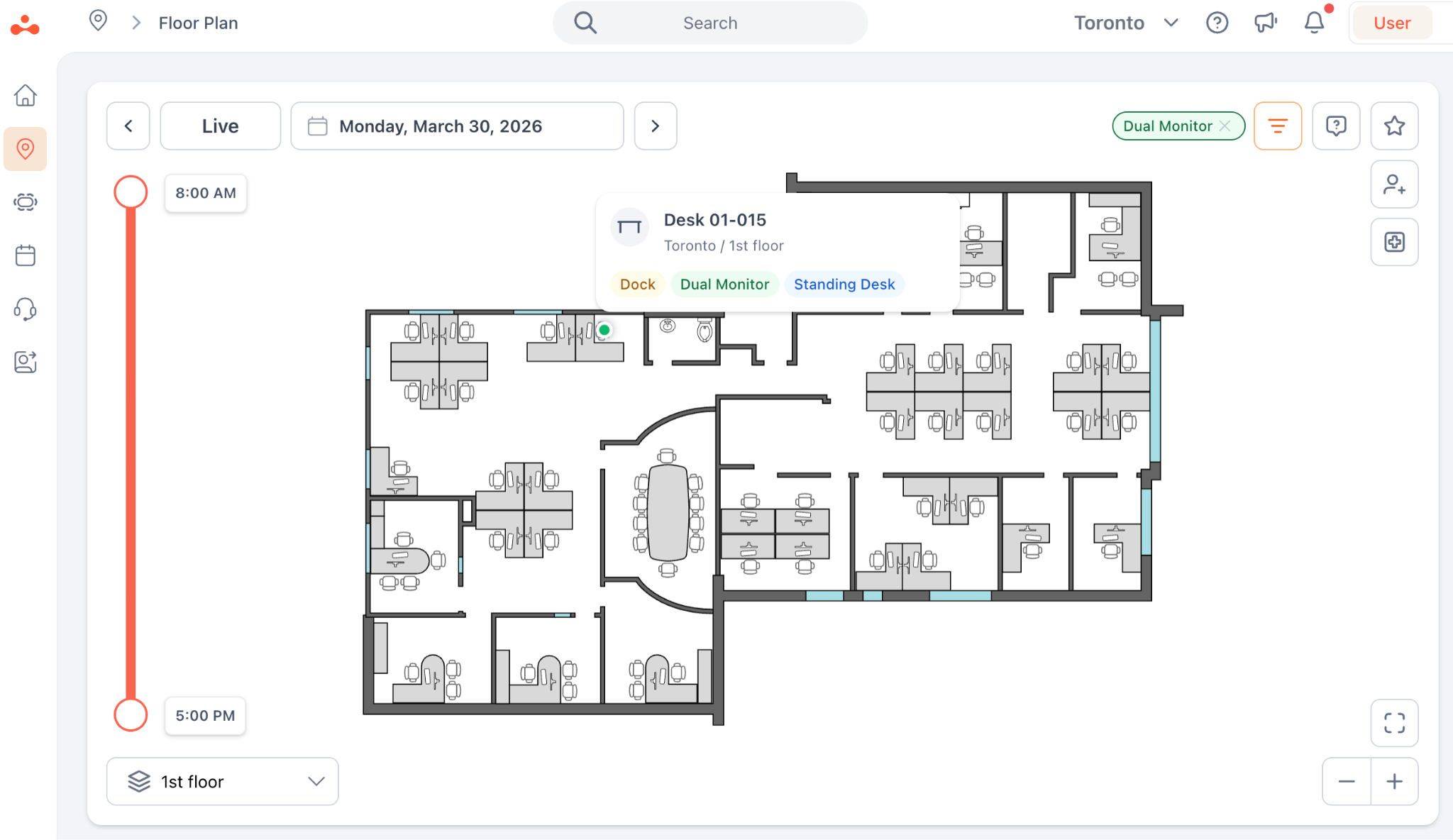
Interactive floor plans: You get a map that shows you exactly who's sitting where in real time.
Social booking: Features like "Sit Near My Team" or "Colleague Invitations" turn booking into a coordination tool.
No-code floor plan editor: Office managers can drag and drop desks or create project zones with no need for IT, no PowerShell, no tickets.
Automated visitor management: A guest arrives, they scan a QR code, the host gets a Teams notification, and the visitor is checked in, all in one workflow.
Service requests: If a monitor is broken or you need catering for a 10:00 AM meeting, you can trigger a service request.
Sensor support if you want: Ghost bookings are easier to catch and wasted space is easier to recover.
Richer analytics: You get to see what's actually happening on the floor, not just desk availability.
Two-way sync: Desk bookings stay in sync across Outlook, Teams and the platform itself. If something gets changed, it updates everywhere else too.
Pros
Cons
Better experience for employees
It’s still a new platform to get to know
Easier for workplace and facilities teams to manage
You need to choose the right platform and governance model
More flexible than native-only setups
Some organizations still prefer to stick with Microsoft
Stronger visibility into what’s happening on the floor
Added capability comes with added cost
How to book desks and rooms in Microsoft Teams with elia
So what does that integrated Teams experience actually look like? Let’s use elia as an example.
The idea is to let employees manage their whole office experience without ever having to leave the app where they already spend their day.
Open the app in Teams: Just click on the Teams sidebar and open the elia desk-booking app. This’s where you’ll see the floor plan, manage bookings, and see who else is planning to be in on a given day.
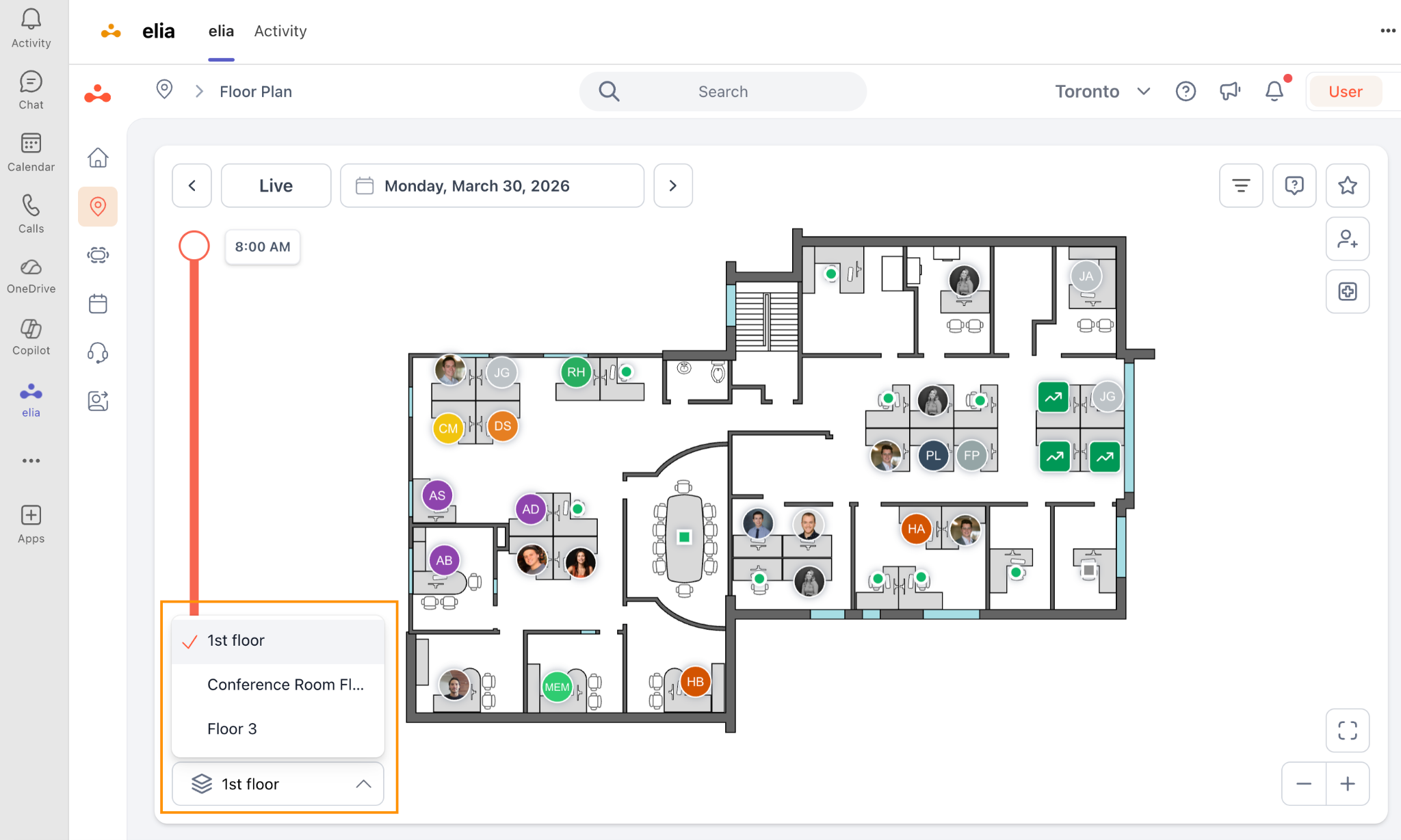
Choose the site and floor: Pick the office location, then the floor. If you work across multiple locations, that’s where you switch between them.
Filter for your must-haves: Use interactive filters for things like dual monitors or standing desks. The map updates instantly to highlight only the desks that fit your needs. You can also see where teammates have already booked and choose a desk nearby.
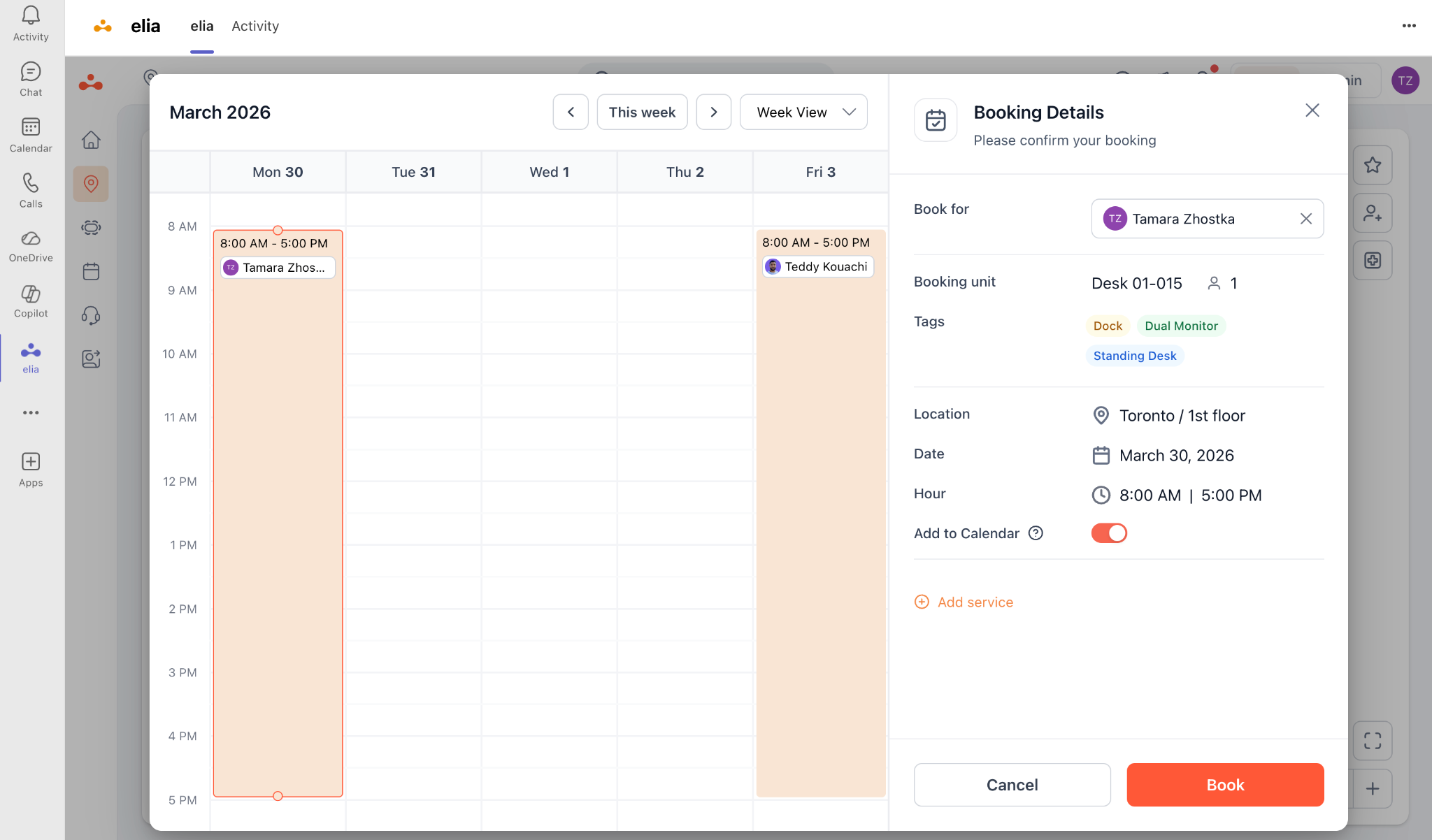
Select an available desk: Pick the time slot and confirm. That’s it 🙂
Let the system sync the rest: Once the desk is booked, the reservation syncs with Teams and Outlook automatically. If check-ins are enabled, the employee may get a reminder before arrival so the desk doesn’t turn into a ghost booking.
Which path is right for your office?
Choosing between these paths usually comes down to whether you want your office managed by code or by people. Put another way, do you want your IT team to be in total control of your office's layout, or do you want the people who use the space to have a say in it?
A classic Microsoft setup is often best for smaller offices with a handful of desks and an IT team that's got the bandwidth to deal with every little change.
Microsoft Places is the stronger Microsoft option if you want individual desk booking, better space discovery, desk-level reporting, and a more modern Teams experience. But it still comes with setup, licensing, data quality, and ongoing maintenance questions.
On the other hand, an integrated path is usually a better fit for bigger, more dynamic companies that want workplace teams, not just IT, to own the office experience. If you care about adoption, coordination, utilization, and making day-to-day changes faster, then the integrated model is often the way to go.
Feature
Classic Microsoft setup
Microsoft Places
Microsoft-integrated platform
Floor plan owner
IT/Exchange admins
IT/Places admins, with facilities input
Workplace/facilities, usually with IT governance
Setup & logic
Uses Exchange resource mailboxes, room lists, and workspaces
Adds workplace hierarchy, Places Finder, desk modes, maps, and licenses
Drag-and-drop interface for managers. Syncs with M365 data
Costs
Lower entry cost if you already use Microsoft 365
Paid tool with extra licensing ($8.55/mo per 4 desks) for advanced features
Additional subscription, but can offset cost of IT tickets and wasted real estate
Desk choice
Good for rooms and desk pools, weak for specific seats
Stronger desk-level choice, including individual desks and metadata
Usually more flexible, visual, and easier to adopt
Occupancy data
Depends heavily on booking behavior and manual check-ins
Better reporting, but still depends on configuration and clean data
Can combine booking data with stronger workflow and occupancy signals
Maintenance
You’re waiting on IT for every room name change or workspace update
IT or admins still need to maintain maps, desk data, and licensing
Workplace managers own the space and can pivot layouts in real time
Booking experience
Functional, but basic
More modern, but can still feel rigid at scale
Usually more visual, social, and employee-friendly
The bottom line
Microsoft can power desk booking in Teams, but the real question is who has to manage it once it’s live.
For simple setups, the classic Microsoft route may be enough. For more advanced desk booking, Microsoft Places is the stronger Microsoft path. But if your workplace team needs faster updates and a smoother Teams experience, an integrated platform like elia is usually the better option.
Your office, finally in sync
Help teams find the right space, right when they need it.
is a Content Marketing Specialist at elia. With 10+ years in content marketing, she writes about workplace trends and the tools that help teams work smarter. Part strategist, part storyteller, Tamara brings equal amounts of data, creativity, and a little Moon Prism Power to every piece she creates. 🌙✨
Share
Contents
Subscribe to our newsletter
Subscribe to the elia newsletter for exclusive product updates and industry best practices. You can unsubscribe at any time.
Thank you! You're subscribed.
Oops! Something went wrong while submitting the form.
Frequently Asked Questions
Answers to Your Common Queries
How does desk booking in Microsoft Teams work?
How do you enable desk booking in Microsoft Teams?
Do I need to create resource accounts for every desk?






.png)