Top SwipedOn Alternatives for Visitor Management in 2026
Tamara Zhostka
Content Marketing Specialist
–
Last updated on Jun 25, 2026
SwipedOn tends to come up early when teams start looking at visitor management software, and for a good reason: it's clean, simple, and lightyears better than a paper logbook.
But as an office grows, the comparison changes, and you start asking more practical questions. Can it handle the pressure? Can it manage contractor inductions without a lobby backup? Is it audit-ready for 2026? Does it scale across ten sites as easily as one?
This guide compares the best SwipedOn alternatives across the areas that matter most when visitor management becomes a real operational system:
visitor and contractor sign-in
employee presence and on-site visibility
compliance and recordkeeping
evacuations and emergency accountability
reporting, integrations, hardware, and rollout effort
pricing structure and multi-site fit
Here’s the shortlist for when you need a system that does the heavy lifting.
TL;DR: Best SwipedOn alternatives at a glance
Tool
Best for
Why it stands out
elia
Teams that want visitors, desks, and rooms in one system
Stronger as a full workplace platform, with visitor management, floor plans, occupancy analytics, and service workflows
Envoy
Large enterprises with high security needs
Deep visitor workflows, strong compliance features, and broad enterprise integrations
Greetly
Unstaffed lobbies and custom front-desk experiences
Highly flexible digital receptionist flows with strong branding and notification options
Eptura Visitor (formerly Proxyclick)
Multi-site global enterprises
Built for security, access control, and consistent visitor processes across many locations
Lobbytrack
High-traffic sites that need faster ID verification
Strong security operations layer, guard workflows, and quick ID-based sign-in
Sine
Contractor-heavy and safety-sensitive workplaces
Best suited for inductions, permits, compliance checks, and industrial site access
SwipedOn
Workplaces focused on dependable visitor sign-in
Simple, reliable visitor management with employee in/out tracking, contractor flows, and evacuation support
What is SwipedOn?
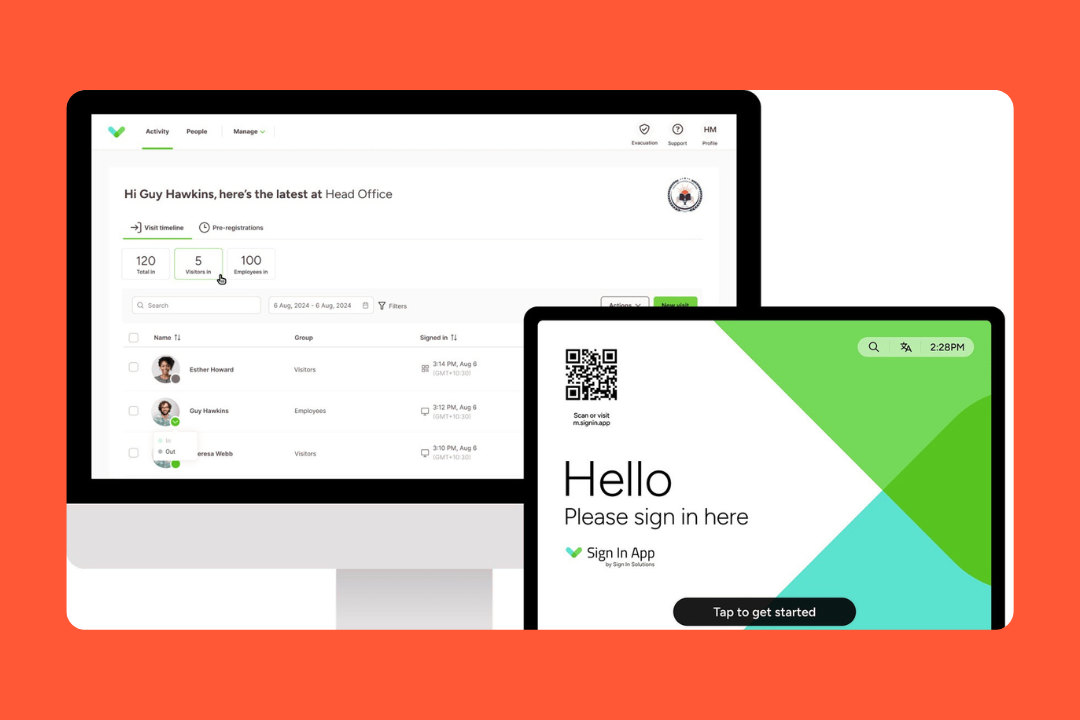
SwipedOn is a visitor management solution for workplaces that need a dependable way to track who’s coming in and who needs to know when someone arrives.
That sounds simple, but the product has stretched well beyond basic reception sign-in. Today, it covers visitor check-in, employee in and out, contractor workflows, deliveries, health and safety processes, and evacuation support. It also has resource-booking modules for desks and other shared assets, though that side of the platform feels more secondary.
Key features
Visitor management: You get visitor pre-registration, digital NDAs or waivers, custom sign-in flows, and instant notifications via email or Slack.
Contractor and visitor compliance: You can include health checks or safety questions they have to answer before they’re allowed on-site.
Employee in/out: Staff can sign in via the tablet, a desktop, or the Pocket mobile app.
Emergency support: If the fire alarm goes off, you have a live roll call on your phone. It even works offline, so you aren't stuck if the Wi-Fi cuts out during an evacuation.
Deliveries and add-ons: SwipedOn also offers delivery handling, SMS notifications, preboarding, and optional space-booking tools for desks and other resources.
Sustainability: For every new customer, they plant a tree. It’s a small touch, but companies looking to boost their ESG scores often like this.
Pricing
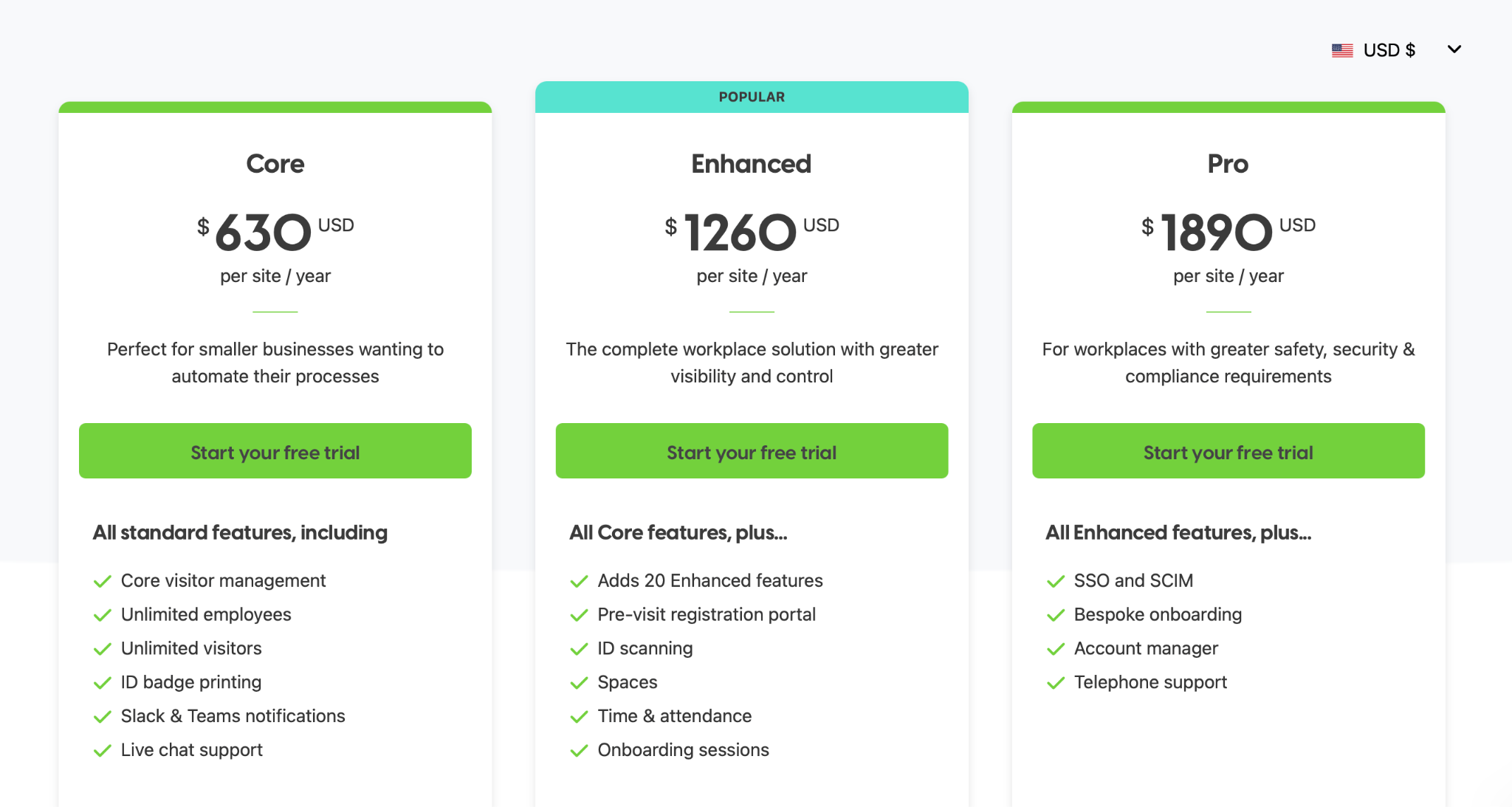
Just a heads-up: they recently merged with Sign In App, so the plans now reflect that combined subscription model. You’ll want to double-check which specific features live in which tier:
Core: $630 per site/year
Enhanced: $1,260 per site/year
Pro: $1,890 per site/year
Source: SwipedOn
What users like
Foolproof: You don't need a manual to use it. Visitors figure it out in seconds, which saves the person at the front desk a lot of headaches.
Solid support: People mention their support team a lot. They respond quickly and help you get things sorted.
Reliable records: It gives you a paper trail of every person who has entered the building without making the process feel like a chore.
Predictable pricing: Since it’s per location, you don’t have to worry about your bill spiking just because you hired ten new people.
Why companies look for SwipedOn alternatives
SwipedOn is a great reception tool, but teams usually start looking elsewhere when they need something more workplace-wide:
High-level data: It’s great for seeing who came in today, but if you want flexible analytics on how your space is being used over time, you might find it a bit thin.
Pricey scaling: Since they charge per location, it’s a steal for one big office. But if you have 30 tiny satellite offices, that per-site cost adds up fast.
Integration depth: They cover the essentials (Slack, Teams, Microsoft), but if you need to hook into complex building hardware or specific HRIS tools, you might hit some limits.
Contractor needs: While it handles contractors well, companies in heavy industry or highly regulated fields sometimes need even more hardcore compliance tools.
Light desk/room booking: If you need interactive 3D floor plans or booking rules for a hybrid team, SwipedOn might feel a bit basic compared to dedicated space management tools.
How we evaluated SwipedOn alternatives
We looked at these tools the way workplace teams compare them once visitor management becomes part of daily operations. That meant reviewing product pages, pricing pages, help-center documentation, integration docs, customer stories, and recent user reviews on G2 and Capterra together, rather than relying on any single source in isolation.
For each SwipedOn alternative, we focused on:
Visitor management: The whole process, including pre-registration, sign-in flows, host notifications, badge printing, approvals, custom fields, and how intuitive it is.
Employee and contractor workflows: Tracking who’s in the office versus remote, plus the heavy lifting for contractors like document capture and on-site verification.
Compliance and privacy: The backend tools that matter for regulated environments, including audit trails and data retention options.
Emergency readiness: How the platform handles evacuations, live roll calls, and whether you can still account for people if the Wi-Fi drops during an incident.
Reporting and visibility: Export options and timeline views. We wanted to see if the data gives you real operational oversight or if it’s just a basic visitor log.
Ease of rollout: What the setup looks like, hardware requirements, device management, admin controls, and if the tool is realistic for day-to-day use.
Pricing: Is the pricing public? We looked at how their model works and how fast costs spike if you add multiple locations or need more advanced features.
Integrations: How well it plays with your existing setup, checking connections for Microsoft, Slack, directory syncs, notifications, SSO, and SCIM.
Reviews: What users praise and what complaints keep recurring.
The idea was to evaluate these options exactly how you’d build a real shortlist: stacking up the features, breaking down the costs, and pulling in enough real-world feedback to separate a marketing pitch from a tool that gets the job done.
Best SwipedOn alternatives: comparison
Legend: ◐ = limited or add-on
Tool
Best for
Price
Visitor mgmt
Contractor compliance
Employee sign-in
Emergency / evac
Booking
elia
All-in-one workplace ops
Free / from $500/m
✅
◐
✅
✅
✅
Envoy
Enterprise security
Custom / modular
✅
✅
✅
✅
✅
Greetly
Digital reception
From $99/m
✅
◐
❌
◐
❌
Eptura Visitor
Multi-site enterprise ops
Custom
✅
✅
✅
✅
◐
Lobbytrack
Security-heavy sites
From free / $50/m / $100/m
✅
✅
✅
✅
✅
Sine
Contractor-heavy sites
Custom / quote-led
✅
✅
✅
✅
◐
SwipedOn
Simple front-desk sign-in
From $630/site/year
✅
✅
✅
✅
◐
1. elia: best for managing visitors, desks, and rooms from one platform
While SwipedOn is a visitor app that added desk booking later, elia was built from the ground up to run the entire hybrid office. It’s an all-in-one workplace platform that handles desks, meeting rooms, visitors, and service requests from a single interactive map. Plus, there’s a growing hardware layer.
If you’re tired of having one tool for the front desk, another for room booking, and a third just to manage visitors, elia pulls all of that into one place.
Key features
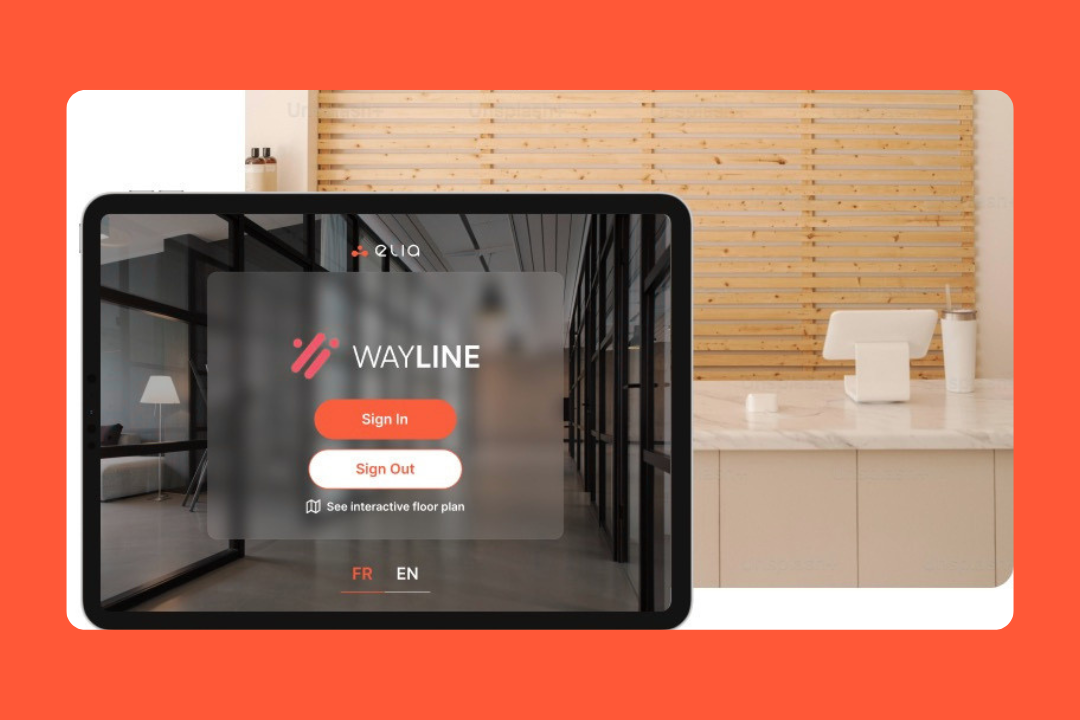
Visitor management: elia includes self-service check-in, host notifications, digital logs, custom visitor flows, and kiosk-based reception.
Workplace-wide booking: You get desks, meeting rooms, assigned spaces, hybrid planning, colleague visibility, and interactive floor plans.
Safety and automation: It supports incident reporting, first responder visibility, compliance tracking, and workflow automation across bookings and requests.
Request management on the map: Teams can submit and track IT, catering, maintenance, or workspace requests directly from the office map.
Occupancy analytics: With heatmaps and sensor integrations, it’s built for teams that want a harder look at how their space is being used.
Integrations and mobile access: It connects with Microsoft, Google Workspace, Slack, SSO, and more. It also has iOS and Android apps for bookings and floor plan navigation.
Pricing
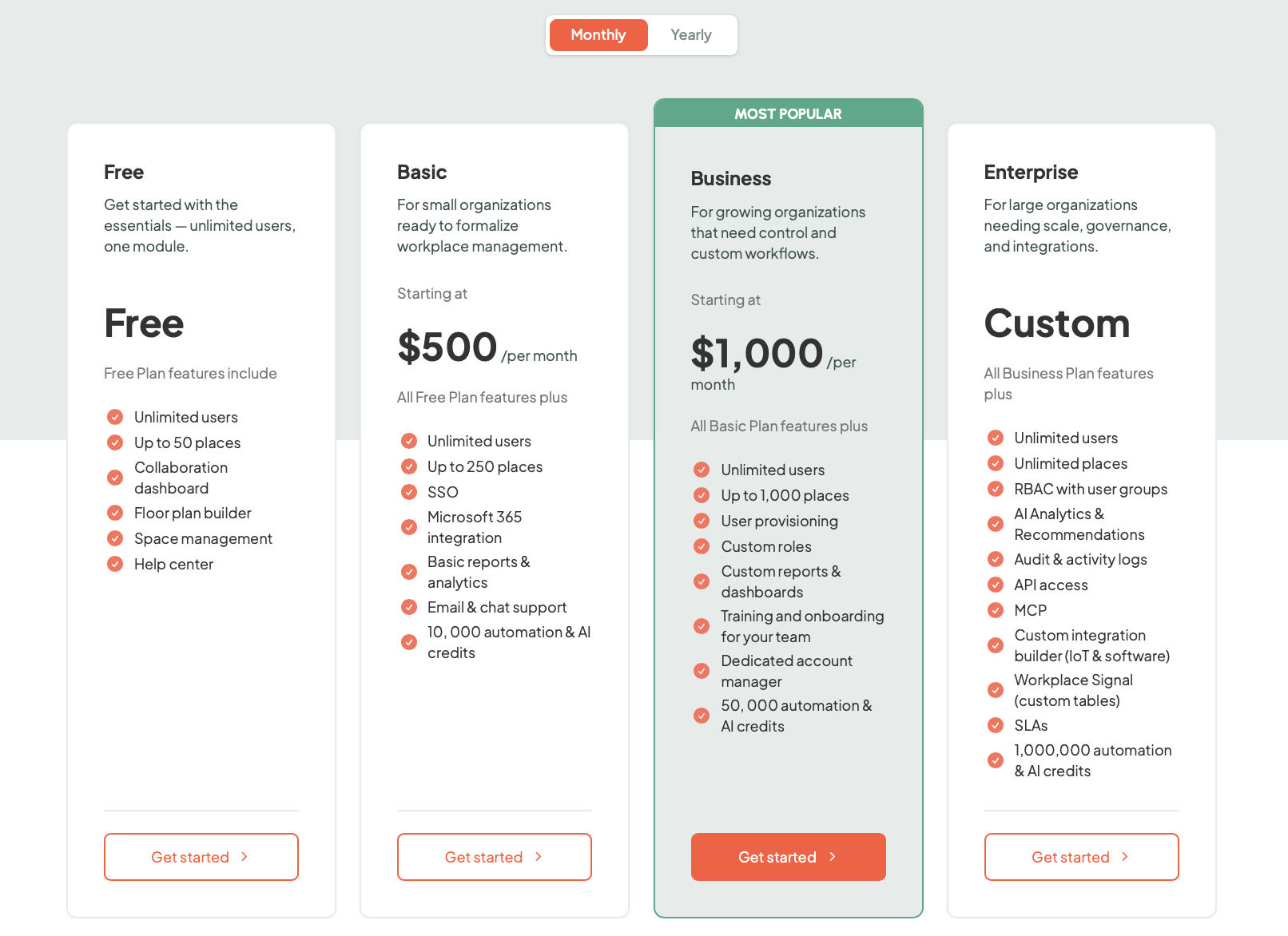
elia uses a flat monthly or yearly subscription priced by the number of places (desks, rooms, lockers), with unlimited users on every plan and hardware priced separately:
Free ($0): Up to 50 places
Basic (from $500/month): Up to 250 places
Business (from $1,000/month): Up to 1,000 places
Enterprise (custom): Unlimited places
Source: elia
What users like
Fast adoption: Teams seem to get comfortable with it quickly, even in larger rollouts.
Hardware ecosystem: Because elia offers its own displays, kiosks, sensors, and gateway, you don’t need to stitch together as much third-party hardware on your own.
Hybrid coordination: It helps employees decide whether it’s worth coming in by showing who else will be in the office.
Visual booking: There’s no dropdown menu to navigate; you just look at the floor plan and click where you want to sit.
Responsive support: Reviews mention the support team is quick to jump in and easy to work with when you have questions.
What to keep in mind
Platform depth: If you only want visitor sign-in or only want desk booking, elia may be more platform than you need.
Ecosystem value: The product gets stronger when sensors and kiosks are part of the rollout, but that also changes the budget and implementation shape.
Regional roots: While elia is expanding in the US, its strongest footprint today is still in Canada.
Feature
elia
SwipedOn
Platform
Workplace operations platform with visitors, booking, requests, and hardware
Visitor management platform with employee sign-in, contractor flows, and safety tools
Starting price
Free, or from $500/month
From $630/site/year
Pricing model
Plan-based
Per site
Visitor management
Yes
Yes
Contractor workflows
Present, but not the main story
Yes, more central to the product
Employee sign-in
Yes
Yes
Emergency
Yes
Yes
Desk and room booking
Stronger, more central
Available, but more secondary
Interactive floor plans
Yes
Not a visible core strength
Request management
Yes
Not a core feature
Health and safety workflows
Yes
Yes
Occupancy tracking
Stronger, with heatmaps and sensor integrations
More sign-in and check-in based
Analytics
Stronger workplace and occupancy view
More focused on visitor logs and operational records
Hardware
Native kiosks, displays, sensors, and gateway
iPad/tablet-based sign-in setup
Mobile app
Yes
Yes
2. Envoy: best for large enterprises that need high-end security
Envoy is the household name of the workplace world. They started as the standard for visitor sign-ins, but they’ve since expanded into a full-scale workplace platform. If you’re a large company with a complex tech stack and high security requirements, Envoy is one of the first names on the list.
It’s built for the enterprise, meaning it manages your desks, meeting rooms, and even mailroom deliveries.
Key features
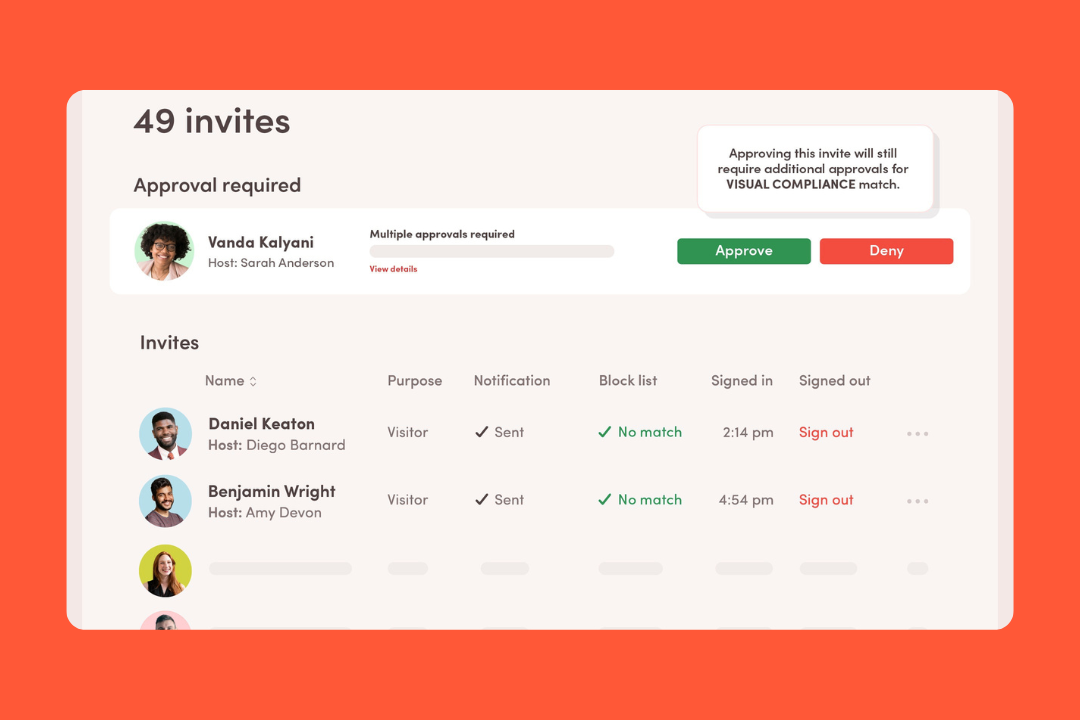
Visitor management: It supports pre-registration, custom sign-in flows, legal documents, assessments, and more.
Visitor security: You get ID scanning (using Veriff), blocklist screening, and custom legal documents for guests to sign.
Integrations: They have over 100 integrations, whether it’s automatically provisioning guest Wi-Fi or connecting to your building’s badge-access system.
Broader workplace tools: Desks, rooms, parking, deliveries, digital signage, ticketing, analytics, and announcements all sit inside the wider platform.
Emergency notifications and roll calls: Envoy has a dedicated emergency product with multi-channel alerts, two-way responses, and evacuation maps.
Virtual front desk: If you have an unstaffed reception area, you can set up a video intercom on the iPad kiosk.
Pricing
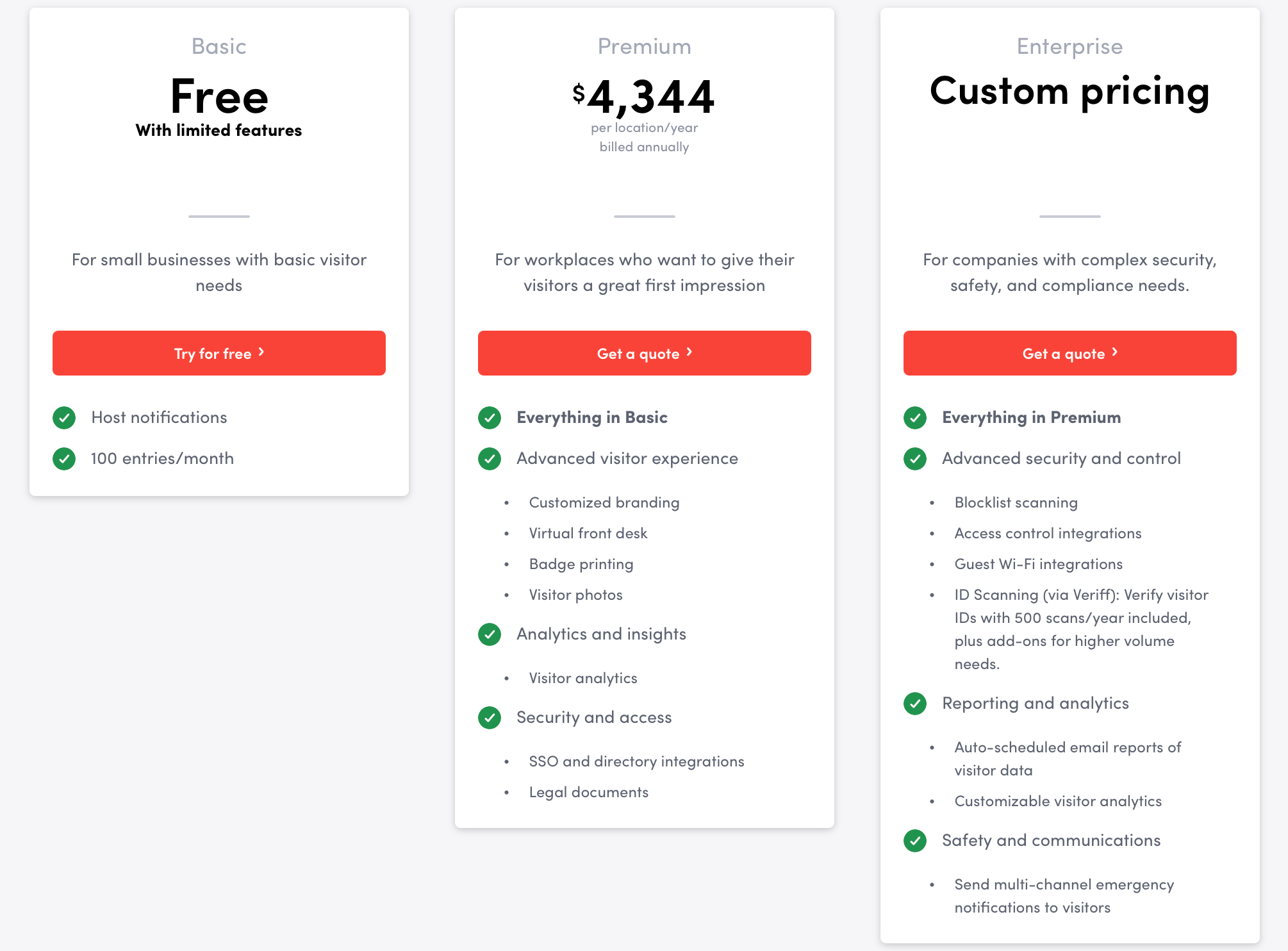
Envoy’s pricing is public, but not that simple. It’s modular, so you pay for exactly what you need, but those modules add up fast:
Visitors: free version on the Basic plan, then paid annual plans by location ($4,344 per location/year)
Emergency notifications: $24 per user/year
Reservations: $60 per bookable resource/year
Screens: $144 per device/year
Deliveries: $3,000 per delivery location/year
Source: Envoy
What users like
Visitor workflows: They handle custom flows, contractor compliance, and visitor categories better than many other platforms.
Easy day-to-day use: Even with all the enterprise depth, many users still describe it as quick to roll out.
Badge printing and host notifications: Those two features come up a lot, especially in settings where front-desk teams want less manual work.
Strong audit trails: If you need to dig through logs or timestamps for a compliance check or an emergency, the visitor data is easy to find and export.
Multi-location management: If you’re running five or fifty offices, you can oversee everything from one central dashboard.
What to keep in mind
Envoy tax: Because it’s so modular, the total cost climbs quickly.
Heavy feature gating: A lot of the coolest stuff (like advanced analytics and higher visitor limits) is locked behind the most expensive tiers.
Notification tuning: If you don’t spend time tuning the alerts, your team’s Slack or email can get cluttered with pings.
iPad-only for kiosks: If your company is an Android house, you're out of luck.
3. Greetly: best for unstaffed lobbies and highly custom front-desk flows
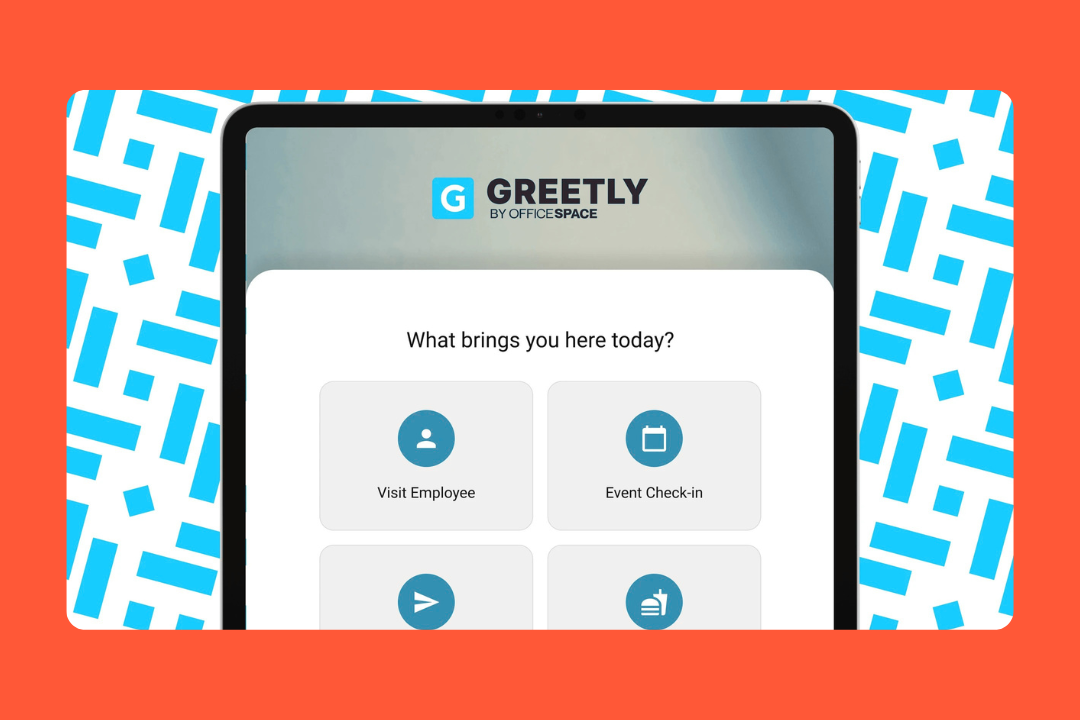
If your goal is to replace the need for a full-time person sitting at the front desk, Greetly is a great choice. It markets itself as a digital receptionist, and it’s built for offices and co-working spaces that want an automated entry without the overhead of a staffed lobby.
While Envoy has a specific look and feel, Greetly is like a chameleon. It’s designed to be customized so the kiosk looks and acts how your business operates.
Key features
Visitor workflows: You can build specific buttons and "if-this-then-that" logic for every type of person walking through your door.
Different check-in workflows: Visitors can pre-register before arrival and complete touchless check-in on their own device.
Badges and legal documents: Greetly supports visitor badge printing, digitally signed agreements, and audit-ready document storage.
Host notifications: Hosts can be notified through email, text, Slack, Microsoft Teams, Google Chat, or voice calls.
Digital mailroom: Greetly can also log deliveries, capture package photos, notify recipients, and keep a delivery audit trail from the same system.
Multilingual support: It’s excellent at handling diverse visitor bases with a toggleable language interface.
Pricing
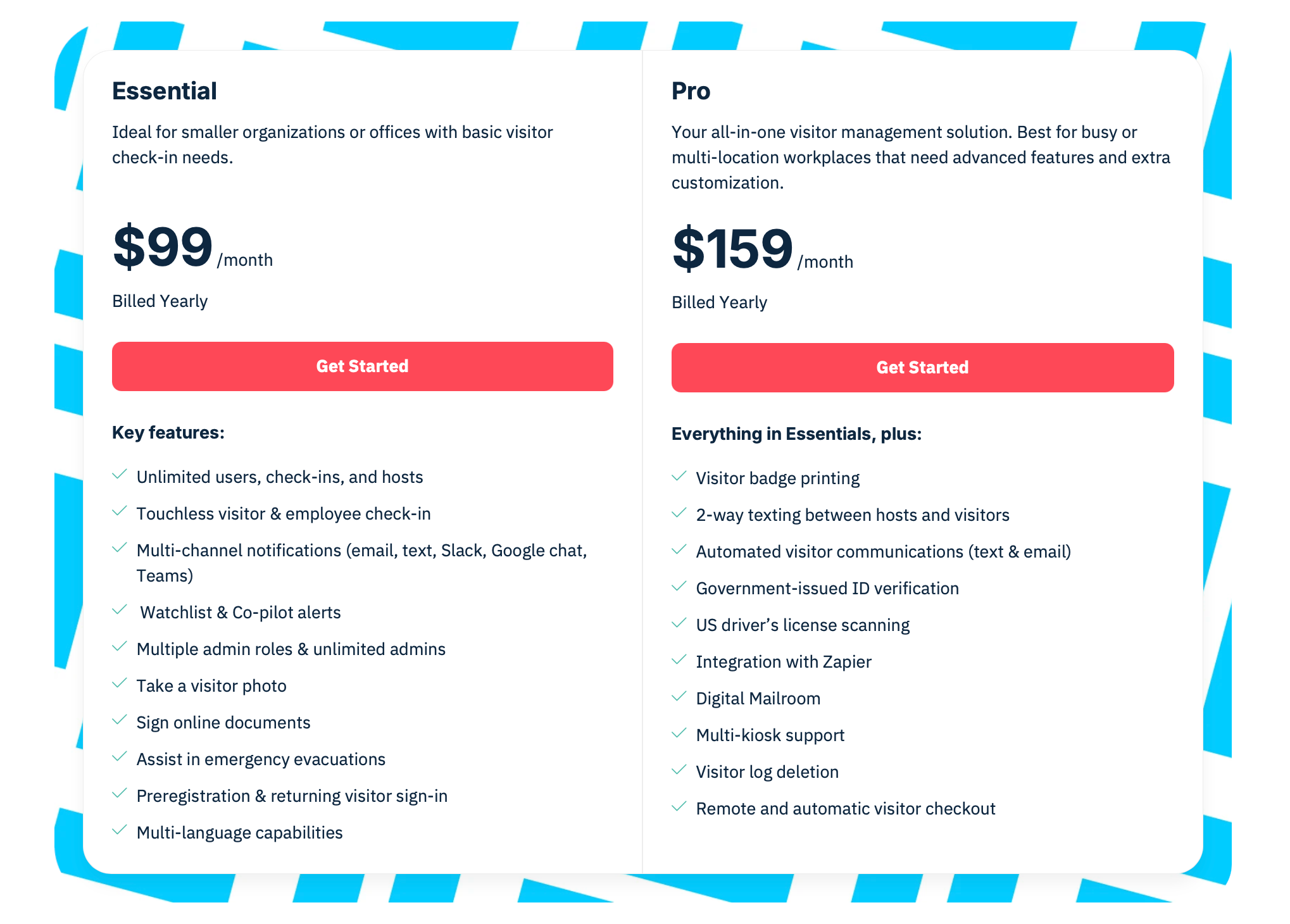
Instead of charging you more as you grow your team, Greetly uses a flat-rate model per location:
Essential: $99/month, billed yearly
Pro: $159/month, billed yearly
Source: Greetly
What users like
Money-saver: For small to mid-sized businesses, the biggest pro is that it often saves them from hiring a part-time or full-time receptionist.
Admin control: Admins love that they can change kiosk buttons and the branding on the fly without needing to call support.
Reliable notifications: Whether it’s via Slack, Teams, email, or text, users mention that the host ping is fast and rarely misses a beat.
Simplicity for the guest: Even with a lot of back-end logic, the interface for the visitor remains clean and smooth.
Multilingual check-in: Visitors can choose their preferred language at the kiosk or on their device.
What to keep in mind
Visitor-first tool: It has useful extras like digital mailroom and evacuation support, but it doesn’t look like a full workplace operations platform.
Hardware: Greetly relies on tablets and specific Brother badge printers, which adds rollout work and extra cost.
Pro features: Badge printing, digital mailroom, multi-kiosk support, and some admin capabilities aren’t all available in the lower tier.
Fine print for healthcare teams: Greetly says it’s not HIPAA compliant and shouldn’t be used to collect or store protected health information.
4. Eptura Visitor (formerly Proxyclick): best for multi-site enterprises
If you’re running a massive enterprise with offices in multiple countries, Proxyclick is likely already on your radar. In 2025, it officially became Eptura Visitor, part of a massive workplace ecosystem.
It’s a security-first people flow platform for the kind of companies that need to worry about strict global compliance, complex access control, and keeping a consistent workplace security posture across 40 different global sites.
Key features
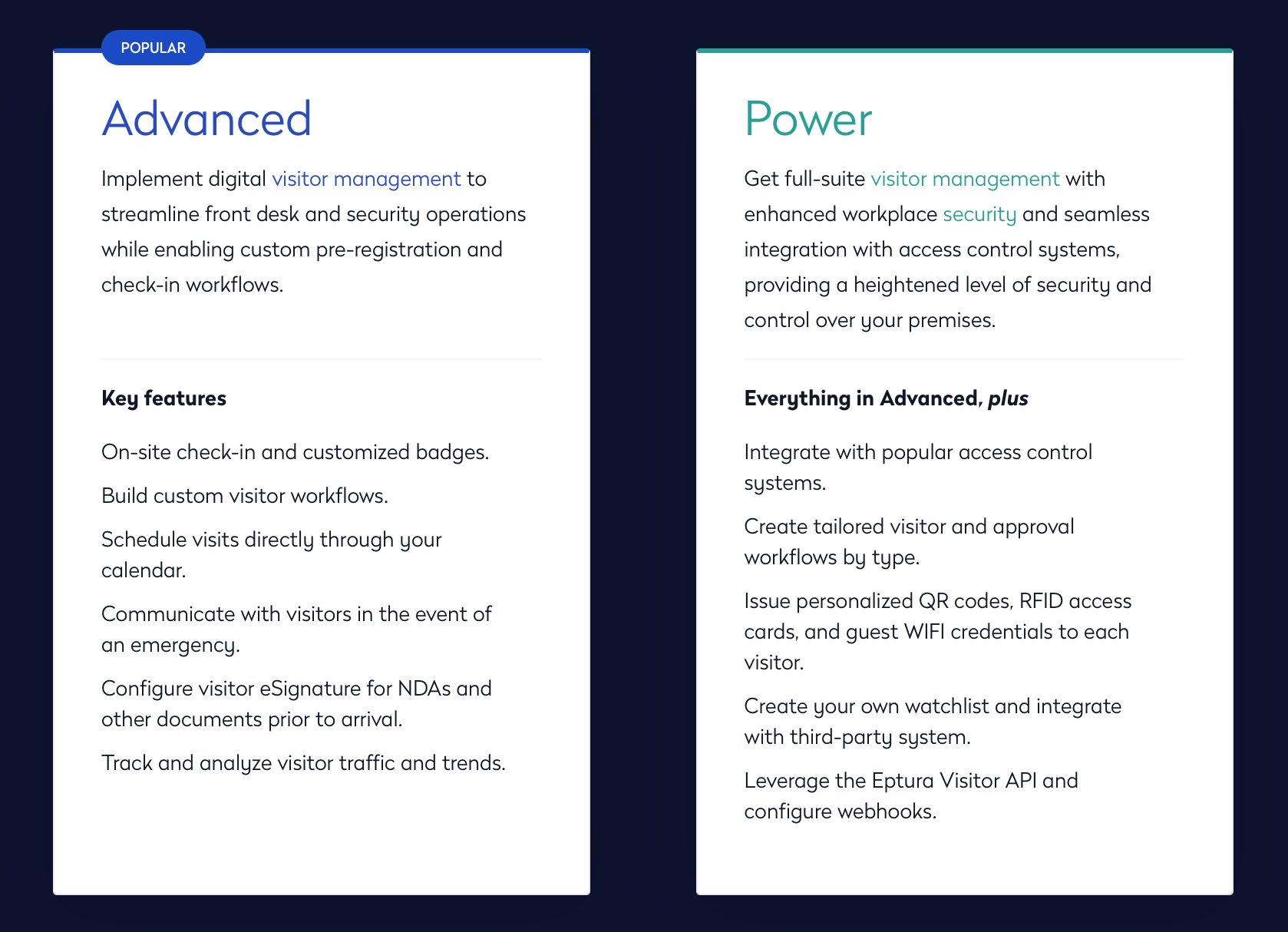
Visitor workflows: Eptura Visitor supports pre-registration, remote registration, custom visitor flows, group visits, recurring visits, and more.
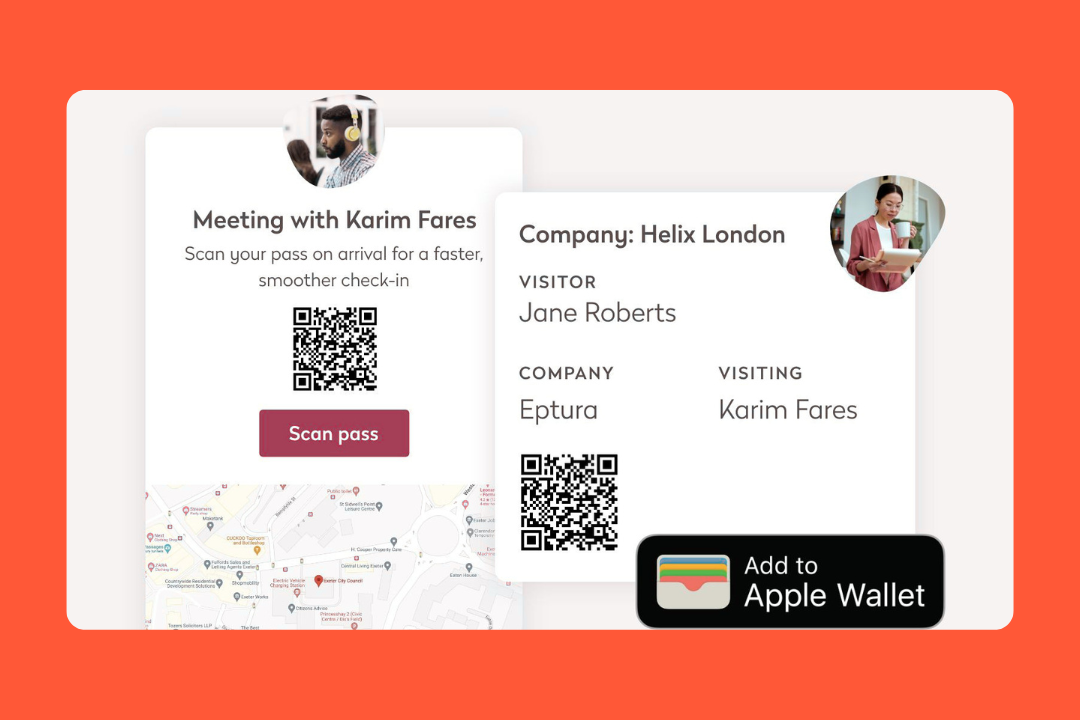
Access control and credentials: It can issue unique QR codes that let visitors through specific turnstiles or elevators automatically.
Multi-site and multi-building visibility: Locations can be grouped into buildings, with shared logbooks, emergency lists, exports, and real-time dashboards.
Employee and contractor tracking: It also includes an employee logbook with expected presence, check-in, check-out, and denied access states.
Reporting and analytics: The analytics module tracks visitor volume, seasonality, host activity, peak times, and pre-registration trends.
Eptura ecosystem: Because it’s part of Eptura, it connects into their broader tools for floor planning and asset management.
Pricing
Eptura Visitor doesn't really do off-the-shelf pricing. It’s an enterprise product, so you’re almost always looking at a custom quote based on your scale.
Source: Eptura
What users like
Easy admin: For such a heavy-duty tool, the backend is clean. Admins love that they can see all their sites from one view without getting lost in lots of menus.
Integration depth: It’s a pro at talking to other software, whether it’s your SSO, calendar tools, or high-end physical security hardware.
Strong branding: Teams like being able to make the experience feel like their own brand rather than the vendor’s.
Good support: Reviewers mention that the support team is fast and understands the needs of a large-scale rollout.
Useful for contractors and safety-heavy environments: Training capture, plant access, contractor handling, and security guard workflows are all practical strengths.
What to keep in mind
Overbuilt for small teams: If you only have one office and 20 employees, Eptura will feel like overkill.
Pricing transparency: Unlike simpler visitor tools, it doesn’t make early cost comparison easy.
Integration depth: There’s a lot here, but some reviewers still mention extra setup effort or integration limitations in practice.
Product transition: Because Proxyclick became Eptura Visitor, some buyers may run into packaging changes or capabilities that now cost extra.
5. Lobbytrack: best for high-traffic sites that need fast ID verification
Lobbytrack feels a lot like SwipedOn at first glance. It covers visitor sign-in, employee attendance, host notifications, and evacuation support. But it leans harder into security operations.
The big difference is the extra guard layer. Alongside the lobby and employee apps, Lobbytrack has a dedicated Guard App for watchlist alerts, incidents, emergency messaging, and evacuation management, which gives it a more security-focused feel than a lot of visitor tools that stop at the reception desk.
Key features
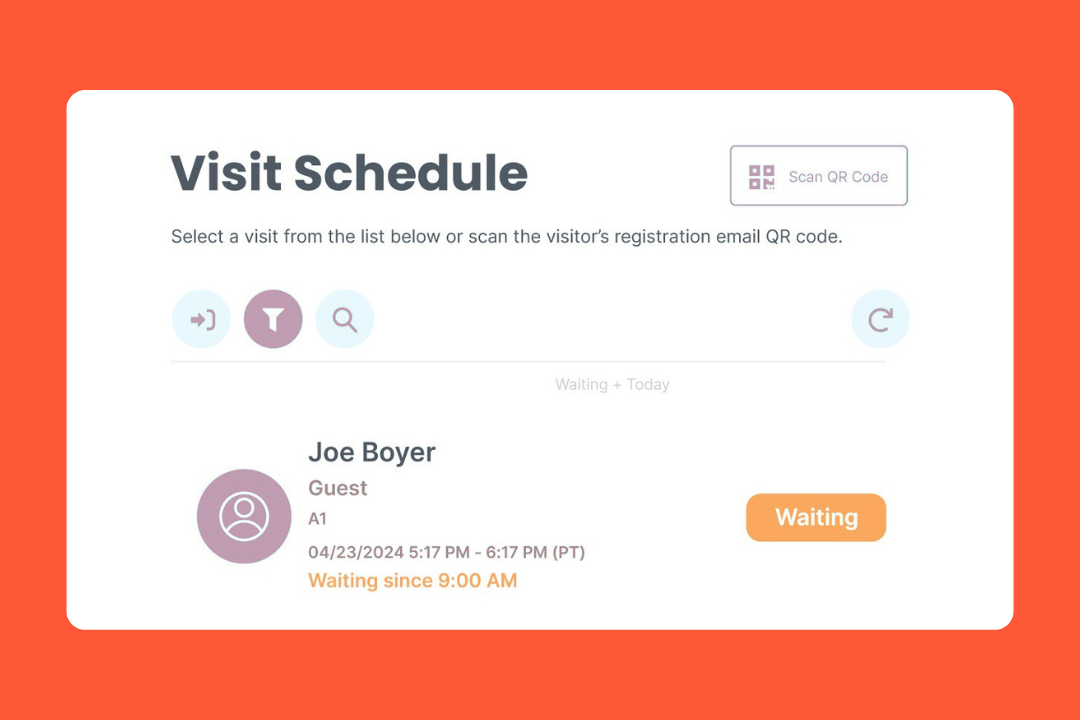
Visitor management: Lobbytrack supports pre-registration, walk-in sign-in, touchless QR check-in, multiple visitor types, reusable badges, group sign-in, and auto sign-out.
Security and guard workflows: Guards can get watchlist alerts, send emergency messages, manage evacuations, and review or close incidents from the Guard App.
Fast ID scanning: You can scan a driver's license or government ID to auto-populate the visitor's info in seconds, which is a massive time-saver for busy lobbies.
Employee and contractor sign-in: There’s employee attendance and contractor tracking in the same system, with payroll-ready exports via kiosk or the Employee App.
Emergency management: Lobbytrack gives you a real-time list of who’s in the building and lets security manage evacuations and drills more easily.
Shared space booking: It also offers meeting room, desk, parking, and shared-space booking with floor maps, though that part feels more like a useful extra.
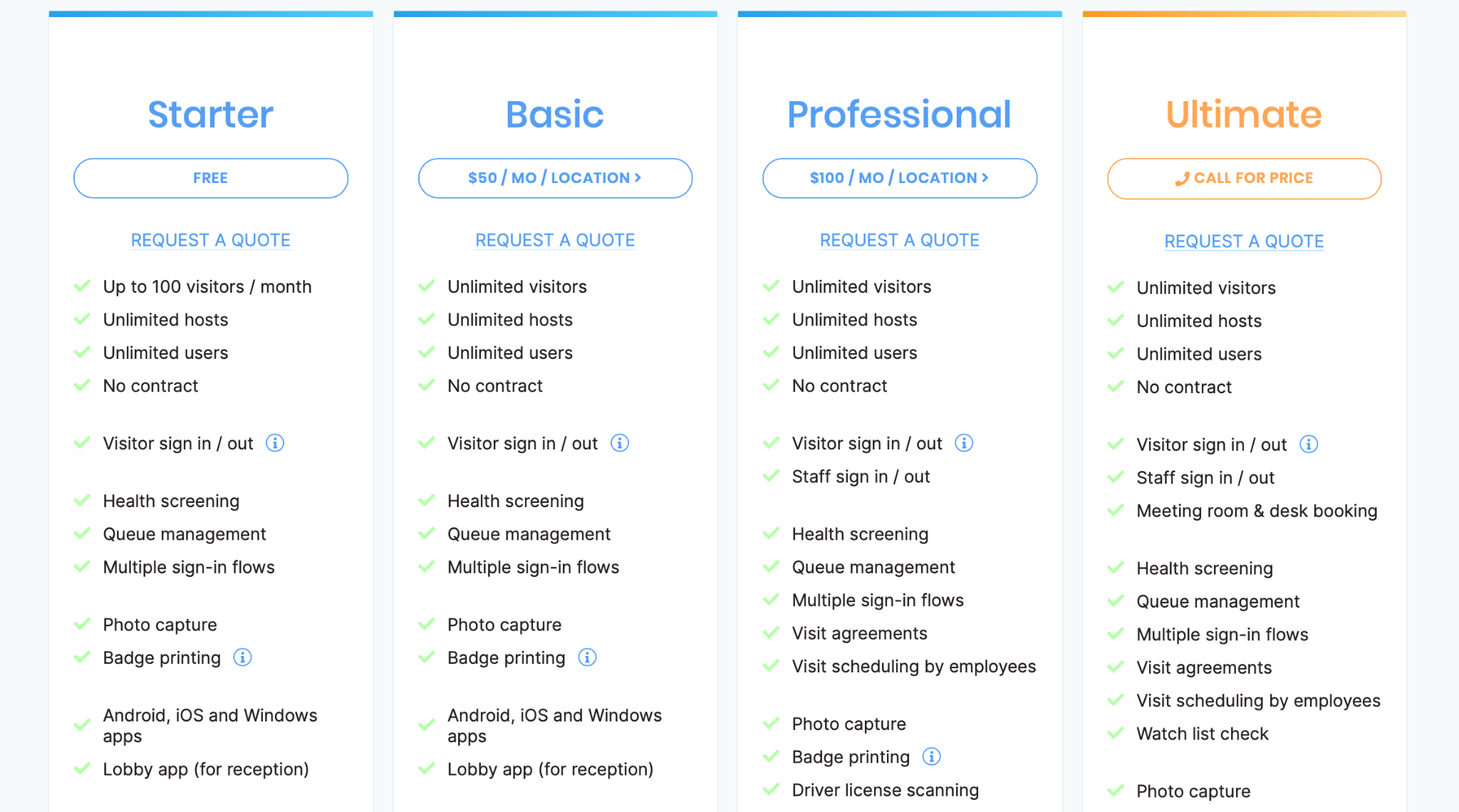
Pricing
Lobbytrack uses a tiered, per-location model. It’s one of the more affordable options for smaller offices that don't need the ultimate security features:
Starter: free (up to 100 visitors/month)
Basic: $50/month
Professional: $100/month
Ultimate: custom pricing
Source: Lobbytrack
What users like
Easy setup: Reviews say Lobbytrack is straightforward to implement.
Helpful support: Support gets called out a lot when teams need help working through setup or fixing small issues.
Guard App value: Security teams can actively monitor visitors, employees, incidents, and evacuation status instead of being left out of the loop.
Employee App: Teams like being able to schedule visitors ahead of time and reduce bottlenecks at reception.
Fast visitor flow: People mention that the UI is simple enough for non-techy visitors to handle without help.
What to keep in mind
Printer friction: Badge and label printer issues sometimes come up in reviews.
Integration gaps: It covers the basics well, but a few users still mention sync limits or missing integrations with their current systems.
Built-in limits: Some teams hit ceilings around visitor caps or workflow flexibility unless they move up plans or work around the defaults.
Setup planning: Because it’s so customizable (badges, watchlist rules, hardware triggers), it’s not a five-minute setup.
6. Sine: best for contractor-heavy sites and workplace safety compliance
Sine by Honeywell is the heavy-duty specialist for workplaces that prioritize safety and compliance over lobby aesthetics. It’s a favorite in industries like manufacturing, construction, and pharma, where signing in involves verifying insurance and site inductions.
Instead of a manual check at the front desk, Sine automates these workflows, acting as a digital gatekeeper that only grants access once a contractor or visitor has cleared every hurdle.
Key features
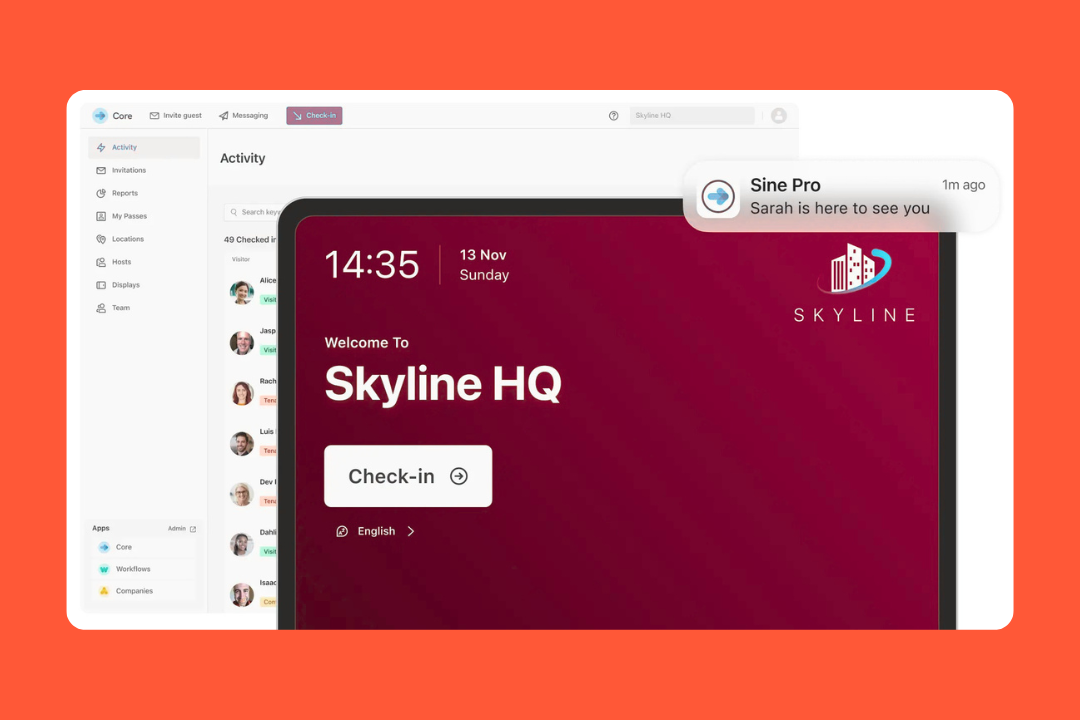
Visitor management: Sine covers the usual visitor stuff well: iPad kiosk check-in, FastTrack QR invitations, host notifications, badge printing, and photo capture.
Contractor compliance: It can handle pre-arrival inductions, licenses, permits, document uploads, expiry tracking, and approval flows.
Mobile and geofenced check-in: The Sine Pro mobile app supports check-in and check-out, auto check-in through geofencing and QR poster scanning.
Supplier and vendor compliance: With Sine Companies, you can keep a live record of approved suppliers and monitor expiry dates.
Security and access control: It includes host approvals, watchlists, Face Check, ID Check, and access control integrations.
Emergency readiness: Roll calls, live activity tracking, and on-site visibility are built in, which matters on busier or more safety-sensitive sites.
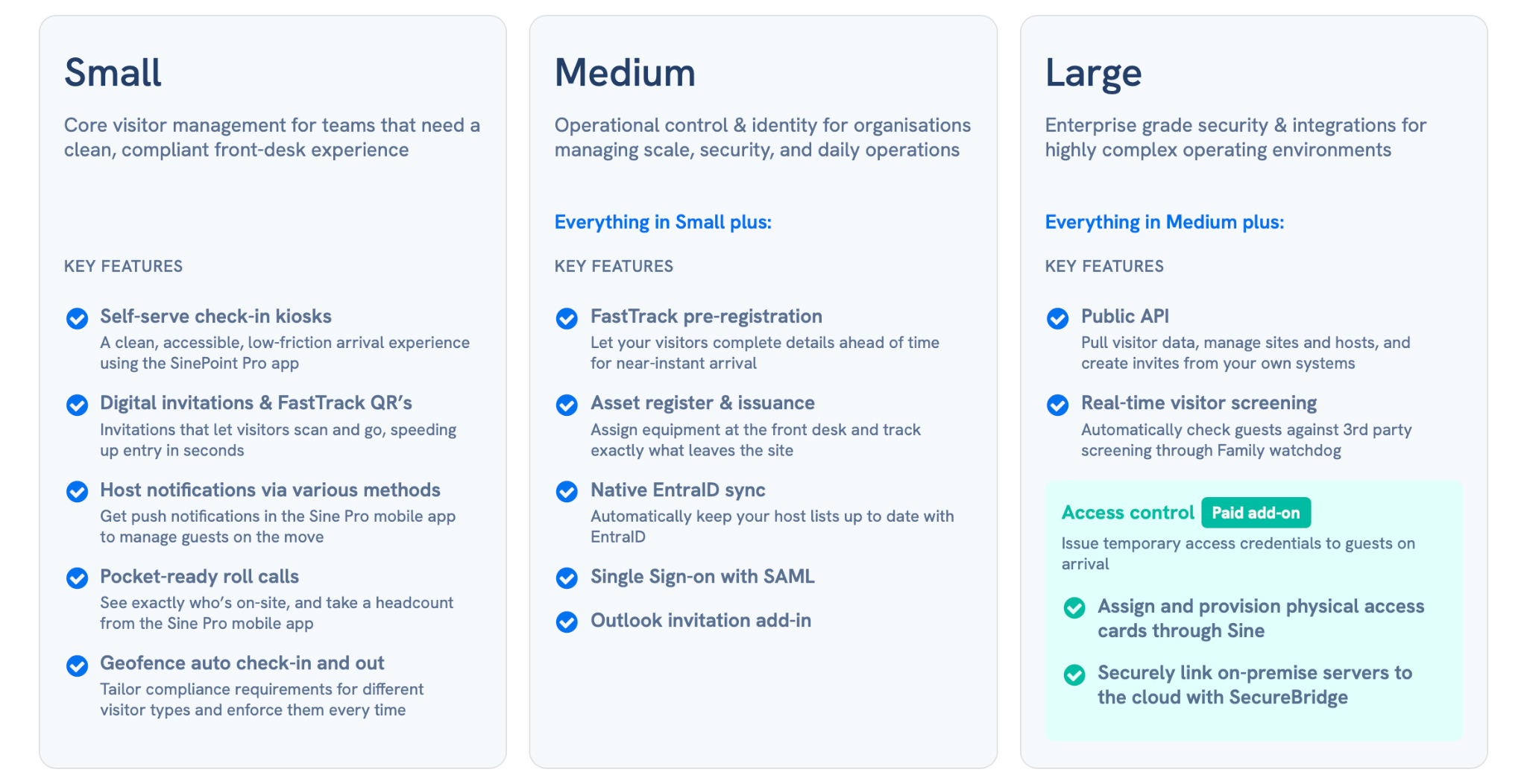
Pricing
Sine uses a volume-based model. Instead of paying per location, you pay for the number of check-ins you use across your sites. While its plan structure is public, the pricing itself isn’t easy to pin down.
Source: Sine
What users like
Fast setup: Several reviewers say Sine is quick to get live.
Stable day to day: Once it’s running, people describe it as reliable and consistent.
Automated compliance: For safety officers, this moves the burden of checking permits and insurance from the front desk to the software.
Mobile check-in: The app-based and geofenced options are a real plus for staff and repeat visitors.
Global support: Being part of Honeywell, it supports a wide range of languages and meets international data privacy standards.
What to keep in mind
iPad dependence: The kiosk experience still revolves around iPads, and that comes up in reviews too.
Pricing transparency: You can see the tier logic, but not clean public numbers.
Manual app restarts: Some users have noted that the kiosk app requires a manual restart after updates or during long periods of heavy use.
Learning curve for workflows: Setting up the deep contractor induction flows requires a fair amount of initial logic planning to get right.
How to choose the right SwipedOn alternative
When comparing the alternatives, the shortlist usually comes down to a handful of practical questions.
Start with the real job you need the software to do
Some teams only need a way to sign people in and notify hosts when guests arrive. Others need a lot more than that. The gap between tools gets much clearer when visitor management becomes tied to security, compliance, contractor access, or multiple locations.
Pay close attention to areas like:
visitor and contractor check-in flows
employee in/out and on-site visibility
emergency roll calls and evacuation tools
document capture and compliance checks
support for multiple sites or reception points
Look at how the product deals with compliance in real life
Some tools are great at replacing a paper sign-in book, but start to feel light once you need inductions, licenses, permits, NDAs, approval rules, or audit trails. That matters even more in industries like manufacturing, logistics, education, healthcare, construction, and government.
When comparing tools, it helps to ask:
can you collect documents before arrival
can the system block entry when requirements are not met
can hosts or admins approve or reject people before check-in
can you track expiry dates and keep usable records afterward
Compare pricing with your rollout in mind
Visitor software pricing can look straightforward until you add more sites or security features.
Some vendors charge per site. Others package features by tier. Others keep pricing vague until you talk to sales. A tool that looks affordable for one reception desk can get a lot more expensive once you need badges, compliance workflows, emergency messaging, or extra locations.
It’s worth checking:
what the first usable plan includes
which features sit behind upgrades or add-ons
how pricing changes when you add more offices or kiosks
Test the workflows
The biggest mistake is testing only the demo path.
Almost every product can look smooth when someone walks you through the polished version. What matters more is how it behaves when your team is busy, a contractor shows up missing paperwork, a visitor needs approval, or reception has to move quickly.
During trials or demos, try things like:
pre-registering a guest
checking in a walk-in visitor
printing a badge
sending a host alert
completing a contractor induction
running an evacuation or roll call
using the mobile app instead of the kiosk
Make sure it fits the systems you already use
Visitor management rarely lives on its own. At a minimum, most teams want notifications and calendar links to work properly. More advanced environments may also need access control, SSO, HR sync, contractor systems, or workflow automation.
The exact list depends on your setup, but common ones include:
Microsoft 365 and Outlook
Google Workspace
Slack or Microsoft Teams
SSO and directory sync
access control systems
APIs or webhooks for custom processes
In the end, the right SwipedOn alternative is the one that solves the problem you have, not the one with the longest feature page.
Final verdict
SwipedOn still makes a lot of sense for teams that want a reliable, easy-to-run sign-in system. It covers the essentials well and doesn’t make the front desk harder than it needs to be.
But once visitor management starts overlapping with strict compliance, multi-site operations, access control, or broader workplace workflows, the differences between tools get much bigger.
Some alternatives are better if you want a more customizable visitor experience. Others are a stronger fit for security-heavy environments, industrial sites, or larger organizations with more moving parts.
And if your team wants visitor management tied into desks, rooms, and day-to-day workplace operations, a broader platform like elia is worth a closer look.
Tamara Zhostka
is a Content Marketing Specialist at elia. With 10+ years in content marketing, she writes about workplace trends and the tools that help teams work smarter. Part strategist, part storyteller, Tamara brings equal amounts of data, creativity, and a little Moon Prism Power to every piece she creates. 🌙✨
Share
Contents
Subscribe to our newsletter
Subscribe to the elia newsletter for exclusive product updates and industry best practices. You can unsubscribe at any time.
Thank you! You're subscribed.
Oops! Something went wrong while submitting the form.
Frequently Asked Questions
Answers to Your Common Queries
What are the essential features of a modern visitor system?
How does the check-in process work for regular visitors?
Can I create custom workflows for different types of guests?
Do I get more control over site security and compliance?


.png)

%20(1).png)