Visitor Badge System: How It Works & What to Look For
Tamara Zhostka
Content Marketing Specialist
–
Last updated on Jul 28, 2026
It's 9 AM. Four people hit reception at once: a contractor, two interview candidates, and a courier. Your receptionist is printing badges by hand and calling hosts one at a time. Two of those guests have already drifted toward the elevators with nothing clipped to their shirt.
That scene plays out way too many times. The badges printed just fine, but the trouble was everything else around them: no record of who those two guests were, and no one sure where they'd gone.
That's the job of a visitor badge system, and the badge itself is the smallest part of it. Any printer makes a badge. What you're paying for is the system behind it: how the visitor gets identified, what the badge lets them into, and whether there's a usable record when someone asks three months later.
So before you go and buy one, here's:
how these systems work
what kind of badges you can issue
and what separates a real system from a fancy sticker machine
What a visitor badge system is
A visitor badge system is a combo of software and hardware that registers a visitor, checks who they are, and issues a credential tied to that record. The credential is usually a printed badge or a digital pass.
The badge is one bit of the system, but the rest of it is doing all the work you care about: keeping a record of the visit, alerting the host, and controlling where the visitor can go. When you’re comparing options, make sure to focus on what each system does with the visit.
The visitor checks in. This registration happens on a self-service kiosk, a reception tablet, or through a QR code they scan when they arrive. Some systems let visitors sign in in advance, so their visitor info is already in the system before they walk in, which cuts the line at the front desk.
The system collects visitor details. It grabs the name, company name, who they're visiting, and why they’re there. Higher-security setups add a photo capture and an ID scan to verify who someone is. Some can screen a visitor against watch lists before letting them in.
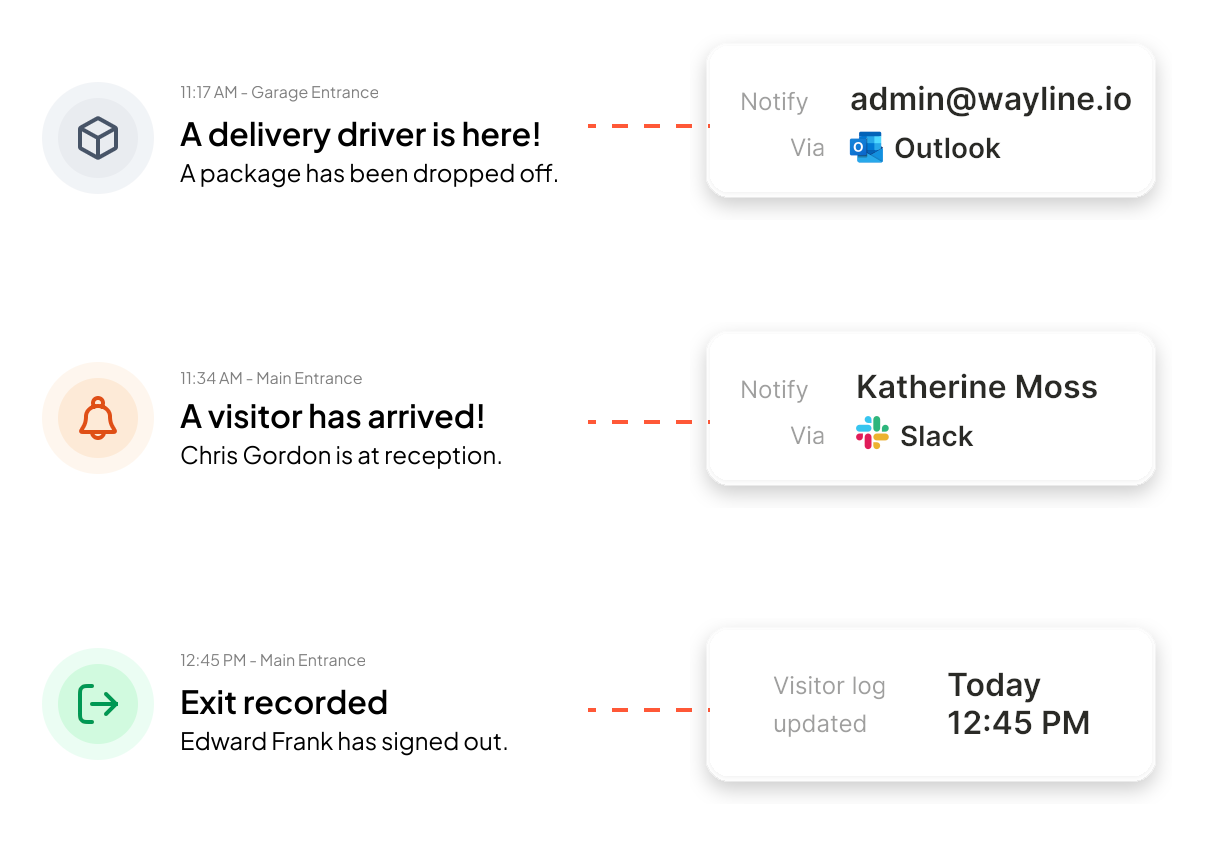
The host gets notified. As soon as sign in is over, the host they're meeting gets an email or message on Slack or Microsoft Teams. No one has to wander around the office looking for the right person.
The badge is issued. The system prints the visitor badge out instantly at the kiosk, or the visitor gets a digital pass on their phone. Either way, they're moving in seconds.
The record is stored. Every guest's visit lands in a digital log you can pull up in a few clicks, which keeps audits quick. It also gives security personnel a useful resource in an emergency when you need to know exactly who's on the premises.
Check-out and expiry. The badge gets logged out when the visitor leaves, or it expires on its own. Some badge stock changes color overnight, so a badge is visibly no longer valid the next day.
What goes on a visitor badge
At the very least you need to show the word VISITOR big enough to read from across a room, plus the visitor's name, their company name, the host they're seeing, and an expiry time. Add a photo if your policy needs visual ID, and a QR code for check-out or door access. The AI logo is optional.
Most systems let you customize this. You can color-code badges by visitor type, so a contractor's badge looks different from an interview candidate's. You can show different fields or messages depending on who's checking in.
Design the badge so that staff and security personnel can quickly identify visitors at a glance. A photo and the host's name do way more for easy identification than a logo does. If a staff member can look at a badge and know this person is with the facilities contractor on floor 3, the badge is doing its job.
What a badge should show by visitor type
Different visitors need different badges. A few common cases:
Contractors and maintenance. Show the company they work for, the areas they're cleared for, and an end time. Many sites also flag whether the person needs an escort.
Vendors and deliveries. A fast, simple badge, usually for the lobby or loading dock only, with no access past the entry point.
Auditors and inspectors. Name, organization, and the host or department they’re sponsored by. These visits often need a clean record kept for later.
Interview candidates. A simple badge that doesn't give away why they're on site.
Escort-required is worth its own special mention. In regulated and manufacturing sites, some visitors can't roam the building on their own. A badge that visibly says "escort required" tells any staff member this person should have someone with them, which is far easier to enforce than a line in a policy document.
Types of visitor badges
Not every workplace needs the same badge. The main options:
Printed adhesive (sticker). The most common type. Cheap, single-use, printed on a thermal printer. Fine for most offices.
Printed badge in a holder. Non-adhesive stock in a plastic sleeve or clip for lanyard wear. The holder is reusable, but the badge insert you print gets binned after use.
Expiring badges. Special stock that changes color after a set time, usually overnight, so the badge visibly voids itself and can't be reused. Worth it for sites that really need extra security. Just be aware this is a property of the badge material, not the software, so you need to confirm your printer and stock support it.
Digital/mobile passes. A QR or NFC passes on the visitor's phone. No visitor badge printing, no paper. Ideal for high-volume or contactless setups.
RFID or NFC cards. A physical card, similar to employee ID cards, that doubles as a temporary access credential and gets returned at the end. Used when a visitor needs to open doors during their visit.
What to look for in a visitor badge system
When I'm checking out a badge system, I tend to ignore the feature list at first. Almost every vendor prints badges, notifies hosts, and logs the visit. It's the way those pieces hold up in real world use that tells you where a system really stands. Here's what I'd check:
It ties the badge to a check-in record. That record is what your security reviews and audits run on, so it's the important part.
Host notifications are automatic. The host should know their guest arrived without anyone having to call the desk. Check which channels are supported (email, Slack, Teams, Outlook, etc.).
It connects to your access control system. A badge that looks official wouldn't stop someone sneaking into a server room. Systems that integrate with access control can issue temporary credentials that restrict a visitor to specific areas, and give security personnel visibility into who's where.
Badges expire or are single-use. A badge that still works tomorrow works for whoever picks it up out of the bin. Expiring stock or single-use printing sorts that out.
Photo capture and ID checks are available. You might not need them for every visitor, but being able to do them for contractors, deliveries or restricted areas is a useful option.
Workflows adapt to visitor type. A delivery driver, a job candidate, and a maintenance contractor shouldn't be treated the same way. So a good system lets you build a different path for each, including an ‘escort required’ flag for restricted sites.
It handles compliance. Digital logs, automatic data retention rules, and exportable audit reports are all part of the picture here. More on this below.
It integrates with your existing tools. Microsoft 365, Google Workspace, Slack, Teams, your calendar. If host notifications and visitor invites live in the tools you’re already using, adoption takes care of itself.
Printing is fast, and the hardware fits your space. Instant printing is normal in a good system. Slow printing is just frustrating. Most systems run on direct thermal printers from Brother, Zebra, DYMO, or Epson. Basic single-color models cost $100 to $800; color card printers run higher.
It's cloud-based and scales. No on-site server to worry about, and it should work the same across 1 office or 10. If you have multiple locations, you want one view across all of them from your single setup.
Badges, compliance, and visitor data
Every badge you print leaves a data trail, and that's useful for security, but it's also a responsibility under privacy rules like GDPR.
The principles are pretty simple: collect only what you need, tell visitors why you're collecting it, keep it only as long as it's useful, and then get rid of it. GDPR is the one most people mention, but the same rule runs through the laws your buyers answer to.
Canada's federal PIPEDA and Quebec's Law 25 both require you to keep personal information only as long as necessary and to destroy or anonymize it after. US privacy law is a patchwork of state rules like California's CCPA, with the same core idea. None of them sets a single fixed retention period. In practice, most organizations keep visitor records for 30 to 90 days, then bin them.
This is where digital beats paper on every count. A cloud-based log is encrypted and can delete records automatically on a schedule. A paper logbook can't do any of that. It sits on the front desk where anyone can read it, and enforcing a retention policy means someone has to remember to shred it.
If a badge system can't auto-delete records on a schedule, treat that as a compliance liability.
How much system do you need?
Where you end up depends on your site, so here's how I'd categorize it, roughly, in 3 tiers:
Basic: sign-in and a printed badge. Smaller offices with less than 25 employees and a handful of visitors per week can keep things simple. Visiting guests sign in, get a badge, and the right people get a heads up. A clean check-in matters more here than a long feature list, and paper can honestly still work if reception is staffed all day.
Integrated: badges tied to identity and access. Multiple locations, regular contractors, or areas that need access control. The badge becomes more than just a name tag, it ties in with records and temporary access permissions, and visitor flows change depending on what sort of visitor it is.
Proactive: compliance and risk built in. Industries with tight rules, regular audits, or super secure sites. These are places where visitor systems need to be able to keep track of everything that's going on. This means automated data storage, escort requirements, ID checks, watch lists and reports that are ready for the auditors at a moment's notice.
Setup time scales the same way. A single-site, self-service system can go live the same day. Guided onboarding with integrations takes 1 to 4 weeks. Enterprise rollouts across multiple sites, especially ones wired into access control, run 3 to 6 months.
The tipping point for most offices is somewhere around 40-50 visitors a week, or the first real compliance requirement, whichever comes first. Below that, you can probably keep things simple. Above it, the log and the access rules stop being extras.
Most of these run the core flow well. Where they split is who they're built for: a polished lobby, a factory floor, or a school checking IDs at the door:
elia. Visitor management inside a wider workplace platform, so badges sit alongside desk booking, room booking, and other office operations rather than in a standalone app.
Envoy for the corporate lobby. Custom badge fields, photo capture, and access-control integration, aimed at larger offices with real security requirements.
Sine (by Honeywell) for the factory floor. Built around site access and safety, so it fits manufacturing and contractor-heavy sites more than a reception desk.
LobbyGuard for schools and government. Heavy on ID scanning and watch-list screening at check-in, which is why it lands in higher-security public buildings.
Kisi when the door is the point. It leads with access control, so the badge and the credential that opens the door come from the same place.
Greetly and VisitUs for a small-to-mid office. Reception-first tools that do a clean sign-in, print, notify, log without much setup.
If you're looking for systems to demo, pick 2-3 that fit your needs and then have a real person come in and try them out. That's often a much better way to figure out what works than just looking at a spec sheet.
Where elia fits, and where to start
Whatever system you're looking at, the same test applies: can a badge hook into a record, notification and access controls that still work their magic on a mad morning?
That's what elia's all about. Visitors check in at a kiosk or tablet, or register ahead of time by scanning a QR code. The host is pinged with an email or a notification on Slack or Teams the moment they sign in, and every single visit winds up in a log that's ready to be exported whenever someone comes knocking. Because it's part of a bigger workplace platform, the badge sits comfy next to desk and room booking instead of off on its own in a separate app.
is a Content Marketing Specialist at elia. With 10+ years in content marketing, she writes about workplace trends and the tools that help teams work smarter. Part strategist, part storyteller, Tamara brings equal amounts of data, creativity, and a little Moon Prism Power to every piece she creates. 🌙✨
Share
Contents
Subscribe to our newsletter
Subscribe to the elia newsletter for exclusive product updates and industry best practices. You can unsubscribe at any time.
Thank you! You're subscribed.
Oops! Something went wrong while submitting the form.





.svg)
%20(1).png)