Best Space Management Software in 2026 (Time to Reduce Real Estate Costs!)
Tamara Zhostka
Content Marketing Specialist
–
Last updated on Oct 01, 2026
There’s a loooooot of RTO going on right now.
And honestly, that’s fair. Everyone wants their employees back on site, collabing and actually using the office again. But from what we’ve seen, not many facility managers and workplace teams really stop to think about the cost of all that.
Luckily, there are tools for that. Space management still feels like a pretty underexplored area, but it can make a big difference if you start paying attention to it.
We’ve handpicked the best space management software in 2026, with each tool selected for what it does best, so you can compare your options without getting lost and find the right fit.
And of course, if you don’t want to read the whole thing, you can jump to the table below.
Clients you might know: Québecor, Cascades, Fasken
Headquartered in: Québec, Canada (handy for those with an interest in the region)
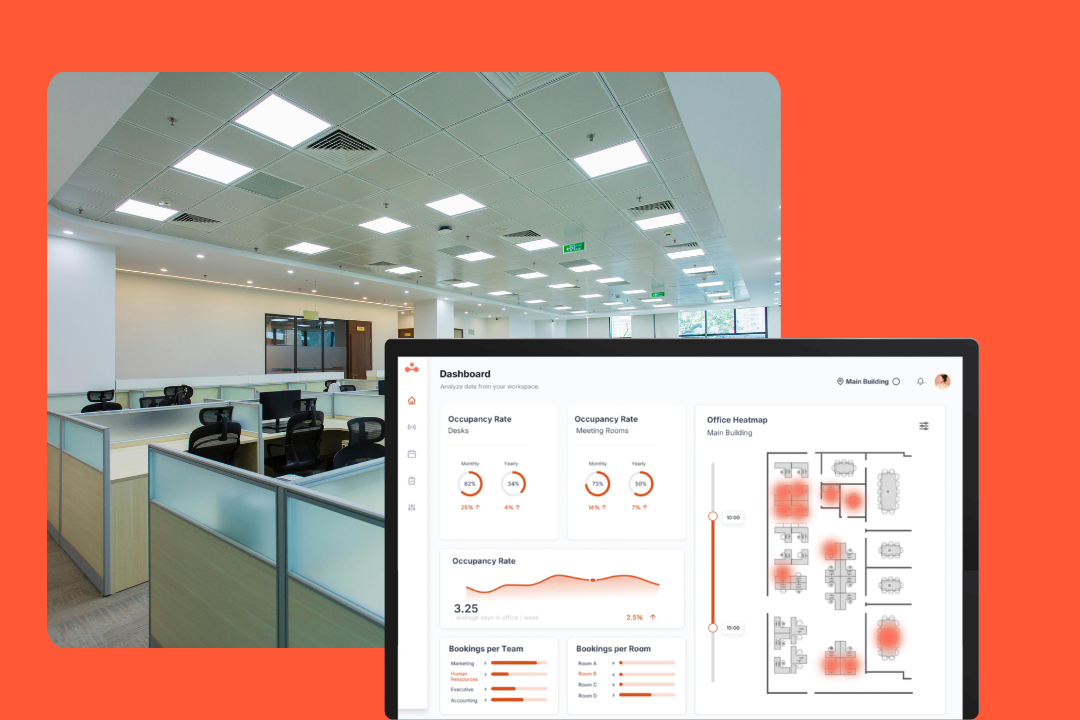
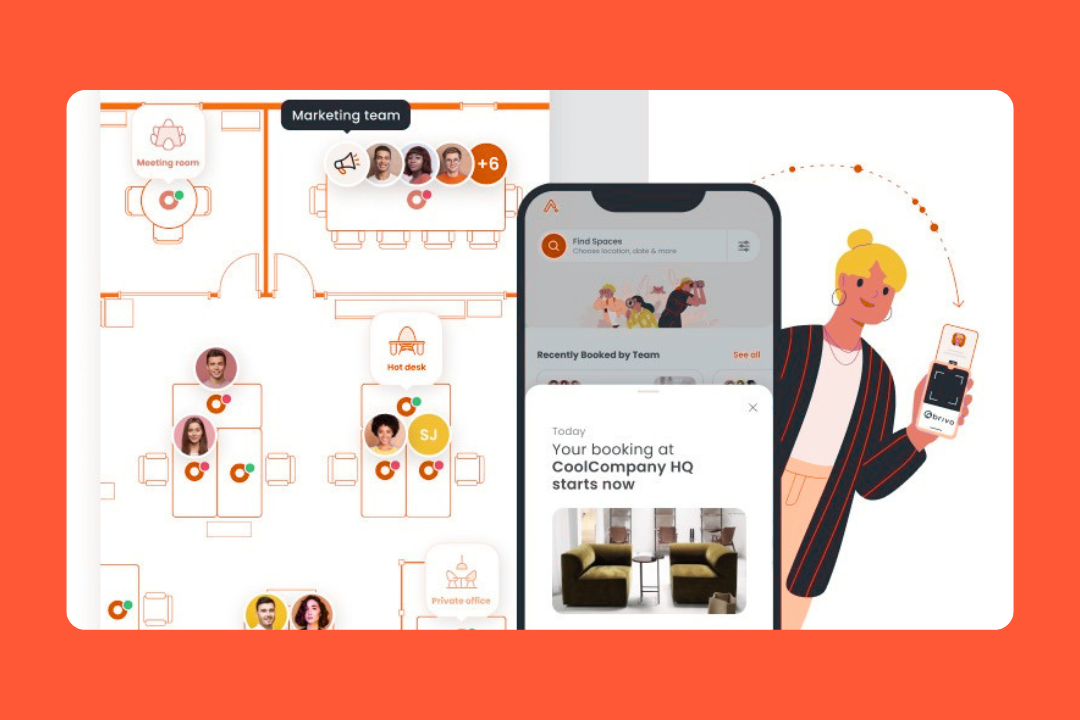
elia is the operations center for businesses that want to take a leap from planned usage to actual usage. It's built for teams that want their whole workplace operations in one place. Many tools only let you know who booked a desk. elia, on the other hand, shows you who’s actually using it.
It’s a single platform that combines desk booking, visitor management, and workplace analytics into one map-based interface to get rid of app clutter.
What you can expect
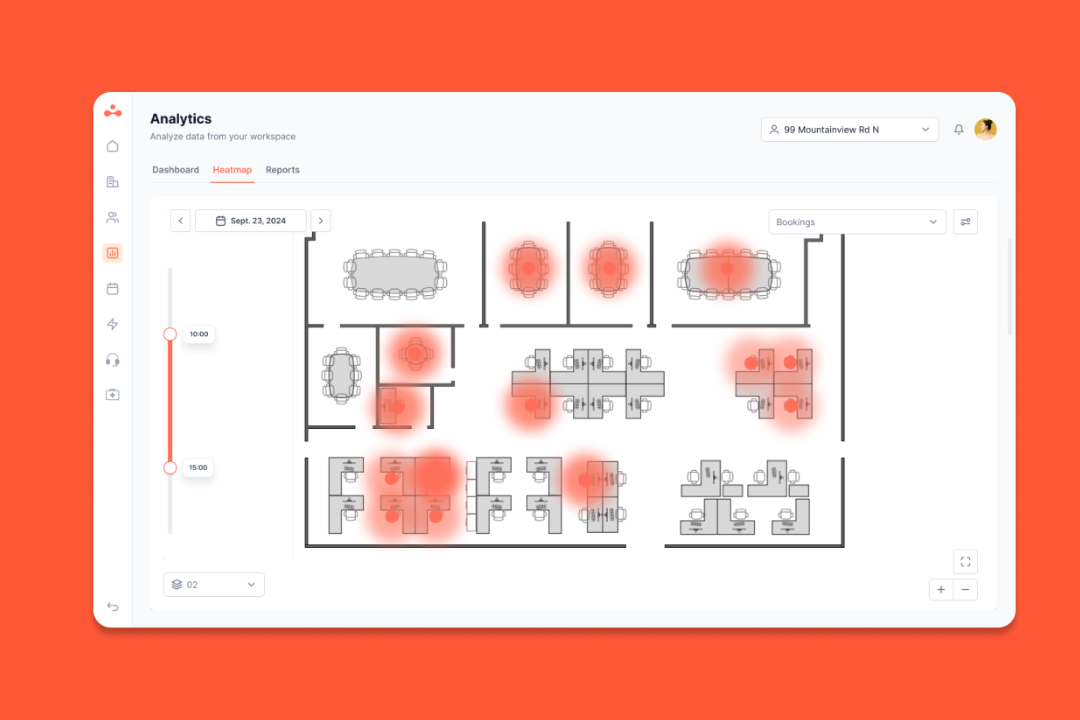
Occupancy monitoring: Real-time data from sensors that tells you exactly how full (or empty) your office is compared to desk reservations.
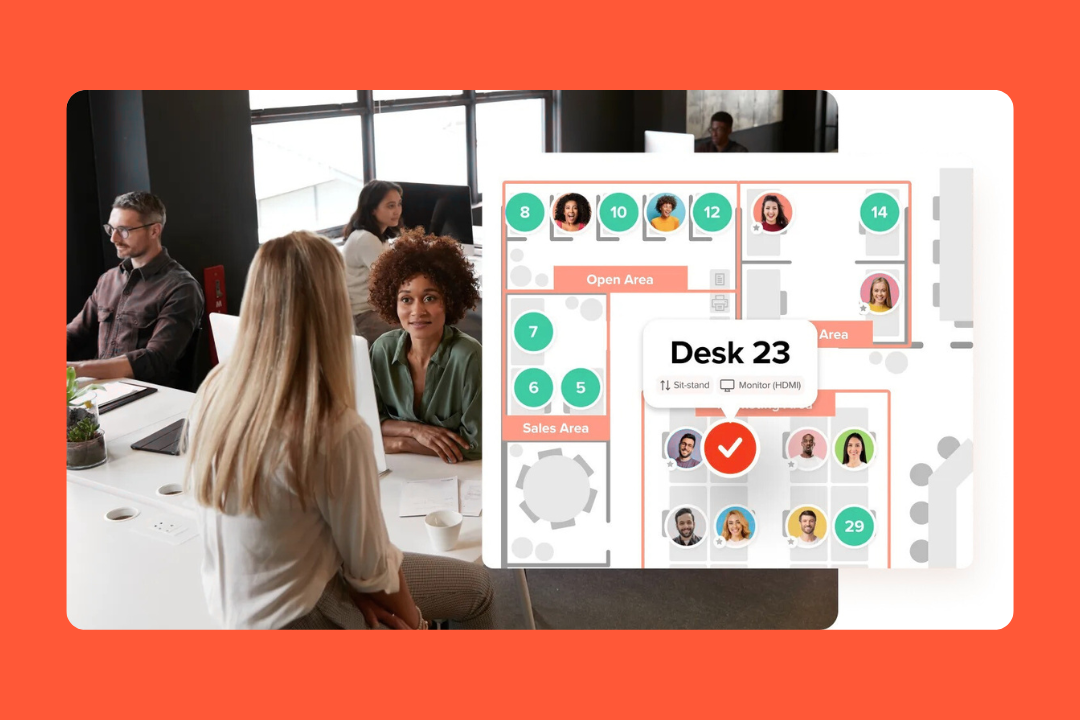
Floor plans: A map where you can book desks, service requests, and manage conference rooms all in one place.
Visitor workflows: Digital check-ins for visitors with instant notifications to the host via Slack, Teams, or email.
Workplace automation: Custom triggers that can automate tasks like canceling ghost room bookings or sending facility alerts.
Ecosystem sync: Native connections to Microsoft 365, Google Workspace, and SSO so employees can log in frictionlessly.
What users like about it
Unified platform: Managers can finally ditch the multiple tools for managing the front desk and floor plans.
Scalability: Easy to set up for a small office but robust enough for a global portfolio (check out Québecor’s rollout).
Adoption speed: The interface is user-friendly, so most employees can start booking without any formal training.
ROI data: The reporting helps pinpoint where a company can safely downsize or reconfigure space.
A few things to think about
Hardware costs: To get the most out of live office space data, you’ll need office sensors, which adds to the initial cost.
Operational focus: Some teams might find the feature set too much, if they’re just looking for a social app.
Scaling integrations: elia covers the basics, like Microsoft, Google, and Slack, but might not have as many niche integrations as bigger legacy platforms.
2. deskbird: best for workforce management
Pricing: Starts at $5 a month per user
Big-name clients: KFC, Samsung, Deloitte
Headquarters: Pfäffikon, Switzerland
At heart, deskbird is a workforce management platform, and it’s designed to solve the hybrid headache: helping employees plan their office days so they can hang out with their teammates, while giving admins the tools to enforce office-day policies and manage all the little things from parking to visitor check-ins.
What’s inside
Hybrid policy enforcement: Automated rules and approvals to make sure everyone follows office-day rules.
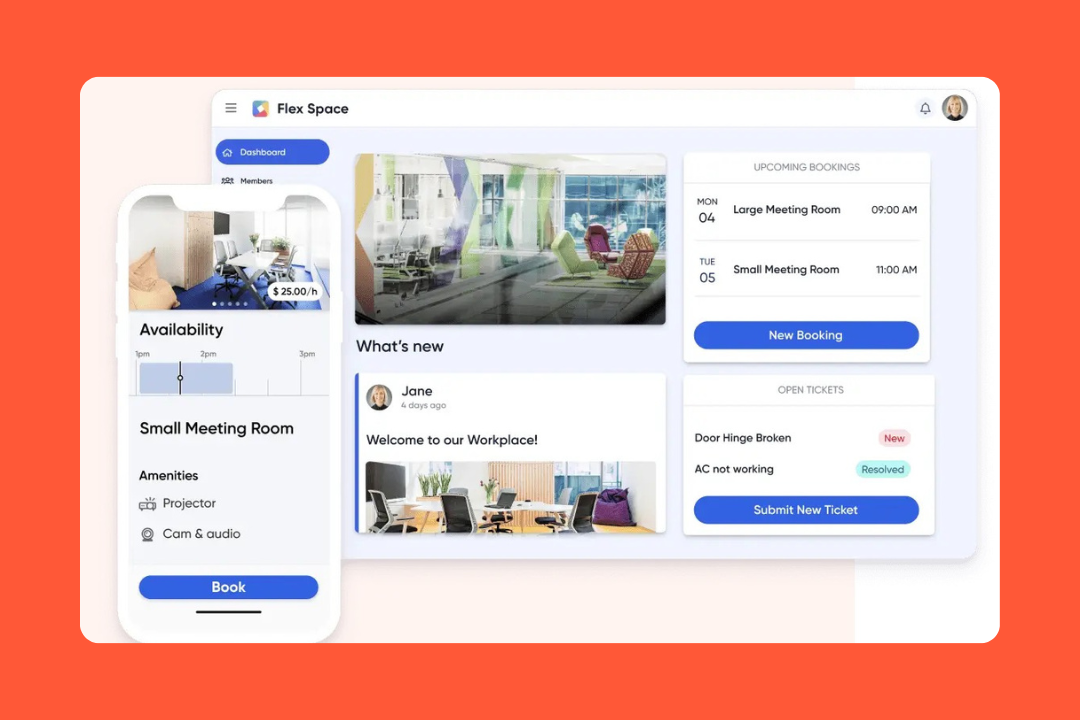
All-in-one operations: One portal for desks, meeting room booking, and parking spots across all locations.
Workplace ticketing: One place to request facility fixes, instead of letting them get lost in email.
Teammate coordination: Social week views that show when colleagues are coming in so teams can plan collaborative days.
Cross-platform accessibility: deskbird nestles nicely inside Microsoft Teams and Outlook.
What users love
Zero-friction UI: It’s got high adoption rates because the UI is clean and social.
Quick setup: IT teams adore it because it’s a breeze to add to the Teams sidebar and syncs with existing HRIS tools.
Transparent pricing: They publish their prices, which makes planning so much easier.
Privacy first: Being Swiss-based gives them EU-data residency and top-tier GDPR compliance. Big win for European legal teams.
A few things to think about
Headcount costs: The per-user price can add up fast if your team is massive and sharing a tiny office.
Mobile app: Some users find the standalone app a bit light on features.
Analytics depth: Teams that care about reporting and export flexibility might want to do a closer comparison.
3. Robin Powered: best for user-friendly workplace booking
Pricing: Custom
Notable clients: Politico, Kayak, ATB Financial
Headquarters: Boston, USA
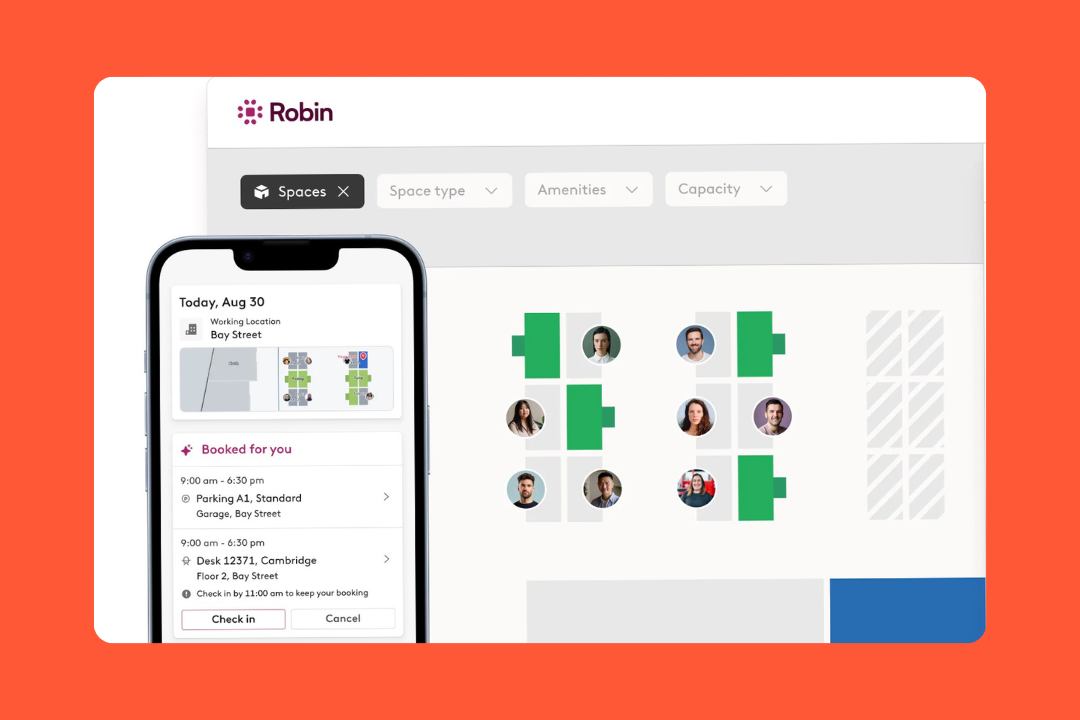
Robin Powered takes the cake for user-friendly workplace booking. It’s got high-resolution maps that make it a no-brainer for large teams that are always on the move. While its core is desk and room booking, it’s expanded into a full AI-driven operations hub that automates the boring stuff, like checking you in via Wi-Fi, so employees can focus on work instead of logistics.
What you can expect
Booking using AI: Smart suggestions for where to sit based on past preferences and where your team is sitting.
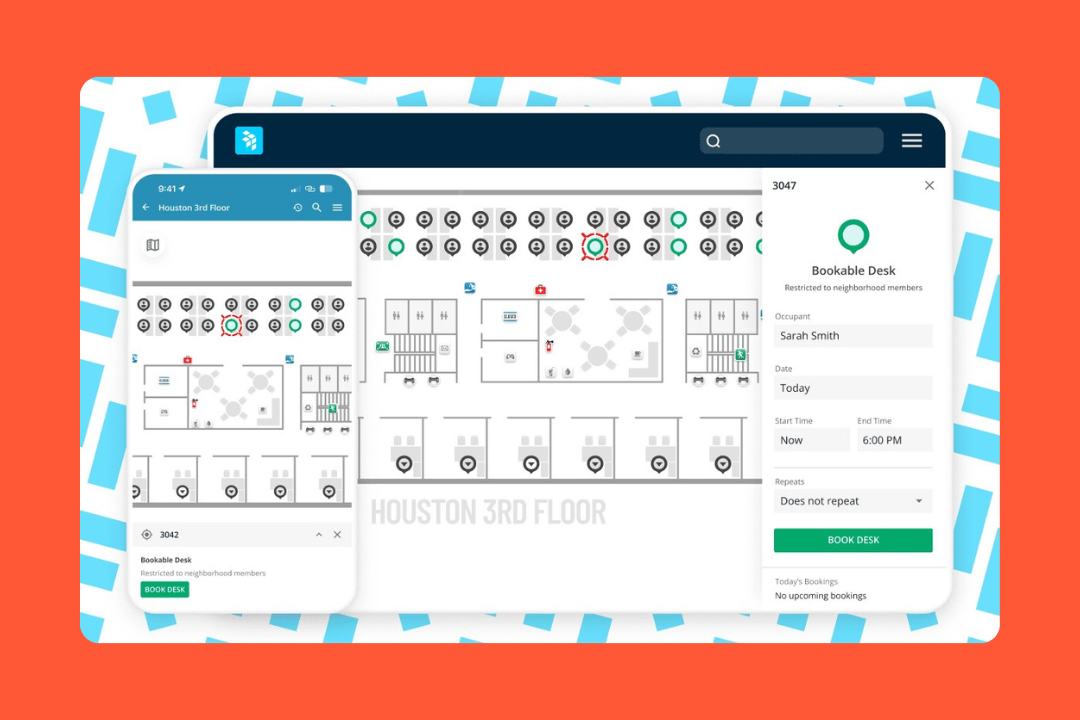
Interactive maps of the office: Real-time digital maps that actually make it easier to find where you need to be.
Abandoned space protection: Automated ghost booking release that ensures rooms and desks aren't locked up and unused.
Neighborhood management: Grouped seating zones that keep departments together but give you the flexibility to work from different spots as needed.
Workplace ticketing: All in one place, it's easy to send in requests for facilities or IT support that are linked to your room reservation.
What users like
Easy check-ins: Users can just scan a QR code or check in over Wi-Fi and they're good to go.
Mobile app: People really love being able to book a desk on the go, especially on their commute.
Full visibility: It keeps everyone in the loop with who's in the office on any given day.
Digital signage: Reliable room displays show availability at a glance and stop room-squatting for good.
Things to remember
Big companies built in: The platform is optimized for companies with 150+ employees, so that's where it shines.
Pricing: They don't list flat rates online, so you'll need to talk to them, so they can get you a quote that's right for your business.
Setup needs some love: Getting your neighborhoods and floor plan just right can take a little more work upfront, but it's worth the effort.
4. OfficeSpace: best for enterprise-level planning
Pricing: Custom
Notable clients: OpenAI, Airbnb, HubSpot
Headquarters: Atlanta, USA
If you've got a huge footprint and want to make the most of every square foot, OfficeSpace is the engine that makes it all happen and gives you the numbers you need to make smart decisions. It's especially great for facilities leaders who need to justify every last bit of real estate costs.
What you can expect
Scenario planning: The ultimate tool for planning a floor rearrangement that lets you simulate all the possible outcomes so you can see if it's worth the hassle.
Move management: Drag-and-drop coordination for employee relocations and departmental shuffles.
Visual planning: High-level view of exactly who has what and where, company-wide.
Asset tracking: Centralized digital inventory for furniture and IT assets across global sites.
Portfolio intelligence: Unified reporting on density and utilization metrics for entire building networks.
What users like
Real numbers for real estate decisions: Leaders love that they can get the hard data they need to justify their space planning decisions.
Directory & wayfinding: They've made it super simple to find anyone or anything in the office, even if you're a new guy.
Hands-on help: Their team will help with the tough part of getting you up and running in just a few weeks.
Big team fit: OfficeSpace can handle thousands of users across multiple cities, with no hiccups.
Things to consider
Longer to set up: This one really does take a bit more time to get right, simply because it's so feature-rich.
Too big for small offices: If you're just starting out, all the bells and whistles might be a little overkill.
Big up front cost: With significant contract minimums, it's a bigger investment than some of our other options.
5. Envoy: best for security-first workplaces
Pricing: Starts at $60/resource per month (Reservations) | $362/location per month (Visitors)
Who uses Envoy: Lyft, AWS, Panasonic
HQ: San Francisco, USA
Envoy starts with a security-first approach to the office, treating it as a secure facility rather than just a place to sit. It's built visitor check-in into the core of what it does, and has since added desk and room booking features.
It's a great choice for companies in heavily regulated industries where security is paramount.
What’s inside
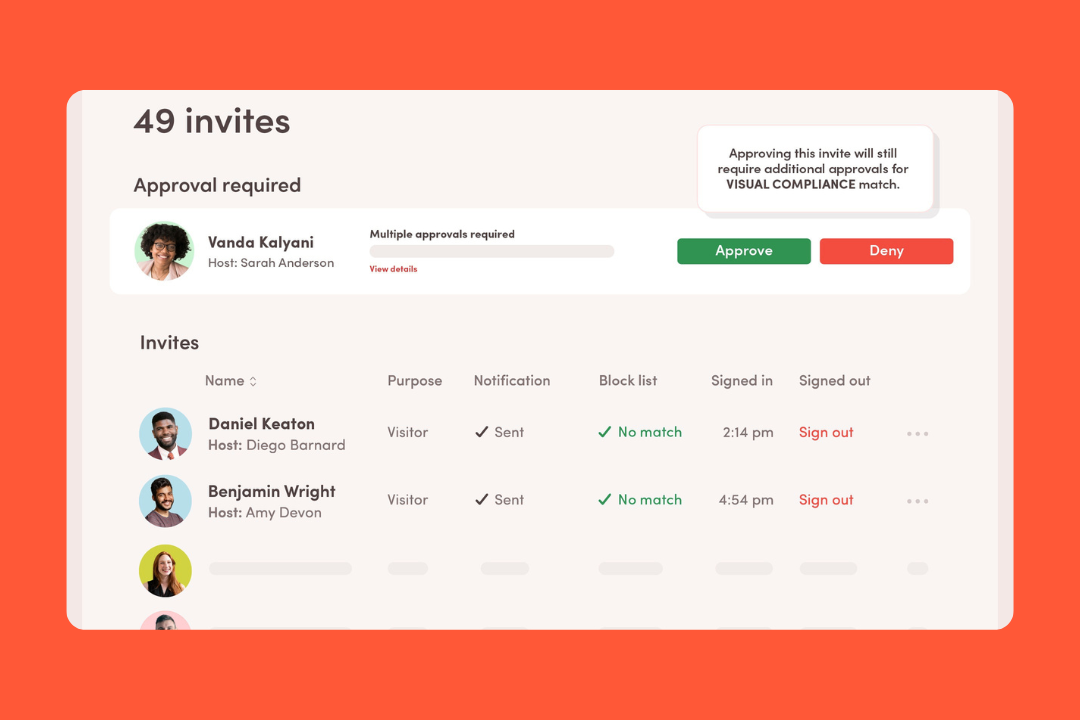
Visitor dashboard: Digital sign-ins with automated host notifications via Slack, Teams, or email.
Compliance workflows: Interval-based signing for legal documents and NDAs during guest registration.
Touchless mobile check-in: QR-code and Bluetooth-based entry for employees and visitors to reduce lobby congestion.
Blocklist monitoring: Real-time cross-referencing of guest data against internal watchlists for security alerts.
Mailroom automation: OCR-driven package scanning that notifies recipients and tracks delivery logs.
What users like
Premium branding: The interface is super customizable, so it's a great first impression when someone walks into the lobby.
Enterprise ecosystem: They integrate with all the major systems for access control and identity.
High adoption: The app is simple enough that employees pick it up right away.
Emergency readiness: If you need to get everyone out or figure out who's safe in real time, they've got you covered.
Things to keep in mind
Pricing per office: Don't be surprised if your costs start to climb if you have a lot of small satellite offices, as they're billed per location.
Modular costs: With desk booking and visitor management being separate modules, the price can stack up fast as you add more features.
Hardware needs: To get the full experience, you’ll likely need to invest in iPads and badge printers for the lobby.
Skedda’s a good bet for offices that don't want to be tied down to HR software. It focuses on a space-first logic, so it works just as well for booking a podcast studio as it does for a desk. That’s why it’s a favorite among mid-sized teams that need a booking engine without the overhead of a full-on enterprise system.
Key features
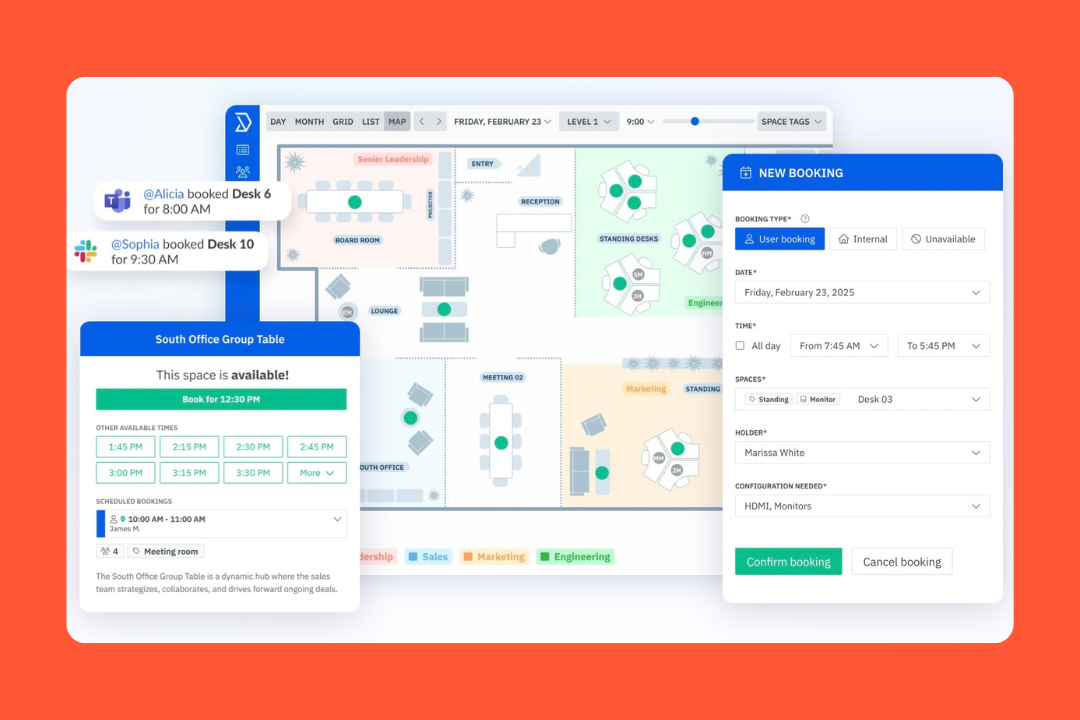
Digital floor plans: Map-based booking that lets users pick specific seats or zones.
Booking rules: Customizable constraints for lead times and recurring reservation limits.
Occupancy management: Real-time visibility into space availability and user check-ins to stop double-bookings.
Versatile resource management: A unified system for managing desks, parking spots, lab equipment, and meeting rooms.
Integrations and API access: Native syncs with Google and Microsoft calendars alongside a flexible API for custom workflows.
What users love
Super flexibility: Admins can set up spaces for just about anything, even your most unconventional office layouts.
Fast setup: You can go from testing the app to a full rollout across the office in no time.
Good support: Onboarding is hands-on, so you can be sure you get things running smoothly.
Office rules: You can set your specific office policies without having to make the app complicated for employees.
Things to keep in mind
Visitor tools: It’s not included as standard, so you'll need to pay for a separate add-on to manage visitors.
Analytics depth: You get a good look at how the office is used, but it lacks the AI planning tools that are meant for huge corporations.
Initial prep: You'll need to spend a bit of time mapping out your rules and groups before you start inviting the team.
7. Kadence: best for team collaboration
Cost: Custom pricing
Notable clients: Boeing, Starling Bank, Softchoice
HQ: San Francisco, USA
Kadence is for organizations that need to help teams get their in-office schedules sorted. That's where their neighbourhoods logic comes in: zones can shift dynamically based on who's coming in that day.
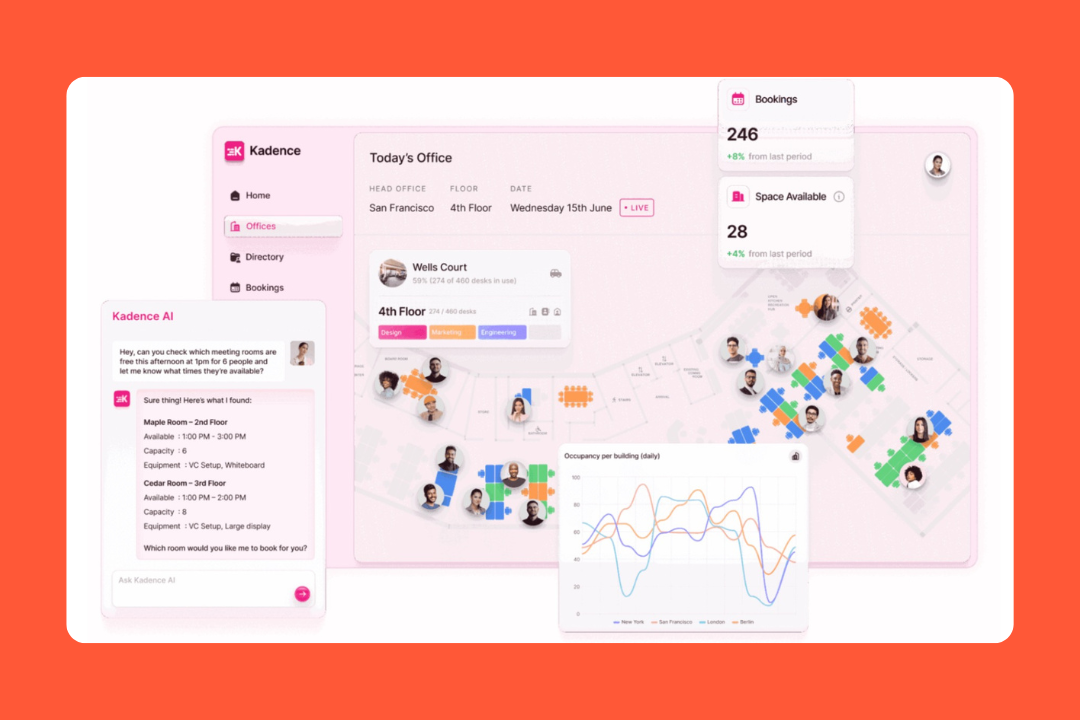
The app now includes an AI assistant that handles the scheduling for you, so the whole hybrid setup feels much more organized and a lot less lonely.
What you get
AI coordination: An assistant that books desks or invites guests through Slack and Teams for you based on when your teammates are in.
Team schedules: A shared view where everyone lists their weekly plans to avoid those endless back-and-forth messages.
Interactive maps: A live floor plan for picking seats or finding where a colleague is sitting.
Visitor management: A system for sending guest invites and tracking office foot traffic.
Block bookings: A tool for managers to reserve groups of desks so the whole team can sit together.
What users love
Works where you work: It lives right inside Microsoft Teams and Slack, so you can sort out your desk without opening another browser tab.
Simplicity: The interface is clean and easy to pick up.
Helps you connect: Being able to follow teammates to see their schedules and grab a seat nearby is a favorite with most users.
Responsive support: Their team answers pretty quickly and actually listens to feedback.
Things to keep in mind
Auto check-in: A useful feature, but some teams report it can be a bit flaky in day-to-day use.
Reporting: You get the core data you need, though custom reporting and analytics depth seem a bit limited.
Initial setup: It's fairly straightforward, but you'll still need to spend some time on floor plans, rules, and team setup.
8. Gable: best for coworking space users
Cost: Starts at $2.50/user per month (Offices) | $99/location (Visitors)
Notable clients: Dropbox, Doordash, Upwork
HQ: San Francisco, USA
Gable is the best choice if you want to give your employees more than a desk at HQ. While it handles your office booking, its real strength is offering access to thousands of coworking spaces around the world.
Perfect for companies that want to offer a professional place to work for people who don't live near the office.
What you get
Big picture access: A way to get into over 20,000 coworking spaces worldwide, where you can book a desk on the fly.
HQ management: A standard booking system for your office, which includes floor plans and seat assignments so you stay on top of things.
Visitor check-in: An iPad-based system for guests that handles sign-ins and legal forms.
Budget controls: A set of tools for managers to put spending limits or location restrictions on how employees use coworking spaces.
Space analytics: A dashboard that shows you how your own office and coworking budget are being used.
What users love
Flexibility: Employees love having a professional workspace nearby when they need a break from working at home.
One-stop shop: Having your office bookings and coworking spend in one place makes life a whole lot easier for finance teams.
Fast to roll out: You can get the whole system up and running in a few days.
Only pay for what you use: With the coworking side, you only pay when someone actually uses a space.
Things to think about
Managing two worlds: Balancing your office rules with the rules of 20,000 different coworking spaces can take some getting used to.
Separate costs: The visitor management and event planning tools are separate add-ons.
Availability limits: Next-day or peak-hour bookings can be harder to get, depending on the location.
9. OfficeRnD: best for flexible workspaces
Pricing structure: Starts at $99/month (Workplaces) | Custom pricing for Flex
Notable clients: x+why, Spacemade, Cubes.Co
Headquarters: Sofia, Bulgaria
OfficeRnD is perfect for companies running a super flexible office. Its coworking space software is designed to tackle the business side of things, handling memberships and sending invoices as easily as it does desk reservations.
If your set up involves lots of different types of members or multiple locations, this is probably your best bet.
What you get
Automated billing: A system that sorts out memberships and one-off bookings without you having to chase people for payments.
Visual floorplans: A map of your office where users can see what's available and book a spot in a few clicks.
Member portal: A dedicated space where your team or members can manage their profiles and payments.
Growth hub: A tool you can put on your website so new people can see your available offices.
Reception & visitors: A digital front desk for checking in guests and letting hosts know they're on their way.
What users love
Complete hub: It manages the entire lifecycle of a member, from the first tour to the monthly bill.
Pro look: The member app and portal can be branded to match your company style.
Scale-ready: It won't fall over if you go from one location to ten or from 50 members to 500.
Space utilization data: The reporting is focused on what matters for your bottom line, like which rooms are making you the most money.
Things to think about
Learning curve: The admin side can feel a bit overwhelming at first, and you’ll likely need some time to get it set up right.
Add-ons: Features like the white-label app or advanced visitor tools cost extra.
Docs lag: Tutorials are generally helpful, but some can feel out of date when Microsoft changes things.
10. anny: best for all-in-one resource management
Pricing: Starts at $5/resource per month
Notable clients: DeepL, Samsung, Toyota
Headquarters: Cologne, Germany
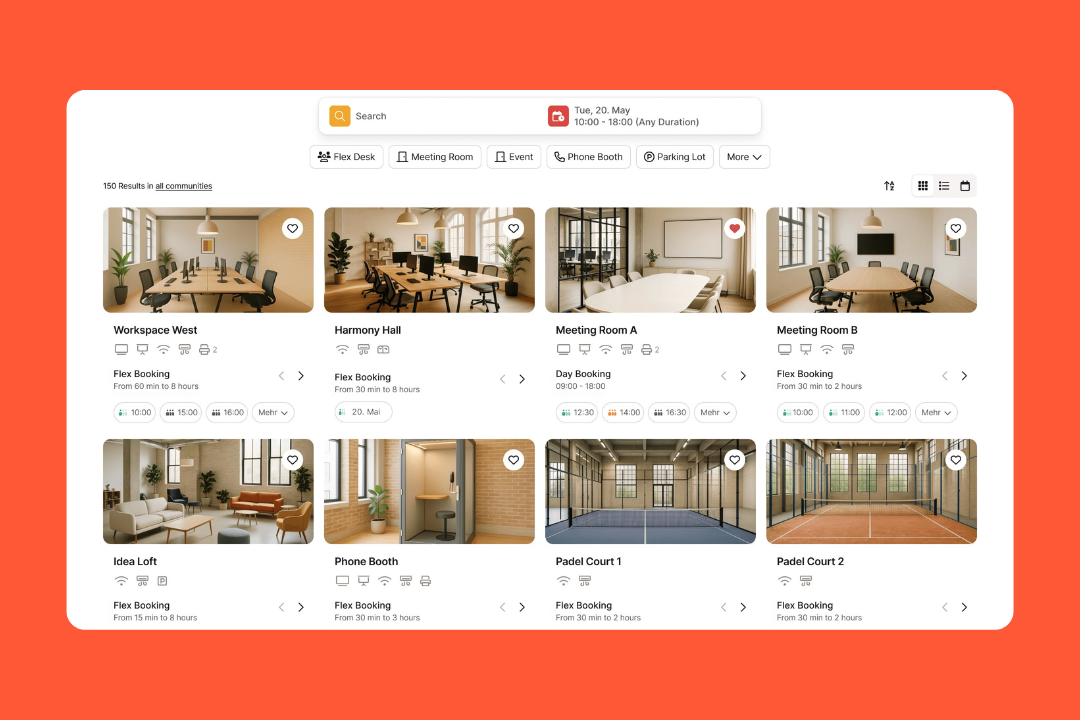
anny is a pretty versatile choice if you need to keep track of more than just a few desks. It treats everything (from meeting rooms and parking spots to office resources and training sessions) as a bookable resource.
It's also popular with companies that need to stick to strict GDPR and privacy standards, since it's hosted in Germany.
What you get
3D floor plans: A map that lets you see how the office looks and pick a spot in real-time.
Smart locks: A connection to your building’s physical security that automatically opens doors when you book a space.
Visitor kiosk: A digital reception for guests to check in and get a printed badge.
Resource allocation: A logic-based system that makes sure if you book a room, you can also grab the specific equipment you need.
Weekly scheduler: A calendar that the whole team can share, so everyone can see who's coming in and where they'll be sitting.
What people like
Asset management: You can use it for desks, but also for company cars, lab gear, or even charging stations.
Privacy: Users in Europe really appreciate the controls over their data and the fact that it's all done in a way that meets the security laws.
Flexible rules: You can set up all sorts of rules about bookings and permissions, so you can get as specific as you need to be.
Attentive service: The team behind the app is always easy to get in touch with and knows how to help you solve problems.
Things to think about
Reporting depth: The analytics cover the basics, but you might find it not as rich as the booking experience itself.
Notifications: anny gives you a lot of notification controls, so it’s worth tuning the settings early to avoid unnecessary alerts.
Process-heavy: It may feel heavier than necessary for smaller teams that just want desk scheduling.
How we evaluated space management software
When it comes to space management software, one size doesn't fit all. The problem is that what one company looks for in a tool, another company won't even think to consider. So instead of trying to boil down our evaluation to a rigid checklist, we looked at how well each tool performs the job it's built to do, while still keeping in mind the criteria that most buyers care about.
Space planning and workplace coverage: First, we looked at the core use case. Does the software help teams manage their office space in a way that makes sense? And by that, we mean things like desk booking, room reservations, floor plans, seeing who's in the office, visitor flows, and the day-to-day nuts and bolts of managing a workplace.
Ease of use: A tool can have all the right features, but if people don't actually use it, it's not doing its job. So we looked at how easy each tool is to use, for both the people running the show and the average user. Because, let's face is, adoption is just as important as functionality.
Occupancy and utilization insights: Since this is all about using space better, we really dug into reporting and analytics. Can the tool help teams figure out how space is being used, not just how it was planned to be used?
How well it fits your workplace’s needs: Not every office is the same. Some need hybrid scheduling, some need strict booking rules, and others are more about scenario planning or coworking access. So we looked at how adaptable each tool is to different workplace setups.
How it integrates with other tools: We also looked at how well each tool connects with the systems teams are already using: Google Workspace, Microsoft 365, Slack, Teams, HR tools, access-control systems, and visitor management workflows where relevant.
What other users say: We also checked out what real users have to say on review platforms like G2 and Capterra, especially where the same strengths and weaknesses kept showing up across different teams and industries.
Value for price: The cheapest option is not always the best one. We looked at whether each tool feels like it's worth the cost for the specific problem it's meant to solve.
How to choose space management software
If you start looking for the "best" space management software without first figuring out what the problem is, you're likely to end up with the wrong tool for your needs.
First of all, a lot of teams start by looking for a "best in class" tool, then compare a few names. But what if the tools you're comparing are built for different purposes? Some are designed to give you live occupancy data, some focus on booking, some are really planning tools for big enterprise portfolios.
Here's a better way to narrow it down.
Start by identifying the biggest space problem you're trying to solve
Take a step back and figure out what's not working right now. Is it low visibility into how your office is being used? Are you getting ghost bookings and underused rooms? Is desk coordination a nightmare? Do you struggle with floor-plan visibility? Are you wasting money on inefficient real estate costs? Or is it something else entirely?
That will help you narrow down your shortlist way faster than comparing features on a theoretical level.
Choose the type of solution before choosing the vendor
This is where so many shortlists go wrong. Figure out what type of solution you need first:
Occupancy-focused tools that give you a real-time look at how space is being used.
Booking-first platforms that help with desks, rooms, parking, and day-to-day coordination.
Planning-heavy software for scenario planning, move management, and enterprise portfolio decisions.
Flexible workspace tools that handle coworking access, memberships, or mixed office models.
Once you know the type of solution you need, the right vendors become way easier to compare.
Check how it fits in with your existing systems
This part is a bit boring, but it's actually very important. Take stock of the systems your workplace already uses:
Google Workspace
Microsoft 365
Slack
Teams
Outlook
HRIS tools
access-control systems
visitor management workflows
The right tool should fit right in with how your team already works, not force you to start using some whole new process just to make bookings or read reports.
Think about what your workplace will look like in the future
A tool that works great for one office with 50 people may not cut it for multiple locations, business units, or regions. Think about how your workplace will change in the next year or two. Will you be expanding locations? Reducing your footprint? Supporting more hybrid schedules? Some tools are built for simplicity, while others are designed for big complexity.
Think about the total cost, not just the base price
This category can get expensive in ways that aren't immediately obvious. Hardware, onboarding, premium integrations, implementation support, add-ons, and sensor requirements can all add up. A lower entry price doesn't always mean a lower total cost.
The better question is: does the tool create enough value for the specific problem you're trying to solve?
Shortlist & take for a spin
Once you have a clear idea of what you're after, trim the list down to 3 to 5 tools that tick all your boxes: use case, budget, integration, the whole shebang. When evaluating vendors, make sure to give preference to those that let you take their product for a spin either via a demo or a trial before committing.
It's also a good idea to get your actual users in on the process, whether that's the facilities team, workplace manager, IT, or the office operations lead.
Now, which one's right for you?
There's no one-size-fits all when it comes to space management software. Every business has a unique workplace problem that needs solving, which means that usually the best tool for the job is the one that you need to ease up on your biggest operational bottleneck.
But if you want a platform that helps you understand real office usage while managing bookings, visitors, and floor plans in one place, elia is worth a closer look 😉
Make every square foot count
See what’s working, what’s wasted, and where space can do more.
is a Content Marketing Specialist at elia. With 10+ years in content marketing, she writes about workplace trends and the tools that help teams work smarter. Part strategist, part storyteller, Tamara brings equal amounts of data, creativity, and a little Moon Prism Power to every piece she creates. 🌙✨
Share
Contents
Subscribe to our newsletter
Subscribe to the elia newsletter for exclusive product updates and industry best practices. You can unsubscribe at any time.
Thank you! You're subscribed.
Oops! Something went wrong while submitting the form.




.png)