deskbird is easy to shortlist. Comparing it properly is harder.
Once teams get serious, the questions get more practical: how pricing changes as headcount grows, which advanced features are actually included, how reliable the analytics are, and whether the platform fits the way their offices run day to day.
This guide is for that stage. We compare the best deskbird alternatives for 2026 across the things workplace teams usually care about:
desk and meeting room booking
visitor management and front-desk workflows
workplace analytics and reporting
interactive floor plans
integrations
free plans, trials, and pricing structure
Some teams want a lighter tool. Others care more about parking, visitor flows, or stronger analytics across multiple locations. The point is to find the deskbird alternative that suits your workplace best.
TL;DR: Best deskbird alternatives at a glance
Tool
Best for
Why it stands out
elia
Teams that have outgrown basic desk booking
Stronger on workplace operations, occupancy visibility, visitors, and connected workflows
Dibsido
Simple workplace bookings
Low-friction desks, rooms, and parking
Kadence
People-first hybrid coordination
Stronger on team overlap, attendance signals, and office-day planning
Ronspot
Parking-heavy workplaces
Strong parking controls, verification, and no-show reduction
Officely
Slack- or Teams-first workplaces
Booking and coordination happen inside chat tools
Whatspot
Simple shared-space booking
Straightforward booking, including guest and public use
Skedda
Highly configurable space booking
Strong permissions, approvals, and booking rules
deskbird
Broad hybrid workplace management
All-round platform across booking, planning, and visitors
What is deskbird?
deskbird is a workplace management platform for hybrid offices. Teams use it to manage desks, meeting rooms, parking, visitors, and office schedules from one place. That alone would make it relevant. But deskbird is clearly aiming higher than basic desk booking.
Today it sits in that broader workplace operations category: part booking system, part hybrid planning layer, part office management platform. That’s one reason it shows up on so many shortlists. If your team wants one platform instead of a stack of disconnected tools, deskbird is an easy product to consider.
Key features
deskbird covers a lot of ground, which is part of the appeal:
Desk, room, parking, and resource booking: Employees can reserve desks, parking spots, and handle meeting room reservations alongside other shared resources, with support for guest bookings, recurring room bookings, QR booking, and assigned spaces.
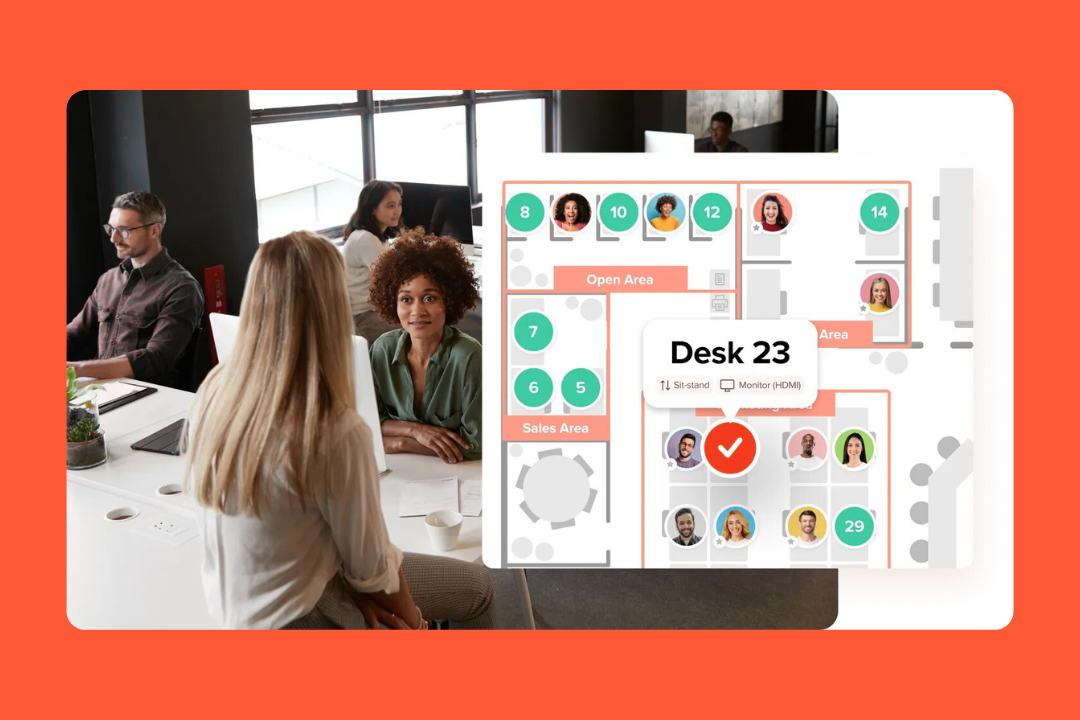
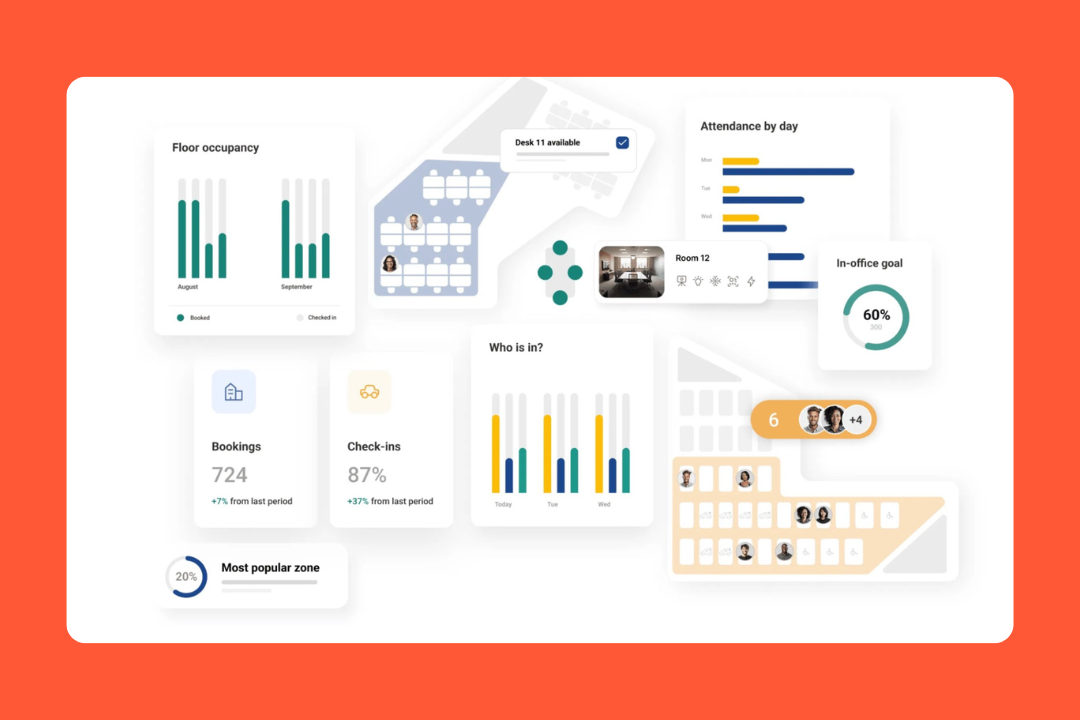
Interactive floor plans and booking rules: Employees can book from the office map and check where teammates are sitting. Admins can manage spaces, permissions, and custom rules behind the scenes.
Hybrid work planning: deskbird goes beyond booking with week planning, weekly preferences, half-day scheduling, team visibility, team days, and manager approvals.
Visitor management: The visitor module includes pre-registration, host notifications, receptionist workflows, self check-in, and kiosk mode.
Analytics and data access: Office Analytics and Workforce Analytics are built in. Higher tiers unlock advanced analytics, custom exports, and public API access.
Integrations: deskbird connects with Microsoft Teams, Slack, Outlook, Google Calendar, Entra ID, SSO, SCIM, HRIS tools, hardware, and API-based workflows.
deskbird pricing
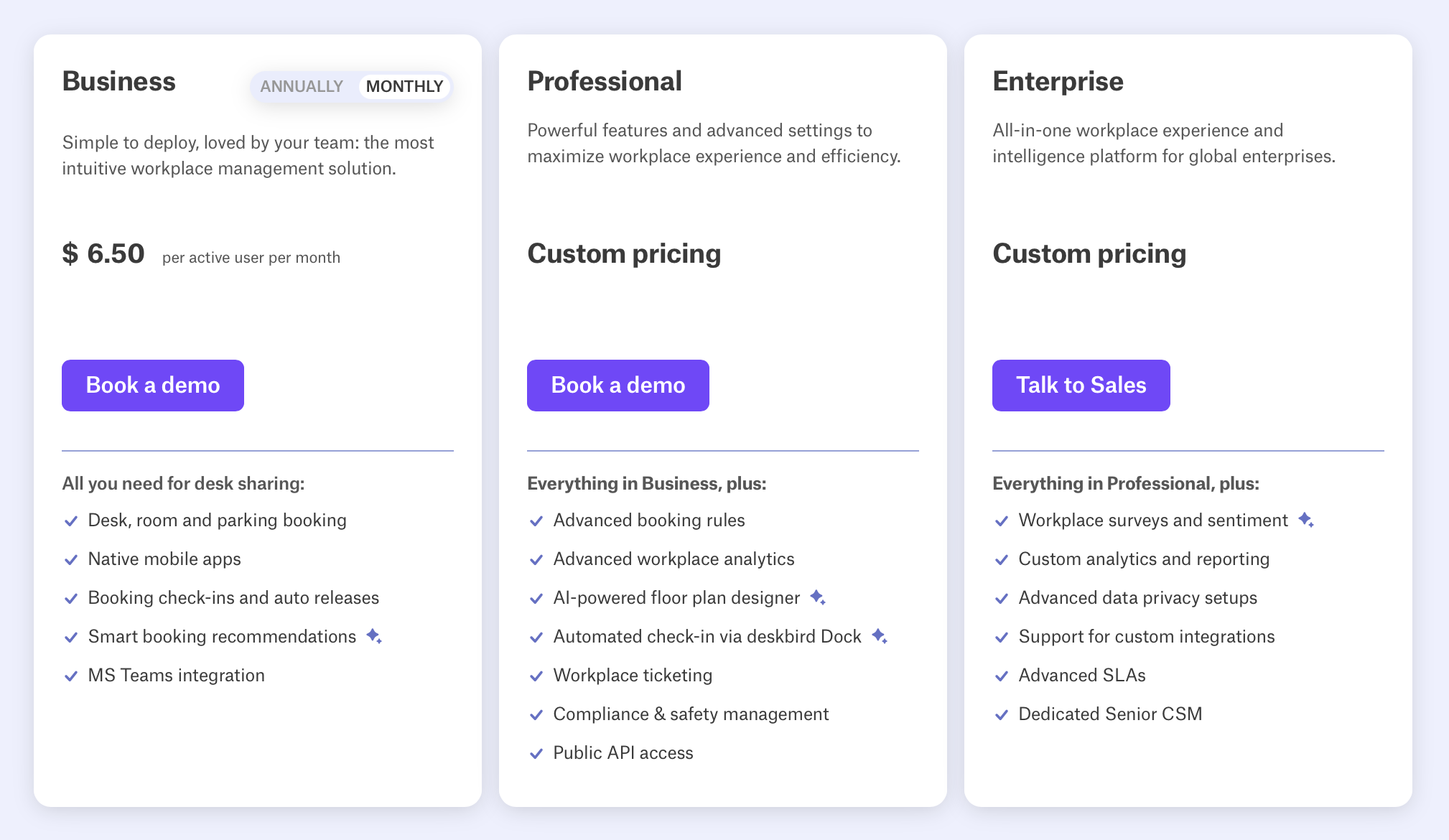
deskbird offers a free Starter plan for up to 15 users and one office.
Paid plans start at:
Business: $6.50 per user/month
Professional: custom pricing
Enterprise: custom pricing
Source: deskbird
That gives buyers a starting point. Not always a clear final cost, though. The real number depends on how many users you have and whether you need extras like Rooms Plus, Visitors Plus, or User & Data Management Plus.
What deskbird reviews say
People pick it up fast: deskbird tends to feel intuitive, which helps improve the overall employee experience.
The floor plan does real work: The map view gets called out often because it helps people choose desks faster and makes larger offices easier to navigate.
It helps coordinate office days: Visibility matters. People like seeing who’s in, where they’re sitting, and whether it’s worth commuting in.
Setup feels quick and support feels solid: Onboarding and customer support both come through well in reviews.
Why companies look for deskbird alternatives
deskbird gets a lot right. Most teams don’t start looking at alternatives because something is badly broken but rather because they’re trying to find the best fit.
A few themes come up most often:
They want a different pricing model: deskbird uses per-user pricing, and some advanced capabilities live in higher tiers or paid add-ons. That works well early on, but can feel less attractive as teams grow.
They want a different regional fit: deskbird has a strong European footprint. For North American buyers, that sometimes makes local comparisons more important.
They want deeper analytics: deskbird includes workplace analytics, and higher tiers go further. But for teams that care a lot about reporting and export flexibility, this is one of the areas to compare more closely.
They want a different level of scope: Some teams just want reliable desk booking. Others need a platform that handles visitor flows, workplace operations, and real space-usage data across offices.
If your team mainly wants broad hybrid workplace management, deskbird still makes a lot of sense. If you need stronger occupancy visibility or more connected office workflows, it’s worth looking more closely at the alternatives below.
How we evaluated deskbird alternatives
We looked at these tools the same way serious buyers usually do: product pages, pricing pages, help-center docs, integration docs, public customer stories, and recent user reviews on G2 and Capterra.
Then we compared those sources against each other to see where the marketing held up, where pricing got more complicated, and where product depth looked stronger or weaker in practice.
For each deskbird alternative, we focused on:
Workspace features: Desks, meeting rooms, visitors, floor plans, booking rules, check-ins, and the everyday flows people rely on once the tool is live.
Hybrid coordination: Week planning, team visibility, policy tools, approvals, events, and whether the product helps align office days without extra back-and-forth.
Analytics and reporting: What gets measured, how useful the reporting looks, what can be exported, and whether the analytics seem helpful for real workplace decisions.
Ease of rollout: How quickly teams can get started, how much admin or IT work it needs, and how easy the product feels once employees start using it.
Pricing: Whether pricing is public, how the model works, what’s included, and how likely the final cost is to grow once you add the features you need.
Scalability: Multi-office support, SSO, SCIM, HRIS sync, APIs, and other enterprise features larger organizations usually expect.
User feedback: What reviewers consistently praise, where friction keeps coming up, and which kinds of teams seem to gravitate toward the tool.
Integrations: Microsoft, Google, calendar sync, collaboration tools, identity systems, HRIS connections, and API flexibility.
The goal was to compare these tools the way a real shortlist gets compared: feature by feature, pricing model by pricing model, and with enough outside signal to tell the difference between a polished pitch and a strong fit.
Best deskbird alternatives: comparison
Legend: ◐ = limited or add-on
Tool
Best for
Price
Free
Desks
Rooms
Parking
Visitors
Insights
elia
Teams that have outgrown basic desk booking
Free / from $500/m
✅
✅
✅
❌
✅
✅
Dibsido
Simple workplace bookings
$1.9/u/m
✅
✅
✅
✅
◐
◐
Kadence
People-first hybrid coordination
Quote
❌
✅
✅
◐
✅
✅
Ronspot
Parking-heavy workplaces
Quote
❌
✅
✅
✅
✅
✅
Officely
Slack- or Teams-first workplaces
$2.50/u/m
✅
✅
✅
✅
❌
◐
Whatspot
Simple shared-space booking
$22/m
✅
✅
✅
✅
◐
❌
Skedda
Highly configurable space booking
$249/m
❌
✅
✅
✅
◐
◐
deskbird
Broad hybrid workplace management
$6.50/active user/m
✅
✅
✅
✅
✅
✅
1. elia: best for teams that have outgrown basic desk booking
elia is a workplace operations platform for companies that need more than desk booking.
Yes, it covers desks and meeting rooms. That’s expected. What makes elia more interesting is everything around that: visitor flows, service requests, occupancy tracking, safety workflows, and the operational stuff that starts mattering the second an office gets even slightly complicated.
It also has a more practical feel than a lot of hybrid workplace software: less focused on helping employees reserve space and more on giving teams better visibility into how the workplace is used and stronger control over the workflows that keep the office running.
Key features
elia stands out most when teams care about office operations as much as booking:
Desk and room booking: Teams can book desks and meeting rooms through interactive floor plans with live availability. The setup supports hot desks, assigned seating, shared spaces, and calendar-connected room booking.
Interactive floor plans and workplace setup: Employees book visually instead of guessing from a list. Admins get drag-and-drop setup, custom floor plan uploads, booking rules, and space allocation controls.
Hybrid office coordination: Employees can see who’s coming in, invite colleagues, and plan office days with more intention.
Visitor management: elia handles the full visitor flow including pre-registration, host notifications, self check-in, digital logs, badge printing, delivery management, and kiosk-style reception.
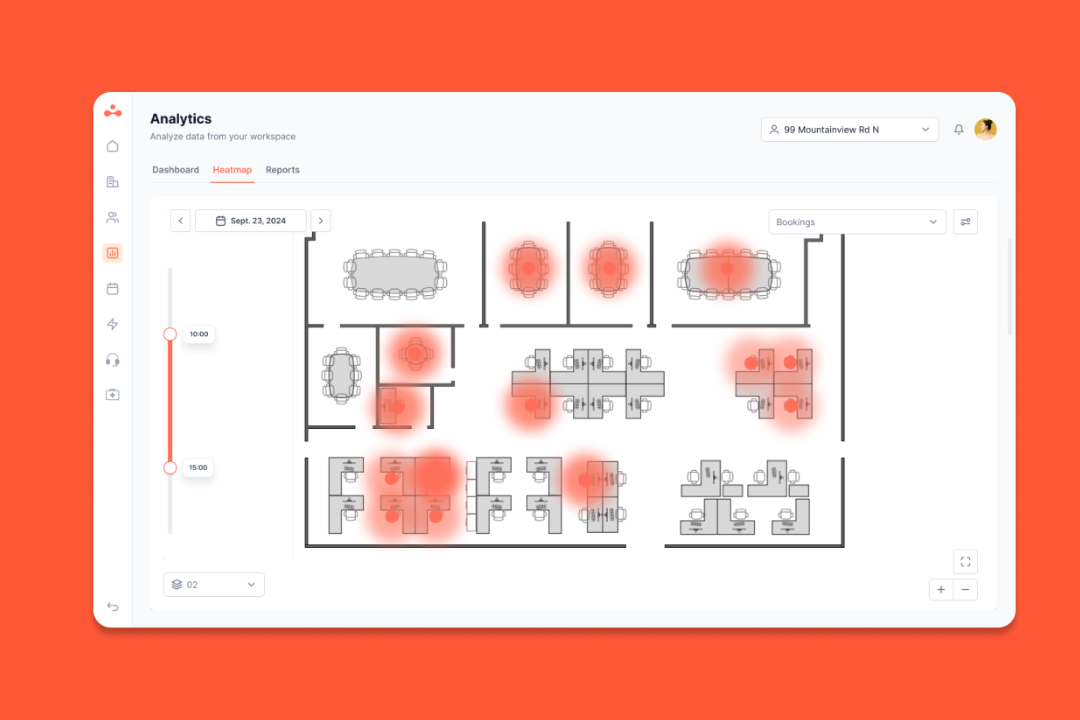
Analytics and occupancy data: It combines booking data with occupancy tracking, including desk- and room-level data through hardware, to provide accurate occupancy data.
Hardware: elia offers desk sensors, room sensors, gateways, kiosks, and displays, so teams can work from real usage data instead of booking data alone.
Integrations and mobile access: elia connects with Microsoft Teams, Outlook, Microsoft 365, Google Workspace, Slack, SSO, and more, with bi-directional calendar sync. It also has iOS and Android mobile apps for bookings and floor plan navigation.
Pricing
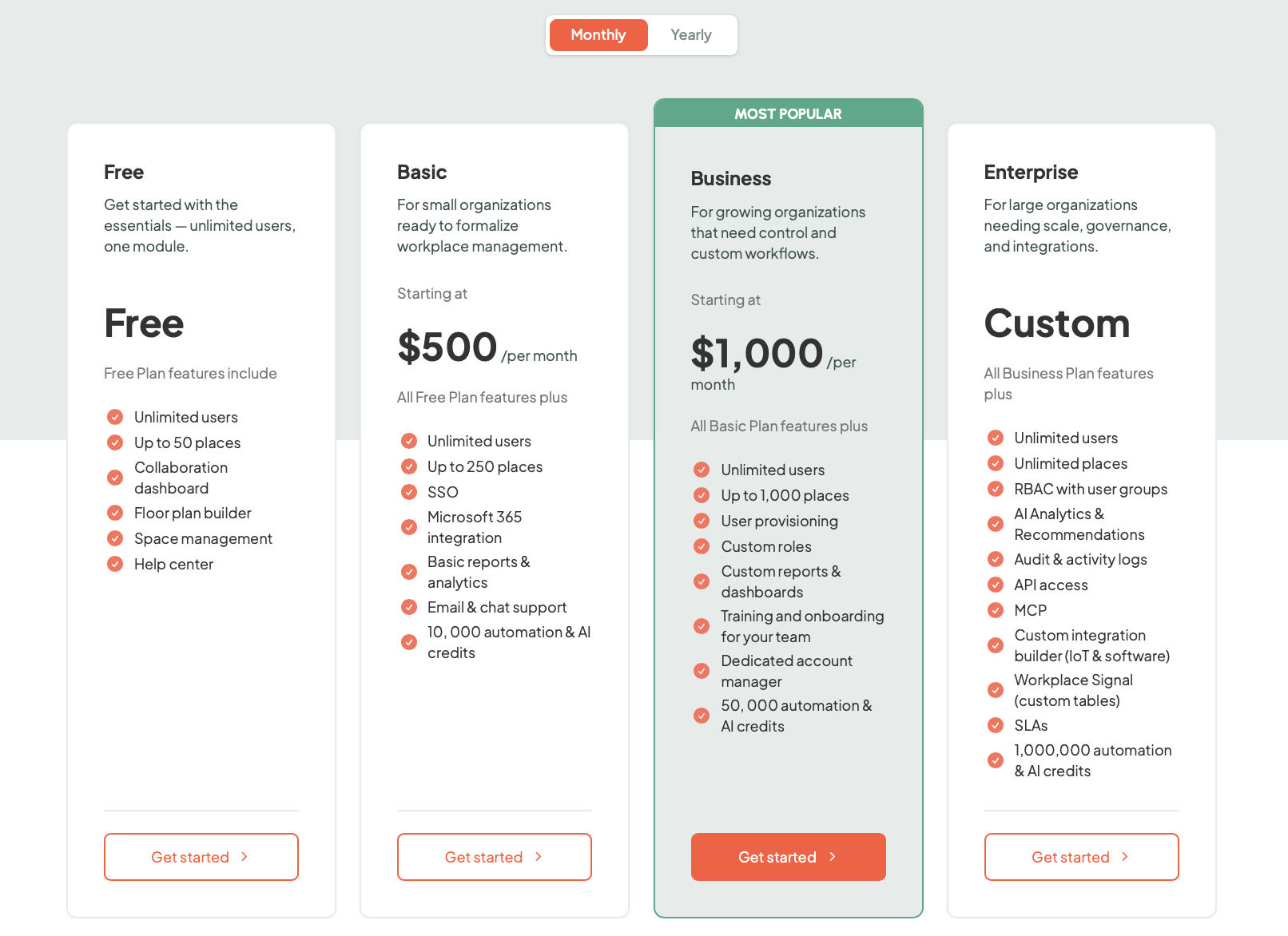
elia has a free plan, and its paid pricing is public and pretty straightforward."
It plans aret:
Free: $0
Basic: $500/month;
Business: $1000/month;
Enterprise: custom pricing.
Source: elia
That’s a very different shape from deskbird’s per-user model. elia prices by plan, based on the number of places (desks, rooms, lockers) in each tier, with unlimited users on every plan.
Best for
elia is a better fit for organizations that want to run the workplace. It suits mid-sized and larger companies where facilities, operations, IT, and office teams all have a stake in how the office works. For simple desk booking, it’s probably more platform than necessary. For teams that want stronger visibility into usage and office activity, it’s much easier to justify.
Who uses elia
elia has more than 100,000 users across roughly 200 organizations, with its strongest footprint in Canada (especially Quebec). Public customer names include Québecor, Beneva, Promutuel, Cima+, Lavery, Fasken, Agropur, Cascades, the Canadian Cancer Society, along with several public-sector and healthcare organizations.
What users like
People get it quickly: Users describe elia as intuitive, with a clean user interface that’s easy to adopt without much training.
The floor plan pulls its weight: The map comes up often because it makes booking more visual and less frustrating.
It helps people find each other: A lot of the day-to-day value comes from simple visibility into who’s coming in and where they’ll be sitting.
Microsoft fits naturally: Outlook and Teams seem to slot into the workflow without creating extra admin.
Support feels close: Quite a few reviewers talk about the team being responsive and improving the product over time.
Analytics go deeper: This is one of the clearest separators. elia feels stronger when teams want workplace insight, not just booking numbers.
Things to keep in mind
Best fit skews larger: Smaller teams with simple desk-booking needs may find elia more complex than they need.
Hardware changes the project shape: If a team wants the full occupancy and workplace intelligence side of the platform, hardware can become part of the budget.
A few UX details still come up: Most feedback is very positive, but there are occasional mentions of smaller UX or mobile refinements.
Feature
elia
deskbird
Platform
Workplace operations platform with software + hardware
Workplace management platform for hybrid offices
Best for
Teams that want booking, workplace intelligence, and office operations in one system
Teams that want broad hybrid workplace management with strong usability
Starting price
Free, or from $500/m
Free Starter, then from $6.50/active user/m
Pricing model
Plan-based
Per-user
Desk booking
Yes
Yes
Room booking
Yes
Yes
Visitor management
Yes
Yes
Interactive floor plans
Yes
Yes
Request management
Built in
Less central
Health & safety workflows
Built in
Not a visible core strength
Native hardware
Yes
No visible native hardware ecosystem
Occupancy tracking
Sensor-based, real occupancy data
More booking/check-in based
Analytics
Stronger workplace intelligence angle
More operational reporting angle
Microsoft Teams
Yes
Yes
Mobile app
Yes
Yes
Free plan
Yes
Yes
2. Dibsido: best for simple workplace bookings
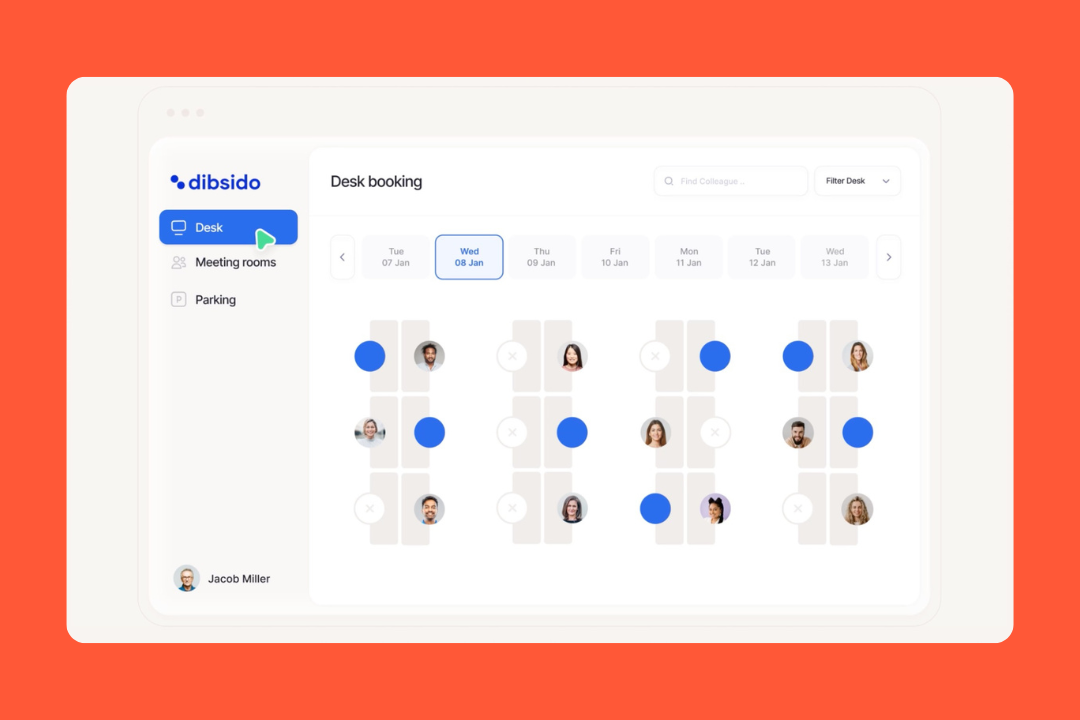
Dibsido is a workplace management platform for companies that want office coordination to feel low-maintenance. It covers desks, parking, meeting rooms, and a few front-desk basics in one place, but it doesn’t try to become a giant workplace operating system. That’s part of the charm.
Compared with bigger workplace platforms, Dibsido feels lighter and more practical, especially for teams that care less about workplace strategy decks and more about getting people booked into the right desk or parking spot without extra friction.
Key features
Dibsido keeps the scope focused, but the basics are covered well:
Desk booking: Employees can reserve desks in a few clicks, book from interactive maps, save favorite spots, check in with QR codes, and see who’s in the office. Admins can set booking windows, rules, permissions, and monthly credits.
Parking management: This is one of Dibsido’s strongest areas. Teams can manage assigned spots, waiting lists, license plates, EV spaces, check-ins, and booking limits.
Meeting room booking: Room booking includes calendar sync, QR check-ins, automatic no-show release, tablet screens, and map-based room selection.
Interactive maps: Maps are a big part of the product experience. Teams upload floor plans, place desks, rooms, or parking spots, and let employees book visually.
Front-desk tools: Dibsido also includes basic guestbook features, package tracking, incident reporting, and office notices.
Integrations and mobile access: It connects with Microsoft 365, Outlook, Slack, Google Workspace, and offers strong Microsoft Teams integration for everyday booking workflows. It also has iOS and Android mobile apps for booking on the go.
Pricing
Dibsido is refreshingly transparent. There’s a 14-day free trial with no credit card required, plus free entry-level plans for teams of up to 20 users.
Paid pricing starts at:
Desk booking: from $1.9 per user/month
Parking booking: from $4.5 per parking spot/month
Room booking: from $6 per room/month
All-in-One: from $2.57 per user/month
There are also add-ons for things like front-desk tools, cars, and carpools. For smaller teams, the entry point is pretty painless.
Best for
Dibsido works best for teams that want desks, rooms, and parking in one place without adopting a heavyweight workplace platform. It’s a good fit for smaller and mid-sized offices, teams still figuring out their hybrid setup, and companies where parking is a real day-to-day issue. If the priority is ease and something people will actually use, Dibsido has a strong case.
Who uses Dibsido
Dibsido appears to have its strongest traction in Europe, particularly among smaller companies and mid-market teams. From the customer mix and product shape, it looks relevant for office coordinators, workplace admins, and lean operations teams trying to bring a bit more structure to hybrid office life without turning the rollout into a full IT project.
What users like
It’s extremely user-friendly: Setup is quick and employees tend to figure it out right away.
Parking gets handled well: Waiting lists, assigned spots, fairer access, and interactive parking maps come up often enough that parking feels like one of the strongest cards.
The visual side helps: People like being able to see the office or parking layout visually instead of second-guessing.
The price is hard to ignore: A free plan for up to 20 users and low paid entry points make Dibsido unusually accessible.
It feels like good value: The pricing stays light without the product feeling stripped down.
Things to keep in mind
The scope is narrower: Dibsido focuses on desks, parking, rooms, and light front-desk workflows. Teams looking for deeper workplace operations tools may want more.
Analytics aren’t the main story: Reporting is there, but this is still much more booking-first than insight-first.
Enterprise depth is lighter: There’s an Enterprise tier, but more complex rollouts may still lean toward vendors built for larger environments from the start.
Visitor tools are light-duty: Guestbook features, package tracking, and arrival alerts are useful, but more advanced reception workflows may need something else.
3. Kadence: best for people-first hybrid coordination
Kadence doesn’t really act like a desk-booking tool that picked up a few extra features. It feels more like a hybrid coordination platform built around one question: how do you make office days actually work?
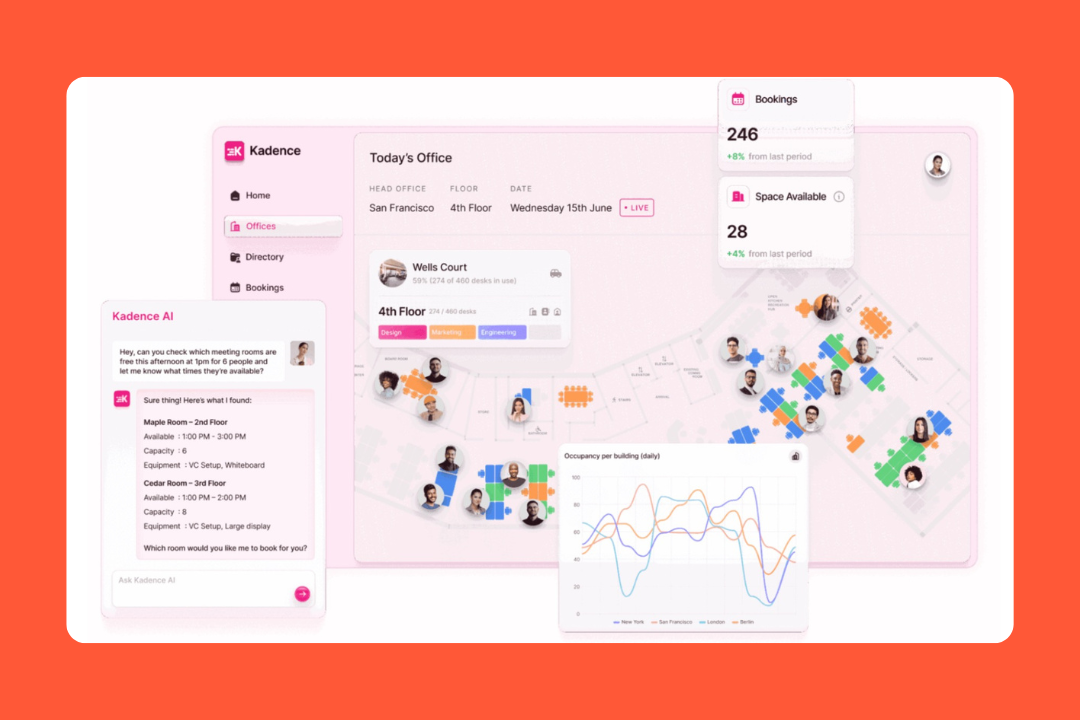
The product still covers the expected stuff (desks, rooms, floor plans, analytics, visitor management, integrations), but the centre of gravity is different. Kadence puts more emphasis on team overlap, attendance signals, automatic check-ins, and planning office time intentionally instead of leaving it to chance. That gives the whole product a slightly different vibe.
Key features
Kadence is broad, but a few features do most of the work:
Desk and room booking: Employees can book desks and meeting rooms through interactive floor plans, with support for neighborhoods, assigned seating, flexible bookings, quick booking, and calendar-connected room scheduling.
Team coordination: Users can see who’s coming in, follow teammates, plan team days, get smart suggestions, and book near colleagues.
Analytics and insights: Kadence includes workplace analytics, exports, attendance tracking, occupancy signals, and higher-end reporting through Insights Plus.
Automatic check-ins: With Kadence Agent and Kadence Sense, the platform can automate check-ins using office network signals and occupancy logic.
Visitor management: Kadence goes a bit further here than many desk-booking tools, with pre-registration, QR check-in, kiosks, badge printing, host notifications, and NDAs.
Integrations and in-workflow access: Kadence connects with Microsoft Teams, Slack, Outlook, Google, SSO providers, HRIS tools, ticketing systems, and API workflows.
Pricing
Kadence doesn’t make pricing easy to pin down.
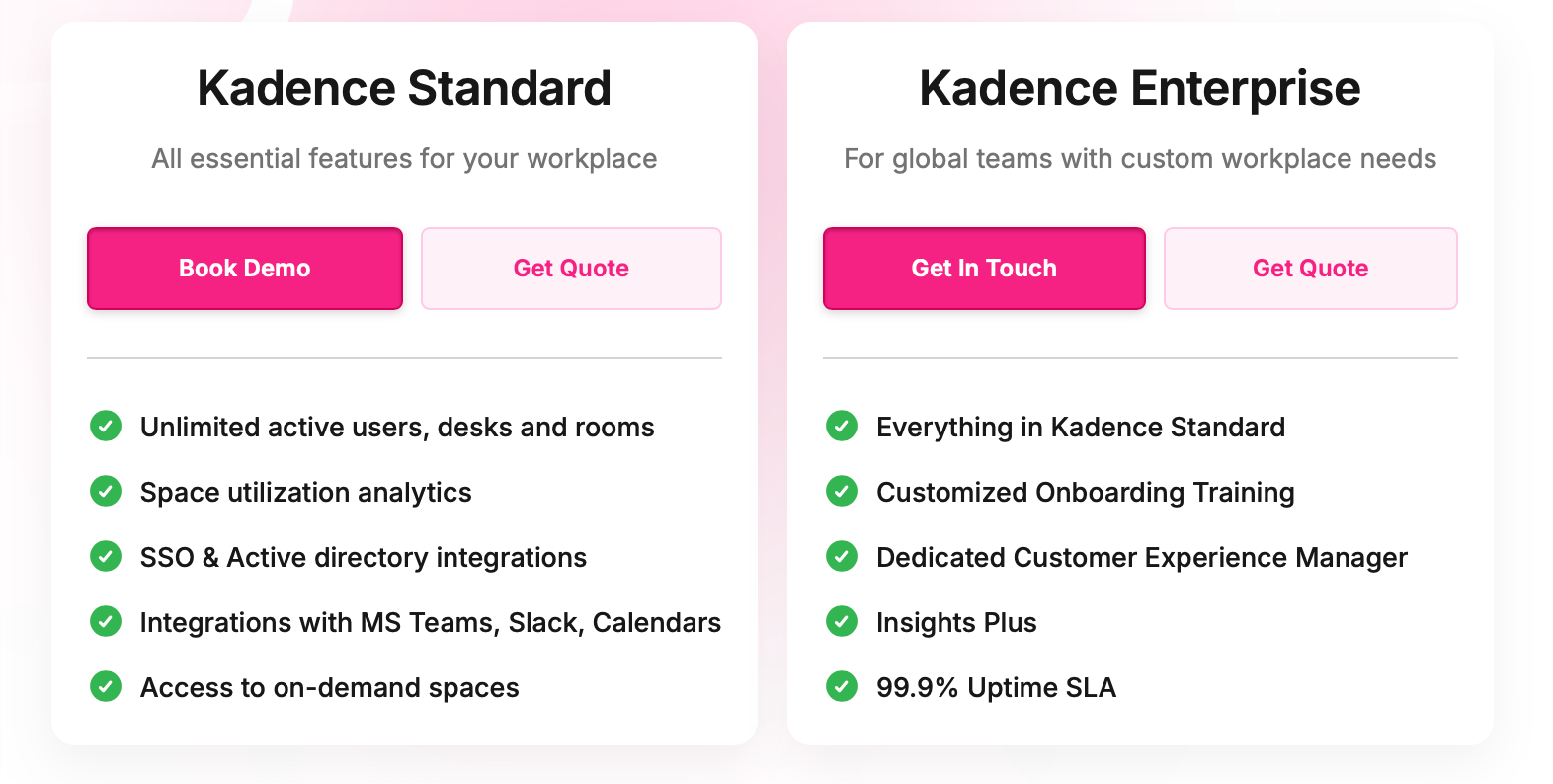
The site packages the product into Standard and Enterprise tiers, and it gives a decent sense of what sits in each tier. What it doesn’t give you is simple public pricing. For most buyers, the real number starts with a demo.
Source: Kadence
That’s common in enterprise software, but it does make quick side-by-side comparisons harder.
Best for
It’s strong for hybrid teams that care about coordinating people and for workplace, facilities, or real estate teams that need more than a nice floor map. If the goal is to make office days feel intentional, track what’s happening onsite, and use that data for larger decisions later, Kadence starts to look pretty compelling.
Who uses Kadence
Kadence supports hundreds of thousands of users globally. Customer stories include MOO, Karger, GWI, RCS England, Wavex, Softchoice, and Denbighshire County Council. It lands across tech, education, healthcare, government, and professional services.
What users like
The interface lands well: People describe Kadence as easy to use and simple to roll out without a lot of hand-holding.
The visual setup makes a difference: Visibility into where colleagues are sitting and who’s onsite comes up constantly.
Slack and Microsoft fit naturally: Teams, Outlook, Slack, and calendar integrations seem to play well with daily routines.
Setup feels lighter than expected: Several users mention that rollout was relatively quick, even if floor plans or advanced settings took longer.
Support gets good marks: The customer support team, account management, and implementation help all show up well across reviews.
Things to keep in mind
Pricing isn’t very transparent: You can understand the product structure, but the actual cost usually requires a demo.
Auto check-in isn’t flawless: Kadence Agent and automated check-ins are useful, but some users report occasional setup friction or reliability issues.
Reporting still has room to improve: Analytics are improving, but some users still want easier exports and less fiddly reports.
Some deeper workflows are more enterprise-shaped: Calendar sync, visitor workflows, SSO, directory connections, and advanced admin settings can take more effort in larger environments.
4. Ronspot: best for parking-heavy workplaces
Ronspot tells you what it cares about pretty quickly. Sure, it does desks and meeting rooms and wants to be part of the broader workplace management conversation. But unlike a lot of competitors that treat parking like a side tab, Ronspot keeps making it front and center.
That shifts the whole feel of the product. It comes across more like a workplace booking system built around the real problem: who gets the parking spot, who showed up, and how to stop admins from spending their mornings untangling it all.
Key features
Ronspot covers the usual booking categories, but a few areas get more attention:
Desk, room, and parking booking: Employees can reserve desks, meeting rooms, and parking spaces from web, mobile, or Microsoft Teams, with interactive maps, calendar connections, recurring meetings, and support for visitor bookings.
Parking management: It supports booking windows, access rules, waitlists, violations, vehicle matching, EV and accessibility spaces, credits, and integrations with barriers, ANPR cameras, swipe cards, and keypad systems.
Interactive maps and booking controls: Admins get detailed control over how spaces work. Custom maps, tags, user restrictions, booking priorities, group permissions, and timed rule changes are all part of the toolkit.
Check-ins and no-show handling: It supports QR check-in, Wi-Fi verification, access-control check-in, reminders, and auto-release of spaces when someone doesn’t show.
Analytics and workplace data: Its analytics can combine booking data with access control, Wi-Fi, HR systems, and occupancy sensors to give teams a fuller picture of attendance and space utilization.
Admin tooling and customisation: Groups, credit systems, approval flows, waitlists, notification templates, admin alerts, and booking questions give teams a lot to work with.
Pricing
Ronspot’s pricing is public in structure, but not in numbers. The model is based on the number of spaces, with a minimum of 20 spaces, annual billing, and a one-time setup fee. The core subscription includes most features, with additional modules under Ronspot Connect.
But if you want the exact price, you still need to talk to sales.
Best for
Ronspot is a good fit for companies that need parking to be managed properly. It makes more sense for teams where shared resources need tighter rules and better verification of who showed up. It also has a clear case for facilities teams and organizations that want occupancy data tied to more than booking alone.
Who uses Ronspot
Ronspot’s case-study mix includes names like Eli Lilly, Siemens, MongoDB, Cardinal Health, Metso, Fenergo, SSE Airtricity, and multiple public-sector organizations. It also focuses on regulated environments, including government departments and other platforms where security and verified attendance matter.
What users like
It’s easy to get people using it: Ronspot tends to be one of the easier platforms to roll out without a long adjustment period.
Parking is where it shines: Credits, waitlists, violations, EV spaces, accessibility spots, visitor parking, and parking-specific rules show up often in feedback.
It gives teams a picture of what’s happening onsite: The data becomes more useful when bookings are tied into Wi-Fi, access control, HR systems, or sensors.
Support seems to matter: Users frequently mention responsive support during rollout and after launch.
Security is taken seriously: Ronspot includes ISO 27001:2022 certification, SSO support, SAML, Entra ID, Okta, and EU-based hosting.
Things to keep in mind
Pricing isn’t fully transparent: You can understand the model, but not the starting price without contacting sales.
The admin side can get deep: That’s great if you want control. Less good news if you wanted something feather-light.
Analytics improve with integrations: The stronger workplace-data angle shows up when Ronspot is tied into Wi-Fi, access control, HR data, or sensors.
Some occasional glitches still come up: Reviews mention periodic technical issues, though support seems to resolve them quickly.
5. Officely: best for Slack- and Teams-first workplaces
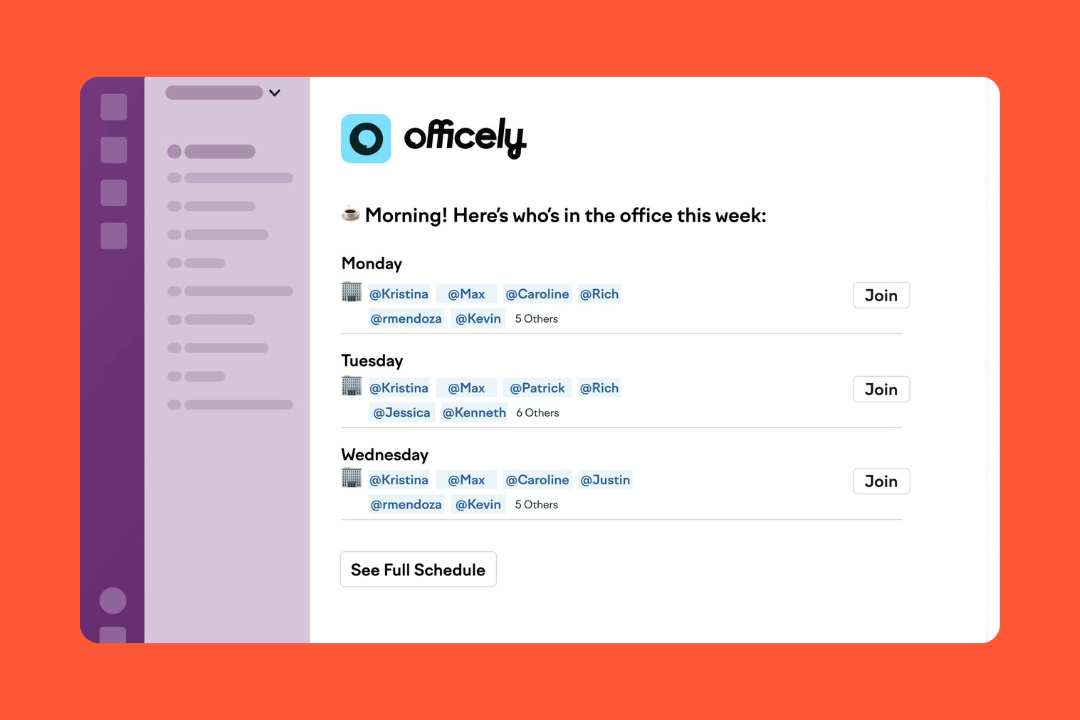
Officely starts with a simple idea: if workplace tools live in a separate app, people forget about them. So instead of building another platform employees have to open, Officely puts desk booking, room reservations, attendance, and office planning directly inside Slack or Microsoft Teams.
That changes the whole dynamic. Less platform rollout, less training, far fewer “who’s in today?” messages, and a much better shot at getting people to use it.
Key features
Officely is strongest when it reduces friction instead of adding process:
Desk booking in Slack and Teams: This is the heart of the product. Employees can reserve desks, set recurring routines, check in when they arrive, and see who else is coming in without leaving chat.
Hybrid coordination: Officely add tools like office broadcasts, favorite coworkers, recurring team days, attendance visibility, and notifications.
Meeting room booking: Meeting Rooms by Officely lets users search and reserve rooms from Slack or Teams, with room tags, capacities, filters, and booking controls.
Parking management: Through Parkly, Officely covers office parking, with per-space pricing, booking rules, car registration, waitlists, and simple parking allocation.
HRIS and calendar integrations: Officely connects with Slack, Teams, Azure AD, Google Calendar, Outlook, and a range of HR systems.
Pricing
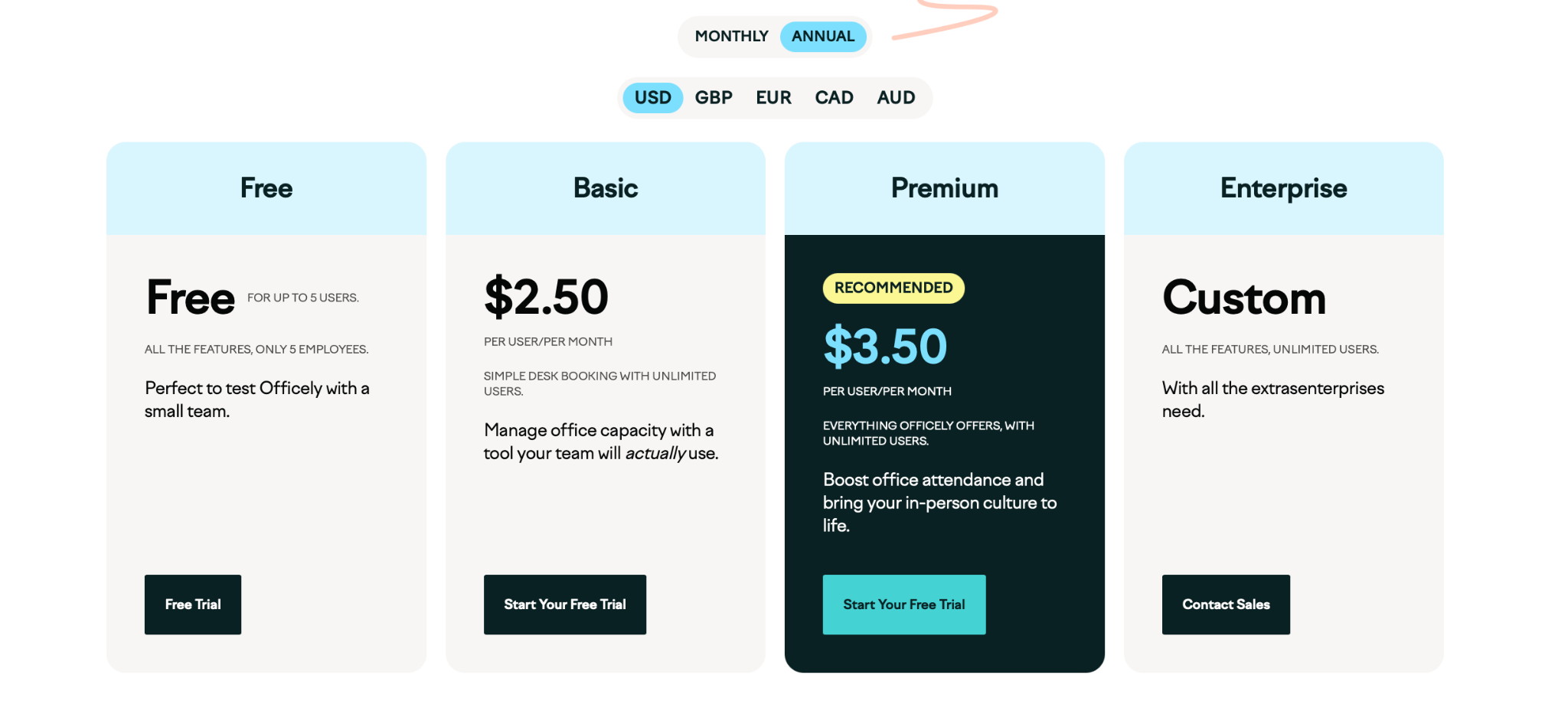
Officely is one of the easier tools in this category to price early. Right now it offers:
Free: free for very small teams of up to 5 users
Basic: $2.50 per user/month
Premium: $3.50 per user/month
Enterprise: custom pricing
Source: Officely
Add-ons have their own pricing:
Meeting Rooms: $12 per space/month
Parkly: $15 per space/month
That makes early comparison a lot less painful than the usual “book a demo to learn the price” routine.
Best for
Officely gets interesting when your team already lives in Slack or Teams. That is when the whole thing clicks: desk booking, room reservations, and office planning start feeling like part of the normal workday. If your company already runs in chat, Officely can remove a surprising amount of friction. If it doesn’t, a lot of the magic disappears with it.
Who uses Officely
Officely helps over 15,000 employees every month and is used by 500+ companies. Public examples include CloudTalk and Adaptavist.
What users like
It’s easy to get rolling: Teams often mention that setup and onboarding are lighter than with traditional workplace platforms.
The Slack integration actually matters: This isn’t a gimmick. Being able to book desks and check attendance inside a familiar tool makes adoption much easier.
It helps people coordinate office days: Seeing who plans to come in helps teams avoid empty offices or overcrowded days.
Recurring routines remove weekly admin: Employees can set regular office days once and stop thinking about it.
Support seems to punch above its weight: Fast responses, helpful onboarding, and willingness to solve odd setup requests are a meaningful part of the product experience.
Things to keep in mind
Customization has limits: Officely is deliberately simple, but that also means some teams will run into ceilings around admin flexibility and workflow customization.
Some settings are harder to find: A few users mention that certain admin controls and analytics aren’t always obvious in the interface.
Reporting is useful, not lavish: Officely offers analytics and attendance insights, but the tone of the feedback suggests they’re more practical than deeply customizable.
It works best if your team already uses Slack or Teams heavily: That’s really the whole point. If chat isn’t central to how your company works, the advantage is smaller.
6. Whatspot: best for simple shared-space booking
Sometimes you just need people to stop double-booking rooms, stop fighting over desks, stop guessing if the parking lot is full, and retire the cursed spreadsheet that somehow runs the office. That’s much closer to Whatspot’s energy.
It handles meeting rooms, desks, parking, and other shared resources in one system, but it also stretches beyond the standard office use case. Whatspot happily serves coworking spaces, schools, community centers, and other places that need external booking as much as internal booking.
Key features
Whatspot’s for you when the goal is to make shared spaces bookable without overcomplicating things:
Rooms, desks, parking, and more: The structure is flexible. Offices can use it, but so can coworking spaces, schools, studios, or public venues.
Public and guest booking: This is where Whatspot stands out. Guests can book spaces without creating an account, public booking pages can be shared directly, and the booking flow can even be embedded on a website.
Booking rules and approvals: Admins can set permissions, require approval, apply quotas, and control who can view or reserve certain spaces.
QR booking and mobile access: QR codes allow quick reservations. There are mobile apps for iOS and Android, and check-in rules can automatically release unused bookings.
Interactive maps and floor plans: Whatspot now includes self-serve floor plan tools, letting teams create interactive layouts without relying on support.
Pricing
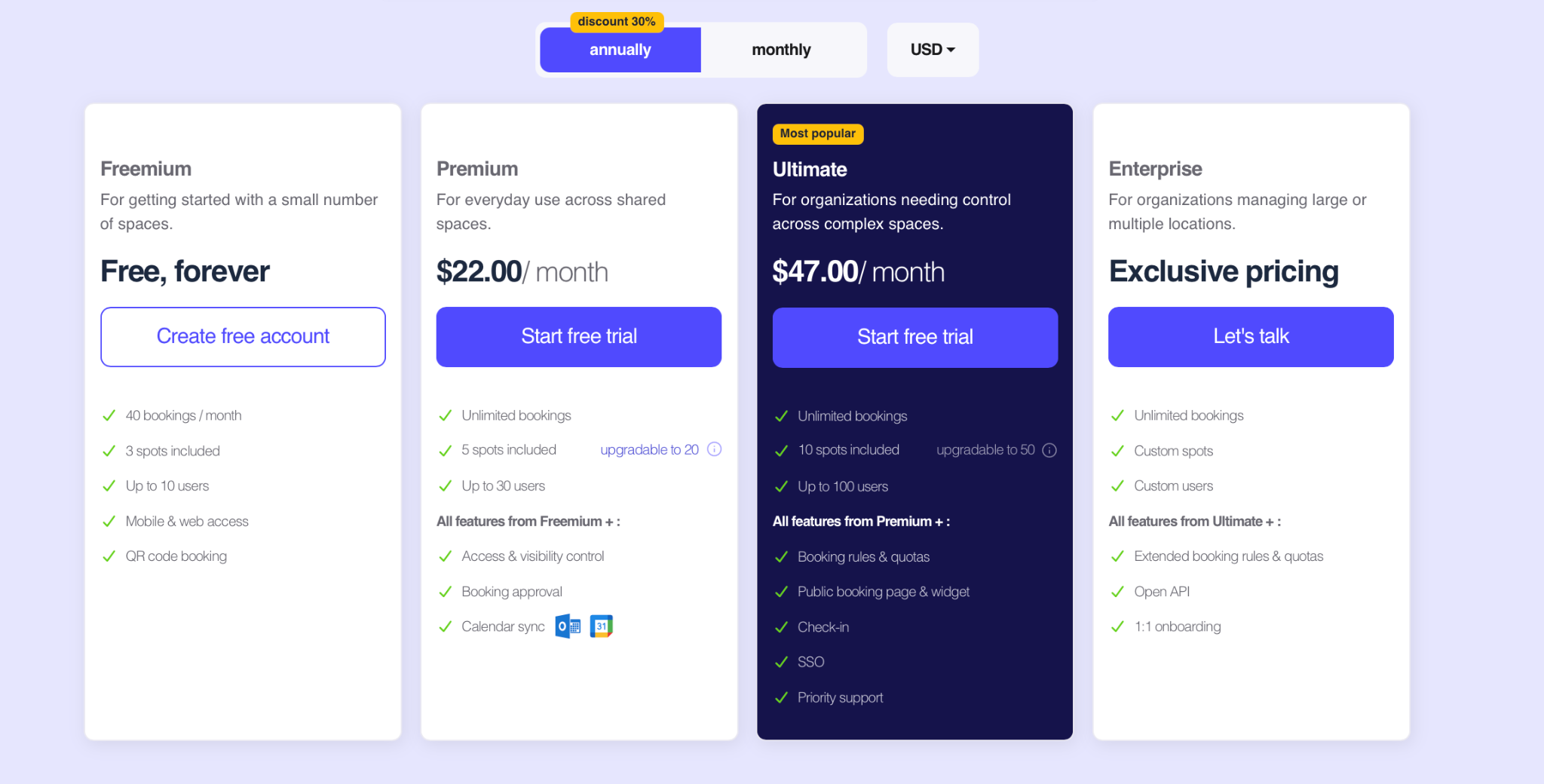
Whatspot is open about pricing. It currently offers:
Freemium: free forever, with 3 spots, up to 10 users, and 40 bookings per month
Premium: $22/month, with 5 spots included and up to 30 users
Ultimate: $47/month, with 10 spots included and up to 100 users
Enterprise: custom pricing
Source: Whatspot
Interactive maps are an add-on at $16.50 per month per floor. The pricing model is based on spots rather than users, which can work well for smaller organizations managing a limited number of shared spaces.
Best for
Whatspot is a great option for organizations that want a low-fuss way to book rooms, desks, parking, or other spaces without buying a more elaborate workplace platform than they need. It’s also a good match for teams that value straightforward pricing and quick setup.
Who uses Whatspot
Whatspot is used by 1,500+ spaces and offices and supports teams in 15+ languages. Customer stories skew toward smaller offices, coworking spaces, schools, nonprofits, and shared facilities rather than giant enterprise headquarters.
What users like
It’s very easy to get running: Setup speed is one of the most consistent positives. Teams describe it as quick to learn and fast to launch.
The simplicity is intentional: Whatspot focuses on doing a few things clearly instead of trying to cover every adjacent workflow.
Support gets a lot of praise: Demos are helpful, responses are quick, and several reviewers mention the team being receptive to feedback.
It’s good value for money: The free tier is genuinely usable, and paid plans stay relatively affordable compared with heavier workplace software.
Public booking is a big plus: Organizations that need people outside the company to reserve rooms or spaces seem to get a lot out of this.
Things to keep in mind
Simplicity has limits: A few users say it covers most of what they need, not every edge case they can imagine.
The platform has evolved over time: Calendar sync, mobile apps, check-in, and self-service floorplans all look stronger now than they did in older reviews, which is good news, but it also tells you the platform is still evolving.
The integrations are practical but not huge: Whatspot connects with Google Calendar, Microsoft 365 calendars, and Teams, but the ecosystem isn’t as broad as some larger platforms.
Some features sit in higher tiers or add-ons: Pricing is public, but buyers should still watch where plan limits land, especially for things like interactive maps or advanced controls.
7. Skedda: best for configurable space governance
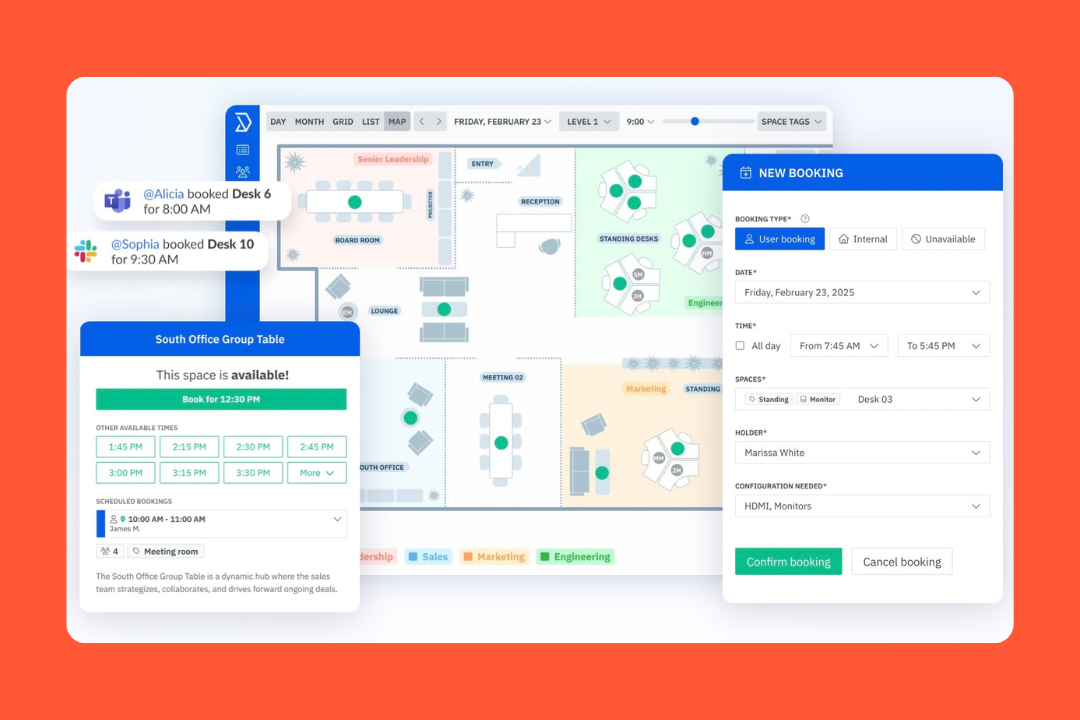
Skedda started with a broader idea: spaces that need booking. That still shows in the product today. It handles desks and meeting rooms, but it’s just as comfortable with parking, labs, wellness rooms, and other spaces that don’t fit neatly into a corporate floor plan.
That background shapes the whole platform. Skedda feels less like a collaboration app and more like a system built to stop shared spaces from turning into a mess. The real draw is control: rules, permissions, approvals, check-ins, and enough structure to keep scarce spaces fair.
Key features
Skedda gets more compelling the closer you look at the mechanics:
Desk, room, parking, and resource booking: It’s not tied to a single office scenario. That flexibility is one reason it appears across workplaces and specialized environments.
Interactive floor plans and neighborhoods: Users can book directly from a visual map, see what’s available, and understand the layout without decoding a long list of room names.
Rules, roles, and booking controls: Admins can configure booking windows, quotas, buffer times, cancellation policies, custom fields, approvals, access rules, and recurring reservations.
Check-ins and occupancy tracking: Skedda supports QR check-in, mobile check-in, reminder-based check-in, auto-release for no-shows, and Wi-Fi-based auto check-in.
Visitor management: Visitor workflows include invitations, self check-in, host notifications, and oversight for admins. This capability is available as an add-on rather than part of every plan.
Analytics and reporting: The Insights dashboard covers utilization, peak booking times, top users, popular spaces, and historical trends.
Integrations: Skedda connects with Microsoft 365, Outlook, Teams, Google Workspace, Slack, Zoom, SAML SSO providers, SCIM workflows, Zapier, webhooks, and more.
Pricing
Skedda is more open about pricing than many competitors.
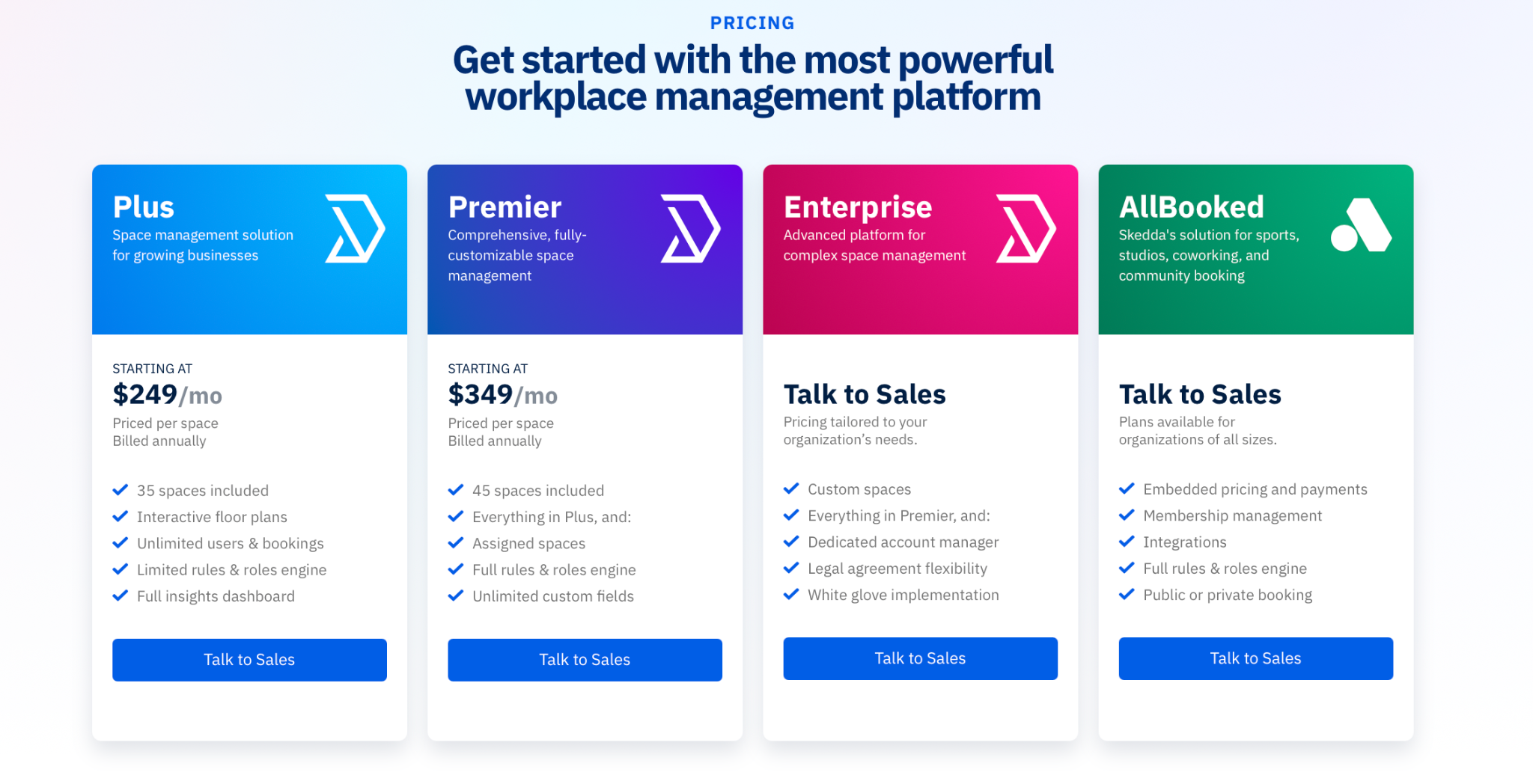
Workplace plans currently start at:
Plus: $249/month
Premier: $349/month
Enterprise: custom pricing
Pricing is based on spaces rather than users. Plus includes 35 spaces, while Premier includes 45. Both allow unlimited users and bookings. That structure can work well for organizations with many employees but a limited number of bookable spaces.
Source: Skedda
Best for
Skedda fits best in offices that aren’t just rows of desks and a few meeting rooms. If your environment includes gyms, wellness rooms, sports facilities, maker spaces, labs, or other specialized areas that need booking rules, it starts to stand out more. It’s also a good match for organizations with a broader mix of people and spaces.
Who uses Skedda
Customer stories span financial services, higher education, research, healthcare, nonprofits, consulting, manufacturing, and technology. Examples include Aon, Brown Bag Films, Boston University Questrom School of Business, York University, Toronto Metropolitan University, Lighthouse Credit Union, and Toyota Connected EU.
What users like
Admins get real control: Skedda earns points with administrators because it handles complex booking rules, permissions, and policies without falling apart.
It handles a wide range of spaces: Skedda is one of the better options here for workplaces booking more than desks and meeting rooms.
Pricing is relatively clear: Skedda’s pricing is public and based on spaces rather than users, which gives buyers a much better starting point than the usual demo-first routine.
Mobile booking works well: The mobile app helps when people need to book spaces quickly instead of sitting at a laptop deciphering a floor plan.
Support gets a lot of love: Users frequently mention responsive support, helpful onboarding, and detailed guidance during implementation.
Things to keep in mind
Setup can take some thinking: Skedda’s flexibility means admins usually spend time defining rules, user groups, and space configurations.
Costs depend on space count and add-ons: Pricing is public, but the final cost still depends on the number of spaces, the chosen tier, and any additional features.
Analytics refresh periodically: Insights data updates every few hours rather than in real time.
Some admin tools could be smoother: User feedback occasionally mentions improvements around notifications, customization limits, and map editing.
How to choose the right deskbird alternative
When comparing deskbird alternatives, a few factors usually matter most.
Match features to your workplace needs
Most platforms cover the basics: desks, meeting rooms, and calendar integrations. The real differences show up once workplaces become more complex.
integrations with Microsoft 365, Google Workspace, Slack, or HR systems
Evaluate the pricing model
Workplace software pricing varies more than it first appears.
Some platforms charge per user, while others price per desk, per room, or per plan tier. For hybrid companies where many employees share a smaller number of desks, the pricing model can significantly affect total cost.
When comparing tools, it helps to look at:
how pricing scales as headcount grows
whether key features sit in higher tiers or add-ons
whether contracts require annual commitments
whether transparent pricing is available before speaking with sales
Test critical workflows during demos
A feature list rarely tells you how a platform actually feels to use.
During trials or demos, test the everyday workflows employees will rely on:
booking desks or meeting rooms
scheduling recurring meetings
checking in from mobile devices
preventing double bookings
viewing real-time availability on floor plans
syncing bookings with Outlook or Google Calendar
Check integrations with your existing tools
Workplace platforms rarely operate in isolation. Most organizations expect them to connect with existing systems.
Common integrations to evaluate include:
Microsoft Teams and Outlook
Google Workspace and Google Calendar
Slack collaboration workflows
identity systems such as SSO or Entra ID
HR systems or directory integrations
API access for custom workflows
Ultimately, the right deskbird alternative is the one that solves your main workplace problem while remaining easy for employees and administrators to use every day.
Final verdict
deskbird is a strong all-rounder, but not every workplace needs the same kind of platform.
For simpler booking needs, there are lighter and cheaper options on this list. For more specialized needs, tools like Ronspot, Officely, and Skedda each have a clear angle.
But for organizations that want stronger workplace visibility and operational workflows alongside booking, platforms like elia are often worth evaluating more closely. It combines desk and room booking, visitor management, workplace analytics, and multi-location support with transparent pricing, without requiring custom quotes or long contract commitments.
If you want to see how it works in practice, you can book a live demo of elia and explore interactive floor plans and workplace analytics dashboards firsthand.
Tamara Zhostka
is a Content Marketing Specialist at elia. With 10+ years in content marketing, she writes about workplace trends and the tools that help teams work smarter. Part strategist, part storyteller, Tamara brings equal amounts of data, creativity, and a little Moon Prism Power to every piece she creates. 🌙✨
Share
Contents
Subscribe to our newsletter
Subscribe to the elia newsletter for exclusive product updates and industry best practices. You can unsubscribe at any time.
Thank you! You're subscribed.
Oops! Something went wrong while submitting the form.
Frequently Asked Questions
Answers to Your Common Queries
What is the best deskbird alternative?
Which deskbird competitors offer free plans or trials?
Which deskbird alternatives offer better analytics and workplace utilization reporting?
What’s the best deskbird alternative for managing multiple office locations?
Are there deskbird alternatives that work entirely inside Slack or Teams?
Does deskbird require an annual contract or can I pay monthly?
Which platforms integrate natively with Microsoft Teams and Slack for desk booking?
What's the difference between per-user pricing and resource-based pricing for desk booking software?
How does per-desk pricing compare to per-user pricing when I have more employees than desks?




.png)
.png)
.png)