5 Greetly Alternatives That Do More Than Just Check People In
Tamara Zhostka
Content Marketing Specialist
–
Last updated on Oct 14, 2026
Greetly does what it’s supposed to do: it acts as an all-around digital receptionist for offices. If all you want is a standalone visitor management system, it does the job.
But some companies need more than that. The front desk just doesn’t operate in a bubble. When a visitor comes in, they might need a meeting room, Wi-Fi access, delivery handling, or a host who’s already trying to coordinate the rest of their office day.
That’s why a lot of teams start looking beyond single-purpose lobby apps.
So here’s a rundown of Greetly alternatives that go beyond basic visitor sign-in and connect the front desk to the rest of the workplace.
TL;DR: Best Greetly alternatives at a glance
Tool
Best for
What sets it apart
elia
Visitors, desks, and rooms in one system
Workplace platform with floor plans, analytics, and service workflows
Envoy
Enterprise security and compliance
Deep visitor controls and enterprise integrations
Eptura Visitor
Multi-site consistency
Standardized visitor processes and centralized oversight
Robin
Analytics and hybrid coordination
Visitor management plus desks, rooms, and workplace data
Archie
Flexible all-in-one workplaces
Visitors, booking, access, and transparent pricing
What is Greetly, exactly?
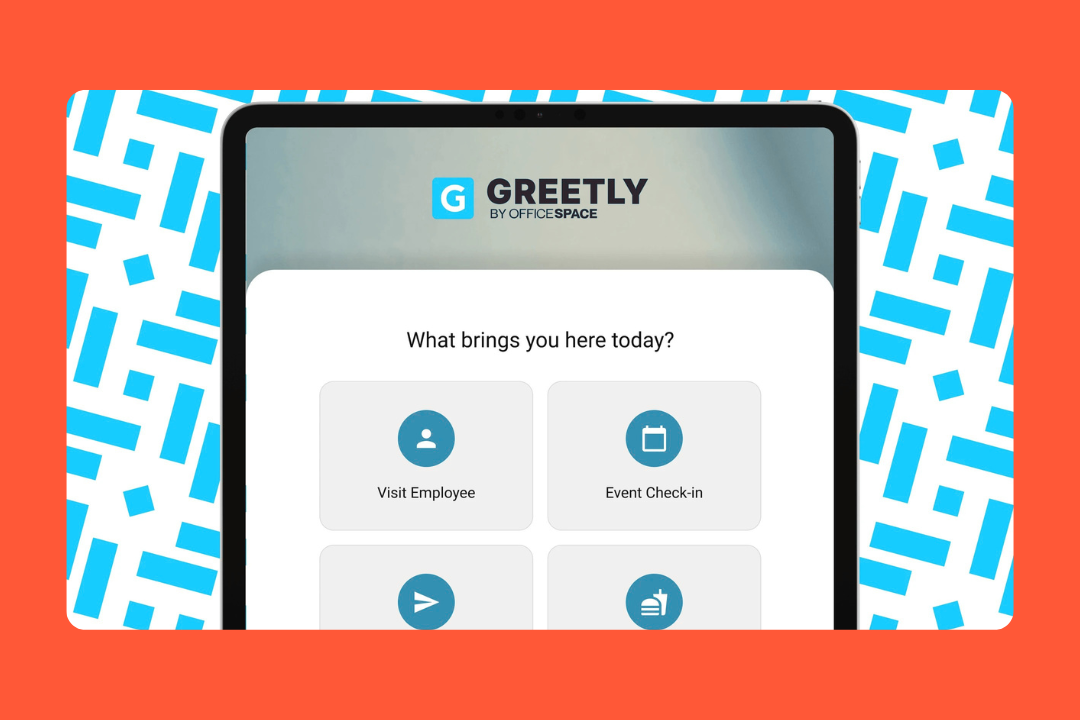
Greetly is visitor management software for offices that want to automate the entire front-desk experience, rather than just tracking visitors.
Sure, it covers the basics like NDAs and host notifications, but Greetly’s real goal is to remove the interruptions of the front desk. It proactively handles deliveries and employee check-ins, so teams can run a professional lobby without having to keep a dedicated staff member on hand at all times.
Key features
Check-in flows: You can set up different paths for different people. Job candidates see one set of questions, while regular vendors or delivery drivers see another.
Notification engine: It can ping hosts via Slack, Microsoft Teams, text, email, or even an auto-dialer if they're not checking their messages.
QR check-in: Visitors can scan a code and complete the sign-in process on their own phone, keeping the lobby hands-off.
Digital mailroom: Greetly logs deliveries, captures package photos, and automatically notifies recipients when a package arrives.
E-signatures & compliance: You can require visitors to sign NDAs or safety waivers right on the screen before letting them in.
Security features: The platform includes visitor logs, watchlists, blacklist controls, badge printing, retention settings, and emergency evacuation tools.
Greetly pricing
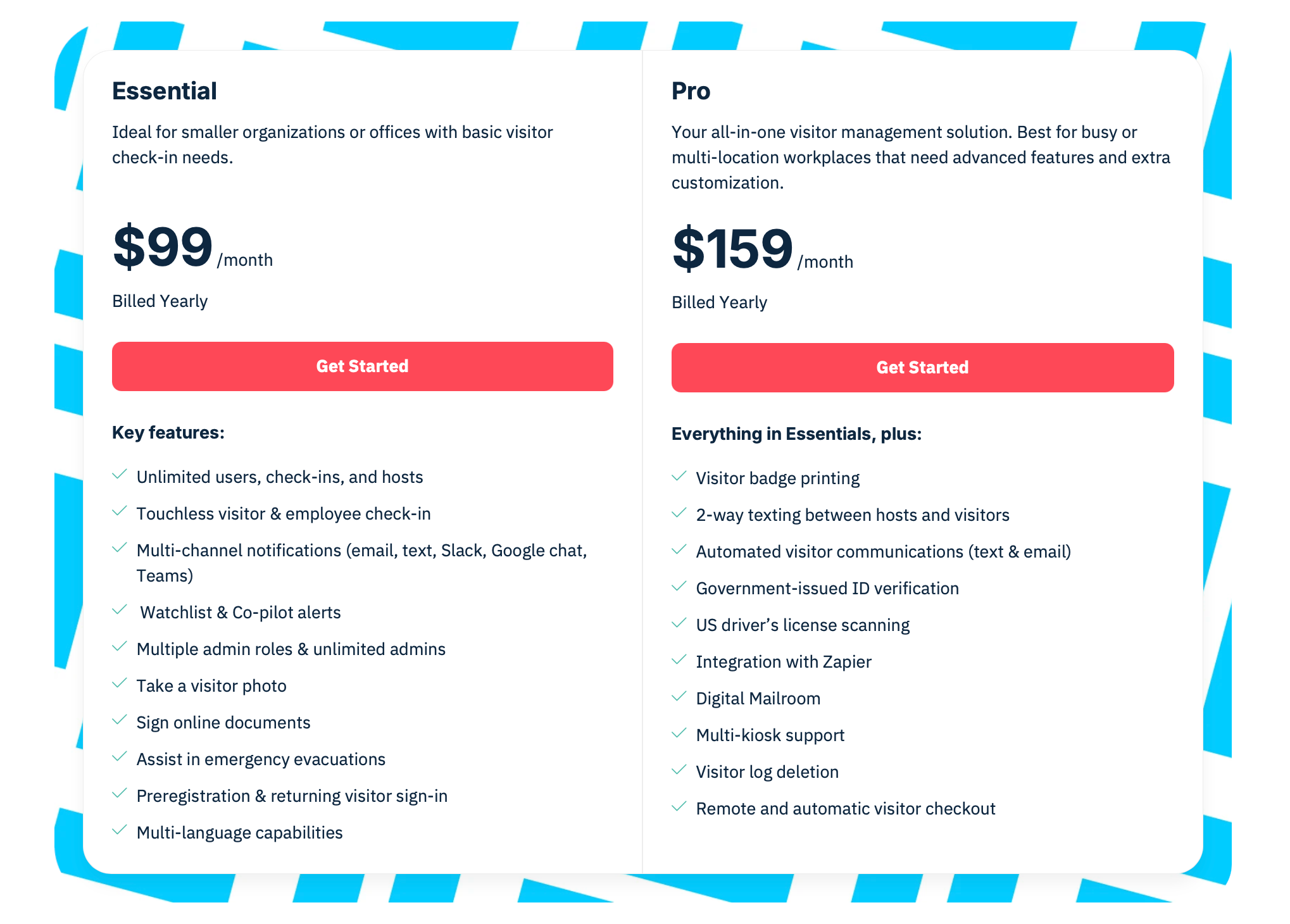
Greetly is pretty upfront about its pricing, with two paid plans listed on its website:
Essential: $99/month (billed yearly)
Pro: $159/month (billed yearly)
That said, the real fit depends on what you need. Some features are Pro-only, hardware is separate, and the more advanced setup can involve tablets or additional configuration work.
Source: Greetly
What Greetly reviews say
Admin time-saving: It’s great at taking the busywork away from office managers or assistants who’d usually have to stop what they're doing to answer the door.
Flexibility: You can change the buttons and the look of the app yourself, no need to call a developer.
Reliable mailroom: Teams with a high volume of deliveries love that the package management is built-in rather than being a separate, pricey add-on.
Helpful automation: Host notifications and digital records seem to reduce front-desk interruptions and make visitor handling less manual.
Ease of use: The check-in experience feels intuitive and simple to understand, which matters a lot in busy lobbies or visitor-facing workplaces.
Why companies look for Greetly alternatives
Greetly is strong at reception automation. If you just want a polished digital receptionist and fewer front-desk interruptions, it’s a great choice.
Where teams start looking elsewhere is when visitor management stops being a front-desk project and becomes a workplace systems project.
Some common themes show up most often among users:
They want visitors connected to the rest of the office: Greetly handles arrivals well, but some teams want visitors, meeting rooms, desks, and office activity to live in one system instead of being scattered across separate tools.
They want more workplace visibility: Greetly does a good job with visitor logs and front-desk records, but companies that care a lot about occupancy, usage trends, hybrid coordination or space analytics often want a platform with deeper workplace reporting.
They want less hardware friction: Because getting tablets, kiosks and badge printers up and running is a big part of the setup process, some teams are looking for alternatives that feel lighter to deploy or more connected to the overall workplace stack.
They want a different device or platform fit: Greetly does support some Android tablets, but it still feels like it's been geared more towards the iPad from a customer perception standpoint.
How we went about evaluating Greetly alternatives
We took the same approach a real buyer would: by looking through product pages, pricing tables, help-center docs, integration guides, customer stories and recent user reviews on Capterra and G2.
Then we held those sources up against each other to see which products look strong in practice, where their features are a bit thinner, and where the pricing or setup gets complicated once you look past the homepage.
For each alternative, we focused on the following core areas:
Visitor management features: Check-in flows, preregistration, returning visitors, QR or touchless check-in, badge printing, and digital agreements.
Reception and workplace operations: How they help reduce front-desk noise with host notifications and emergency support.
Compliance features:Visitor logs, retention settings, permissions, signed documents, ID scanning and exportable audit trails.
Customization and flexibility: How they let you create different paths for different types of guests and control the look and feel of the system.
Reporting and visibility: Whether the data is more operational (helping you run the office day to day) or strategic (helping you plan for next year).
Ease of rollout: How much IT involvement is needed, whether you’re tied into specific hardware and how hard it is to get from buying to having a working front desk.
Pricing transparency: How clear the pricing is, what you get with each plan, whether you're locked into certain features and where costs are likely to creep up.
Scalability and integrations: What options you have for connecting with Slack, Teams and SSO.
Real-world feedback: What consistent themes are coming up in recent reviews.
Best Greetly alternatives: comparison
Legend: ◐ = limited, lighter, or add-on
Tool
Best for
Price
Visitor mgmt
Custom flows
Deliveries
Access / security
Desks / rooms
elia
Visitors, desks, and rooms in one system
Free / from $500/m
✅
✅
✅
✅
✅
Envoy
Enterprise security
Modular (starts free)
✅
✅
✅
✅
✅
Eptura Visitor
Multi-site enterprises
Custom
✅
✅
❌
✅
◐
Robin
Workplace analytics
Custom / quote-led
✅
◐
✅
◐
✅
Archie
Flexible all-in-one workplaces
From $109/location/m
✅
✅
✅
✅
✅
Greetly
Digital reception
From $99/m
✅
✅
✅
✅
❌
1. elia: best for teams that want workplace operations in one system
elia is a broader workplace operations platform built for teams that want desks, rooms, visitors, and office workflows to live in one connected system.
If you just need a simple check-in app, this might feel like overkill. But for teams running a hybrid office with a lot of moving parts, that wider scope is the whole point. Visitor check-in is there, but so are floor plans, room booking, occupancy sensors, request management, safety workflows, and automation.
Key features
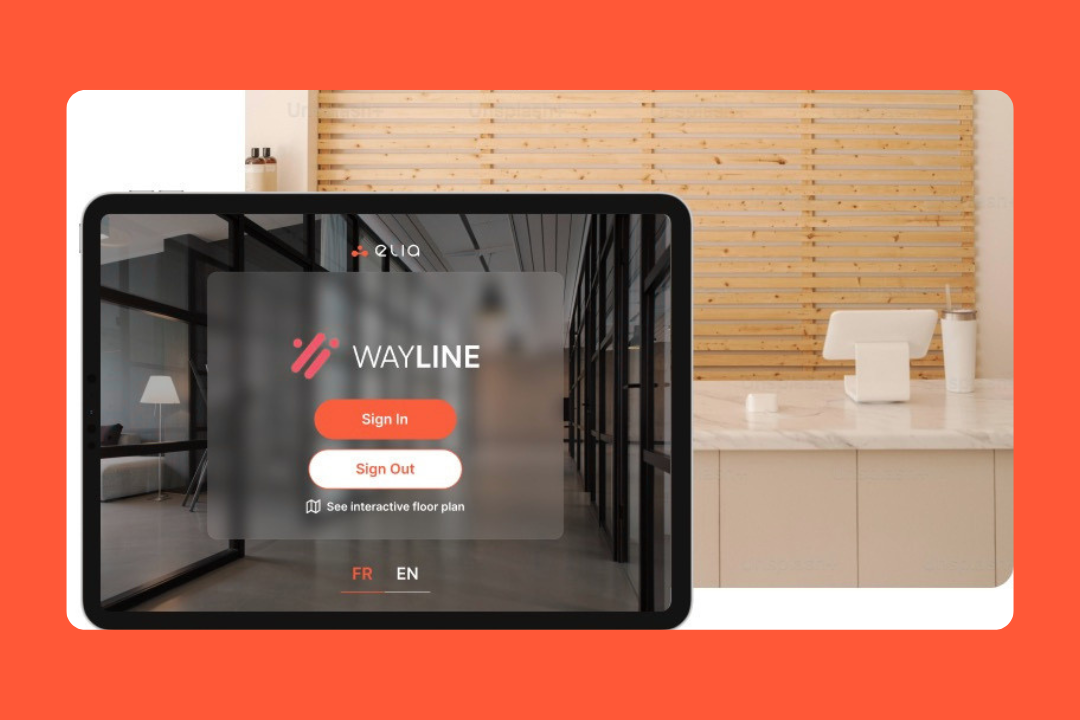
Visitor management: Visitors can sign in through a self-serve kiosk and hosts get automatic notifications, with digital logs for reporting and compliance.
Desk and room booking: Employees can reserve desks and meeting rooms through interactive floor plans and coordinate with colleagues’ presence in the office.
Occupancy and space intelligence: elia combines booking data with optional desk and room sensors, heatmaps, dashboards, and occupancy reporting.
Request management: The platform also takes care of service requests tied to the floor plan, such as IT issues, catering needs, maintenance, or room setup.
Health and safety: elia has a dedicated safety module with first responder visibility, incident reporting, emergency notifications, and compliance tracking.
Hardware ecosystem: It also comes with its own room displays, touchscreen kiosks, desk sensors, room sensors and IoT gateway.
Pricing
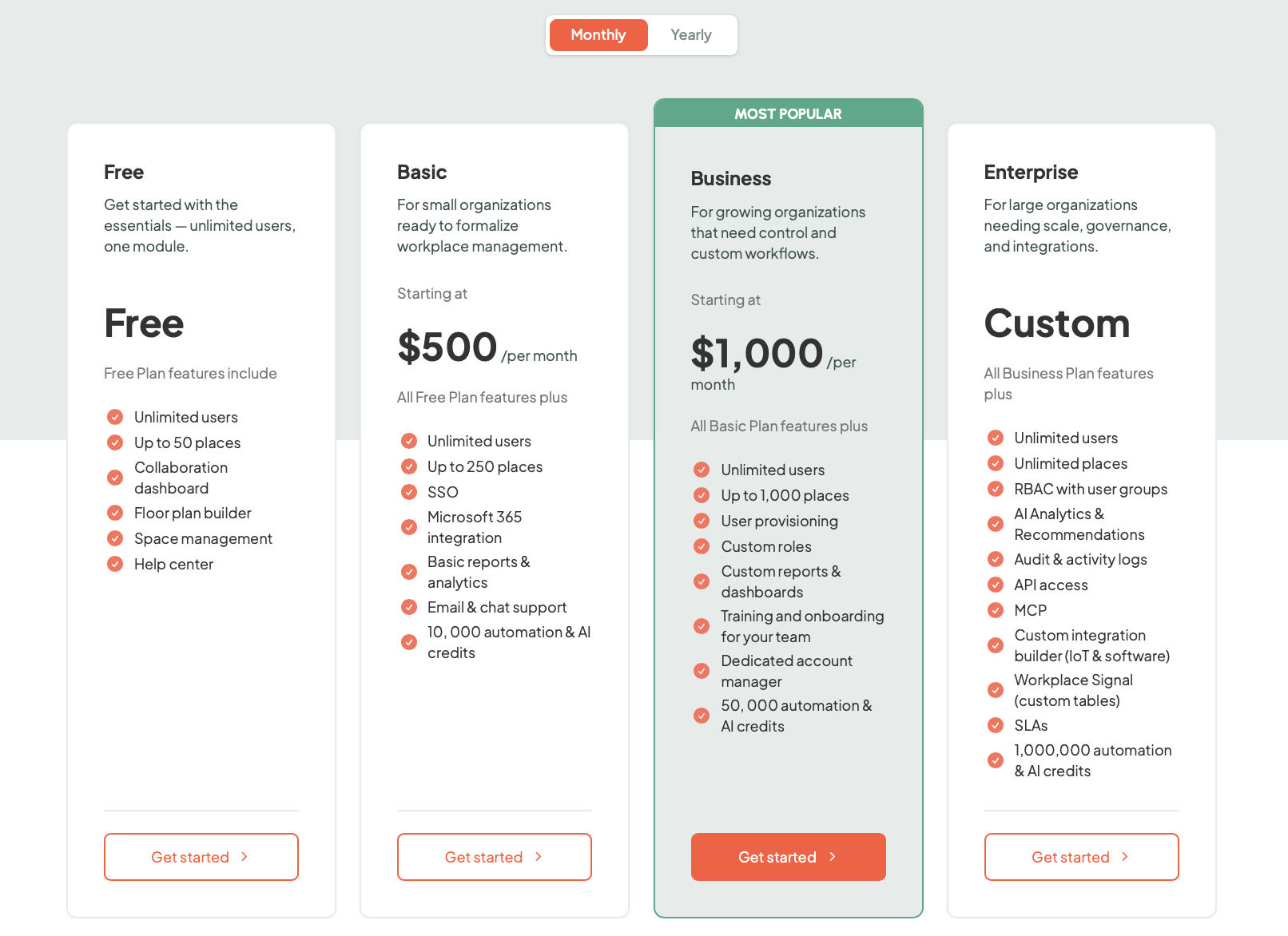
elia uses a flat-fee subscription model priced by the number of places (desks, rooms, lockers), with unlimited users on every plan and hardware priced separately:
Free: $0 (up to 50 places)
Basic: from $500/month (up to 250 places)
Business: from $1,000/month (up to 1,000 places)
Enterprise: custom pricing (unlimited places)
Source: elia
What users like
Easy setup: Reviews describe elia as simple, intuitive, visual, and easy to use without much training.
Floor plans: Users like being able to pick their spot from a floor plan visually, rather than scrolling through a text list of room names.
Hybrid coordination: It makes going to the office more intentional by showing everyone else who’s coming in.
Microsoft and mobile fit: It feels like it was made to be a part of your workday if you use Teams & Outlook, with mobile access that works on the go.
Strong support: People mention the support a lot, and usually for the right reasons.
What to keep in mind
More than a visitor tool: If you only care about visitor sign-in and nothing else, then elia might be too much.
Hardware scalability: The sensors and displays are great for data, but they turn a software project into a physical one, which requires more planning for the initial rollout.
Regional concentration: elia is growing, but right now it still feels most rooted in the North American market.
Feature
elia
Greetly
Platform
Workplace platform with visitors, desks, rooms, requests, analytics, and hardware
Digital receptionist and visitor management platform focused on front-desk automation
Starting price
Free, or from $500/month
From $99/month
Pricing model
Plan-based
Monthly, with hardware separate
Visitor management
Yes
Yes
Custom visitor flows
Yes
Yes, more central
Deliveries
Yes, within visitor workflows
Yes, with digital mailroom features
Employee sign-in
Yes
Yes
Emergency / evacuation
Yes
Yes
Desk and room booking
Yes, more central
Not a core strength
Interactive floor plans
Yes
Not a core strength
Request management
Yes
Not a core feature
Occupancy tracking
Stronger, with heatmaps and optional sensors
More check-in and visitor-log based
Analytics
Stronger workplace and occupancy view
More front-desk and visitor-log oriented
Hardware
Native kiosks, displays, sensors, and gateway
Tablet/kiosk setup with badge printer support
Mobile app
Yes
Yes
2.Envoy: best for scaling security and global compliance
Envoy is one of the biggest names in this space, and it really shows.
It started out as a visitor management tool, but it has grown well beyond that. Today, Envoy covers visitors, desks, rooms, parking, deliveries, emergency notifications, digital signage and workplace analytics, all with a much more security-heavy and enterprise-friendly feel than a lot of other tools out there.
Key features
Identity verification: It can scan driver’s licenses or passports on the spot to make sure the guest is who they say they are.
Virtual front desk: If there's no one at the desk, the kiosk can trigger a video call to a remote staff member who can vet the visitor from anywhere.
Access control: Envoy can tie in to systems like Brivo to automatically issue visitor access during check-in.
Global administration: If you're running multiple sites, you can update a security policy or legal waiver once and push it to every single kiosk.
Emergency management: A dedicated tool for fire drills that sends alerts to everyone's phone.
Mailroom and deliveries: It can scan packages, match them to recipients, send notifications, and keep a digital delivery log.
Pricing
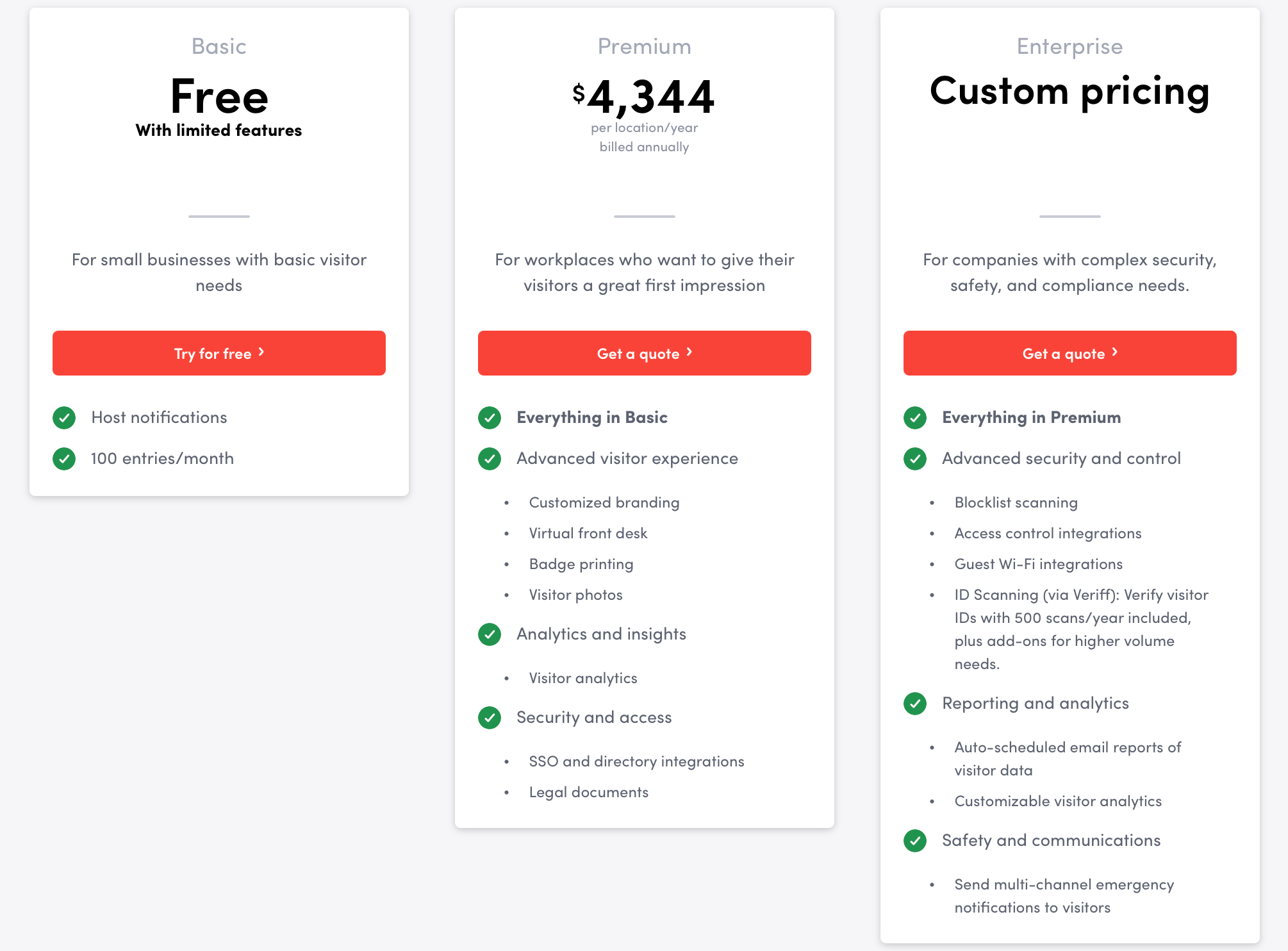
Envoy is modular, so you only pay for what you turn on:
Visitors Premium: $4,344 per location per year
Emergency Notifications: $24 per user per year
Reservations: $60 per bookable resource per year
Screens: $144 per device per year
Deliveries: $3,000 per delivery location per year
Source: Envoy
What users love
Visitor flows: Envoy gives teams a ton of freedom to design how different visitor types move through sign-in.
Badge printing and host notifications: Those two features come up a lot because they save front desk staff so much time and hassle.
Audit trails and exports: Envoy is very good at keeping detailed records and making them easy to dig up.
Multi-site oversight: If you’re managing multiple locations, the visibility from one place is a major draw.
Day-to-day use: Even with all the extra depth, a lot of people still describe Envoy as easy to use.
What to keep in mind
Pricing: Modular pricing means the bill can spiral quickly once you add desks and deliveries.
Apple only: You’re locked into the iPad ecosystem for kiosks.
Feature gating: Some features that feel like standard visitor management are locked behind the higher tier plans.
Configuration heavy: Getting the most out of the integrations and custom flows can take some real effort.
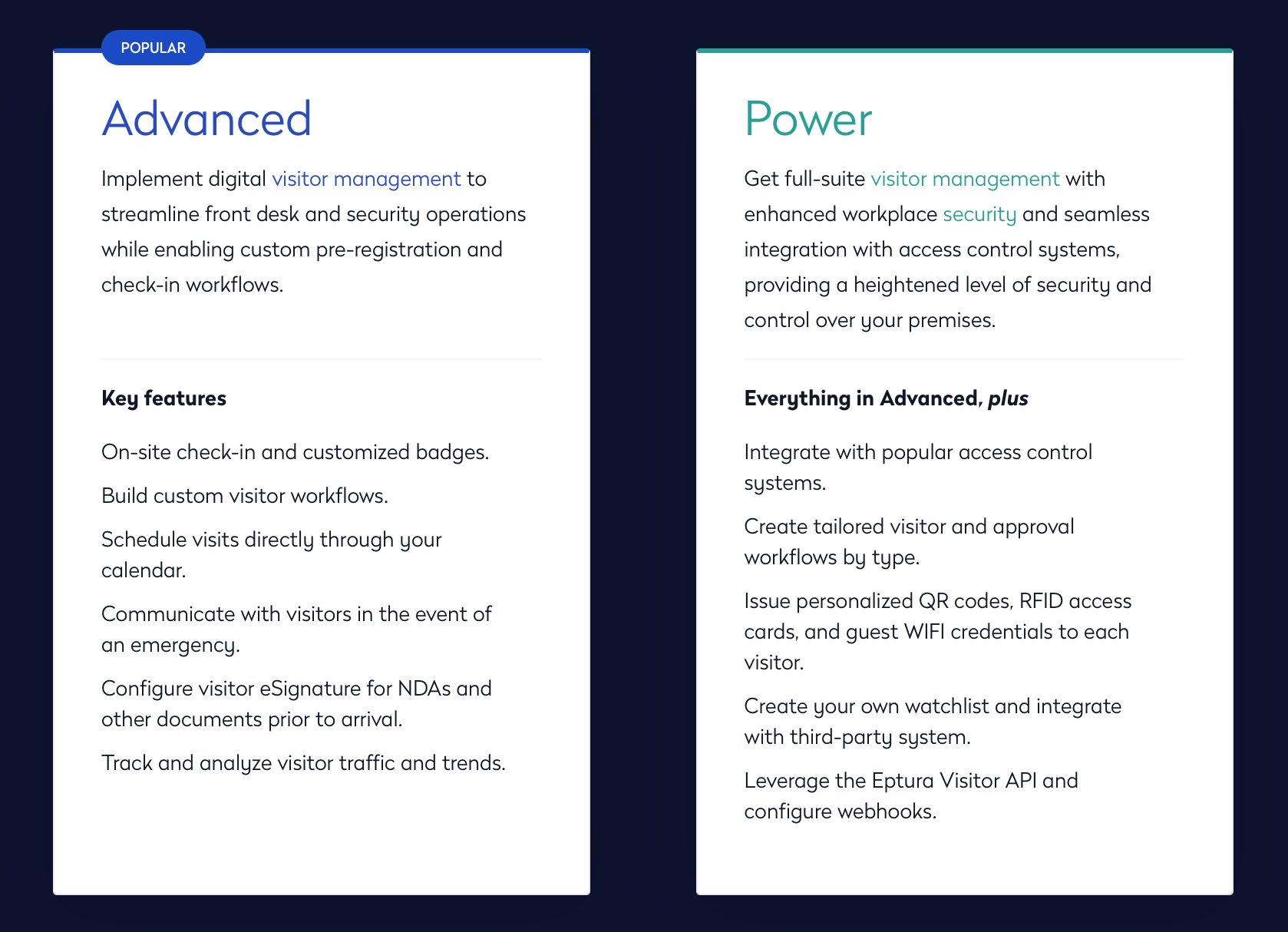
3. Eptura Visitor: best for multi-location enterprises
If you were looking at Proxyclick before, that’s Eptura Visitor now. It’s the top choice for companies that need to manage a massive volume of visitors across global offices while keeping the IT teams happy.
It’s built for high-security environments like pharma or manufacturing where knowing who’s in the building is a legal requirement. It also lives inside the wider Eptura platform, which gives it a much more enterprise feel than a standalone sign-in tool.
Key features
Visitor journeys: You can build entirely different sign-in flows based on who’s arriving.
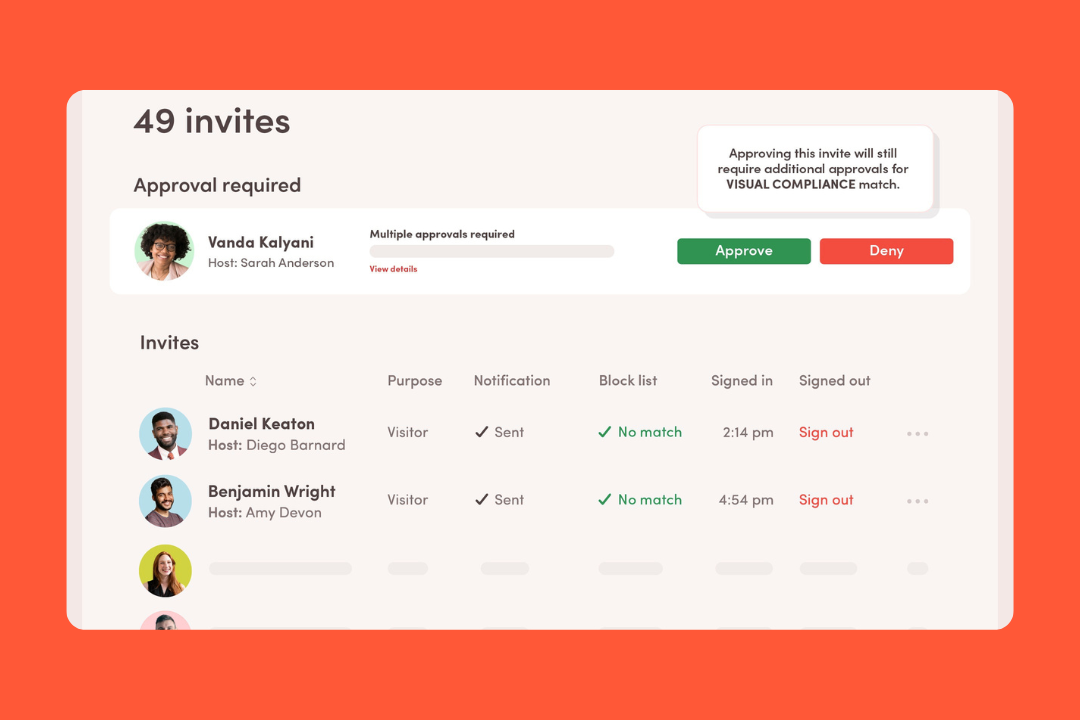
Integrated watchlists: It checks people against your own internal watchlist or third-party security databases.
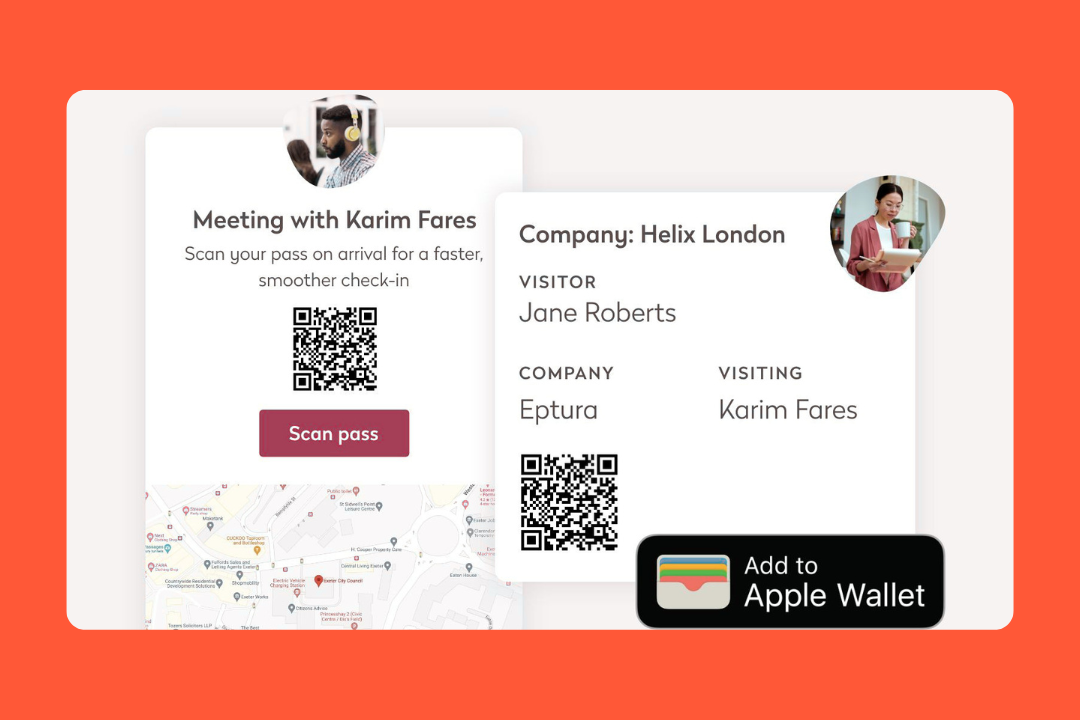
Remote pre-registration: Guests can be invited ahead of time, receive a QR code, and complete things like NDAs before arrival.
Access control hooks: It integrates with access control systems so visitor access can be tied more closely to the building.
Broader workplace connection: Because it sits inside Eptura’s wider platform, it can connect more naturally to workplace booking and operational systems.
Reporting and oversight: The bigger draw here is having centralized visibility across multiple offices.
Pricing
Eptura only offers custom quotes. They don't do the simple monthly pricing you'll find with Greetly.
Source: Eptura
What users like
Professional look: The guest interface makes a great first impression.
Global oversight: If you have offices in London and Tokyo, you can manage all of them from one dashboard and ensure they all follow the same security rules.
Integrations: The integration story is one of the bigger reasons to look at it in the first place.
Security: For companies that get audited frequently, the detailed logs and signed documents Eptura keeps are a game changer.
Admin experience: For a product built for bigger rollouts, Eptura gives teams a lot of control from one system.
What to keep in mind
Pricing transparency: There’s no public starting price, which can slow down shortlist comparisons.
Setup complexity: Because it’s so customizable, you’ll need to put some time into configuring your workflows and testing your integrations.
Learning curve: The admin backend has a lot of toggles. It’s powerful, but it can be overwhelming if you just want to change a logo or a welcome message.
Part of a much bigger platform: That can be a strength, but it also means buyers need to be clear on what belongs to Visitor itself vs the rest of the Eptura ecosystem.
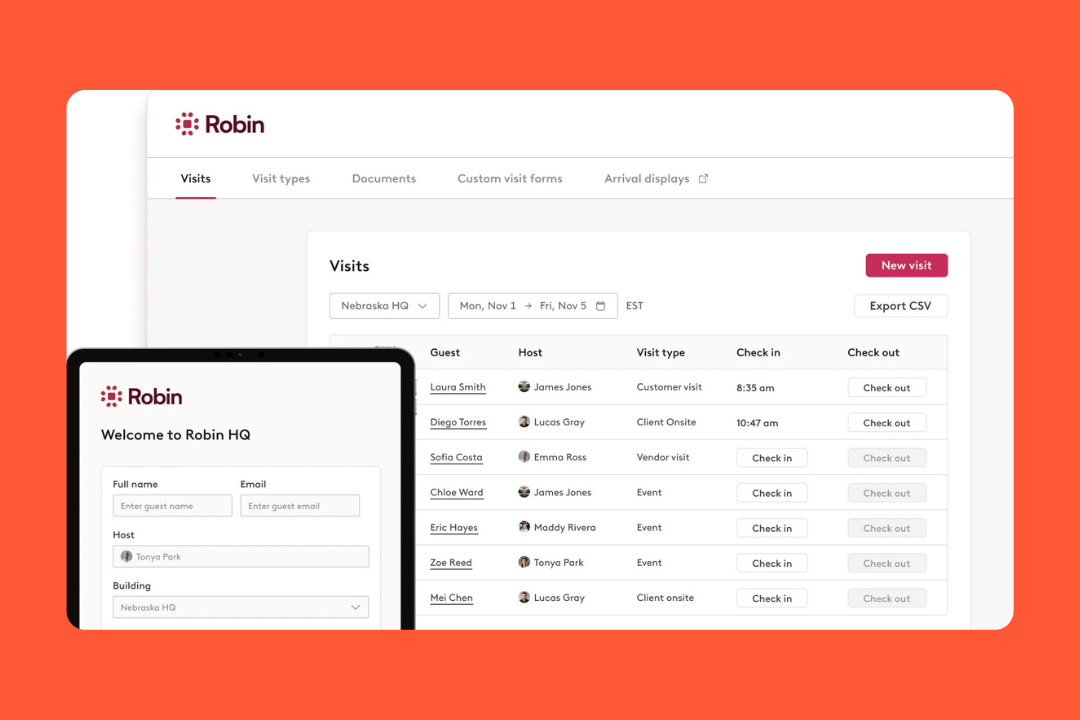
4. Robin: best for teams that want stronger workplace analytics
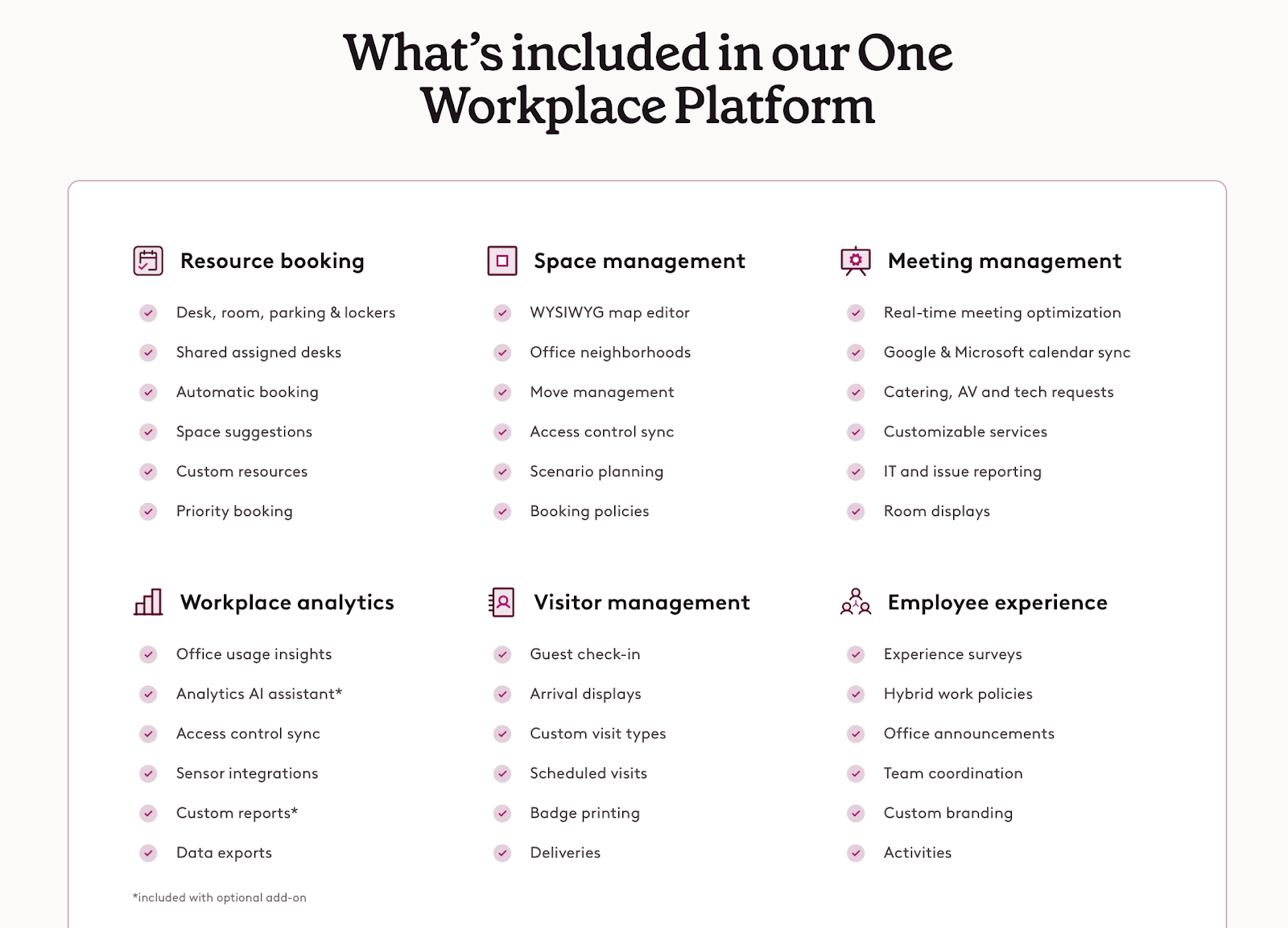
Robin leans in a different direction than tools that focus more on reception or facilities operations. It’s built more around desks, rooms, workplace analytics, and day-to-day office planning. It still covers visitors, but the bigger story is helping teams book resources and make smarter workplace decisions.
It’s not trying to be the sharpest visitor tool on the market but rather the platform that helps people use the office better.
Key features
Host-driven invites: Your employees can pre-register their guests from Robin, and it also integrates with calendar-based office scheduling to tie in visitor workflows.
Compliance: You can add legal documents and custom check-in steps so your guests complete the right forms before they’re checked in.
Integrated deliveries: When a package is scanned in, the recipient gets a ping just like they would for a visitor arrival.
Badge printing: It's got badge printing covered, so your guests can grab their pass and go.
Resource booking: Robin handles desks, meeting rooms, parking, and custom resources.
Workplace analytics: It tracks bookings, check-ins, cancellations, workplace presence, collaboration patterns, and department-level trends.
Pricing
Robin doesn’t make pricing especially easy to compare. The site points you towards demo and quote flows rather than giving you a public pricing table.
Source: Robin Powered
What users like
All-in-one experience: Users love that they don't have to switch between different apps.
Calendar sync: Robin connects deeply with Google and Microsoft calendars, which is a big part of the appeal (even if setup isn’t always friction-free).
Coordination: It helps your employees plan their office days more intentionally by showing who’s coming in and where people are sitting.
Easy to use: Robin is one of those tools people tend to pick up quickly.
Strong analytics: Admins who care about data get a lot out of the analytics side, especially when they want more than basic booking numbers.
What to keep in mind
Feature creep: If all you want is a visitor sign-in app and you have zero interest in desk booking, Robin is way too much platform for you.
Pricing transparency: There’s no clear public starting price, and add-ons like Advanced Analytics make the total cost less obvious.
Admin workflows: The employee side looks easy, but the admin side can get more involved once you start dealing with planning tools and integrations.
Floor plan changes: Robin is strong on maps and planning, but bigger redesigns and floor changes don’t always look effortless in practice.
5. Archie: best for a simple, visual all-in-one experience
Archie makes a lot of sense when visitor management is just one piece of a bigger office setup.
It’s clearly built for a wider job. It wants to sit underneath the whole workspace: desks, rooms, visitors, deliveries, access, and even coworking-style operations all run through the same system. So instead of feeling like visitor software with a few extras, Archie feels more like space software with a strong visitor module built in.
Key features
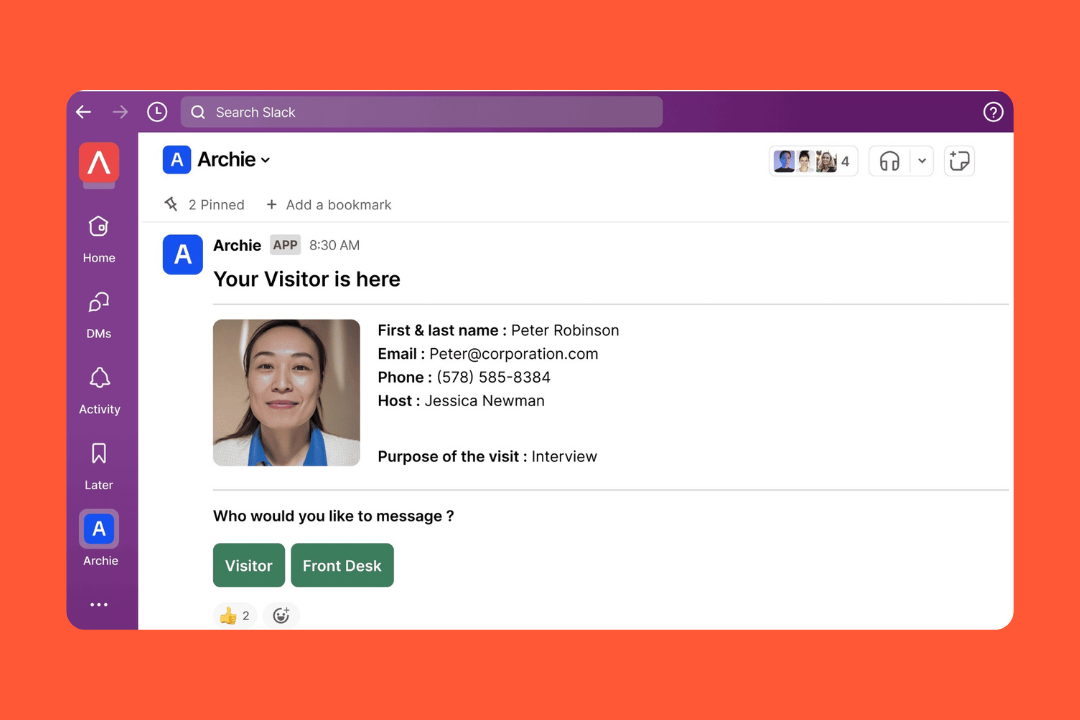
Visitor flows: You can set up pre-registration, QR check-in, host notifications, badge printing, photo capture, e-signatures, custom forms, visit types, and recurring visits.
Host pings: Archie supports host notifications through channels like email, Slack, Teams, and SMS, depending on your plan and setup.
Floor plans: It uses map-based floor plans for desks and rooms, so your employees can find their teammates and book nearby spaces more easily.
Emergency alerts: If there’s a drill or a real event, you can trigger an evacuation from the tablet.
Coworking and billing: If you charge for certain resources or have external members using your space, it can handle the billing and payments natively.
Access control, Wi-Fi, and deliveries: Archie can connect visitor and workplace flows to door access, Wi-Fi sharing, and delivery management.
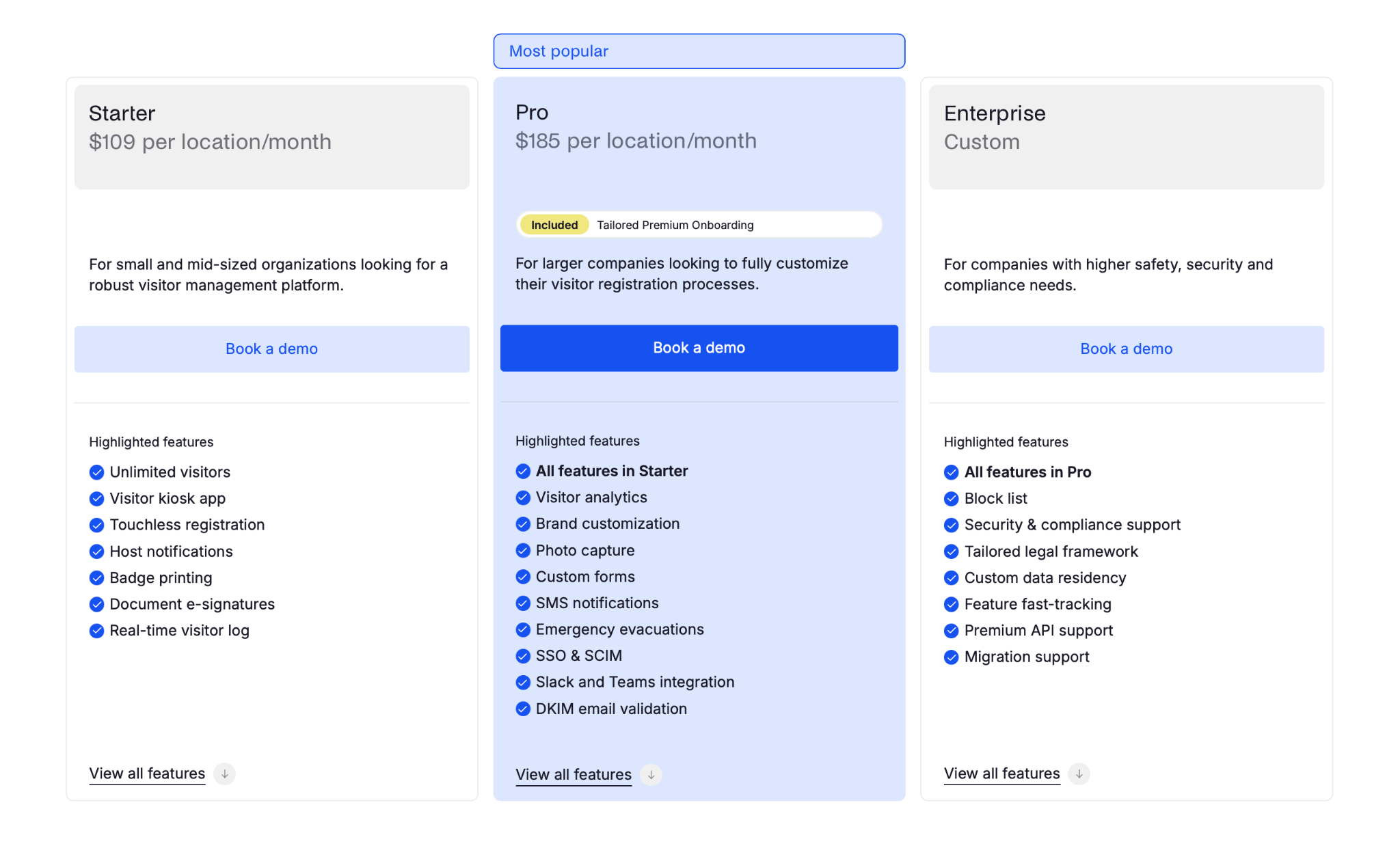
Pricing
They tend to price by location for visitors and by desk/resource for the rest:
Starter: $109 per location/month
Pro: $185 per location/month
Enterprise: custom pricing
Source: Archie
What users like
Easy to pick up: Employees usually don’t need much hand-holding to start booking desks or guest visits.
Quick implementation: Archie looks easier to roll out than some bigger systems, even if setup still takes real admin work.
All-in-one consolidation: It helps you ditch separate subscriptions for your guest log and desk booking.
Solid support: The onboarding and support teams are frequently mentioned as being fast and actually helpful.
Modern look: A lot of the feedback points to the interface feeling current and easier to work with than older workplace tools.
What to bear in mind
Advanced logic: If you have some seriously complex security needs (like doing multi-layer background checks), a dedicated security tool might have more depth.
Configuration: Policies, maps, integrations, and workspace rules still need admin setup behind the scenes.
More than a visitor tool: If all you want is a lightweight reception product, Archie may feel bigger than the job.
Hardware side: Tablets, printers, and related setup are part of the rollout on your side.
Choosing the right visitor management software
Ultimately, it all comes down to one question: are you looking to modernize the reception or do you want to have one system that can run the whole office?
1. Look at the whole floor plan
Before you buy a tool just for the front desk, ask whether you are also going to need desks, rooms, deliveries, or workplace requests in the near future. If the answer is yes, a standalone visitor app may solve today’s problem and create next quarter’s problem.
2. Check where your team actually works
If people have to leave the tools they already use just to invite a guest or book a room, adoption usually drops. The best products fit into places like Teams or Slack so the workflow feels natural instead of extra.
3. Do the math on modular pricing
A lot of tools look affordable at first because the quote only covers basic visitor sign-in. Then the extras show up: custom branding, SMS, room booking, desk booking, deliveries, analytics. Look closely at what’s included and what starts pushing the price up.
4. Think about the hardware
Software is only half the setup. Depending on the tool, you may also need a kiosk, badge printer, room display, or other hardware. Some vendors make that easier than others, so it’s worth thinking about early.
Guestbook era is over
A sign-in tool is fine when all you need is a sign-in tool.
But if your team is already managing visitors, desks, rooms, and all the little office moments around them, it might be easier to have it all in one place.
Want to see how it works in practice?
Welcome visitors better
Make every guest feel expected before they even reach reception.
is a Content Marketing Specialist at elia. With 10+ years in content marketing, she writes about workplace trends and the tools that help teams work smarter. Part strategist, part storyteller, Tamara brings equal amounts of data, creativity, and a little Moon Prism Power to every piece she creates. 🌙✨
Share
Contents
Subscribe to our newsletter
Subscribe to the elia newsletter for exclusive product updates and industry best practices. You can unsubscribe at any time.
Thank you! You're subscribed.
Oops! Something went wrong while submitting the form.


.svg)
%20(1).png)
.png)