YAROOMS Alternatives: Best Picks for Hybrid Office Success
Tamara Zhostka
Content Marketing Specialist
–
Last updated on Aug 20, 2026
YAROOMS covers a lot of ground: desk and room booking, visitor management, floor plans, and analytics. That all-in-one appeal lands well for some, but like most workplace software, the real questions show up after the rollout.
How flexible is it in practice? Does the data drive decisions, or does it just create more admin work? Ultimately, is it the perfect fit for the way your office actually runs?
This guide breaks down the top YAROOMS alternatives for 2026, comparing them on the factors that matter most once a shortlist gets serious:
desk and meeting room booking
visitor management
workplace analytics
hybrid coordination
integrations
pricing and rollout complexity
The point is to see where each one pulls ahead, and which kind of workplace it suits best.
TL;DR: Best YAROOMS alternatives at a glance
Tool
Best for
Why it stands out
elia
Automated office workflows
Stronger on workplace operations, occupancy visibility, visitors, and connected office workflows
Envoy
Lobby security
Stronger on visitor management, compliance, front-desk workflows, and secure check-in
OfficeSpace
Real estate planning
Better for floor planning, move management, scenario modeling, and multi-site analytics
Robin Powered
Workplace analytics
Stronger on utilization insights, collaboration data, presence visibility, and hybrid coordination
Skedda
Custom booking rules
Stronger on permissions, approvals, policy controls, and configurable booking logic
Kadence
AI-assisted booking
Stands out for people-first coordination, smart suggestions, and chat-based booking workflows
Officely
Slack- and Teams-native booking
Booking and office coordination happen directly inside chat tools with minimal rollout friction
What is YAROOMS?
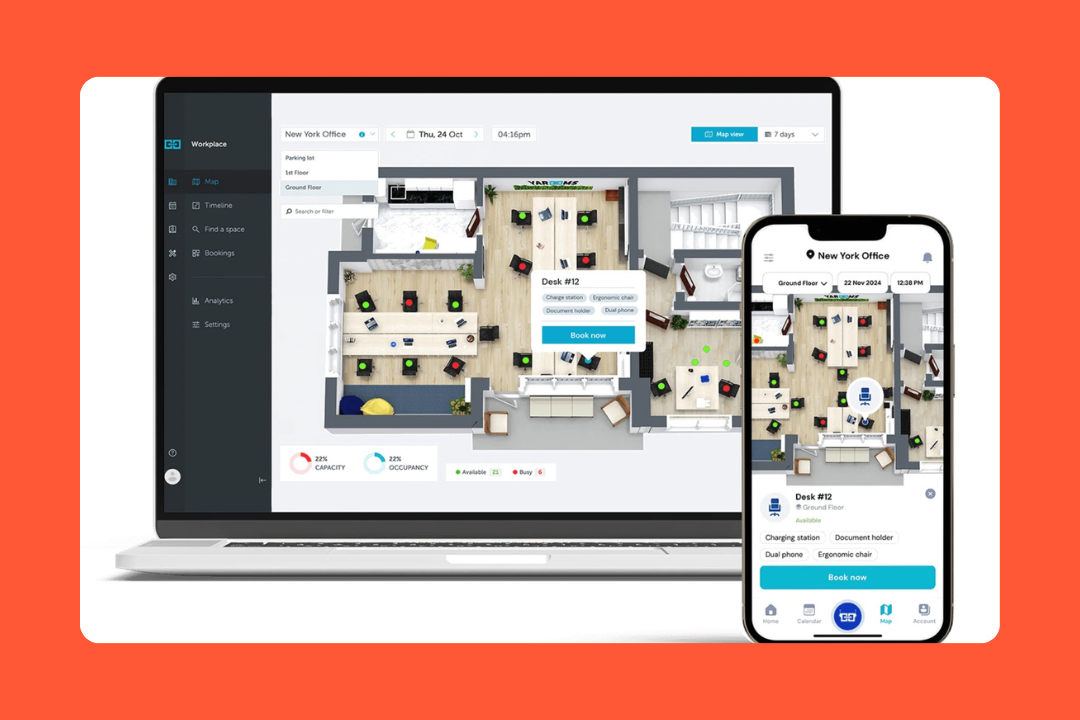
YAROOMS is a heavy-duty workplace management platform that feels like it was built from the ground up to handle the messy reality of enterprise offices. It’s a single pane of glass for everything: desks, rooms, visitors, and even the digital signs on your walls.
It’s a good choice for companies that have outgrown basic spreadsheets or booking apps. If you’re in a regulated industry like finance or healthcare, or if you’re a Microsoft-first shop, YAROOMS is usually one of the first names on the list.
Key features
Total resource booking: You can book desks, rooms, and parking spots, but it goes further with equipment and service booking (like ordering catering or a projector).
Visitor management: There’s a full front-desk module with self-check-in kiosks and digital badges.
Digital signage: You can push the booking info directly to tablets outside meeting rooms, so people stop knocking on the glass to see if a room is free.
Yarvis (AI Assistant): Instead of clicking through maps, you can just talk to Yarvis via Microsoft Teams, Slack, or email.
Deep integrations: It lives inside Microsoft Teams and Outlook. If your team never wants to leave their calendar or chat app to book a desk, they don’t have to.
Workplace analytics: It tracks real estate utilization. You can see which rooms are ghosted and whether you need that extra floor of office space.
YAROOMS cost
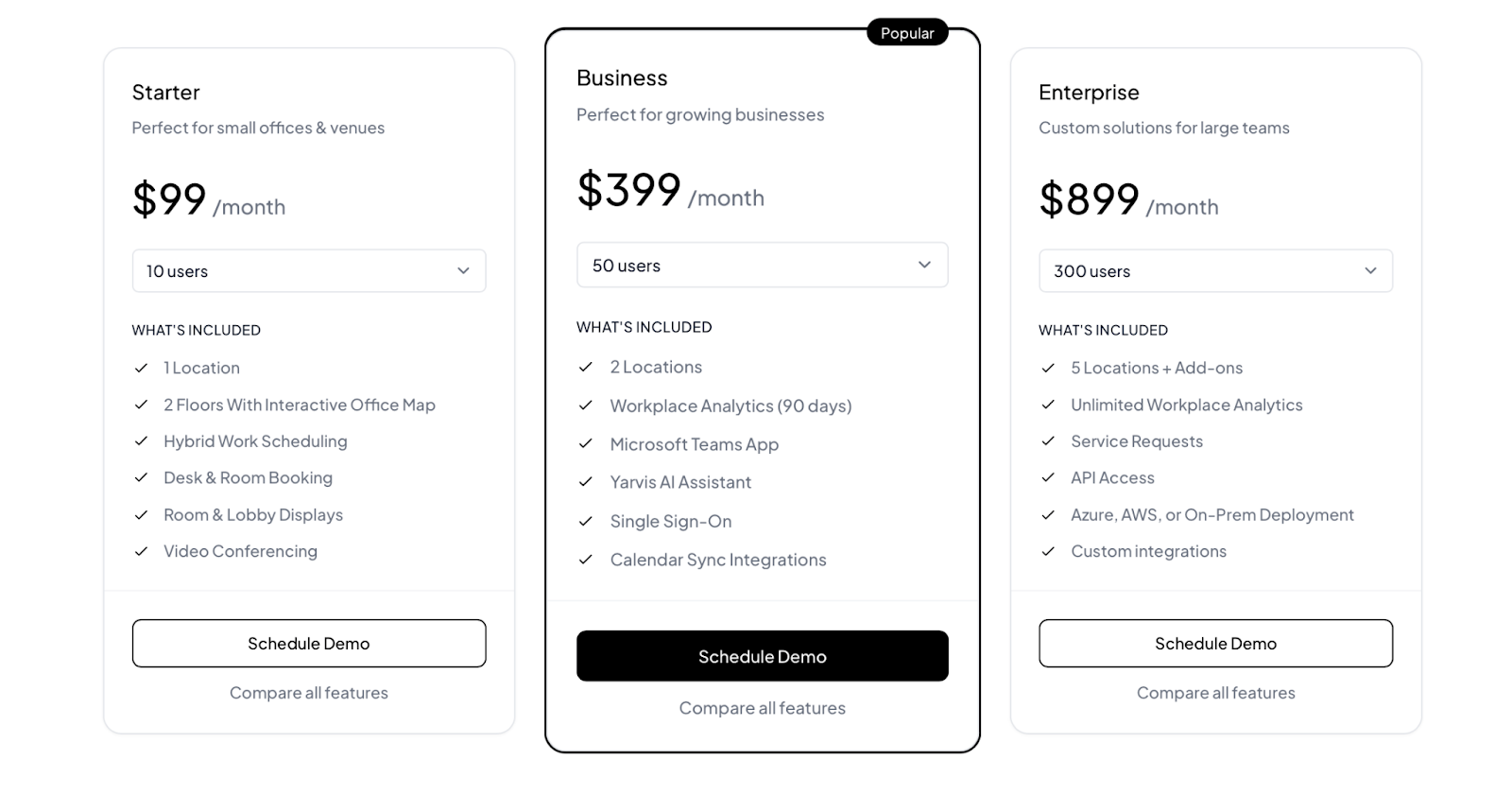
YAROOMS is more transparent on pricing than a lot of workplace software vendors. It currently lists:
Starter: $99/month
Business: $399/month
Enterprise: $899/month
Visitor management: $99/location/month
Source: YAROOMS
What users like
Teams integration: For Microsoft-heavy shops, YAROOMS feels like a native part of the workflow.
Ease of use: Employees can figure out how to book a desk in a few seconds without a training manual.
Green angle: Being able to show the board a report on carbon savings from hybrid work is a massive differentiator that users find cool.
Reliable customer support: They have a reputation for answering fast and helping with the initial floor plan upload.
Useful map view: Floor plans and blueprint views come up often because they make it easier to see what’s available and where colleagues are sitting.
Why companies look for YAROOMS alternatives
Even though it’s a powerhouse, it’s not for everyone. Here’s why some teams keep looking:
They want something simpler: If you have a 20-person office and just want to make sure two people don't sit at the same desk, YAROOMS will feel like overkill.
They want a stronger mobile experience: While the web and Teams versions are top-notch, some users find the mobile app experience not quite as polished.
They want an easier rollout: YAROOMS integrates broadly, especially with Microsoft tools, but some of that depth also means more setup effort than lighter competitors.
They want a different pricing shape: The pricing is public, but the overall fit depends on plan limits, locations, analytics access, and add-ons like visitor management.
They want a platform that feels more seamless: Some reviews mention occasional friction around load times, app behavior, and booking or check-in sync.
How we evaluated YAROOMS alternatives
We looked at these tools the way workplace teams compare them once YAROOMS is already on the shortlist. That meant reviewing product pages, pricing pages, help-center documentation, integration docs, customer stories, and recent user reviews on Capterra and G2 together, rather than relying on any single source in isolation.
For each YAROOMS alternative, we focused on:
Workspace booking: Desks, meeting rooms, visitor-related bookings, and how well the product handles day-to-day booking workflows once the rollout is live.
Workplace operations: Whether the platform is just good at booking spaces or the operational side as well, like service requests and access controls.
Visitor management: The whole process, including pre-registration, host notifications, badge printing, and how intuitive the kiosk experience feels for guests.
Analytics and reporting: What gets measured, how useful the reporting looks, and what can be exported.
Ease of rollout: How much setup the product needs, how technical the integrations look, and how much admin work is involved.
Pricing: Whether pricing is public, how the model works, what’s included, and how likely the total cost is to change once you add visitors or analytics.
Scalability & integrations: How well it connects with Microsoft 365, Slack, and identity providers like SSO as the organization grows.
Reviews: What reviewers praise, where friction keeps coming up, and which types of teams seem happiest with the product.
The aim was to find which tools handle the specific mix of workplace operations and admin control that makes YAROOMS a complex product to replace.
Best YAROOMS alternatives: comparison
Tool
Best for
Pricing
Visitor
Booking
Admin
Analytics
Integrations
Pricing clarity
elia
All-in-one ops
Free / from $500/month
Strong
Strong
Good
Strong
Strong
Strong
Envoy
Visitor security
Free / modular pricing
Strong
Good
Good
Basic
Strong
Good
OfficeSpace
Space planning
Quote only
Basic
Good
Strong
Strong
Good
Basic
Robin Powered
Workplace analytics
Quote only
Strong
Strong
Good
Strong
Good
Basic
Skedda
Booking rules
From $249/month
Basic
Strong
Strong
Good
Good
Strong
Kadence
Hybrid coordination
Quote only
Good
Strong
Good
Good
Good
Basic
Officely
Chat-based booking
From $2.50/user/month
Basic
Good
Basic
Basic
Strong
Strong
YAROOMS
Microsoft-first teams
From $99/month
Strong
Strong
Strong
Good
Strong
Strong
1. elia: best for automated office workflows
elia is what happens when desk booking stops being the whole problem. Once a workplace gets even a little more complicated, the questions multiply fast. Who’s coming in? Which rooms are being used? How do visitor check-ins connect to the rest of the office? Where do service requests go?
elia is a tool for that version of the workplace. It combines desks, meeting rooms, visitors, workplace requests, safety workflows, and occupancy tracking in one system. Plus, it provides its own sensors, kiosks, displays, and gateway.
Key features
Desk & meeting room booking: Employees can reserve desks and meeting rooms through interactive floor plans.
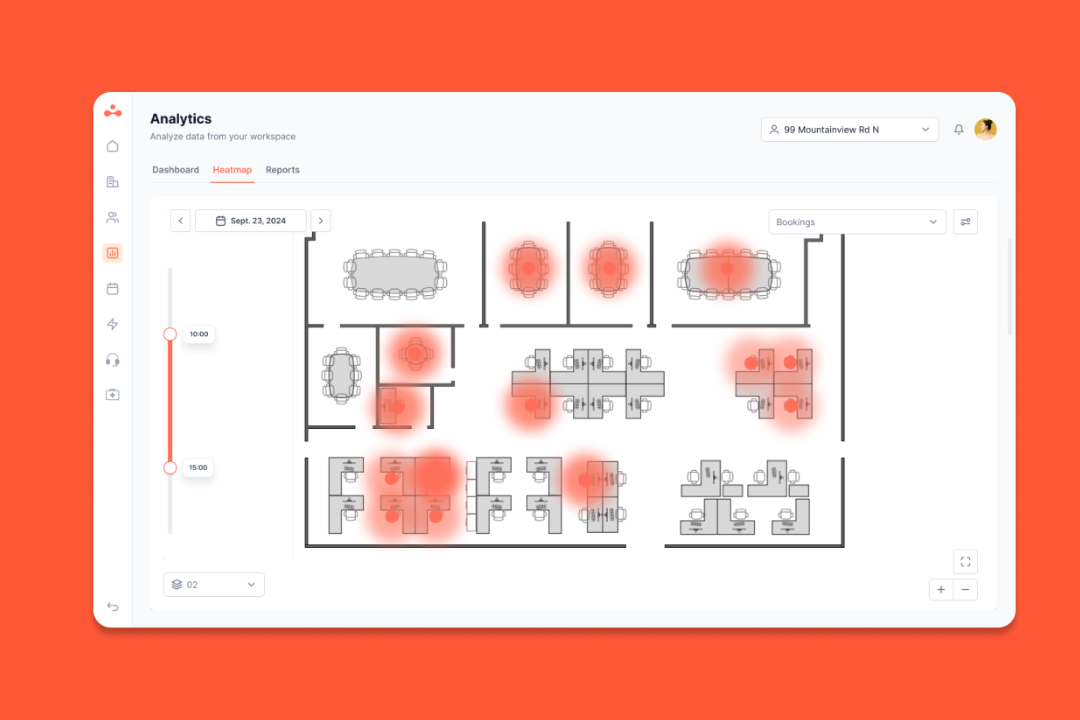
Occupancy tracking: Instead of relying on reservation data, it combines software with desk and room sensors, heatmaps, and dashboards.
Workplace requests: Employees can submit IT, maintenance, catering, and setup requests directly from the floor plan.
Visitor flows: elia includes self-service check-in, host notifications, secure visitor logs, badge printing, and kiosk-based reception.
Health & safety tools: First responder visibility, incident reporting, training logs, and compliance workflows are part of the product story.
Hardware ecosystem: It offers meeting room displays, touchscreen kiosks, desk occupancy sensors, room sensors, and an IoT gateway designed to work together.
Integrations: Native connections with Microsoft Teams, Outlook, Google Workspace, Slack, and SSO.
Pricing
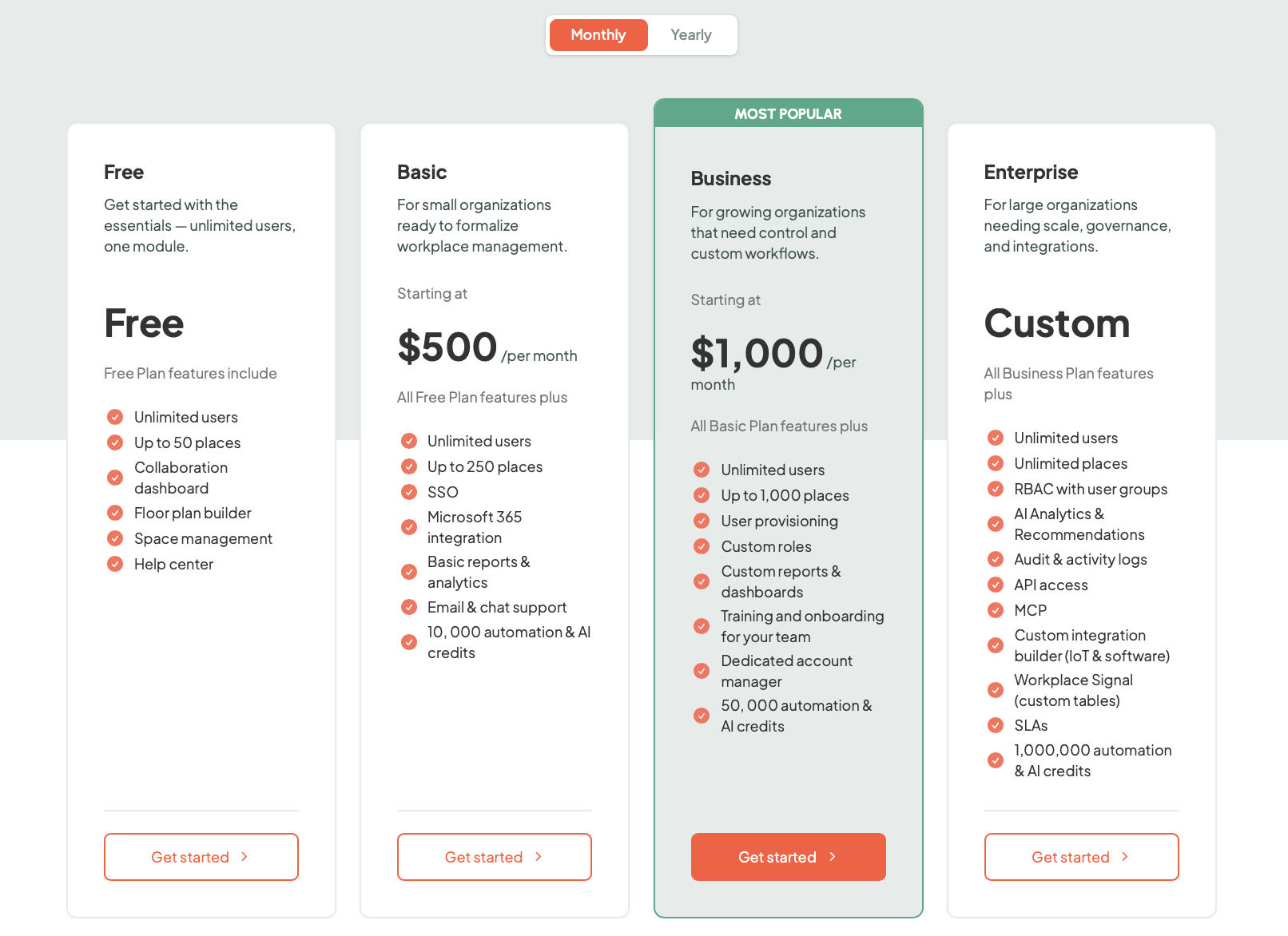
elia offers tiered plans priced by the number of places (desks, rooms, lockers) you manage, with unlimited users on every plan, including a free tier to start.
Paid plans start at:
Basic: from $500/month;
Business: from $1,000/month;
Enterprise: custom pricing.
Hardware is priced separately, which is worth factoring in because the platform gets stronger once that part of the ecosystem enters the picture.
Source: elia
What users like
Zero training UI: Admins often mention that employees get it without needing a walkthrough.
Great support: The team is responsive and listens to new feature requests.
All-in-one simplicity: It handles the visitor-to-desk-to-service-request journey without forcing you to jump between different modules.
Better office coordination: Seeing where colleagues will be and when they’re coming in shows up as a real benefit in the reviews.
Analytics: The occupancy data and heatmaps make it more useful for teams trying to understand how the office is being used.
What to consider
Operational complexity: If you’re looking for a single-feature add-on, this might feel like more software than you were looking for.
Hardware considerations: The upside is a more unified system. The tradeoff is that the rollout can become bigger than a simple software purchase.
Ideal organization size: It shines brightest in companies with multiple stakeholders and moving parts rather than small offices.
Feature
elia
YAROOMS
Platform
Connected workplace ops
Enterprise workplace management
Best for
All-in-one ops
Microsoft-first teams
Starting price
Free, or from $500/month
From $99/month
Pricing model
Tiered plans + hardware
Tiered plans + add-ons
Desk booking
Yes
Yes
Room booking
Yes
Yes
Visitor management
Strong
Strong
Floor plans
Yes
Yes
Admin controls
Good
Strong
Requests
Built in
Service booking
Safety workflows
Built in
Basic
Hardware
Native ecosystem
Limited
Occupancy tracking
Sensor-backed
Booking-led
Analytics
Strong
Good
Integrations
Strong
Strong
Mobile app
Yes
Yes
2. Envoy: best for lobby security
Envoy is essentially the industry standard for the front door. While other platforms started with desk booking and added visitors later, it did the opposite. It built its reputation on a secure iPad check-in experience and then expanded into the rest of the office.
Today, it’s an ecosystem that includes desks, rooms, deliveries, and even mailroom management. It’s the go-to for companies where security and compliance are core operational requirements.
Key features
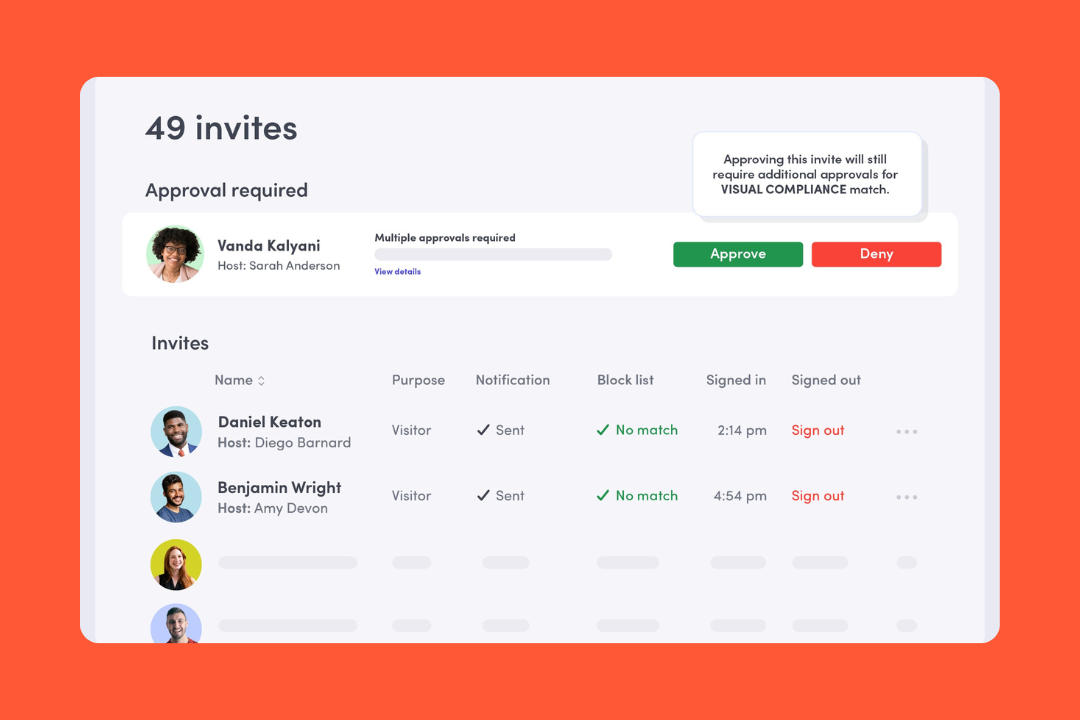
Visitor management: Envoy offers NDAs, health screenings, badge printing, and instant host notifications via Slack or Teams.
Security & compliance: It includes blocklists and real-time cross-referencing against watchlists before a visitor even arrives.
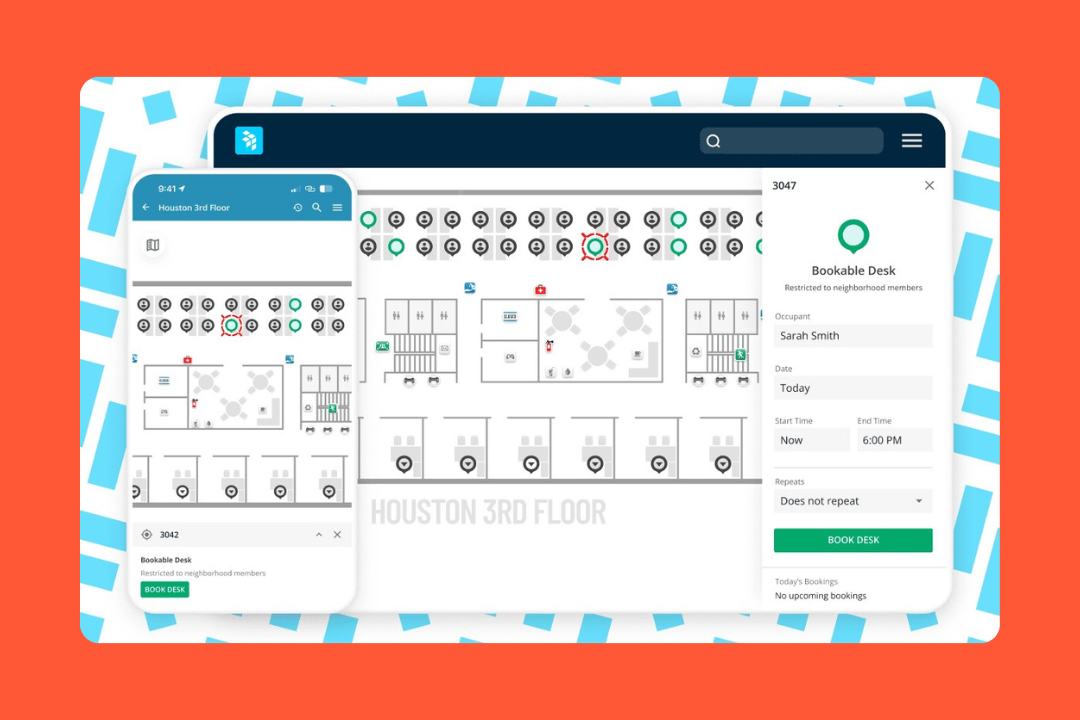
Desk & room booking: A functional booking layer supports neighborhoods and flexible schedules.
Workplace map: An interactive map helps employees find desks and amenities in real time.
Deliveries & mailroom: An automated system scans labels and pings employees when a package arrives.
Emergency notifications: A one-touch system broadcasts critical alerts and takes over office screens with emergency messages.
Pricing
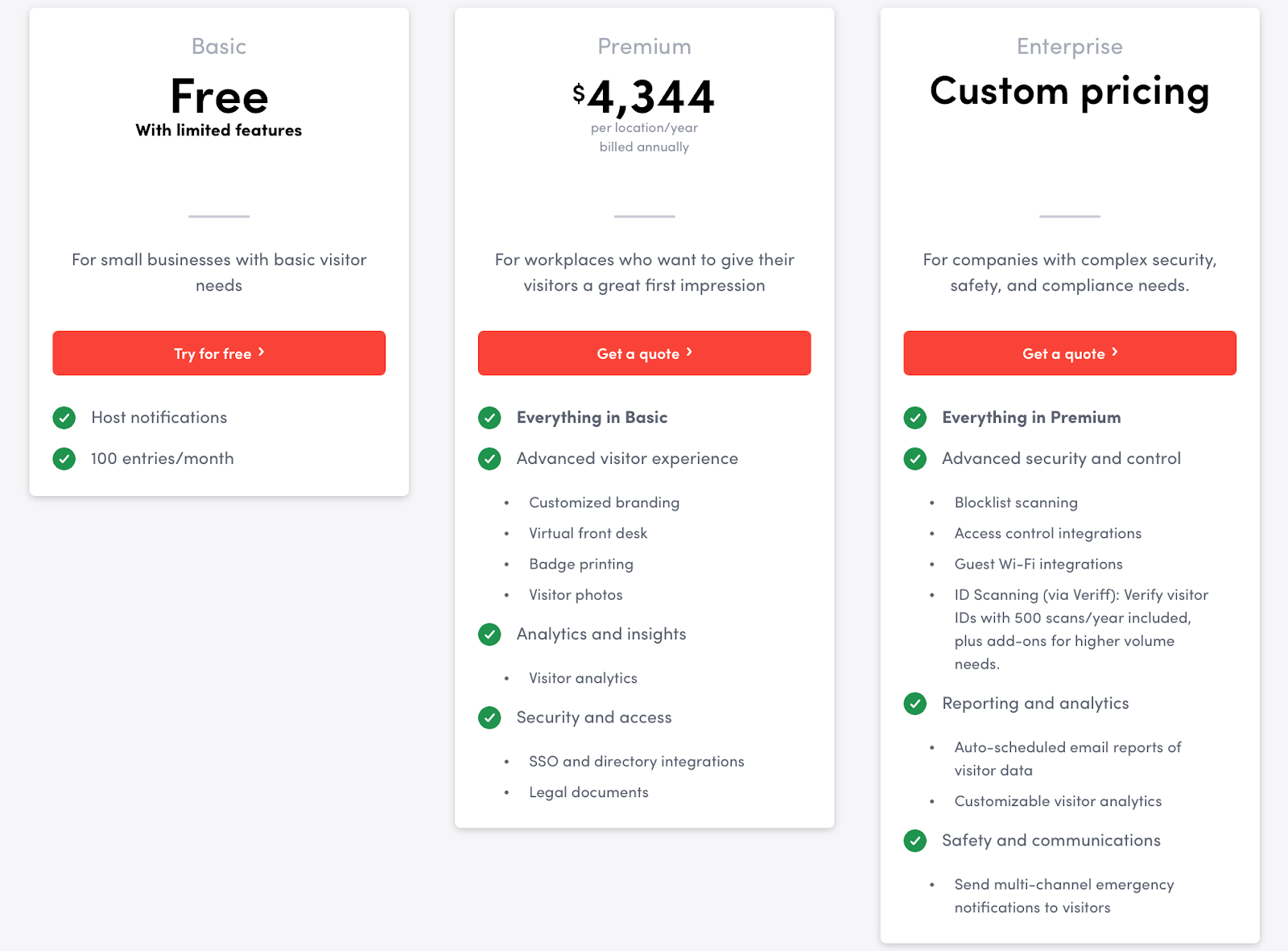
Envoy’s pricing is modular and can get tricky because you pay for different products (Visitors, Rooms, Desks) separately.
It currently lists:
Visitors Basic: free
Visitors Premium: $4,344 per location/year
Emergency Notifications: $24 per user/year
Reservations: $60 per bookable resource/year
Screens: $144 per device/year
Deliveries: $3,000 per delivery location/year
Source: Envoy
What users like
Visitor experience: Quick check-ins, QR code registration, badge printing, and host notifications all get positive mentions.
Security integrations: It plays well with physical access control systems and chat tools.
Mobile app: The employee app is highly rated for being snappy and making it easy to book a spot on the go.
Automatic check-ins: Users love that they don't always have to remember to check in, as the system can do it for them via the office Wi-Fi.
Multi-site visibility: Admins managing multiple locations like being able to oversee several sites from one place.
What to consider
Pricing: Since features are split into different products and tiers, the total bill can be much higher than an all-in-one platform.
Gated features: A few reviewers mention limits on lower tiers or needing to move up-market for features like SSO or customization.
Hardware limitations: The visitor app is iPad-only. If your IT team prefers Android or other tablet hardware, you'll have to switch or look elsewhere.
Heavy setup: A full rollout (especially with hardware and access control) is more of an IT project than a plug and play software switch.
3. OfficeSpace: best for real estate planning
OfficeSpace is a workplace management platform that prioritizes the planning side of the office. It’s a great fit for facility managers and real estate teams who have to design floors and figure out how to consolidate buildings.
It’s often considered a more mature enterprise choice. It treats the office like a digital twin, allowing admins to run simulations and what-if scenarios before they move a single desk. If you’re a large organization with multiple sites, OfficeSpace can manage that level of complexity.
Key features
Visual directory & wayfinding: High-resolution floor plans make it easy for employees to find colleagues or specific amenities across large campuses.
Move management: It offers a dedicated drag-and-drop tool for planning everything from a single desk swap to a departmental relocation.
Scenario planning: OfficeSpace allows admins to create draft versions of floor plans to test new layouts or social distancing rules before taking them live.
Desk & room booking: Standard booking tools include neighborhoods for team-based seating and equipment filters.
Workplace analytics: It provides utilization data to help real estate teams decide whether to renew a lease or downsize their footprint.
Visitor management: Visitor check-in, pre-registration, badges, forms, deliveries, and digital logs are supported through Greetly by OfficeSpace.
Pricing
OfficeSpace doesn’t publish transparent list pricing. It follows a custom, enterprise-quoted model based on your employee count and the specific modules you need.
Source: OfficeSpace
What users like
Ease of use: OfficeSpace is user-friendly and easy to learn for both admins and everyday employees.
Strong analytics: Users regularly call out occupancy reports, office trends, multi-site visibility, and the ability to make more data-driven workplace decisions.
Fast implementation: OfficeSpace pushes 35-day implementations in its product messaging.
Move tools: Facilities teams love the move management module because it replaces manual spreadsheets and chaotic email chains.
Employee adoption: The interface seems to land well with end users, especially for desk booking, room booking, maps, and finding people.
What to consider
Visitor management: OfficeSpace offers visitor tools, but they run through Greetly, making this part of the platform feel less native than planning and analytics.
Pricing transparency: Because there’s no public starting price, it’s harder to budget for than transparent competitors without going through a full sales cycle.
Workflow depth: Reviews suggest request and ticketing workflows could go further for complex facilities processes, especially around approvals and categorization.
Planning-heavy focus: If you only need a social booking app for a small team, the move management and block-planning tools will feel like unnecessary bloat.
4. Robin Powered: best for workplace analytics
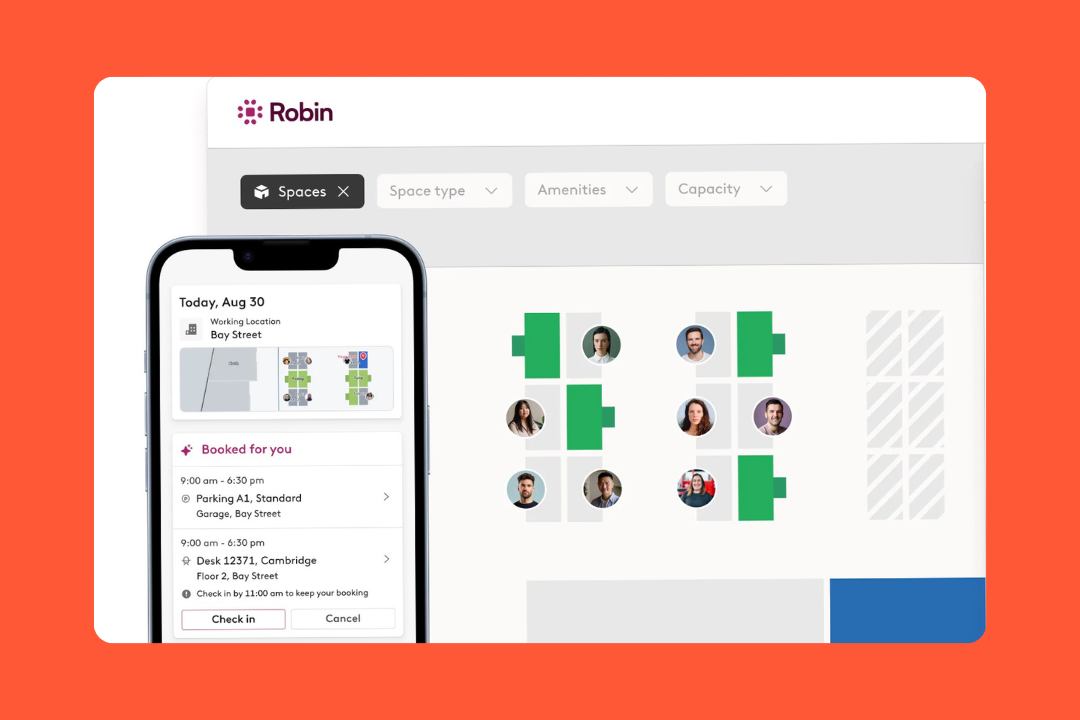
Robin is a workplace platform that focuses on the social side of hybrid work, helping people find each other and coordinating when to come into the office. It’s one of the most recognizable names in the space, particularly for mid-market companies that need a tech-forward way to manage desks and rooms.
It puts a lot of weight on meeting workflows, check-ins, calendar integrations, and smoothing out the small bits of office friction that make hybrid work feel harder than it should.
Key features
Office maps: Employees can visually browse the office to find teammates and book nearby desks or rooms.
Neighborhoods: Admins can group desks into specific zones for departments or project teams.
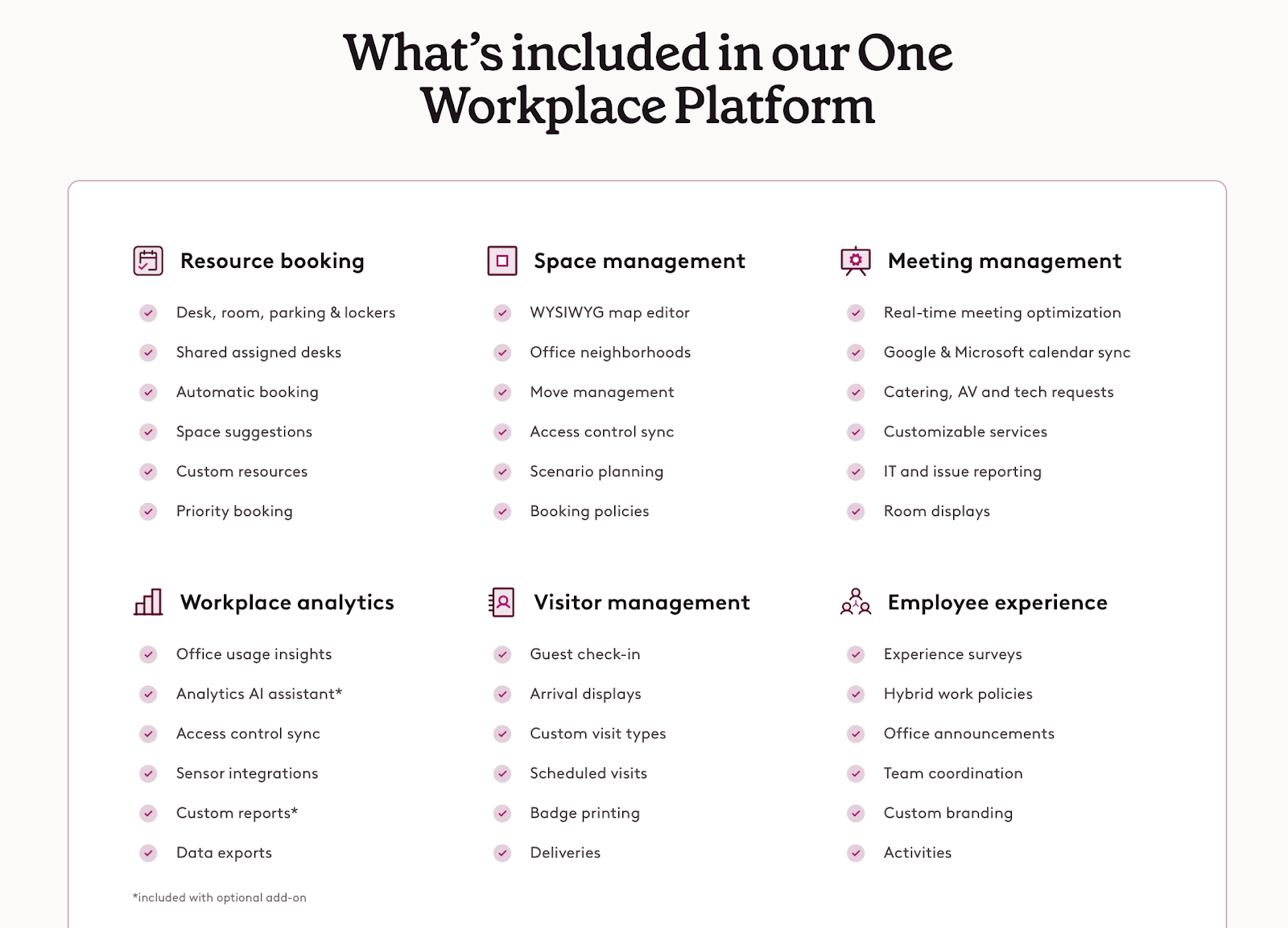
Workplace analytics: The platform provides desk and space insights, collaboration metrics, occupancy dashboards, and utilization reporting.
Visitor management: It includes pre-registration, custom forms, legal documents, health questionnaires, host notifications, badges, arrival displays, and deliveries.
Presence tracking: Robin uses Wi-Fi to automatically check people in and provide accurate occupancy metrics.
AI-powered workflows: That includes automatic desk booking, smart room suggestions, an analytics AI assistant, and the Scheduling Agent.
Pricing
Robin doesn’t have actual pricing. Instead, it asks buyers to request a custom quote based on workplace size and setup. It does at least say it’s generally a fit for organizations with more than 150 hybrid employees, and strongest for companies managing multiple floors or buildings.
Source: Robin Powered
What users like
Integrations: For Google or Microsoft shops, Robin feels like a native part of the workflow through its browser extensions and mobile app.
Actionable insights: Admins seem to get real value from the reporting side, especially for tracking office use and planning changes.
Everything in one place: People like not having to jump between tools to plan an office day.
Meeting features: Things like recurring meetings and room controls come up a lot.
Interactive maps: The office map is a plus because it makes booking and wayfinding faster.
What to consider
Pricing transparency: Robin is harder to compare quickly with tools that show real numbers.
Analytics add-ons: The deeper reporting and AI assistant features are tied to Advanced Analytics.
Layout maintenance: More involved layout changes don’t always sound super lightweight.
Workspace size: Robin makes more sense for mid-sized and bigger hybrid workplaces than for tiny teams with basic needs.
5. Skedda: best for custom booking rules
Skedda handles anything that can be booked: studios, sports courts, coworking desks, or community centers. It’s a highly reliable platform that excels at the logic of booking.
It’s often a top pick for organizations that need granular control over who can book what and for how long, without the administrative overhead of a legacy enterprise system. Skedda focuses a lot on the rules, managing the fair use side of things, so you don't have to manually police desk-hogging.
Key features
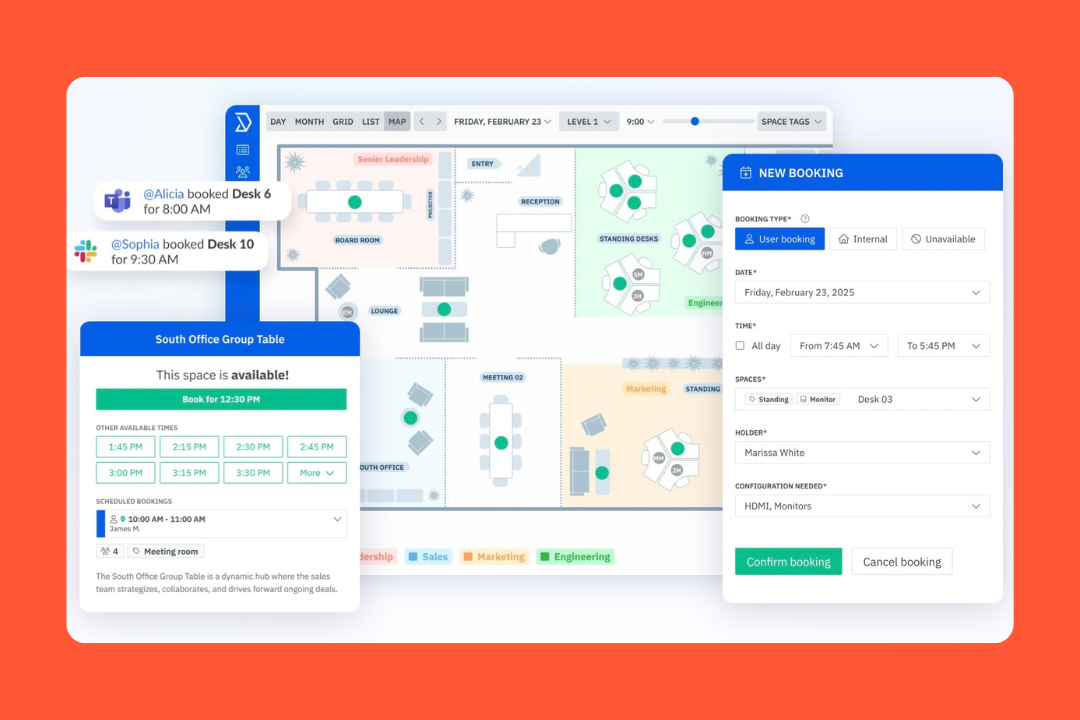
Desk and meeting room booking: Skedda supports desks, meeting rooms, and other shared spaces with interactive floor plans and check-ins.
Powerful rules engine: It offers detailed control over booking windows and cancellations, allowing you to automate fair use policies.
Visitor management: A dedicated module for guest check-ins and host notifications keeps the lobby organized.
Payment integration: There’s a built-in support for Stripe, letting organizations (like coworking spaces) charge for bookings directly through the platform.
Utilization reporting: Visual dashboards track how spaces are being used, identifying peak times and underutilized zones.
Resource booking: Parking, labs, equipment, and other bookable resources are very much part of the product story.
Pricing
Skedda uses a per-space pricing model, which makes it cost-effective for companies with a high headcount but a small, focused office footprint.
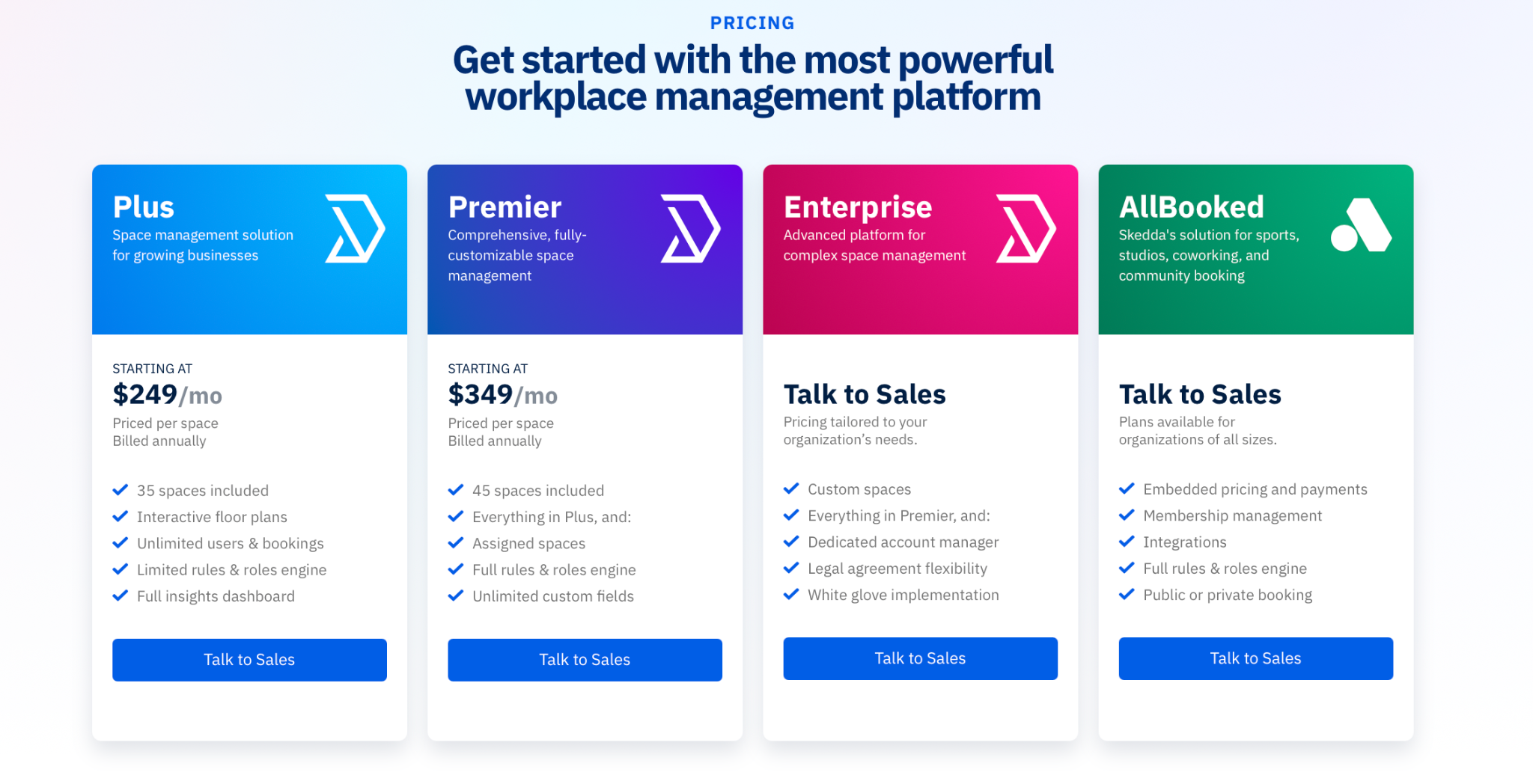
It currently offers:
Plus: from $249/month
Premier: from $349/month
Enterprise: custom pricing
Source: Skedda
What users like
Customizable logic: The ability to model real-world office policies (like specific booking quotas) is a standout feature.
Resource handling: Beyond just desks and rooms, it’s equally good at managing parking spots or lockers.
End-user UX: Employees find the map-based booking straightforward enough to use without formal training.
Support team: Fast replies, helpful onboarding, tailored videos, and responsive support come up again and again.
Fast setup: For a tool with this much control, Skedda gets teams live pretty quickly.
What to consider
Rule-mapping effort: Because the platform is flexible, you need to have a clear handle on your policies before you start building them in.
Pricing for scale: If you have hundreds of bookable desks, the costs can scale quickly compared to a flat-fee or per-user model.
Visitor tool maturity: Visitor management is an add-on. While it covers the essentials, it might not feel as deep as a dedicated lobby platform.
It’s more of a control tool: If someone wants a product built mainly around hybrid rituals or team coordination, Skedda might not be the most natural fit.
6. Kadence: best for AI-assisted booking
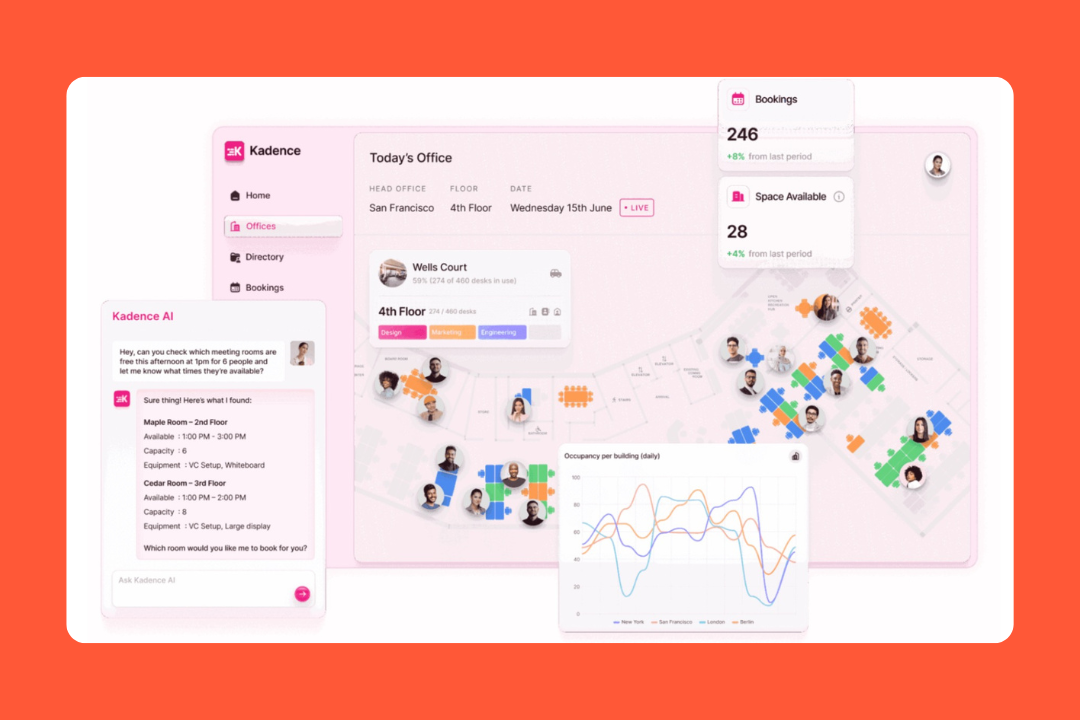
Kadence exists around the idea that reserving a desk shouldn't require opening a separate application. It leans heavily into AI and chat integrations to make space management invisible.
Rather than just showing a map of empty chairs, it focuses on people. The platform pushes smart suggestions based on when your frequent collaborators are coming in, turning a standard reservation system into a social scheduling tool. It’s a strong contender for mid-market and enterprise teams that want a highly communicative hybrid experience.
Key features
Kadence AI: A natural language assistant inside Teams allows employees to reserve spaces or locate colleagues by chatting.
Smart suggestions: Automated notifications ping users when their teammates plan to be on-site.
Floor plans: Color-coded maps make it simple to locate specific colleagues and book a spot nearby.
Office neighborhoods: You can use admin tools to assign specific departments or project squads to designated zones on chosen days of the week.
Native chat workflows: Users can complete check-ins and cancellations entirely within their daily communication tools.
Visitor management: A front-desk module covers guest check-ins and overall lobby coordination.
Pricing
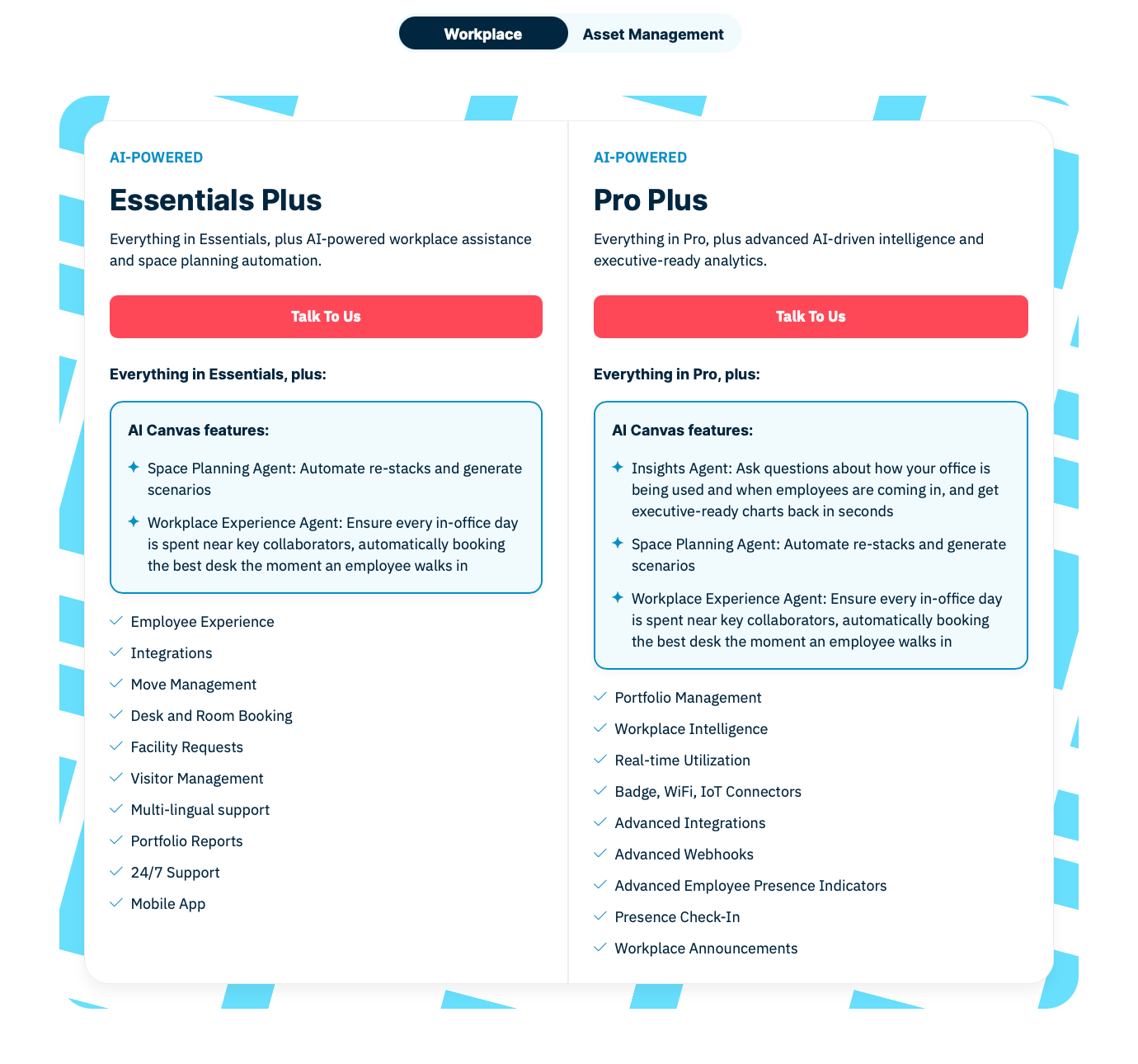
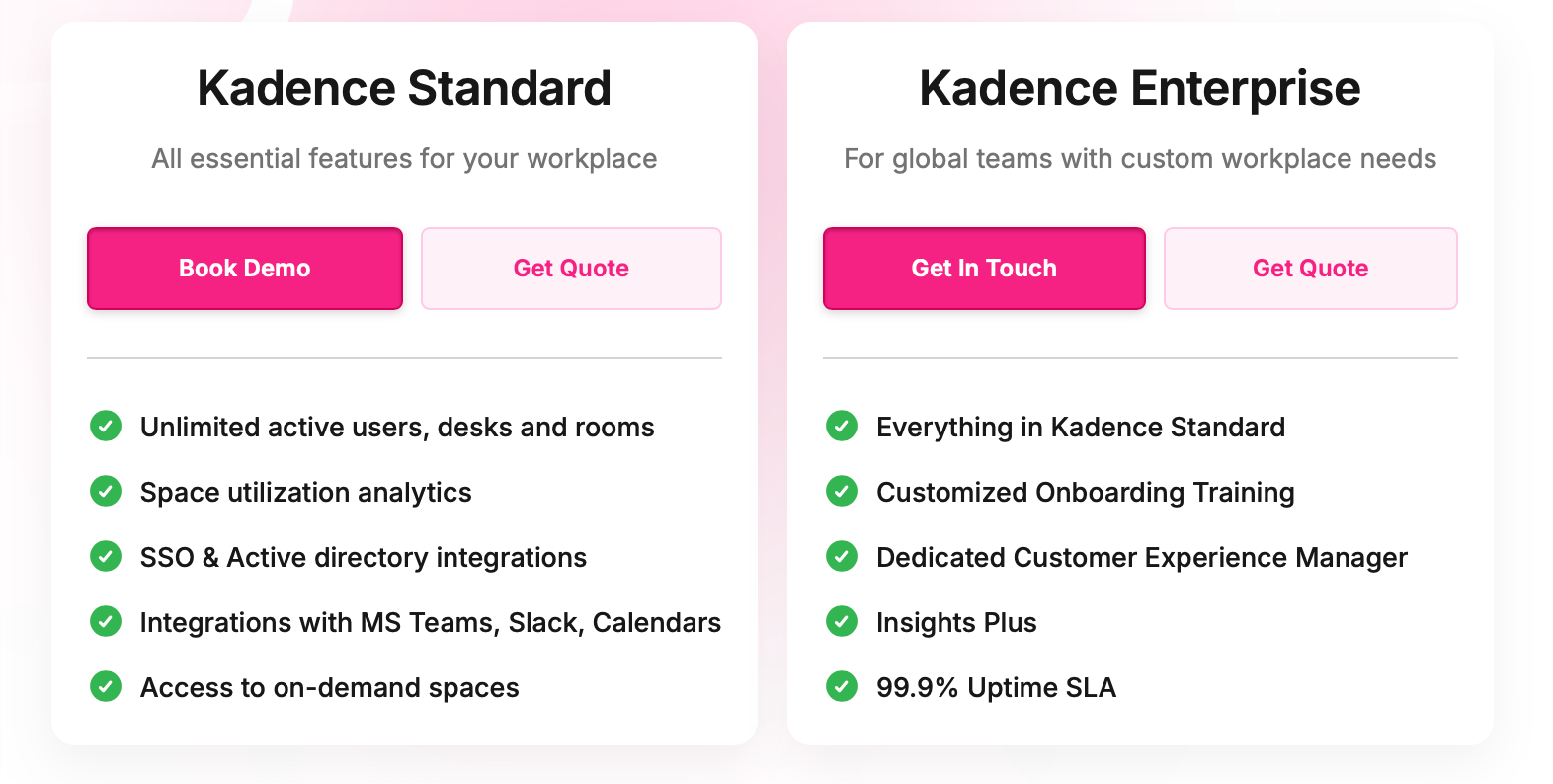
Kadence has shifted toward a custom, quote-based model for most of its platform. It currently splits the product into Standard and Enterprise, with features like Insights Plus and more enterprise support sitting higher up.
Source: Kadence
What users like
Invisible workflows: Being able to secure a spot without leaving Microsoft Teams is a win for rapid employee adoption.
Social scheduling: People like being able to check whether teammates are coming in and decide if the office day is worth it.
Attendance visibility: Teams get good day-to-day value from seeing office activity and patterns in how space is being used.
Polished interface: Reviewers mention the look and feel a lot.
Support during rollout: Support and onboarding come up often, especially when teams are getting set up or making changes.
What to consider
Platform intensity: If you need a tool to stop double-bookings, the AI assistant and neighborhood zoning might be more firepower than necessary.
Auto check-in: It’s one of the more interesting parts of the platform, but it also shows up in reviews as one of the more temperamental ones.
Reporting limitations: Kadence cares about analytics, but not every user finds the reporting as flexible as they want.
Admin setup: The day-to-day experience feels light, but behind the scenes there can still be a fair bit of setup around floor plans and policies.
7. Officely: best for Slack and Teams-native booking
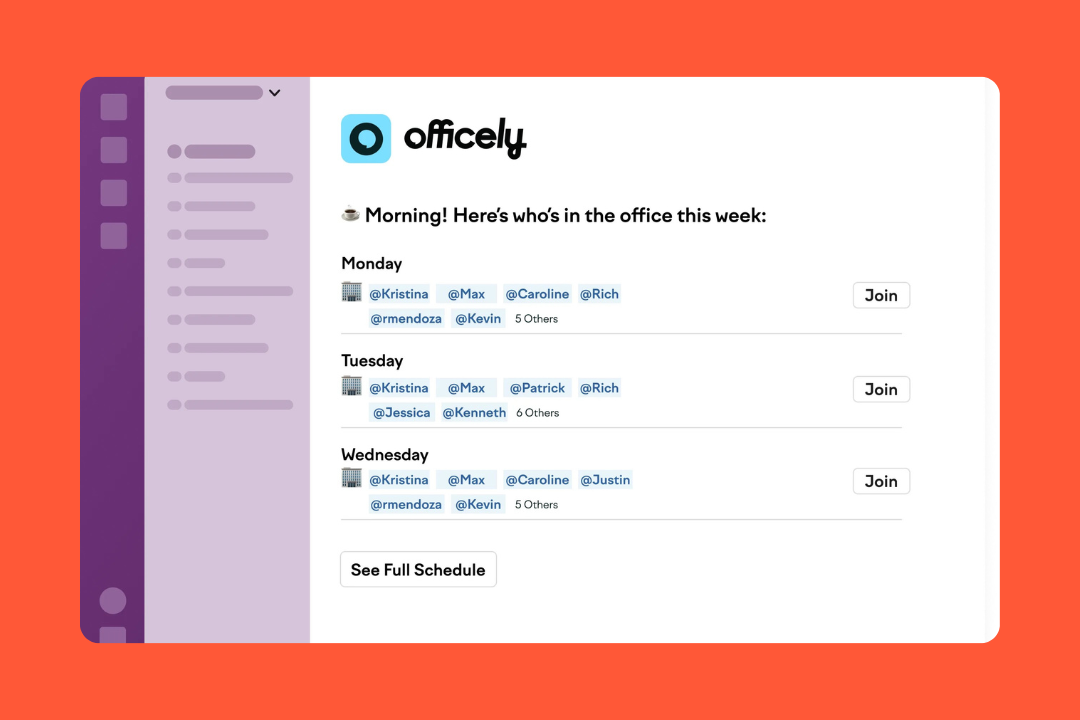
Employees hate downloading another app to book a desk. Instead of forcing teams into a separate browser window or mobile app, Officely lives completely inside Slack and Microsoft Teams. It turns your existing communication channels into your space management system.
It’s the most frictionless option for small to mid-sized teams that want basic coordination without a heavy rollout. If your goal is getting people to see who else is coming in so they show up, Officely removes the barrier to entry.
Key features
Desk booking inside Slack and Teams: Employees can reserve desks in a couple of clicks, use one-click bookings, set routines, and join waitlists.
Hybrid coordination tools: It includes office broadcasts, favorite coworkers, recurring team schedules, and daily visibility.
Meeting room booking: Meeting Rooms by Officely lets teams find available rooms, invite attendees, and book on behalf of others.
Parking management: Parkly adds office parking with space setup, one-click booking, car registration, and waitlist support.
Attendance visibility: A daily summary drops into your chat channels showing who’s working from the office, from home, or on PTO.
Utilization analytics: It provides lightweight dashboards for leadership to track attendance trends and identify wasted space.
Pricing
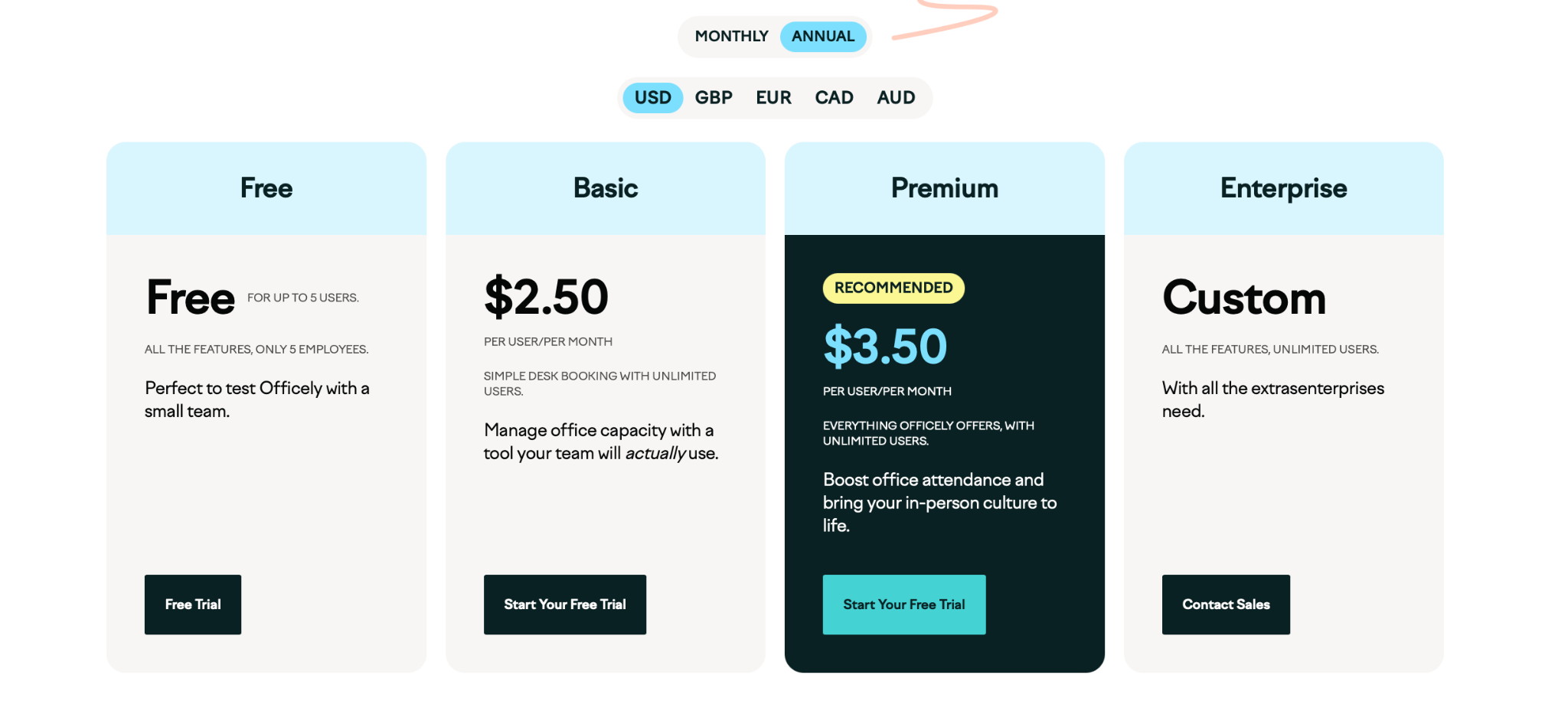
Officely uses a per-user pricing model, scaling by headcount rather than the number of desks in your office.
Paid plans (billed annually) look like this:
Free: for up to 5 users
Basic: $2.50 per user/month
Premium: $3.50 per user/month
Enterprise: custom pricing
Resource add-ons: meeting rooms are an extra $12 per space/month; parking is $15 per space/month
Source: Officely
What users like
Slack and Teams-native booking: People like that Officely works inside tools they already use.
Desk booking: Booking a seat or checking office plans seems to feel easy for employees without much training.
Exceptional support: Support gets mentioned a lot, especially in setup and handling smaller requests.
Attendance data: Users seem to like that the reporting is easy enough to read and useful for basic office decisions.
Data exports: The analytics aren't complicated; they provide clear data on who’s actually showing up.
What to consider
Feature depth: If you need architectural planning or hardware sensors, this isn’t the right tool.
Headcount economics: The per-user model can bite. If you have 500 employees but only 50 desks, you’re paying for the total headcount.
Ecosystem reliance: Your experience depends entirely on your chat tool.
Light customization: Some settings and statuses aren’t very flexible, and more specific requests may need Officely’s help.
How to choose the right YAROOMS alternative
When comparing YAROOMS alternatives, the basics only get you so far.
A lot of tools offer desk booking, meeting rooms, and floor plans. The differences show up once you look at how the platform fits your workplace day to day and whether the product is built for simple coordination or something broader.
Match the product to the kind of workplace you’re running
Some teams just want an easier way to book desks and see who’s in. Others need a platform that can handle visitors, room scheduling, parking, check-ins, policies, and space data across multiple locations.
That’s usually the first split to look at. Some YAROOMS alternatives are lighter and easier to roll out. Others are better for companies that need stronger workplace operations or deeper reporting.
Check how much control admins really get
This is one of the bigger reasons buyers look at YAROOMS in the first place.
Not every alternative gives the same level of control once you get past the product page. Booking limits, permissions, approvals, recurring schedules, check-in rules, and team-based seating can all look fine in a demo, then turn out to be much more rigid in practice.
It helps to look at things like:
what your admins can change on their own
what still needs vendor support
how easily the tool adapts to your real office rules
That tends to separate the lighter tools from the more configurable ones pretty quickly.
Treat analytics as a real comparison point
Almost every vendor now says they offer insights, but that alone doesn't tell you much.
What matters more is whether the reporting helps with real decisions, like:
spotting underused space
tracking attendance patterns
checking policy compliance
understanding team behavior
planning future layout or footprint changes
In some tools, analytics are mostly there for visibility. In others, they go further into occupancy and planning. If reporting matters to your team, this is one of the easiest areas for tools to look similar on paper but feel very different once you use them.
Think about rollout like an operations project
The platform that looks easiest in a screenshot isn’t always the easiest one to launch.
Some tools need more setup around floor plans, directory sync, room calendars, integrations, or admin permissions. Others are much faster to get live because they sit inside Slack or Teams and ask less from IT and workplace teams.
That’s worth checking early:
how much setup sits with your team
how much depends on the vendor
how easy it is to onboard employees
how much change management is needed
Final thought
YAROOMS is a solid option, but the best fit really depends on what you need more of: simpler booking, tighter control, better coordination, or stronger workplace insight.
If you want something broader and more operational, elia is one of the strongest YAROOMS alternatives to look at more closely. It combines desks, rooms, visitors, and workplace analytics in a way that feels practical day to day.
If you want to see how it works in practice, book an elia demo and take a look for yourself.
Tamara Zhostka
is a Content Marketing Specialist at elia. With 10+ years in content marketing, she writes about workplace trends and the tools that help teams work smarter. Part strategist, part storyteller, Tamara brings equal amounts of data, creativity, and a little Moon Prism Power to every piece she creates. 🌙✨
Share
Contents
Subscribe to our newsletter
Subscribe to the elia newsletter for exclusive product updates and industry best practices. You can unsubscribe at any time.
Thank you! You're subscribed.
Oops! Something went wrong while submitting the form.
Frequently Asked Questions
Answers to Your Common Queries
Why are organizations considering alternatives to YAROOMS?
What features should I prioritize when evaluating YAROOMS alternatives?
Are there cost-effective alternatives to YAROOMS suitable for small businesses?
What are the scalability limits of YAROOMS, and do alternatives better serve rapidly growing companies?


.png)

.png)
.png)