Contents
Subscribe to our newsletter
Subscribe to the elia newsletter for exclusive product updates and industry best practices. You can unsubscribe at any time.
Thank you! You're subscribed.
Oops! Something went wrong while submitting the form.


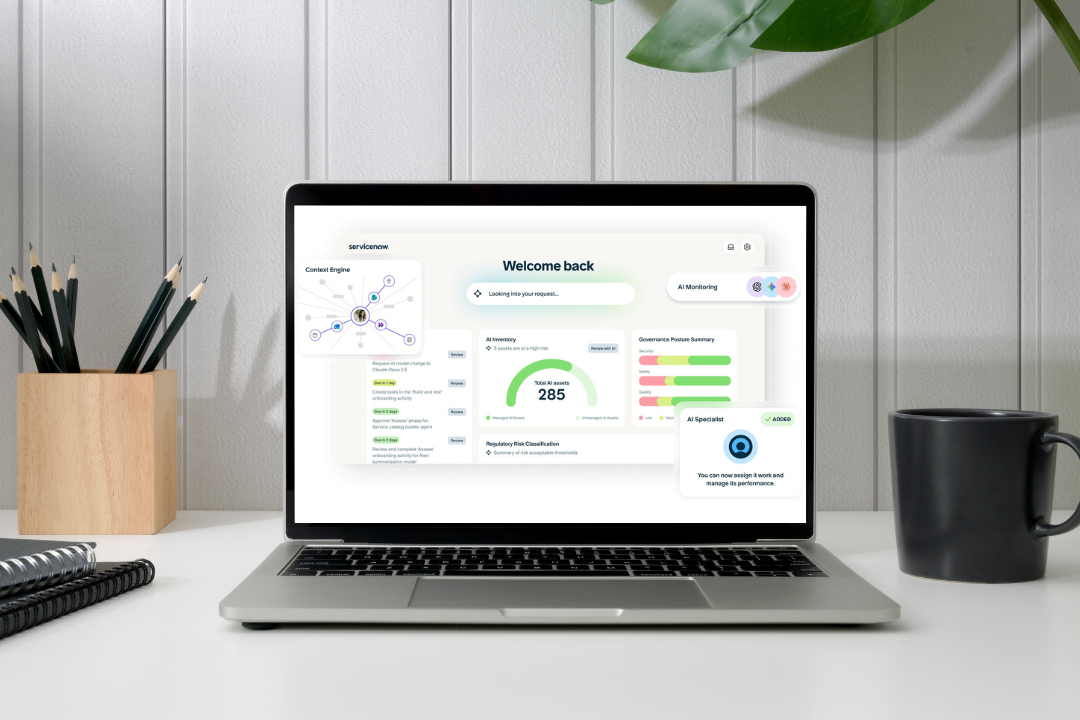
I'm on the content side here at elia, so I'm not the one setting these systems up. But I sit close to the people who talk to workplace and facilities leads all day, and one question comes up more than almost any other:
"We already pay for ServiceNow for IT... why not manage the workplace from there too?"
I mean, a totally fair question. And ServiceNow has a product built for exactly that. It’s called Workplace Service Delivery (WSD for short), and it books desks and rooms, checks visitors in, turns service requests into tickets, maps your space, and more, all inside the platform your IT team already uses.
So I put together a guide to help you get ahead of it, pulled from ServiceNow's own docs, independent pricing breakdowns, and the conversations we have with teams sorting through the same thing:
Hope it helps!
WSD is ServiceNow's solution for the physical workplace. It does four jobs:
A typical week gives you a feel for it. Someone opens the ServiceNow Employee Center on Monday, sees which desks are free on their floor, and grabs one near their team. On Wednesday, the monitor at the desk won’t turn on, so they raise an employee request from the same portal. It becomes a case that gets assigned to the facilities team, just like an IT ticket would. Their facilities lead can then pull up case volumes by building, and if there are sensors in the floor, how full each area gets.
For a company already living in ServiceNow, doing all of that in one place is the whole appeal.
WSD isn't a separate product with its own engine. It’s built on the Now Platform, the same foundation as ServiceNow's IT and HR products. Every desk, room, request, and visitor is a record on that platform, handled with the same workflow logic ServiceNow uses for an IT incident.
It’s great when you want one system for everything! Also the reason so much of WSD leans on ServiceNow itself.
WSD is a set of apps you can use separately or together, all using the same info about your buildings and spaces. That’s useful, but it also makes licensing and dependencies a bit more important, which I'll get to.
Short answer: WSD is IT's to run.
Long answer: WSD sits under ServiceNow’s platform governance, which means IT or a central platform team ends up owning a lot of the setup. They decide who can do what, write the booking rules, manage the integrations, and run the upgrades. Your workplace team then works within what they've created.
And that's not a knock on ServiceNow. It's so configurable you could rebuild most tools inside it. That flexibility is the whole reason it sits with IT, though. Somebody has to build all of it and then keep building.
So when something needs to change, you often have to go through IT. An extra neighborhood or a tweak to how a request routes, those are platform changes, so they happen on IT's schedule. We hear this all the time. Someone on the workplace team wants to move a few desks around, and suddenly it’s a ticket waiting in another team’s queue.
There's also a people side to it, and some of the reviews are pretty blunt about it. ServiceNow admins often describe each workflow as a small project of its own, with different stakeholders and budgets involved. And when facilities processes are adapted to IT-style workflows, it doesn’t always work.
The setups that seem to work best split the responsibilities: IT looks after the platform, while facilities and HR decide the actual workplace rules.
Quick heads up before we get into the list: WSD is a biiiiiig suite.
There are close to 20 apps if you count everything. Along with the ones people use daily, there’s Workplace Core and Workplace Central holding things together in the background, a Workplace Concierge AI agent, a mobile app, an Outlook add-in, calendar sync, and Workplace Lease Administration for property contracts.
Most teams won’t use anywhere near all of these. So instead of going through 20 apps one by one, I’m focusing on the 6 people are most likely to use and what you can do with each.
The employee-facing part of WSD.
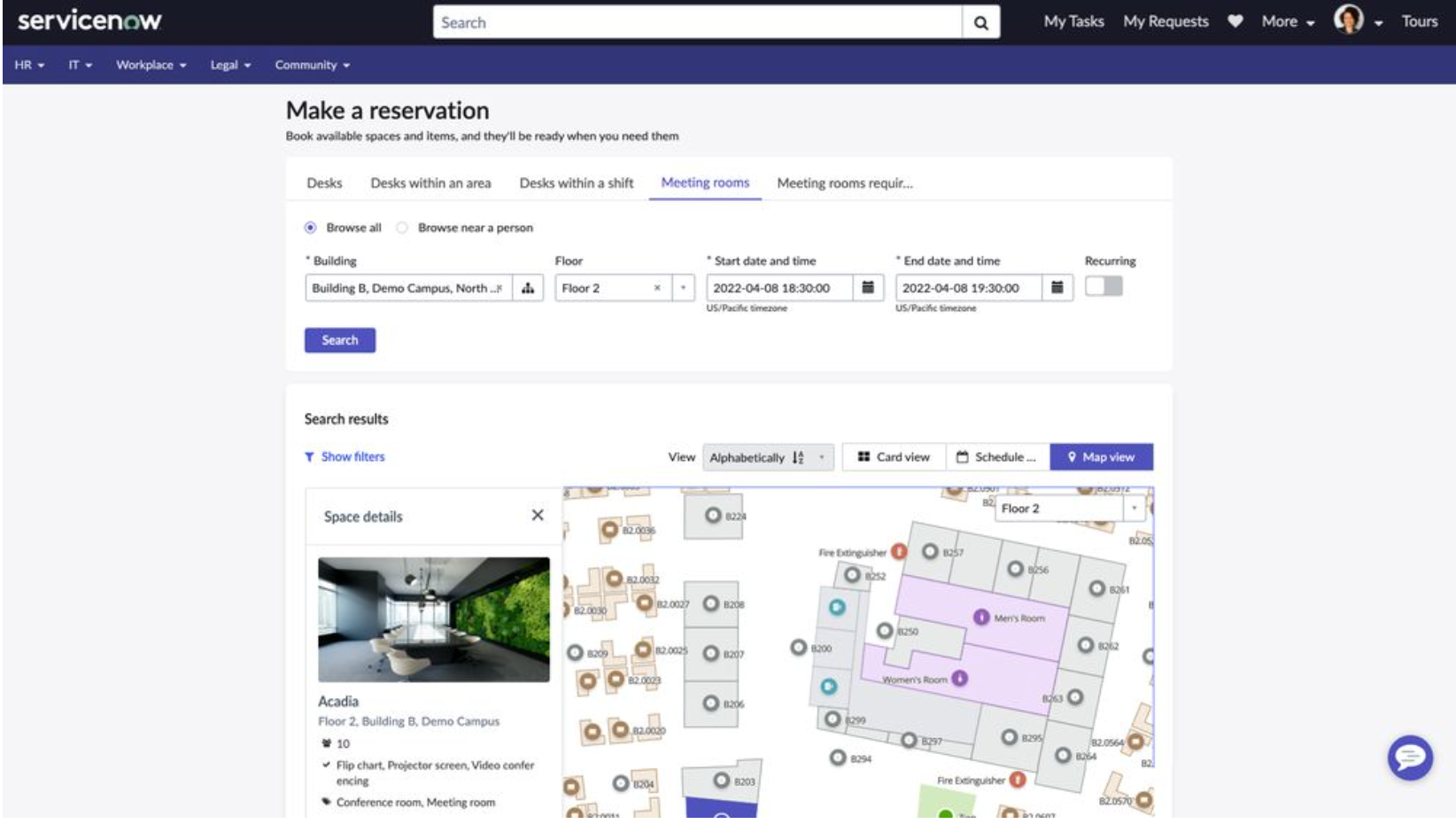
You can reserve desks, rooms, parking, equipment, and other collaboration spaces from the Employee Center, your phone, or straight from Outlook and Google Calendar. You can also filter by amenities or who else is coming in. Walk up to a free desk, and you can claim it on the spot, QR code and all.
Desks can be set up as reservable, drop-in, or assigned, and no-shows can auto-release so someone else can use the desk.
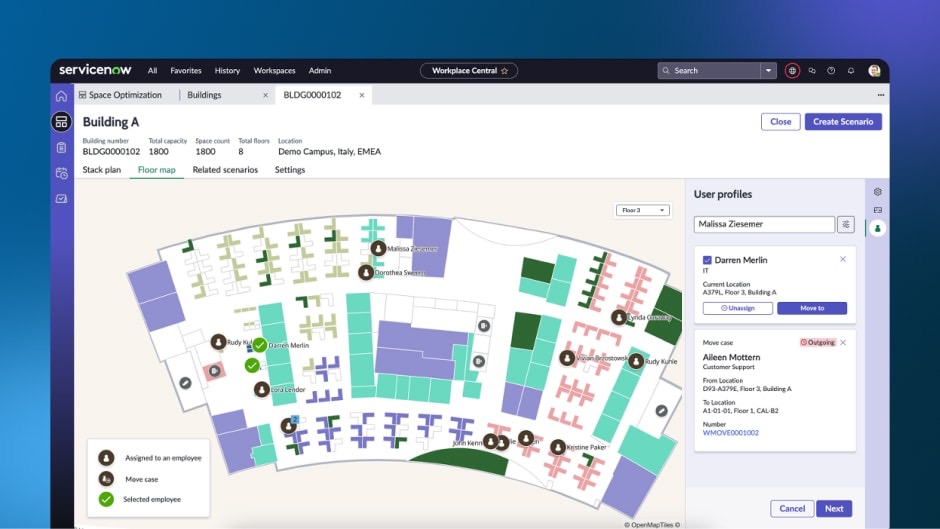
Floor plans and occupancy data show you which floors are half empty and which ones are getting crowded. You can also test different layouts before making any changes, like moving desks or changing a floor layout. Once you’re ready to make the move, workflows can update the records and free up the old desks.
It also helps teams see where they’re wasting space and where they might need more of it.
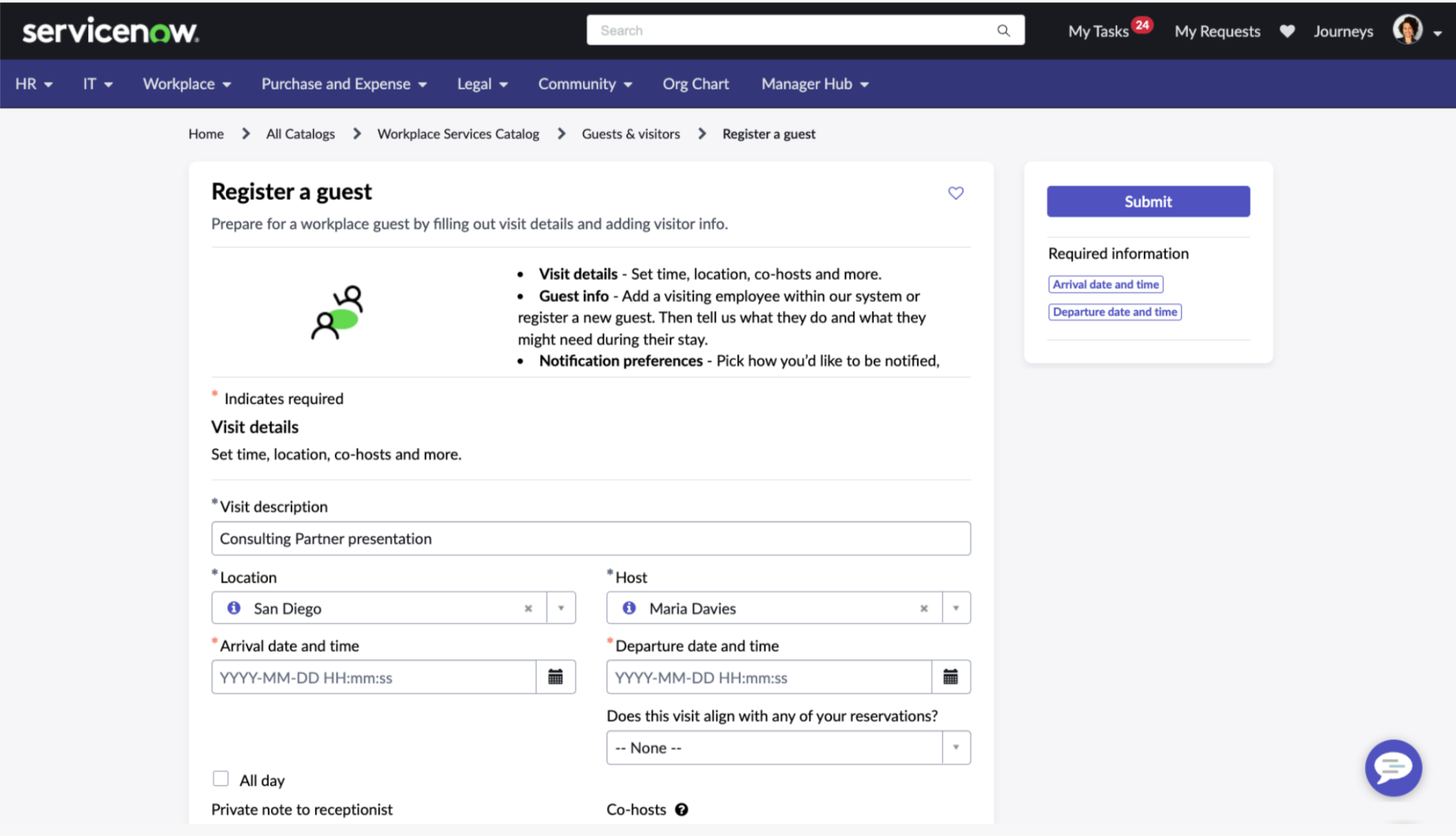
You can pre-register visitors, and the system takes care of things like emails and paperwork. A visitor booking can also set off other tasks, like giving them building access, setting up Wi-Fi, assigning parking, or connecting them to a room.
Reception gets a live view of who’s coming in, and you can set different visitor flows and questions for different types of guests.
You can report things like a plumbing leak, a pest problem, a meeting room that's just too darn chilly, a furniture swap, and more and more. Each request gets assigned to someone with a deadline, and Service Activity can automatically create the approvals and tasks that need to happen next. Facilities works it just like IT deals with an incident.
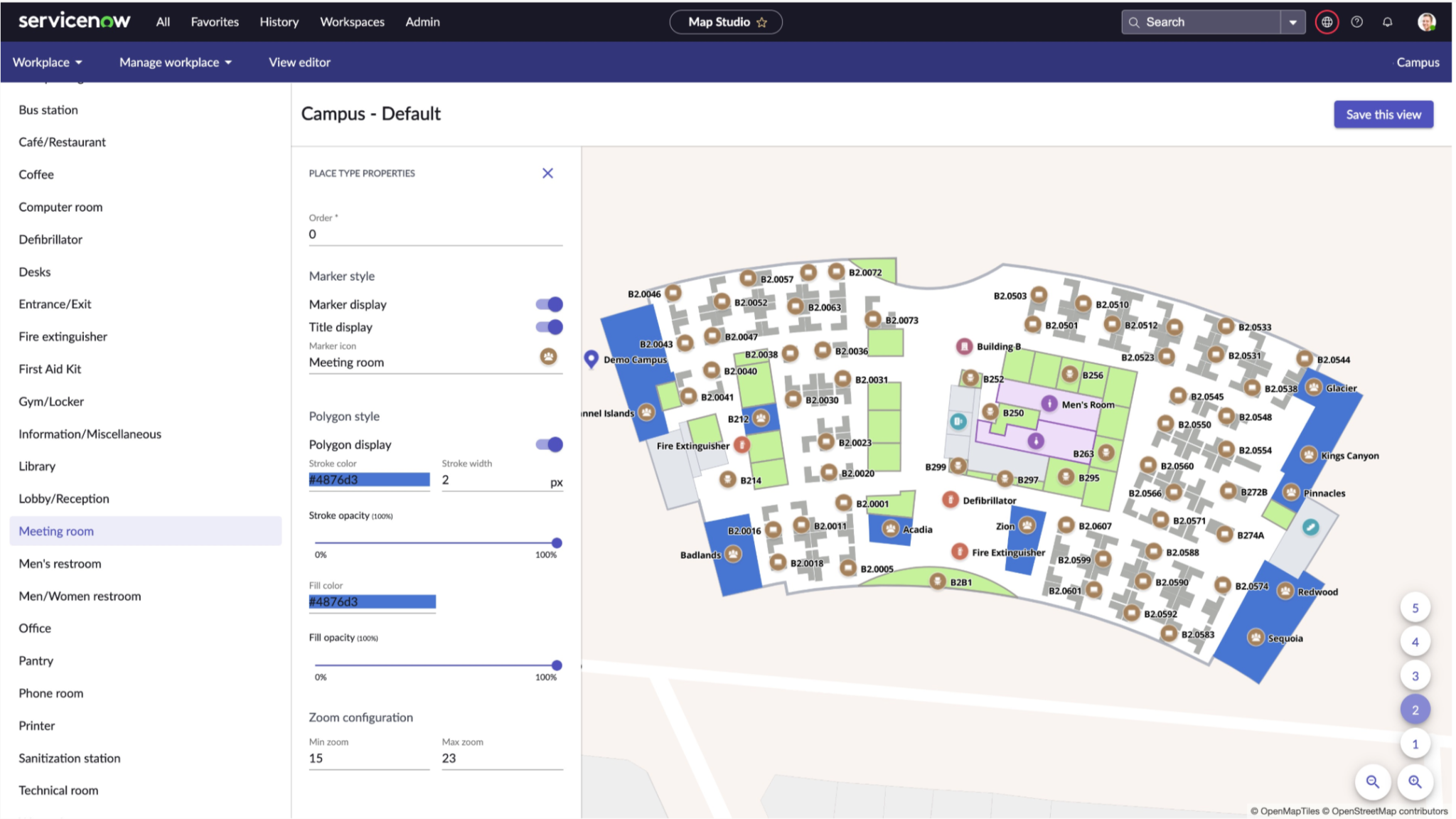
WSD turns your floor plans into interactive maps for booking and wayfinding, and ServiceNow now includes its own native mapping for this. (You can still do it with a third-party map provider like MappedIn, but from what I see, it’s a less common path.)
For that, you need to export your floor plans from AutoCAD as a .dxf file, keep the file under 5MB, and make sure rooms and desks are set up correctly so they match the right records in ServiceNow. And whenever the office changes, the map needs to be updated too. It’s a fair amount of work, especially when you have a lot of floors.
ServiceNow doesn't make hardware, so anything physical comes from somewhere else.
Workplace Connectors pull in all sorts of data from outside sources (badge swipes, occupancy sensors, environmental readings) and feed it into the dashboards. It's how WSD knows what's happening in the building instead of just what people booked. And, of course, it's also another integration to set up and maintain.
The first thing you should know: ServiceNow doesn't publish prices. No calculator, no list, no per-desk rate. Every deal is a one-off annual quote based on your modules and how much setup you need. You're negotiating with no public number to compare against.
But you can still get a rough idea of the model, because ServiceNow charges by role.
Fulfiller seats make the cost add up. Facilities people who work on cases need them, and they’re the pricey ones. Someone who just books a desk or sends in a request is a requester, which is free under ServiceNow’s standard model. So a company with 5,000 employees might only need 50-100 paid fulfiller seats while everyone else can still use the system.
There’s a catch, though. Some ServiceNow products are priced per employee, so don’t assume the whole employee side of WSD is free. Check exactly how it’s being counted in your quote.
Seats are also not the only thing that affects the price:
Get the numbers from your ServiceNow rep and look closely at what’s included.

You have to configure it, connect it to your other systems, and get your floor plans ready, so many companies bring in a ServiceNow partner or ServiceNow’s own Expert Services.
And that setup is also the expensive part. The partner work might cost 3-5 times the cost of the licenses, with services eating most of the first-year spend. Besides, you’ll need people to look after it once it’s up and running.
It also takes a while. A single module can be up in 6-12 weeks, but a full rollout across a few sites is more like 6-12 months.
WSD does an awesome job treating the workplace as tickets inside ServiceNow, and to be fair, the product itself is easy enough to figure out. Reviews call the booking experience intuitive, too. The bigger questions come up once you look at what it takes to run it. Before you sign anything, these are the things I’d look at:
None of that means WSD is a bad product! It can actually be a really good fit for some companies.
So it comes down to a build-or-buy question:
If you already use ServiceNow across IT and HR, have a platform team that knows it well, and want everything in one system, WSD fits naturally. The biggest benefit is how all those pieces can work together. Someone gets hired, HR adds them, and that can kick off the IT work for their laptop and the workplace work for their desk, without anyone having to start those requests manually.
If that kind of automation is a bigger priority to you than having the workplace team make quick changes on their own, and you have the budget and people to support it, WSD is your strong pick!
Most of the teams we talk to don't want to pull ServiceNow out. They like it for IT, and they should.
They just want something simpler for the workplace side:
They consider having a dedicated workplace platform for that. These tools are built around workplace management rather than IT, so the workplace team can manage more of it themselves. You get features like built-in occupancy data, faster setup, and pricing that’s based more around your spaces than your total number of employees.
You can still connect it to ServiceNow, too. So IT can keep using ServiceNow while the workplace team has its own system, and the two can pass information back and forth.
There are three ways you can go, depending on how much you already have tied to ServiceNow and what you need from your workplace platform:
If the gaps above are dealbreakers, or you just don't want your workplace sitting on an enterprise IT platform, here are the dedicated tools I'd compare. All of them cover the workplace on their own, without needing a platform team behind them:
WSD can do all of it, desks, rooms, visitors, requests, and if you're already deep in ServiceNow, having everything in one place saves you real money and a lot of hassle.
The trade-off is that the workplace side comes with the same setup as the rest of ServiceNow. IT usually owns it, pricing isn’t public, implementation can take months, and you’ll need third-party hardware for things like occupancy data.
But if you want your workplace team to have more control, faster changes, and a better idea of what you’re going to pay, a dedicated workplace platform may be a better fit. You can also keep ServiceNow for IT and connect the two.
If that sounds more like what you need, look at a dedicated platform before you make the call. The elia team can show you how it works.
I pulled this together from ServiceNow’s own product and setup docs, independent pricing sources, G2 reviews, and conversations from ServiceNow admins and platform owners. I’ve also included some of the things we hear from workplace teams looking at WSD.
ServiceNow doesn’t publish its pricing, so treat the dollar figures as rough estimates and check the numbers with your ServiceNow contact. The product also changes with each release, so some details may be different by the time you read this.
See what’s working, what’s wasted, and where space can do more.

Answers to Your Common Queries