A service catalog is a list of what people can ask your team for, like catering, AV, room layout, a desk move, or a new badge. For each one, it says who takes care of it and how much notice you need.
Most articles about service catalogs are written with IT teams in mind, but this one's for facilities, where a request usually comes with a room and a time.
Here's what you'll find:
what a service catalog is in more detail, and its IT roots
how a workplace one differs
service catalog examples for a typical office
a sample entry you can copy
how to build one without it going stale
and more :)
What is a service catalog?
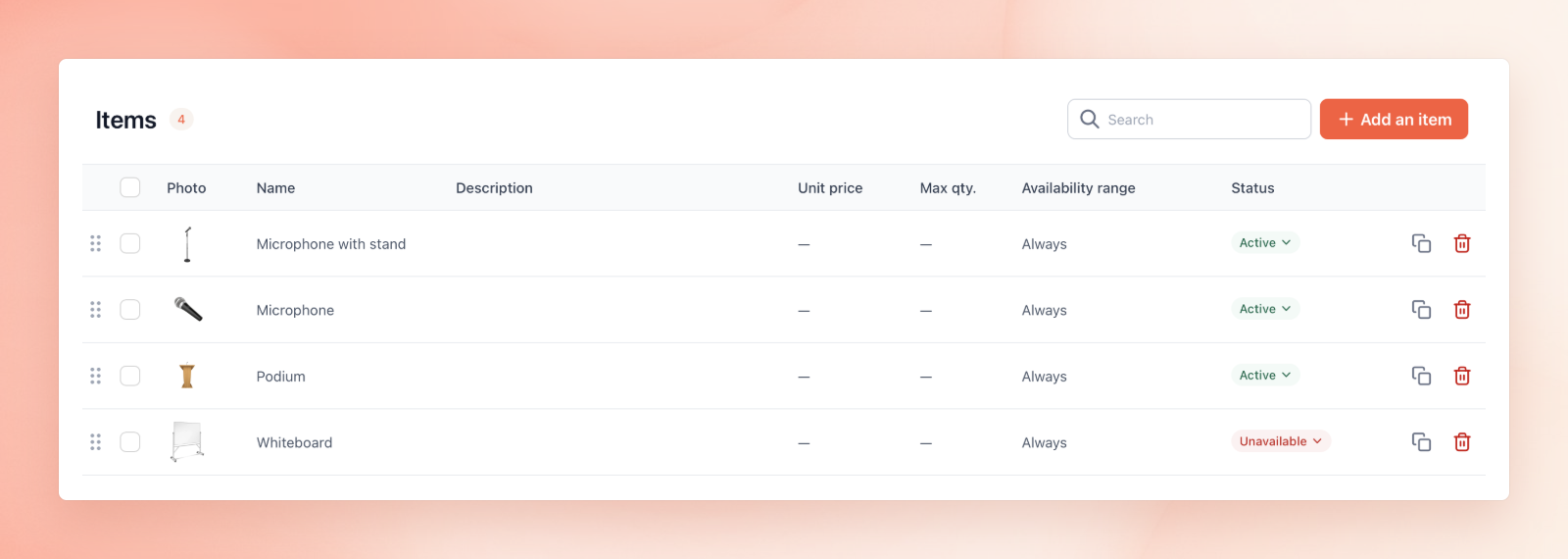
Service catalog items (Source: elia)
A service catalog (also spelled service catalogue) is basically a list of all the services your team offers, written plainly enough that other employees can find and request what they need without knowing who does the work.
For example, each entry might say:
what the service is
who can ask for it
what information you need from them
who takes care of it
how long it takes
Or something else. You decide here 🙂
The idea came from ITIL (Information Technology Infrastructure Library), the framework most IT teams follow for IT service management (ITSM). And an ITIL service catalog lists the available IT services, like a new laptop or access to a shared drive, with service definitions and service level agreements for each one.
IT got there first, but facilities, HR, and other teams take requests all day too.
You'll see a couple of other terms thrown around:
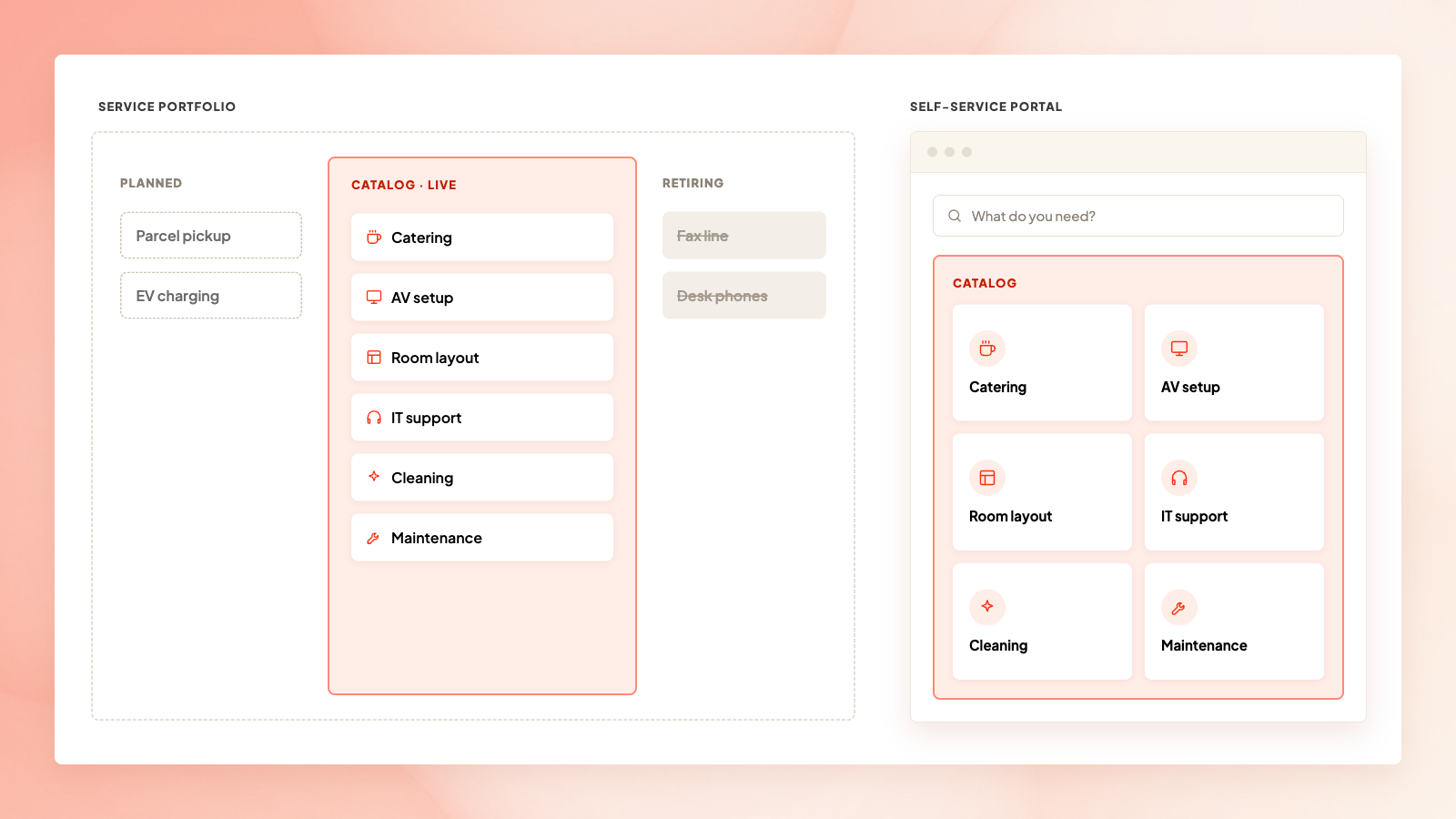
Self-service portal. That's the page or app that lets users browse the available services and self-serve instead of emailing the IT service desk. The catalog is inside it.
Service portfolio. That's the full list of services offered, including ones still in planning and ones on their way out. The catalog includes those people can request today.
Service portfolio vs self-service portal (Source: elia)
Developers also have their own uses for a service catalog, a list of software services behind an app (tools like Port and Backstage), but it's a different story.
What happens after someone asks, from routing to getting it done, is its own topic, and so is incident management for when something breaks. Our service request management guide covers both.
How is a workplace service catalog different from an IT one?
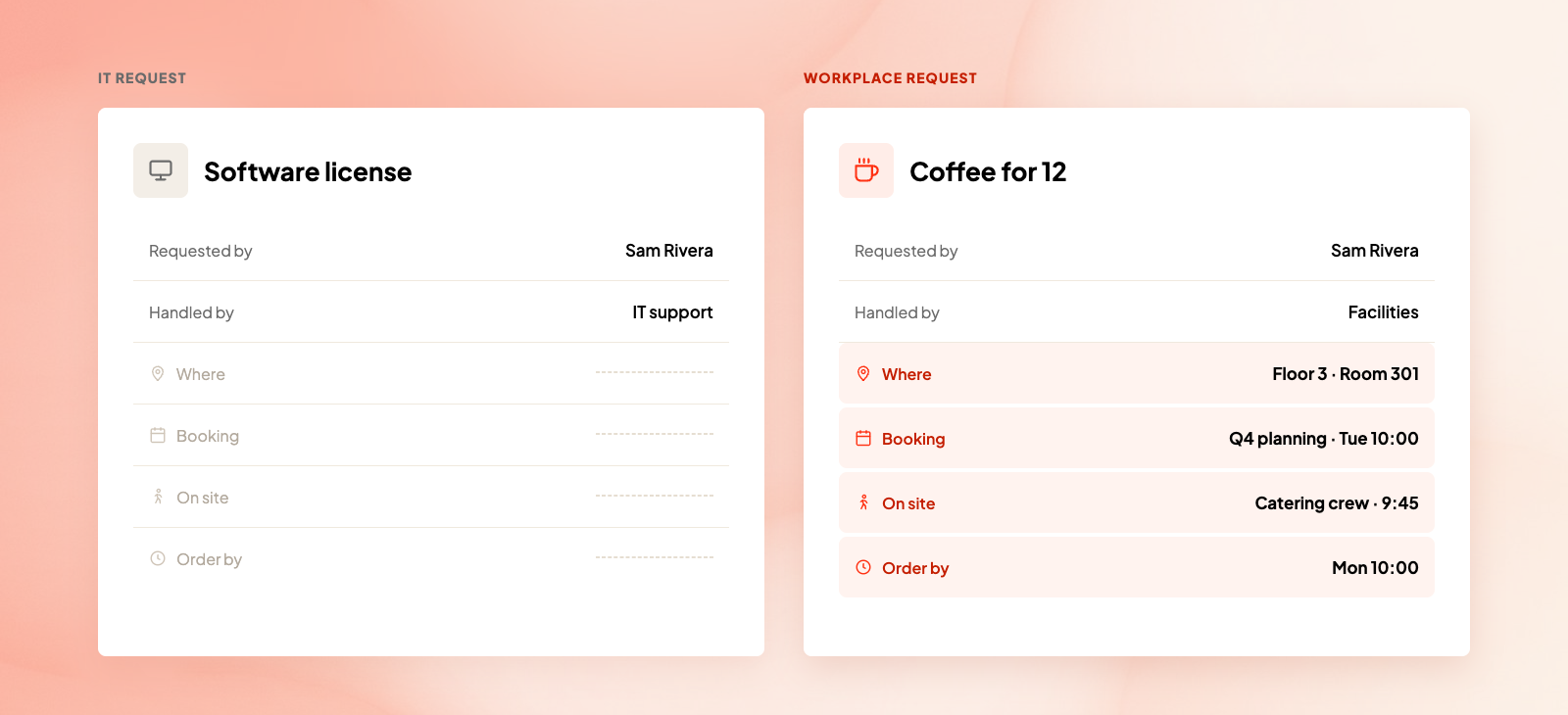
An IT catalog assumes the IT team can deliver services from anywhere. Approving a software license doesn't depend on which floor you sit on.
Workplace requests are different in 4 ways:
They happen somewhere specific. The “heat's not working" doesn't do anyone much good until you know the floor and the room. A desk move needs the old desk and the new one to be in the right places.
Someone has to physically show up. Caterers, cleaners, movers, and AV techs need to know where to go and when, and most of them will never log into your service desk.
A lot of them belong to a booking. Coffee for a 10 a.m. meeting, a U-shaped layout for a training day, extra chairs for an all-hands, or a flip chart for a workshop only make sense next to the reservation they're for.
Lead times change with the day.Kastle's Back to Work Barometer put average weekly office occupancy at 56.3% in 2025, with Tuesday at 66.0%. On your busiest day, there are more meetings, more lunch orders, and a caterer trying to keep up with all of them. A 24-hour cutoff might be plenty on a Friday and not nearly enough on a Tuesday.
IT request vs workplace request (Source: elia)
You can't really take IT's catalog and use it for facilities. There's nowhere to put the room, and the caterer can't see the booking; they don't even know which meeting the lunch is for. Then it's a bunch of messages back and forth, or another support ticket...
And that takes waaay longer than you'd think. HappySignals looked at 1.77 million end-user responses about IT tickets in their 2026 benchmark. When a ticket gets fixed on the first try, it costs the person about 2 hours. When it goes through 5 teams, it's more like 10 and a half (!).
What does a workplace service catalog look like?
Start with how people go about asking for things from your team. Most offices have a similar set of core services employees use over and over again:
Category
Example services
Who does it
Meeting services
Catering for a meeting, setting up a projector, changing the room layout, running an event
Hospitality team, or outside vendors
Maintenance and repairs
Fixing a broken chair, sorting out a leak, replacing a light bulb
Cleaning up a spill, deep cleaning after a big event
Cleaning contractor
Lockers and storage
Locking up your stuff, dealing with lost keys
Facilities team
Supplies
Kitchen supplies restocking, getting more printer paper
Office manager
And employees don't all make requests in the same way, anyway. A property manager we spoke to keeps requests from the people who work there separate from the issues his own team spots on regular walk-throughs. Those 2 request types go to different assignees, with different urgency levels.
What should each catalog entry include?
That’s flexible.
A catalog entry is just a way of describing the service. You write it once, and it decides what the request form asks every time someone uses it.
Here’s what you can include:
Name, in the words employees use.Salesforce's IT guide turns "Provision L2 VPN access" into "Get access to the work-from-home network." Same idea here, so "Catering for a meeting" instead of "Food and beverage service request."
Owner. One person accountable for the entry, its form, and its lead time.
Who can request it. Is it the whole company, or certain teams or roles?
Required fields. Location, date and time, headcount, and the booking it's linked to if there’s one.
Who does the work. Is it someone in your team, or a named vendor?
Lead time and cutoff. How long in advance people need to order, and what happens to requests that are made late. It's basically the service level agreement for that service, and it sets clear expectations on both sides.
Cost center. Which department or budget it gets billed to.
Here's what one could look like:
Field
Catering for a meeting
Owner
Hospitality lead
Who can request it
Everyone in the organization, but managers have to approve requests over a certain amount
Required fields
Linked room booking, headcount, special dietary needs, delivery time
Who does the work
Approved caterer, delivered to the room by the hospitality team
Lead time
24 hours, same-day by exception
Cost center
Requester's department
Keep the form short and sweet. If an entry is linked to a booking, any orders tied to it need a second look when the meeting gets moved, and our service request management guide has a bit more on that, plus a template for the request form.
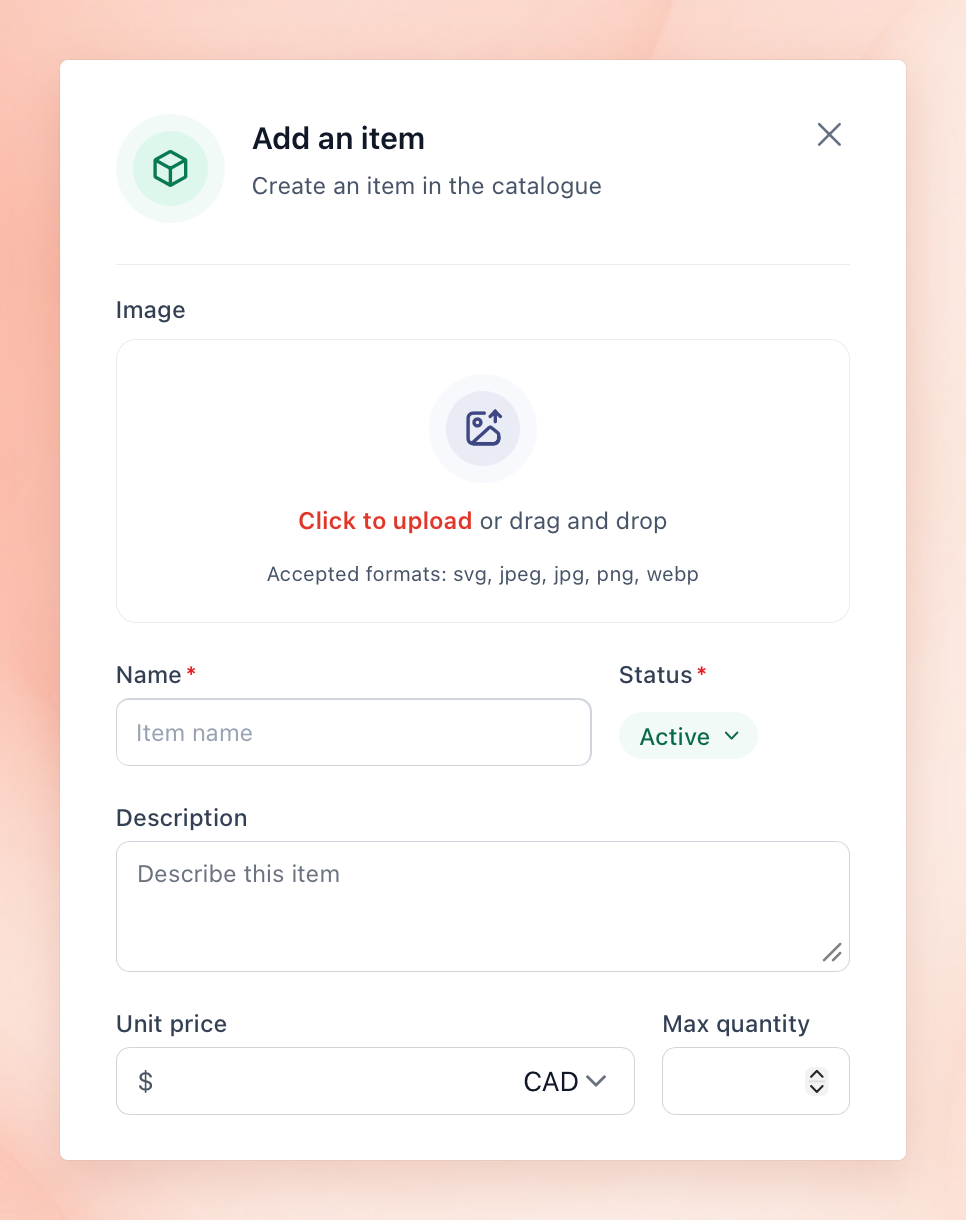
What are catalog items, and when does a service need them?
In an ITIL service catalog, a catalog item is one specific thing you can order under a service, like a particular laptop model under new hardware. Workplace service offerings need items more often than IT does because a lot of them come with a menu:
Catering has a menu. Each item needs a price and availability hours, for example, breakfast only before 11 am.
Equipment has limits. If you only have 4 portable screens, a 5th request for the same afternoon shouldn't be approved.
Room setup has different layouts. A picture of each one (boardroom, classroom, theatre, U shape) saves the person making the booking from having to describe it in a comment box.
Supplies run out. When the last one's gone, people should see that before they order.
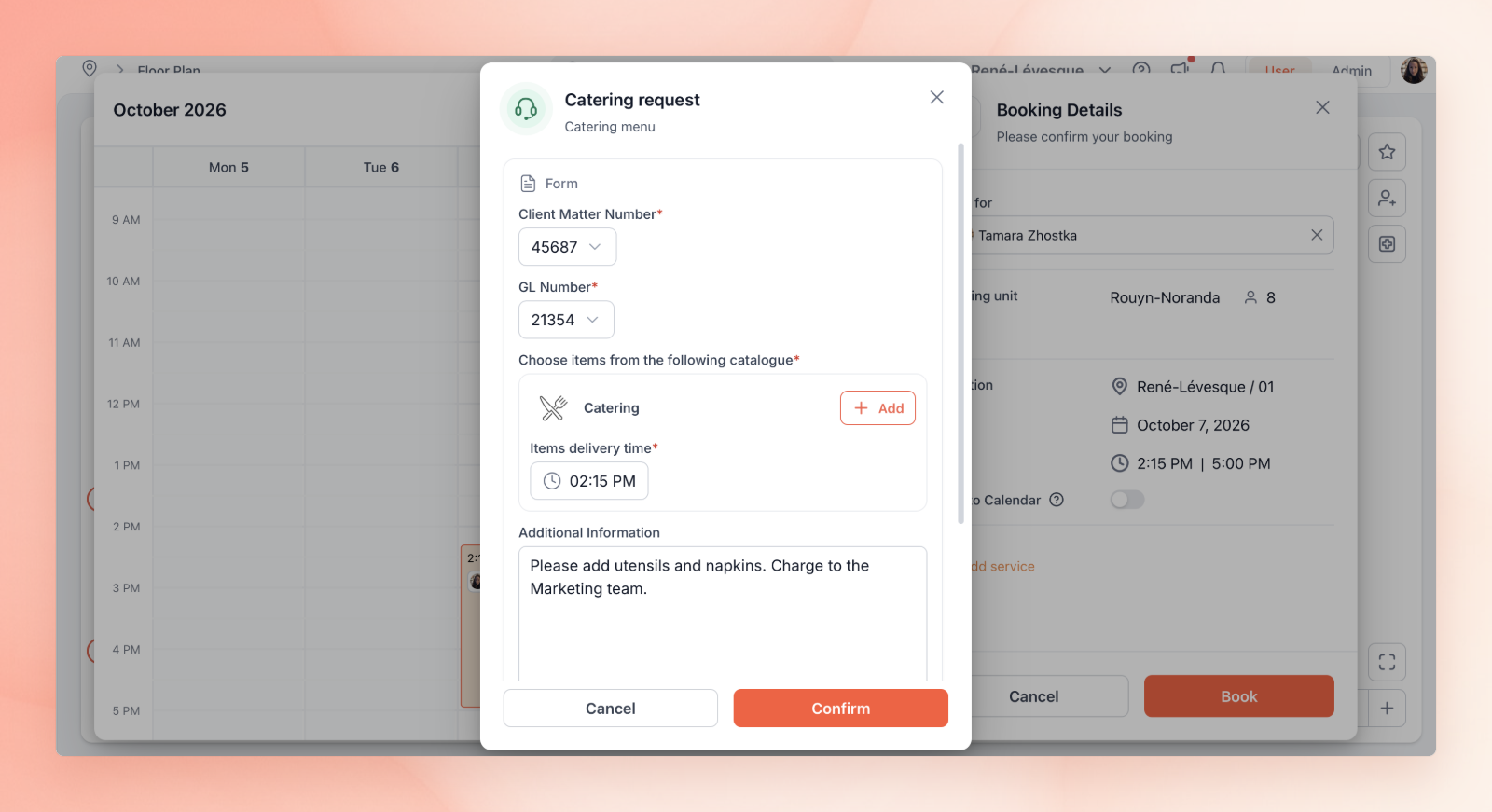
Delivery time needs its own field too. An all-day workshop might need coffee at 10 and lunch at noon, and neither of those lines up with when the meeting starts.
Some services don't need items at all. A broken chair report is just a photo and a location. Add items when people are choosing from a fixed set of service options, or when whoever's doing the work needs to know quantities or prices.
Who owns the catalog when IT, facilities and HR all take requests?
Employees don't care which team fulfills the request. They want easy access to one place to ask, and you can split everything behind it however suits your teams.
What tends to work:
One front door. People start their request in the same place for different services, whether it's a laptop or lunch, and it should be easily accessible, like a Teams tab or the intranet homepage.
One person per entry. Someone keeps the form, lead time and vendor for each service up to date.
One lead for requests that need 2 teams. Say a client event needs catering from hospitality and a screen from IT. One person owns the whole thing and checks that the other team's part got done.
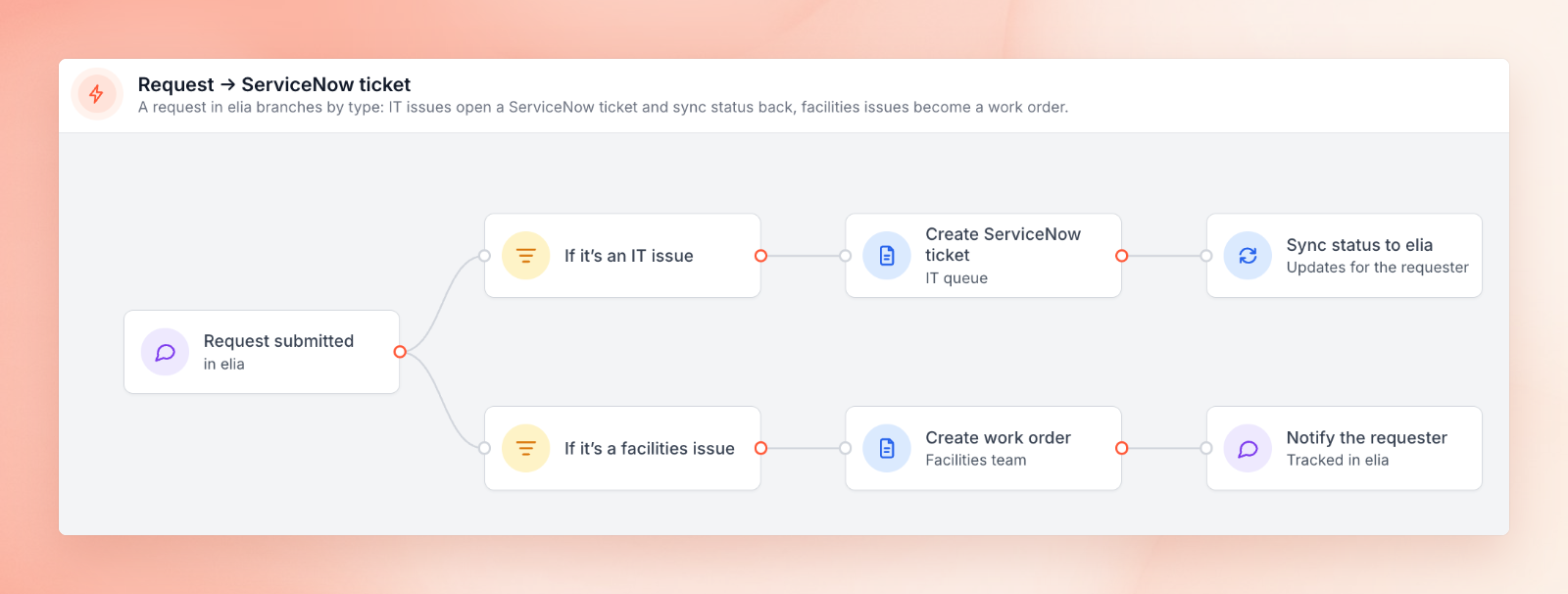
Separate queues. Facilities see facilities work, and the IT team see IT work.
Each team keeps its own toolbox. IT can leave its laptop and access requests in ServiceNow or Jira Service Management, and room and booking requests can be sent to a tool that knows the layout of the floor. We compared that setup in ServiceNow Workplace Service Delivery vs elia.
Service path examples (Source: elia)
The facilities team is usually one of the last to get into service management.
According to a 2024 report from HDI's State of Service Management, 52% of respondents were using service management to do things outside of IT, mainly customer service and HR. And yet, facilities didn't even make it to the top 3.
How do you build a workplace service catalog?
Adding a service catalog item (Source: elia)
Building an effective IT service catalog and a workplace one are the same steps, with a couple of twists for the workplace:
Start with what people already ask for. Take last quarter's requests from email, Teams, Slack and your ticketing tool, and count them up by type. Then add in all the questions every new employee asks you in their first week. That's your draft.
Group services the way employees think about them. Have a couple of chats with people from different teams, and you'll get a better idea of what they need than you would from looking at the org chart. Employees look for things like "meeting services" or "something's broken," and they rarely know which team is behind each one.
Work out what stays off the catalog. If it's something really urgent like a gas leak or a flooded washroom, there should be a phone number on the wall. Who needs to be filling out a form in an emergency situation?
Launch with the most popular services, then prune.InvGate's guide to service catalog best practices lists warning signs that a catalog has gone stale: when requests pile up under "Other" or people go back to emailing you directly again. Every now and then, go through the entries. A couple of performance metrics, like how often each hits its lead time, and a quick user satisfaction rating can be a big help.
A workplace service catalog covers everything employees ask for, including repairs they report. Preventive maintenance on building equipment, like quarterly HVAC servicing or pump inspections, goes in a computerized maintenance management system. Plenty of teams use those alongside their catalog.
What does a service catalog look like in practice?
Requesting a service (Source: elia)
A shared form or page on the intranet is a good start, but once orders start depending on rooms and times, you're going to want something that knows about booking.
For instance, in elia, our catalog lives inside request management, and each order is tied to a desk, a room or a booking.
Here's what that looks like:
Items with limits. Each item has a price, and you can set a max quantity if you need to. So, if all 5 podiums are booked for the afternoon, the next person has to pick another time.
A menu your team controls. Breakfast can be orderable on weekday mornings only, and admins can change items and prices as they go.
Ordering while booking. People can add catering or a room setup when they're booking the room, and the delivery time doesn't have to match the meeting start.
Room layouts you can see. Setups like boardroom or U shape come with a picture, and users pick the one they want instead of describing it.
Cutoffs that enforce themselves.With automation, a catering order that comes in less than 24 hours before the meeting can get declined automatically, with an email telling the person why.
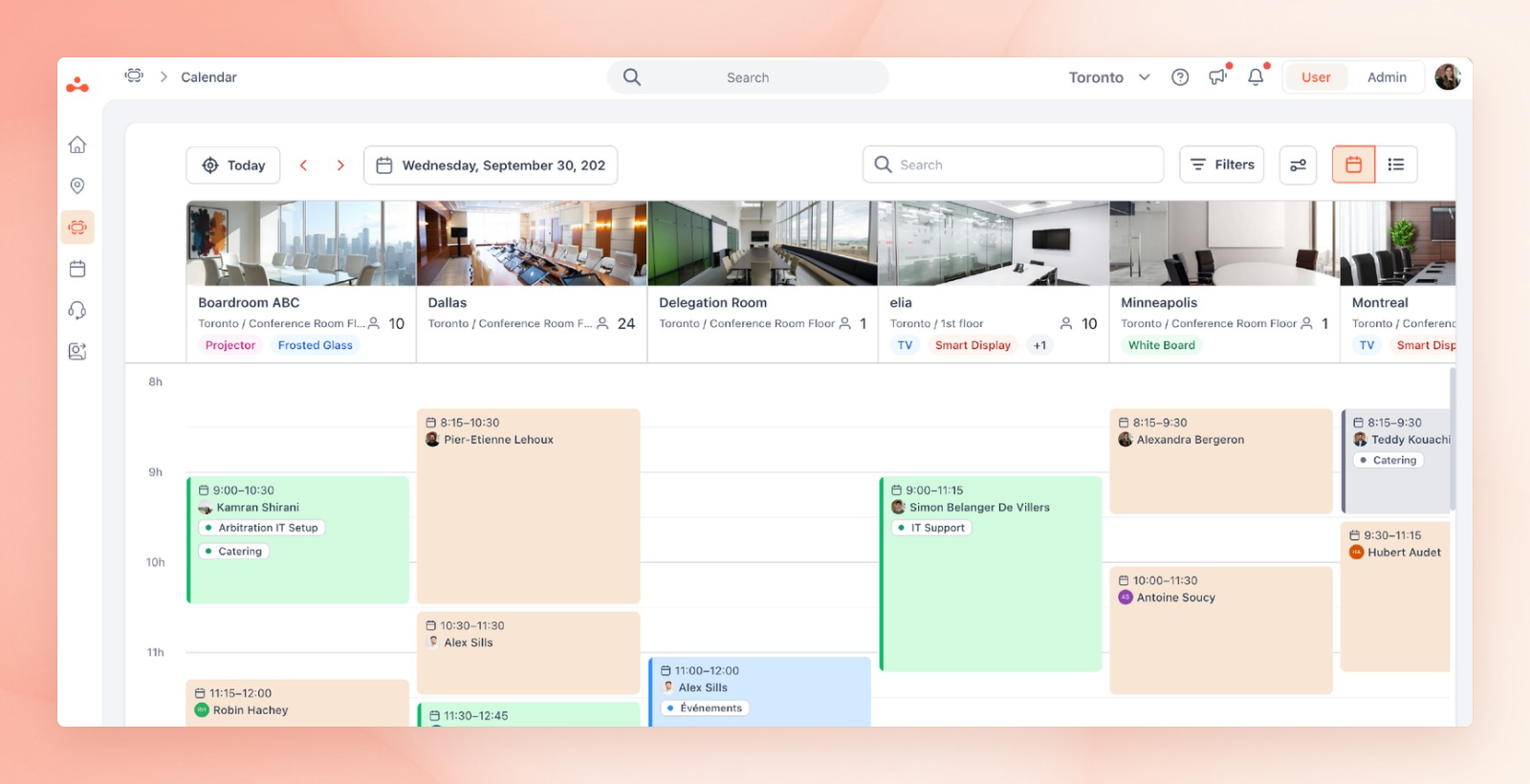
Status on the calendar. A room turns blue while its services are in progress and green once everything's done.
Status on the calendar (Source: elia)
Once it's all set up, people stop asking you how to order lunch, and you stop chasing them for the room number. Orders show up with everything the caterer needs, and the calendar tells you what's still missing before the meeting starts.
If that sounds like a nice change from Teams messages and a PDF menu, book a demo. We'll show you how it'd look with your own rooms and menu.
Tamara Zhostka
is a Content Marketing Specialist at elia. With 10+ years in content marketing, she writes about workplace trends and the tools that help teams work smarter. Part strategist, part storyteller, Tamara brings equal amounts of data, creativity, and a little Moon Prism Power to every piece she creates. 🌙✨
Share
Contents
Subscribe to our newsletter
Subscribe to the elia newsletter for exclusive product updates and industry best practices. You can unsubscribe at any time.
Thank you! You're subscribed.
Oops! Something went wrong while submitting the form.
Frequently Asked Questions
Answers to Your Common Queries
What's the difference between a service catalog and a service request?