Contents
Subscribe to our newsletter
Subscribe to the elia newsletter for exclusive product updates and industry best practices. You can unsubscribe at any time.
Thank you! You're subscribed.
Oops! Something went wrong while submitting the form.



You already use ServiceNow for IT, so it’s pretty natural to ask: why not use it for the workplace side too? Facilities requests, desk and room booking, space management, who sits where, all of it.
You can! ServiceNow has a workplace product for it, called Workplace Service Delivery (WSD for short). But it's not the only way to go, and plenty of teams keep ServiceNow for IT and use a workplace platform like elia for everything on the workplace side. The two can connect, so you don’t have to choose one or the other.
So let's go through it:
This post is about the choice between them. If you just want the full rundown on WSD itself, what it is, all the modules, where it falls short, we have a separate ServiceNow WSD overview for that.
PICK SERVICENOW WSD IF: You're already all-in on ServiceNow across IT and HR, have a platform team that knows it well, and want to keep everything in one place and on one contract. Just keep in mind that IT will probably look after the workplace too (because on ServiceNow, they do).
PICK ELIA IF: Your office is more than desks and rooms, and you want your workplace team to own the tool instead of IT. You get booking, visitors, service requests, smart lockers, occupancy sensors, and health and safety in one system, and your team can make changes themselves, no waiting on a ticket.
OR DO BOTH: Keep ServiceNow for IT, put the workplace on elia, and connect them so IT requests still go where they need to. You get a tool built for the workplace management team and you keep ServiceNow doing what it's best at. And since people are already in elia day to day, more workplace requests get captured, and the IT ones can flow over to ServiceNow on their own.
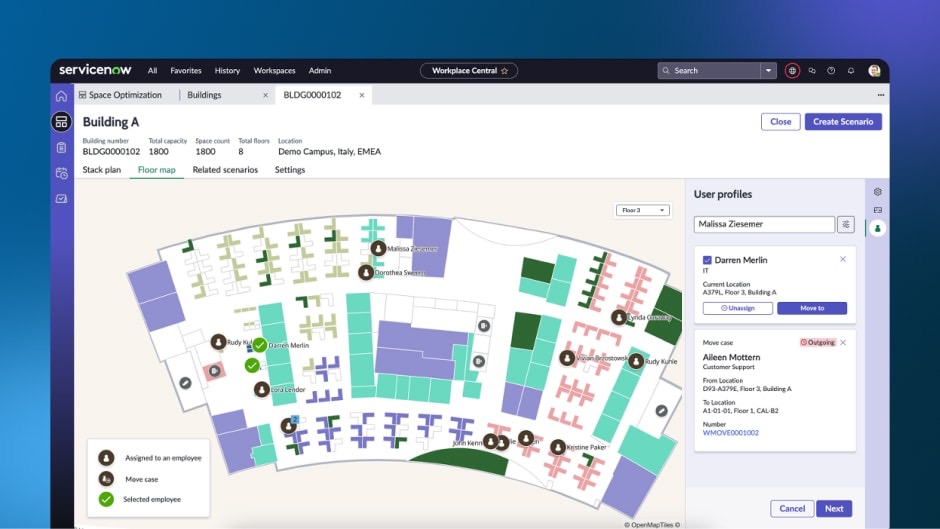
WSD is ServiceNow's workplace suite, built on the Now Platform, the same foundation as its IT and HR products, so everything sits in one system. That’s quite handy: a new hire gets added in HR, for example, and that can kick off the IT work for their laptop and the workplace setup at the same time.
Its limit: it's a workplace layer on an IT platform, so it gets set up and looked after like one.
What you get:
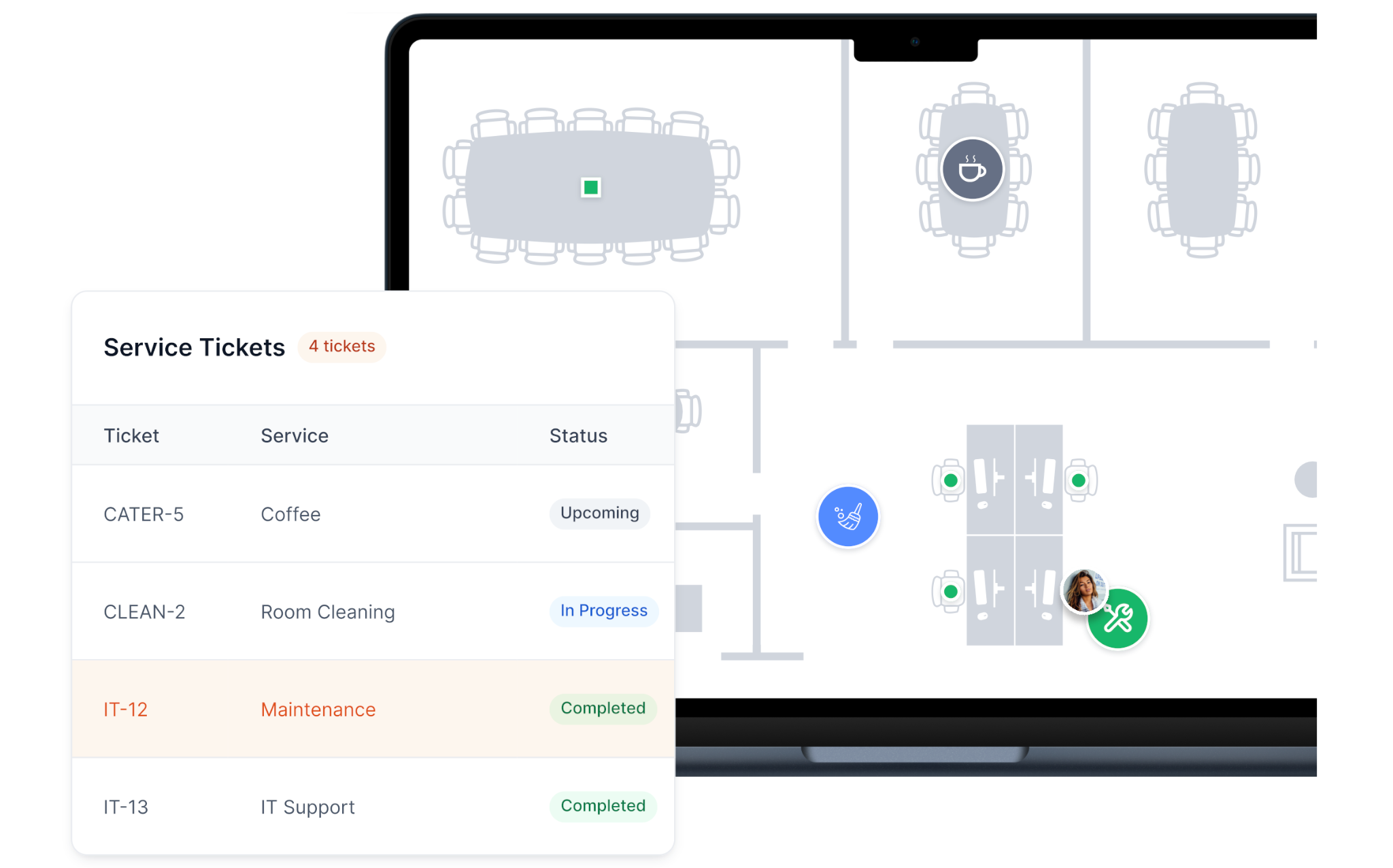
elia is a standalone workplace operations platform, so you’re getting it for the workplace rather than as part of a bigger enterprise suite. It works with Microsoft 365, Google Workspace, and Slack. It’s also ISO 27001 certified and built and run in Canada. Around 150,000 people use it, including teams at Québecor and Cascades.
On the software side, you get:
There’s hardware too: desk and room occupancy sensors, meeting-room display screens, a touchscreen kiosk, an IoT gateway, and a smart lock that turns existing lockers into bookable ones.
You don’t have to buy all of that upfront, either. You can start with the software and add hardware later.
They cover a lot of the same basics. The real difference comes down to how much of the workplace each one covers, and who's in charge of it.
Let’s start there.
ServiceNow didn't make WSD a separate product. They built it on their main platform, the same one that runs IT tickets. So every desk, room, request, and visitor is a record on that platform, treated like an IT ticket would be.
Config, roles, booking rules, module installs, and integrations sit with the ServiceNow team. Facilities works with what they’ve built, so moving a few desks or changing a booking rule typically means filing a ticket and waiting for IT to get to it.
And an office never sits still:
On ServiceNow, every one of those is a platform job.
The maps take some work too: ServiceNow's own setup docs have you export floor plans from AutoCAD as a special file and match every room and desk to a record, then redo it whenever something moves. The booking screen employees see is simple, but getting everything behind it set up properly is another story.
elia puts more of that in the hands of the workplace team. You can change rules, open up a floor, or adjust how requests work yourself, without scripting or waiting for IT.
This is usually the real deciding factor, and it's often not about desks at all. Some of the teams we talk to don't even want booking! They need a better way to deal with facilities requests, see occupancy, or keep HR, facilities, and IT working from the same information.
Both tools do the basics just fine: floor plans, booking, and seeing who’s in. elia’s case is everything around that:
You can get most of that with WSD too, but it can mean adding more modules and setting up the pieces they depend on (neighbourhoods need Space Management switched on, live Outlook availability needs the Exchange Online connector, the lobby kiosk is its own component). With elia, many of those things are already part of the platform.
WSD makes the most sense when you’re already using ServiceNow across the company. If IT and HR are there, adding the workplace side means you’re building on something you have. If you’re not using ServiceNow much outside of IT, that benefit is smaller. You’re taking on the whole platform for the workplace rather than adding to something that’s already in place.
elia is a bit more flexible here. It works with Microsoft, Google, and Slack, supports both Outlook and Google Calendar, and connects out through its API to the systems you use, like your HR platform (Workday, Greenhouse, and the like) and ServiceNow. It doesn't assume you've picked one stack.

ServiceNow doesn’t make the hardware. WSD can pull in data from third-party sensors, but you have to buy and connect them yourself through Workplace Connectors. Until you have those sensors in place, your usage data is really just booking data, which can make the office look a lot busier than it actually is.
elia makes its own sensors and screens, so the hardware is already part of the platform. If someone books a room and never shows up, you can see that. You’re not dealing with a separate hardware setup or another vendor to get that data.
It gets a bit more interesting here.
Most ServiceNow clients we talk to don't want to get rid of ServiceNow, and they shouldn't. It's doing its job for IT. Nobody's trying to replace it. The point is just to stop making the workplace live inside an IT platform.
ServiceNow is built to connect one system to another, and elia can be the workplace piece it connects to. It holds the workplace side, desks, rooms, visitors, requests, sensors, and passes anything that's an IT job over to ServiceNow, where IT already works.
This integration has a quieter upside, too. A lot of workplace requests never make it into ServiceNow because people aren't in it. They don't know the interface, or they never open it. When the request starts in the tool people are in every day, it gets captured.
And ServiceNow isn't the only thing elia connects to. The same automation engine links to the systems you might use, your HR platform included, so information moves on its own instead of getting entered twice.
A couple of examples of what that looks like:
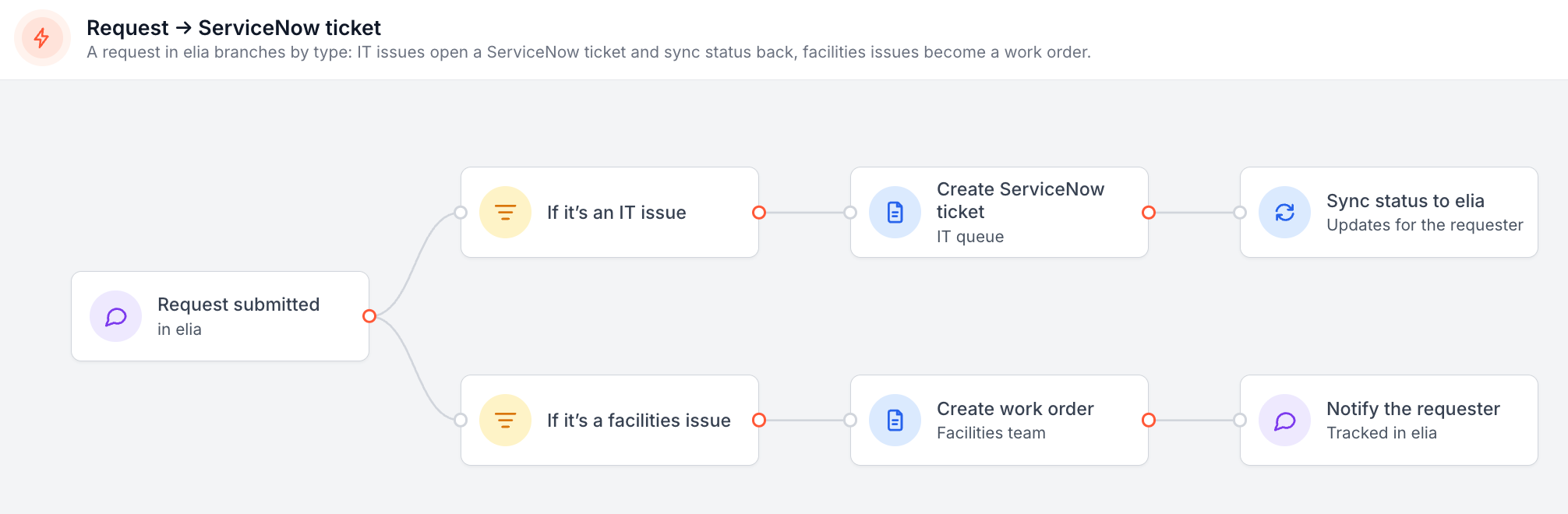
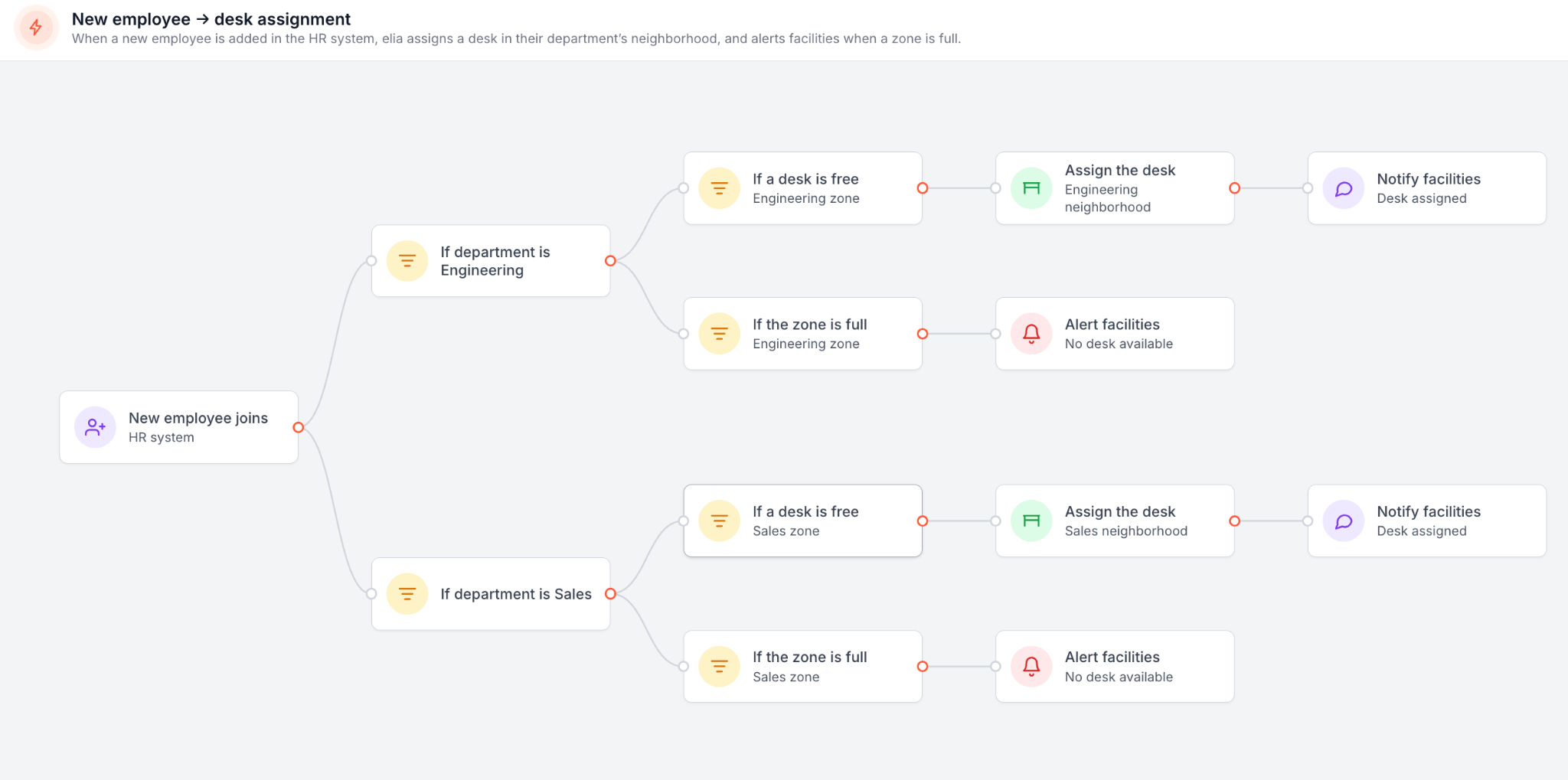
For the employee, none of that needs to be complicated. They report a broken light or a jammed door in elia. If IT needs to deal with it, the request gets sent to ServiceNow in the background.
ServiceNow doesn’t publish its pricing, so every deal is different. Most numbers you’ll find come from independent sources and people who’ve worked with the platform.
The licensing depends on what people need to do:
Then there’s the implementation. WSD isn’t something you just turn on and start using. Some estimates put implementation at 3-5 times the license cost, with a 50-fulfiller rollout estimated at $500,000 to $2 million in the first year. A single module can take 6-12 weeks, while a full rollout can take 6-12 months.
elia does pricing a little differently. You pay for the bookable seats you set up, then add the modules you need, like visitor management or health and safety. Hardware is separate if you want to use it, and larger companies can get a custom Enterprise plan. So there isn't one simple number I can give you for everyone, but you do start with published pricing.
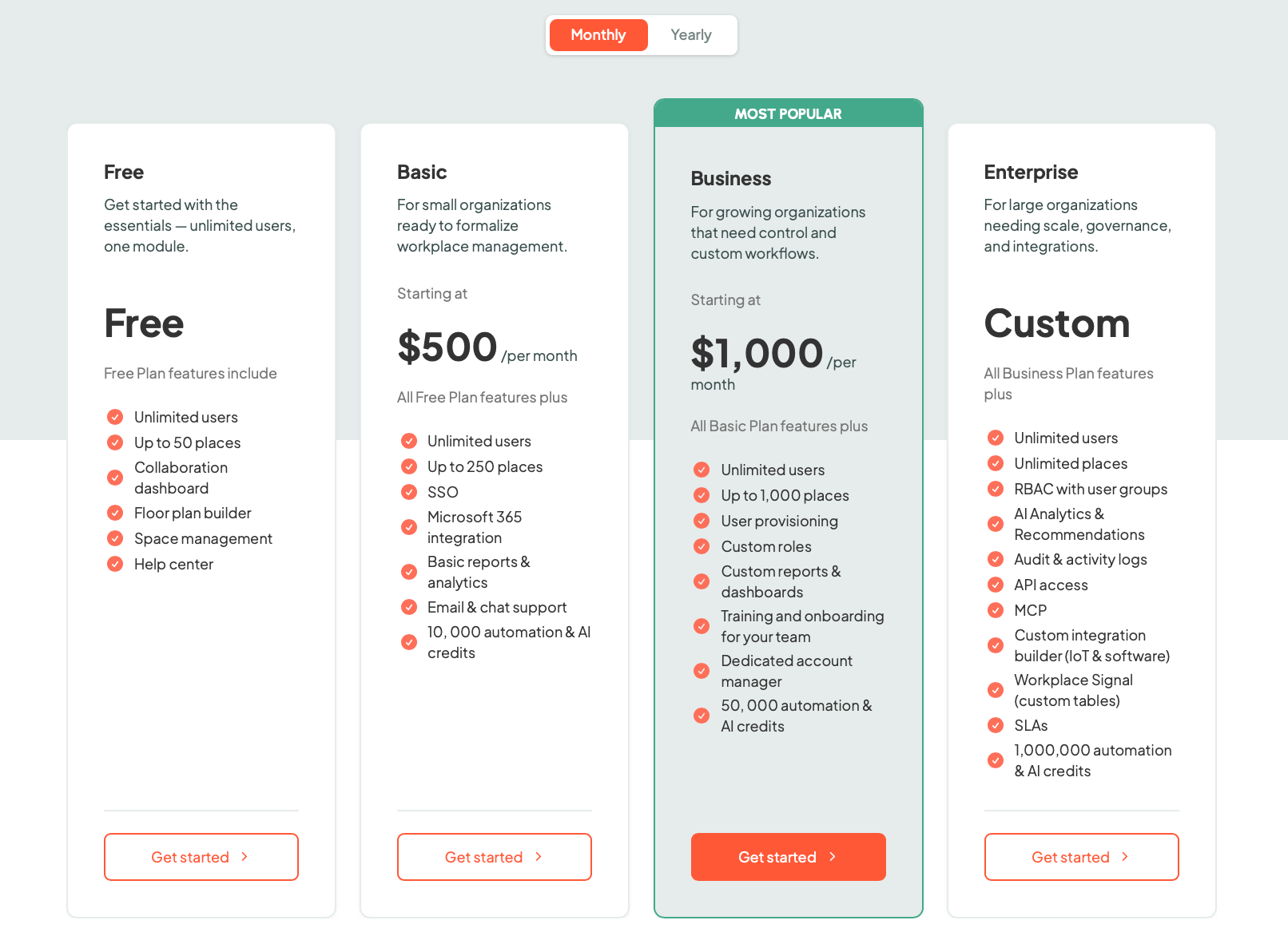
Keep in mind this though: you can't really put these numbers side by side. The $500,000-$2 million ServiceNow figure is for one specific 50-fulfiller rollout and includes the setup and people around it. elia is a subscription based on bookable seats and the modules you choose, with custom pricing for larger setups.
Run your own figures, ours included.
Write down what you need the workplace tool to do over the next couple of years, and who you want looking after it:
At the end of the day: how much do you need your workplace tool to do, and who do you want in charge of it?
WSD details are from ServiceNow's own product and setup documentation. Cost and timeline figures are from independent pricing and implementation breakdowns (Quackback, Desk365, Virima) and ServiceNow's own reported customer numbers, since ServiceNow doesn't publish workplace pricing.
elia details and pricing are from elia.io and the elia pricing page. Bear in mind that prices can vary depending on where you are and what kind of deal you can negotiate, so always check in with the vendor for the very latest pricing.
Answers to Your Common Queries