6 Microsoft Places Alternatives That Book Inside Teams (2026)
Tamara Zhostka
Content Marketing Specialist
–
Last updated on Aug 25, 2026
Microsoft Places dropped in price on April 1, 2026. Now a lot of workplace teams are asking whether they should just switch it on or look around first.
That sent me down the rabbit hole of comparing tools. I looked at Microsoft Places alternatives side by side to see what you get with each one and where they differ.
A lot of them say they work with Microsoft. I let some go because I wanted to keep the ones where you can book on a visual map inside the same window as Teams. You click a tab, and your floor plan is there. You don't have to open a separate app or a browser. So every tool in here can do that.
Here's what you’ll find:
what Microsoft Places is, what it’s good at, and why people still shop around
what Places costs once you add the map and the licenses
how I compared the 6 tools, and what criteria I used
each tool, how it books in Microsoft, what else it does, and what it costs
how to choose the right one for you
The short version
Tool
Best for
Starting price
elia
The whole office in one Teams tab
Free to 50 spaces, then from $500/mo. Enterprise is custom
Skedda
Detailed booking rules
From $249/mo
Kadence
Getting your team in on the same days
Quote only
Dibsido
Setting it up yourself on the cheap
Free to 20 users, then €1.9/user/mo
Clearooms
Getting everything without an enterprise tier
Desks from $80/mo
OfficeRnD
Offices that double as flex space
Workplace from $99/mo
What Microsoft Places is
Places is Microsoft's office management app, built into Teams and Outlook. It's the default choice for a lot of Microsoft shops because it's essentially “free” since it comes with your existing Microsoft 365 licenses (there’s a catch here, more on that later).
It does three jobs:
people set which days they're coming in and see who else will be there
and facilities team gets some numbers on the space usage
I’d start with how Places is put together, as it explains a lot of what you run into down the line. It sits on top of Microsoft 365, using the same Exchange and calendar setup as Outlook. That’s why it fits so great into the Microsoft world, but it also gets a little more complicated once you go beyond basic room and desk booking.
What it does
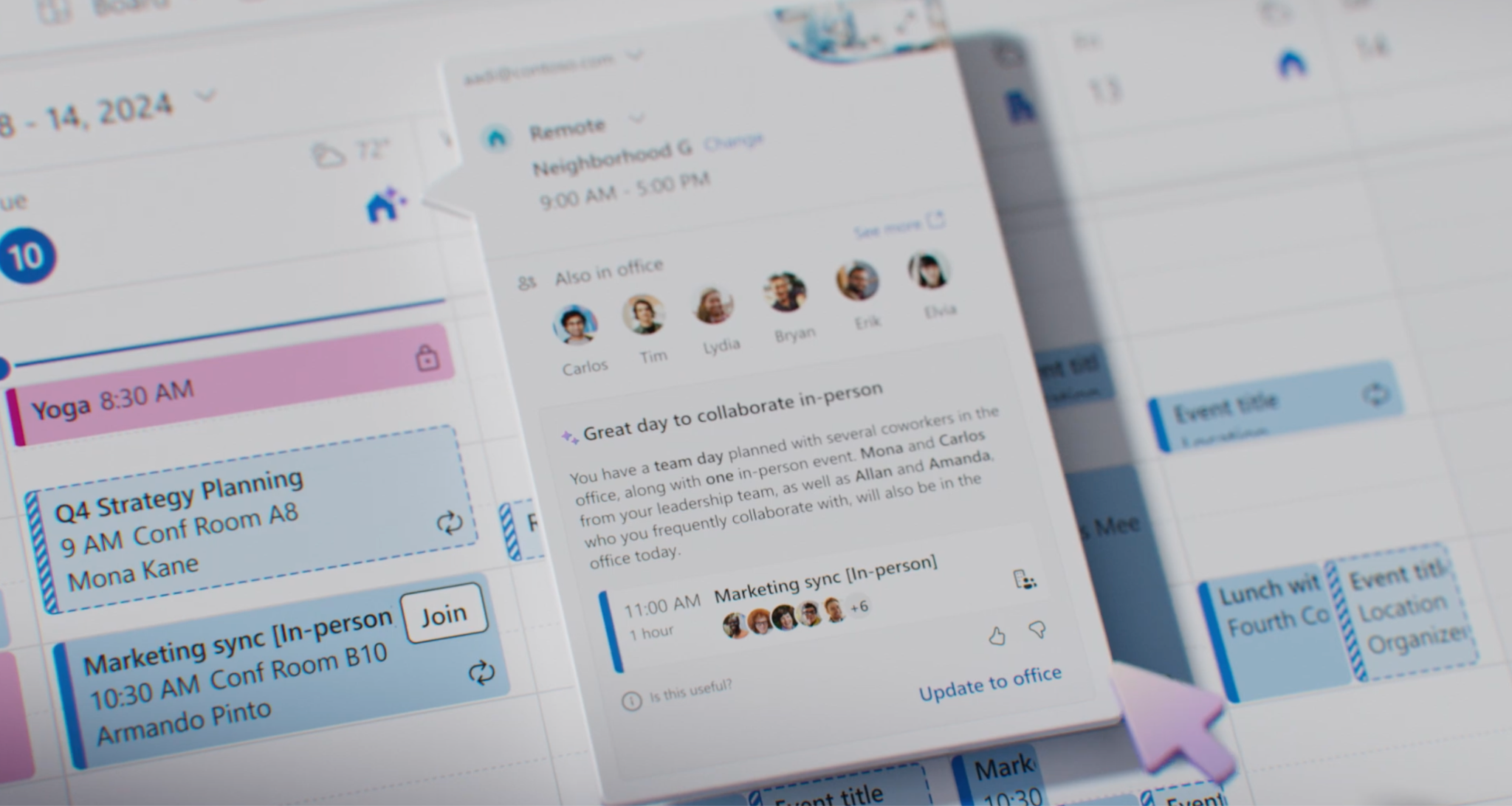
Work plans and who's-in. Set your office days in Outlook or Teams and check when your coworkers are planning to be in.
Room and desk-pool booking. Book meeting rooms and shared desk pools from your calendar. You don’t need an extra license for this.
Individual desk booking. Pick a specific named desk, with four modes (reservable, drop-in, assigned, unavailable). This bit needs an additional per-space license.
Auto-release. A desk or room nobody shows up for auto frees itself back up after a set window, 10 minutes by default.
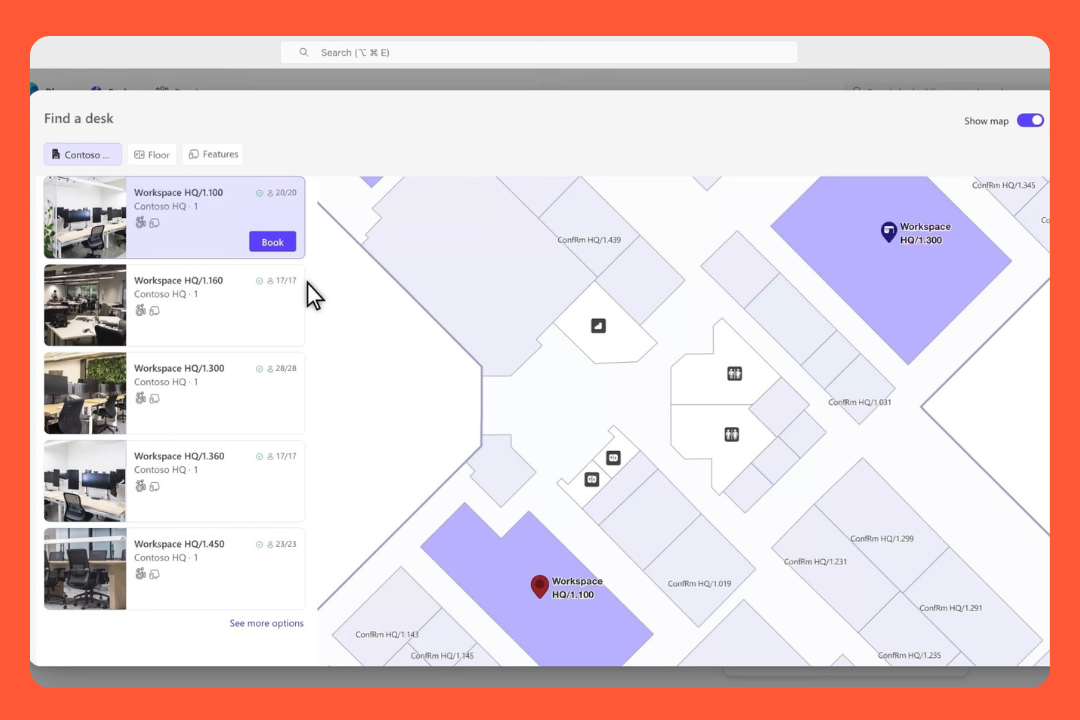
Places Finder and Explorer. Search rooms and desks by building, floor, capacity, and A/V, with photos once someone adds the metadata.
Occupancy and analytics. Get planned-versus-actual dashboards, but only if you hook in badge or sensor data.
Copilot booking. Ask Copilot to find and book a room, if you pay for a Copilot license.
Before April 2026, the good stuff was tucked away behind a Teams Premium license at $10/user a month.
On April 1 Microsoft changed things around:
The everyday coordination (work plans, who's-in, Finder, Explorer, room and desk-pool booking) is now included in most Microsoft 365 licenses, so it costs nothing on top.
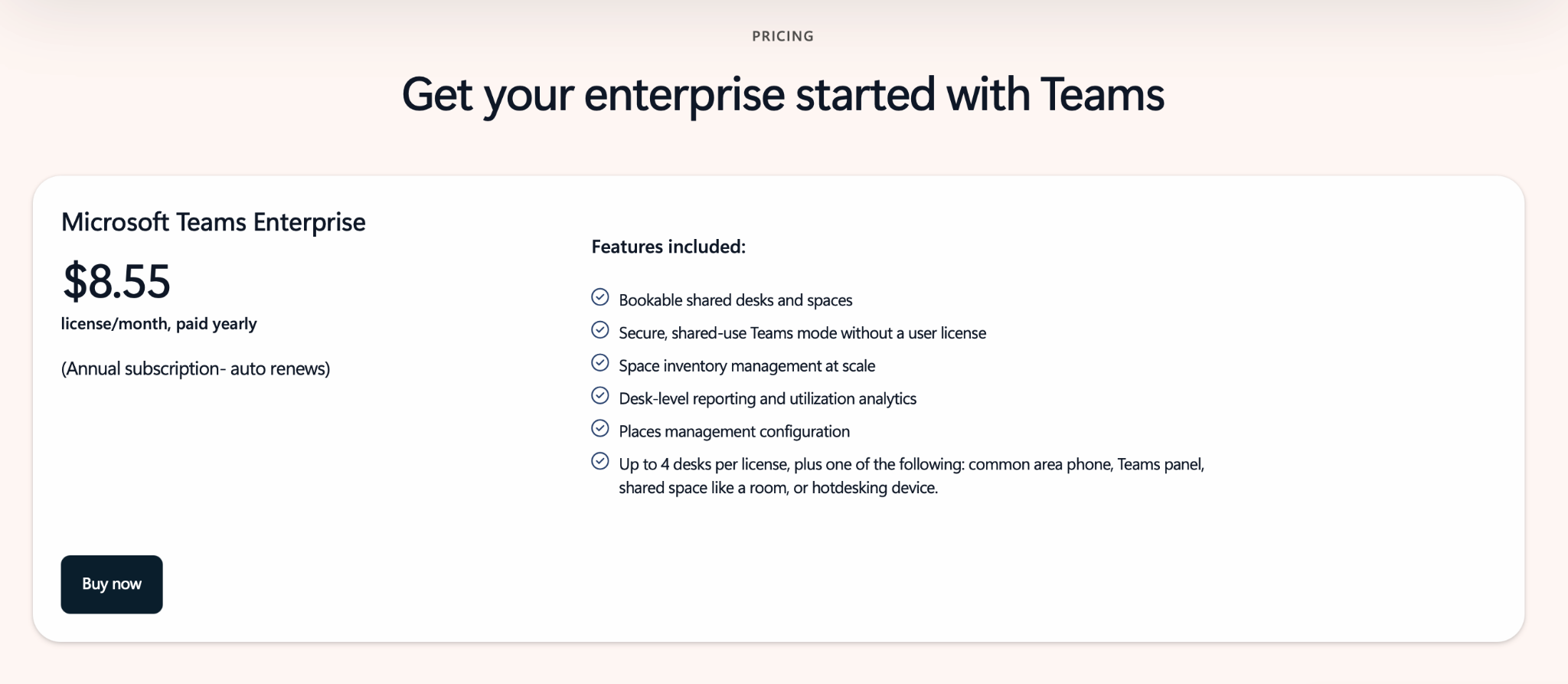
The desk-level features (individual desk booking, auto-release, occupancy reports) moved onto a per-space license called Teams Shared Space, at $8.55 a month, where one license covers 4 desks, and one more space.
Source: Microsoft Places
But there are a few things I’d check before using that number in your budget:
If you bought Teams Premium before April 1, you keep the old setup until your renewal, then it flips to the per-space model.
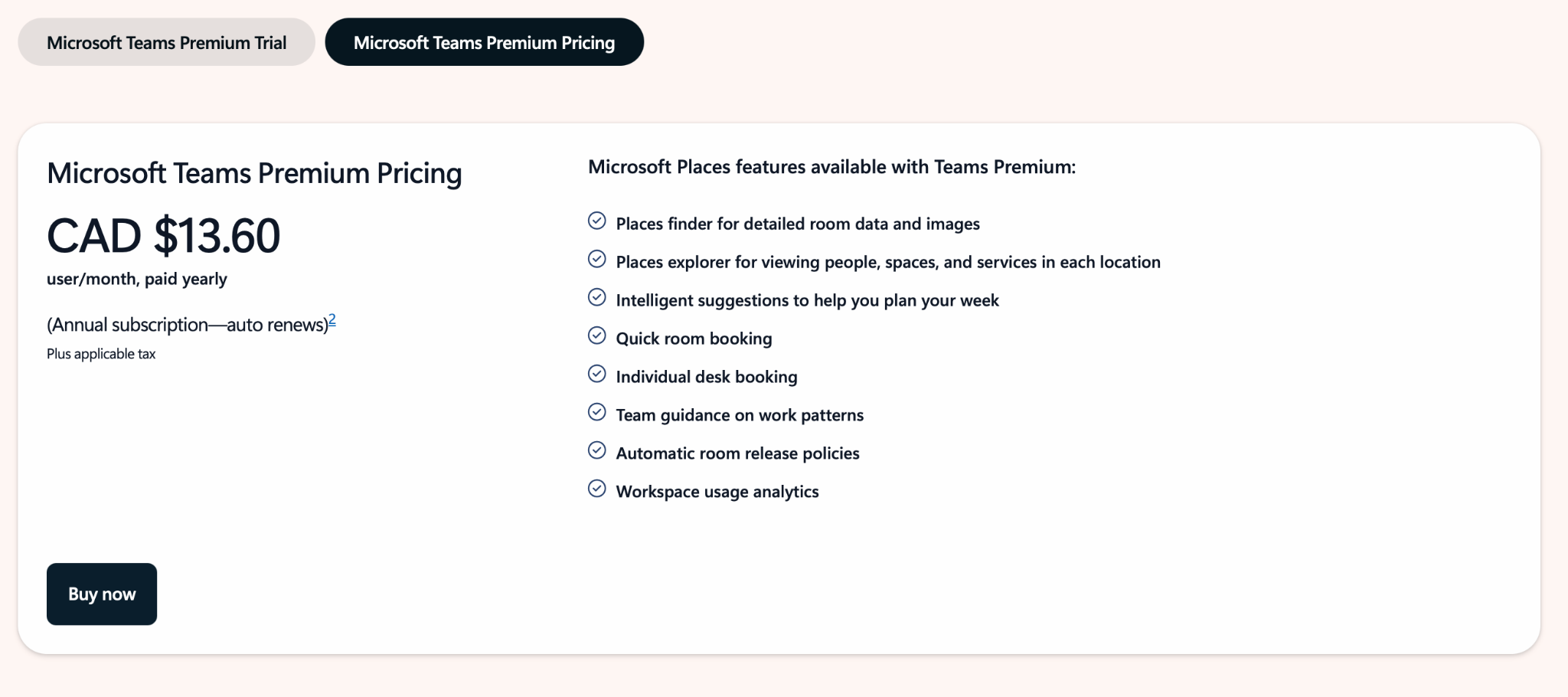
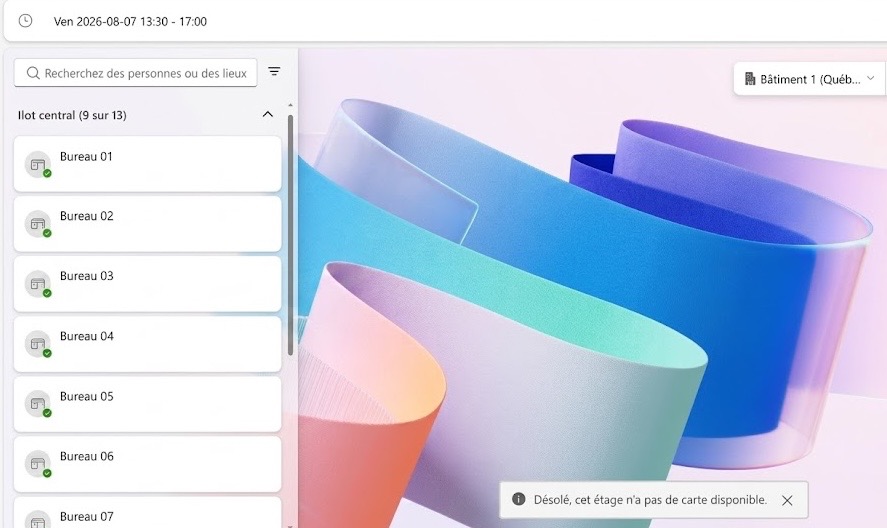
The $8.55 is in USD, and many of Microsoft's localized pricing pages still list the older Teams Premium route (see the screenshot below from the Canadian page), so confirm your local number before you budget.
None of that includes the floor-plan map, which is a separate vendor bill.
Source: Microsoft Places
Here's what that looks like for a real office. I priced it for 4 buildings, 8 floors, around 300 desks.
The desk licences. You'd need 75 Teams Shared Space licences. That's about $7,700 a year.
The maps. Many mapping companies have a 10-plan minimum. Archilogic is one of them, at around $4,250 a year. Mappedin prices per building and is closer to $7,900-9,600.
So all in, you're looking at roughly $11,950 to $17,300 a year, before the one-time setup to license the desks and connect the maps to your rooms.
So, yeah, Places is free in the sense that the basic version doesn't cost anything. But once you get into the features you'd probably want for a bigger office, you're paying for the Microsoft licences and a separate mapping service.
Where Places is good
Cost. If you’re on one of the Microsoft 365 plans that includes room and desk-pool booking, there’s no extra license for the basics.
Familiarity. You book in the Outlook and Teams calendar you have open.
Coordination. Work plans and in-person meeting RSVPs (ask people to show up in person, see who said yes) are some of the better parts of Places.
Copilot. If you pay for Copilot, you can ask it to find a room near your team and book it for you. If the meeting moves, it can adjust the booking on the fly.
Self-service admin panel. The Places portal lets workplace admins change desk modes and booking rules without PowerShell, so it’s (kind of) self-serve.
Microsoft. Self-explanatory 🙂 You get their full weight of security, compliance, support, and a roadmap.
Why people look elsewhere
Paid map vendors. You need to pay for a mapping company to get an IMDF file that Places will accept. There are a bunch, but only a few actually show their pricing. For example, Mappedin is $165 per building a month, while Archilogic is $24.90-$35.40 per floor plan a month. Without one, a 200-desk floor plan is a long list of desk names.
Source: Microsoft Places
Map changes. With a vendor connector it auto-syncs, but if you’re doing it DIY, you have to remove and re-upload maps through PowerShell every time a desk moves.
IT setup. You can make some everyday desk changes yourself, which is a nice improvement. But setting up the floor map, assigning licenses to desks, turning on analytics, and connecting Wi-Fi or dock check-in still goes to IT, often using PowerShell.
Desks and rooms only. No visitor management, lockers, service requests or health and safety at any price. You can build some of this yourself with Power Apps (Premium is $20 per user a month), but then you’re buying another product and paying someone to build and maintain it.
Hybrid Exchange. If some people are still on an on-prem mailbox, they can’t use the Places app or work plans. They’re stuck with Room Finder. And check-in and auto-release only work with rooms and desks backed by Exchange Online.
Opt-in occupancy. There's no Places sensor. It can use connected docks or Wi-Fi, but those are more like work-location signals than actual desk sensors. Admins have to turn the automatic updates on, and Wi-Fi can be set up as either opt-in or opt-out for employees. You can also bring in badge data through PowerShell or Microsoft Graph, or use third-party sensors.
How I compared Microsoft Places alternatives
I've spent some time in Places and elia, so those two I know from using them. The others I got to know from the outside, going through their docs, pricing pages, demo videos, and screenshots, and reading what people say on G2 and Capterra.
Then I looked at the same 6 things for every tool. I didn’t do a big feature comparison, just the things that make a difference once you're using it on a daily basis.
Can you book inside Microsoft Teams, and how easy is it? Can you open Teams, see your floor plan and tap a desk to book it, or does it just send you a message through a chatbot and make you go somewhere else to pick a seat? I only counted the floor-plan-in-Teams part when the vendor's docs actually showed it.
What else does it do beyond desk and room booking? Booking’s the easy part, most tools have it. What I was more interested in is whether it also covers visitors, lockers, service requests, parking, and occupancy data, because a lot of people start off thinking they only need booking and realize later they needed the rest as well.
Who gets to change things day to day? When a team moves desks or a floor gets rearranged, can the workplace team make those changes themselves, or do they have to ask IT and wait? It sounds like a small thing, but offices change all the time.
What’s the real price? Whether it's priced per user, desk, space, or place, and what that adds up to for an actual office. I used the public prices as of August 2026.
Can you trust the occupancy numbers? If a tool says it shows the space usage, I wanted to know where that data comes from and if it's good enough to make big decisions, like giving up a floor. There's a difference between numbers from people badging in and numbers from someone remembering to check in.
How much of a pain is the setup? How long before you can start booking spaces and how much of that work is gonna fall on IT, rather than your own team.
There's no single best tool here. It really depends on your office, so I've included who each one suits as I go.
Best Microsoft Places alternatives: comparison
Tool
In-Teams map booking
Beyond desks & rooms
Who makes changes
Starting price
Occupancy data
Setup
Microsoft Places
Built in, maps need a separate setup
Desks and rooms only
IT + workplace admins; portal and PowerShell
Core included with M365; desks $8.55/mo per 4 desks, plus a map vendor
Workplace check-in/presence signals, not desk-level
Moderate to heavy, IT-led
elia
Yes, the whole app in its tab
Visitors, lockers, requests, work orders, health and safety
Workplace team; elia standardizes the map
Free to 50 spaces, then $500–1,000/mo; Enterprise is custom
Its own sensors
Self-serve to light
Skedda
Yes, plus an @Skedda channel bot
Parking, visitors, analytics
You move desks; Skedda handles the base map
From $249/mo; visitors $99/mo
Network presence, not desk-level
Light
Kadence
Yes, full app and an AI booking bot
Visitors, analytics, space management, scenario planning
You manage the map
Quote only
Wi-Fi, badge, kiosk and other presence signals
Self-serve to light
Dibsido
Yes
Parking, carpools, visitors
You, self-serve
Free to 20 users; desks €1.9/user/mo
Reports, analytics and heatmaps
DIY
Clearooms
Yes
Visitors, parking, room services
You manage desks; Clearooms can create the base map
Desks from $80/mo; rooms from $13.50/mo; no contract
Reporting, no heatmaps
Quick
OfficeRnD
Yes
Coworking and billing, parking, helpdesk, visitors
Admin-configurable
Workplace from $99/mo; Flex priced separately
Detailed dashboards
Demo-led, configurable
1. elia, best for having your entire office in one Teams tab
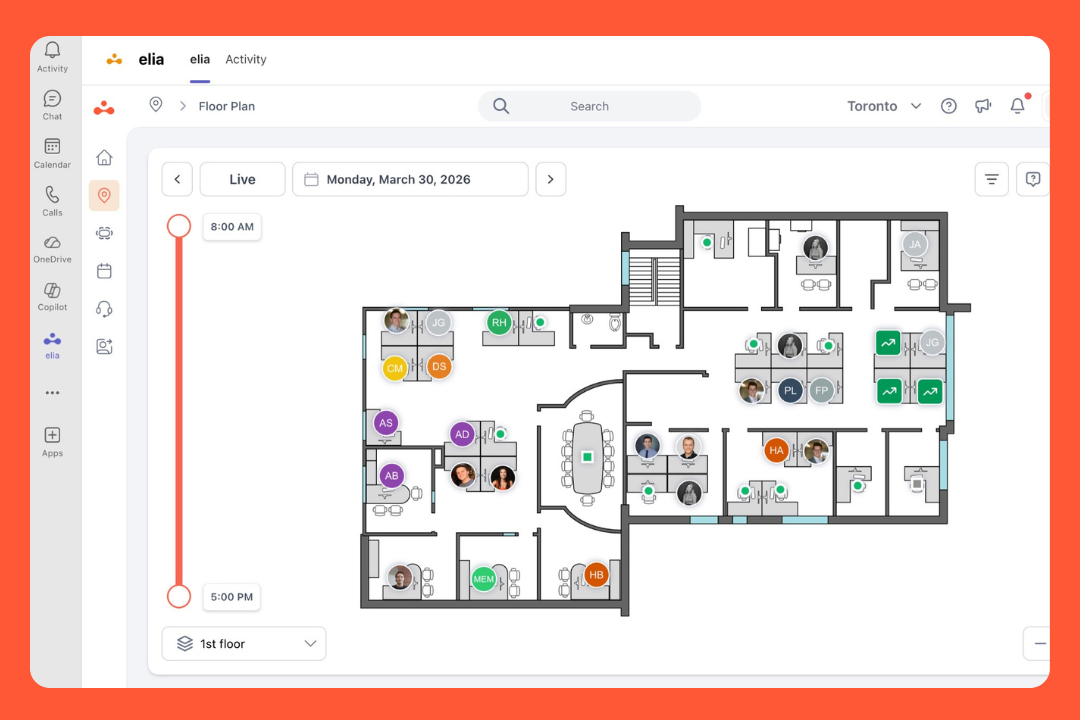
elia is way more than desk or room reservations. You can do that, of course, but you can also sign in a visitor, report something that's broken, choose a locker for the day, and log a safety incident, all from the same app. Besides, it has its own sensors, so if someone wants to know if the third floor is full or just looks booked, you can tell them.
In Teams, elia opens as its own tab with the whole product inside, so you can do all of that without leaving the app. Your bookings still pop up in your Outlook calendar the way you’d expect.
What's in it
Floor plans. Pick a desk or room from the map, whether you're on the web or in Teams. Filter for what you need and set up neighbourhoods so teams can sit together.
Rooms. Book one from the map, and it shows up in Outlook. You can also book a room for someone else while you're setting up the meeting.
Visitors. There's a kiosk at reception that checks people in, prints their badge, collects NDAs, and lets the host know they've arrived.
Requests. Something's broken? Need catering for a meeting? Flag it from the floor plan and it goes to the right team.
Health and safety. Log an incident and see where the first-aiders are sitting.
Occupancy sensors. The sensors are elia's very own, so you can see which desks and rooms get used.
Automations and a phone app. No-show desks can free themselves up, and people can book from their phone.
Pricing
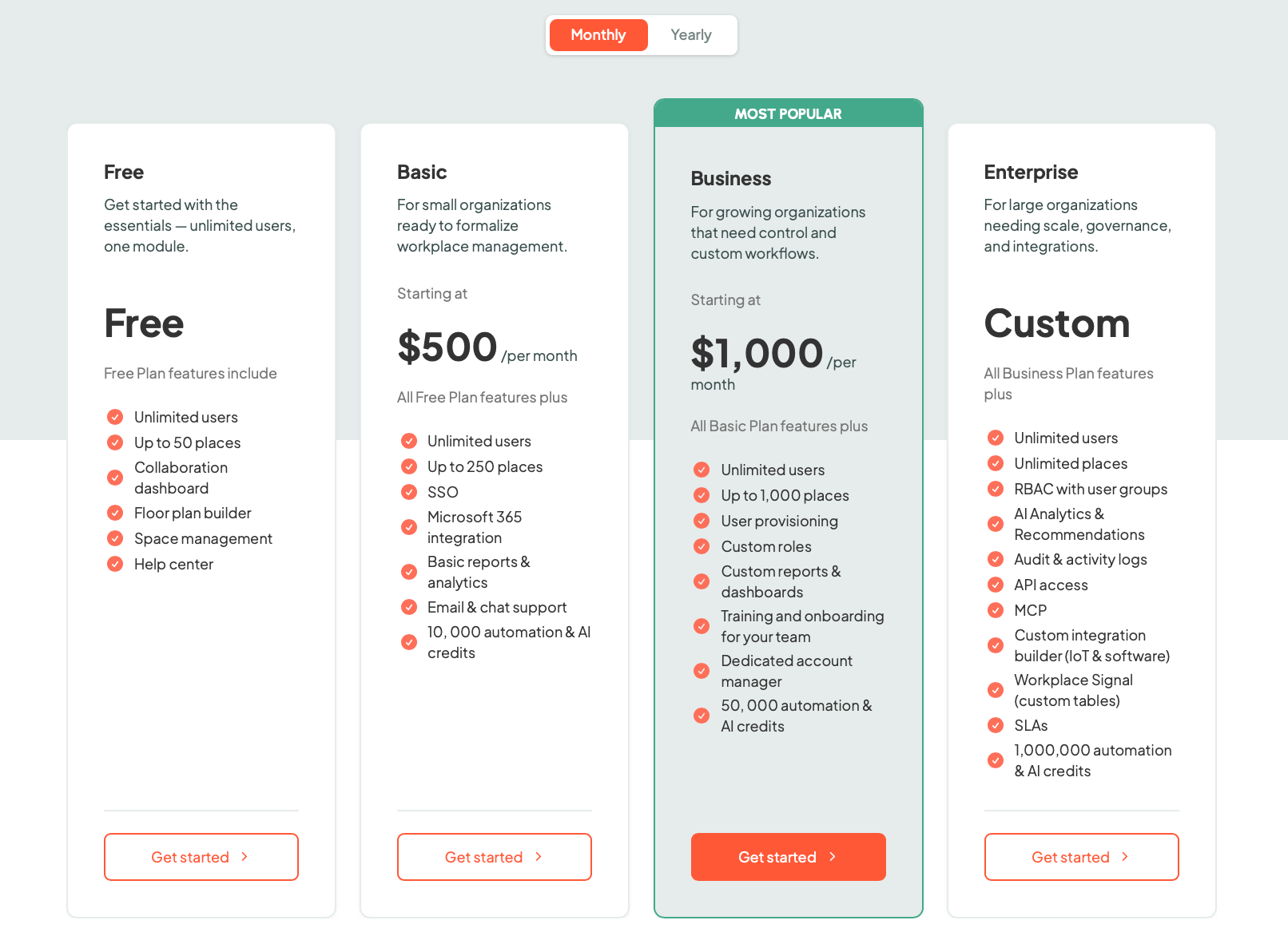
elia’s free up to 50 spaces, then $500 a month up to 250 spaces, and $1,000 a month up to 1,000. Unlimited users. After that, it's custom. You pay by the number of spaces you're booking, so everyone can use it. Sensors and room displays cost extra, but you can start with just the software and add them later, it’s really optional.
It syncs with the free parts of Places where people mark their work location, too. You don’t have to set it in two places.
Source: elia
What teams like about it
No training. The map comes up, they book a desk, and there isn't much more to explain.
Self-serve. If you need to add a desk or tweak a rule, you can do it and it's live straight away, without raising a ticket or waiting for IT.
One system. Because bookings, visitors, work orders, lockers, requests, and safety are in the same place, reception and facilities aren't each logging into a different tool.
Occupancy data. The sensors stay on, so you get a proper sense of how much a space gets used. If you're paying for a floor that sits half empty, you can catch it and let it go.
A few notes
Hardware. You can start with just the software, but you'll need sensors if you want occupancy data.
Company size. elia’s a much smaller company than Microsoft. You get more direct support and things move faster, but you don't get the resources of a company that size.
AI. There's no Copilot-style AI in it (yet!). If you’re looking at Places because of that, elia won't match it right now.
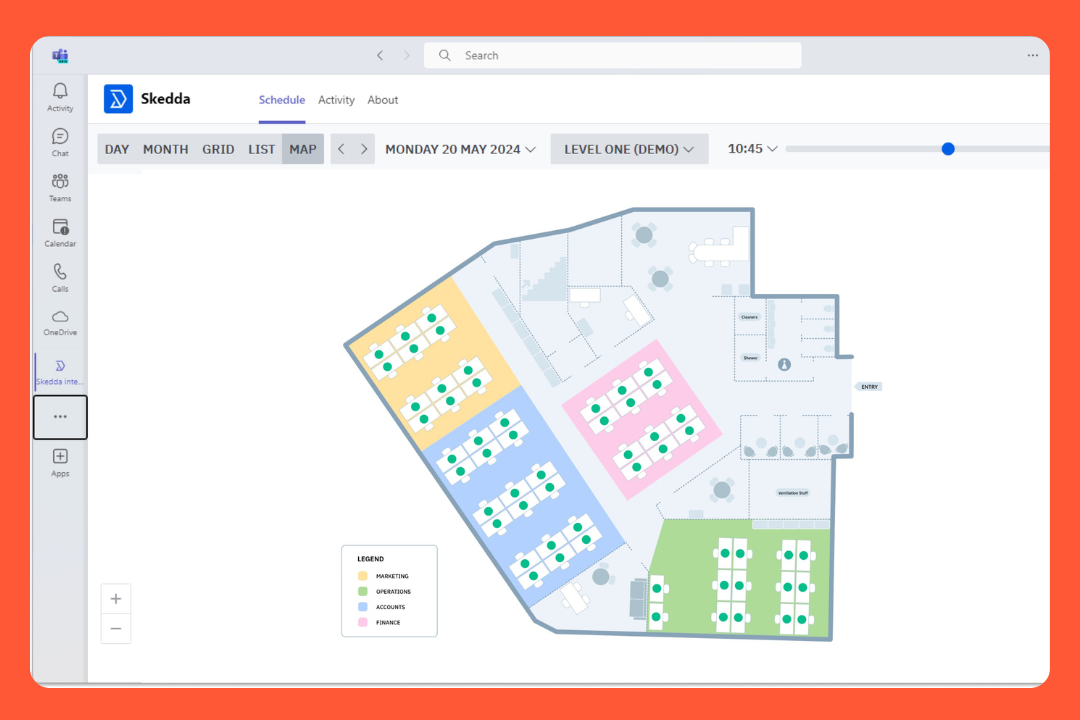
Skedda's been at the top of G2's space management list for a few years now, and I get why. It started out as a booking tool, but it's grown a lot since. It'll do your parking, sign your visitors in, give you the usage numbers, and it has this rules engine that lets you get really specific about who books what. Users love it.
There's a bot too, you type “@Skedda in” in a channel and it tells you who's coming in that week. And it's not just for offices. Universities use it for lecture halls and lab equipment, so it's quite flexible.
What you get
Desk and room booking. Pick what you need and book it.
Booking rules. Control who books what, how far ahead they can book, how often they can book, whether something needs approval, and so on.
Other spaces. Parking, lab equipment, and pretty much anything else you want people to reserve.
Visitors. Guests can check in on a tablet and the host gets a notification. This costs extra.
Microsoft integration. Outlook and Microsoft 365 sync, plus work-account login and directory sync for new employees.
Pricing
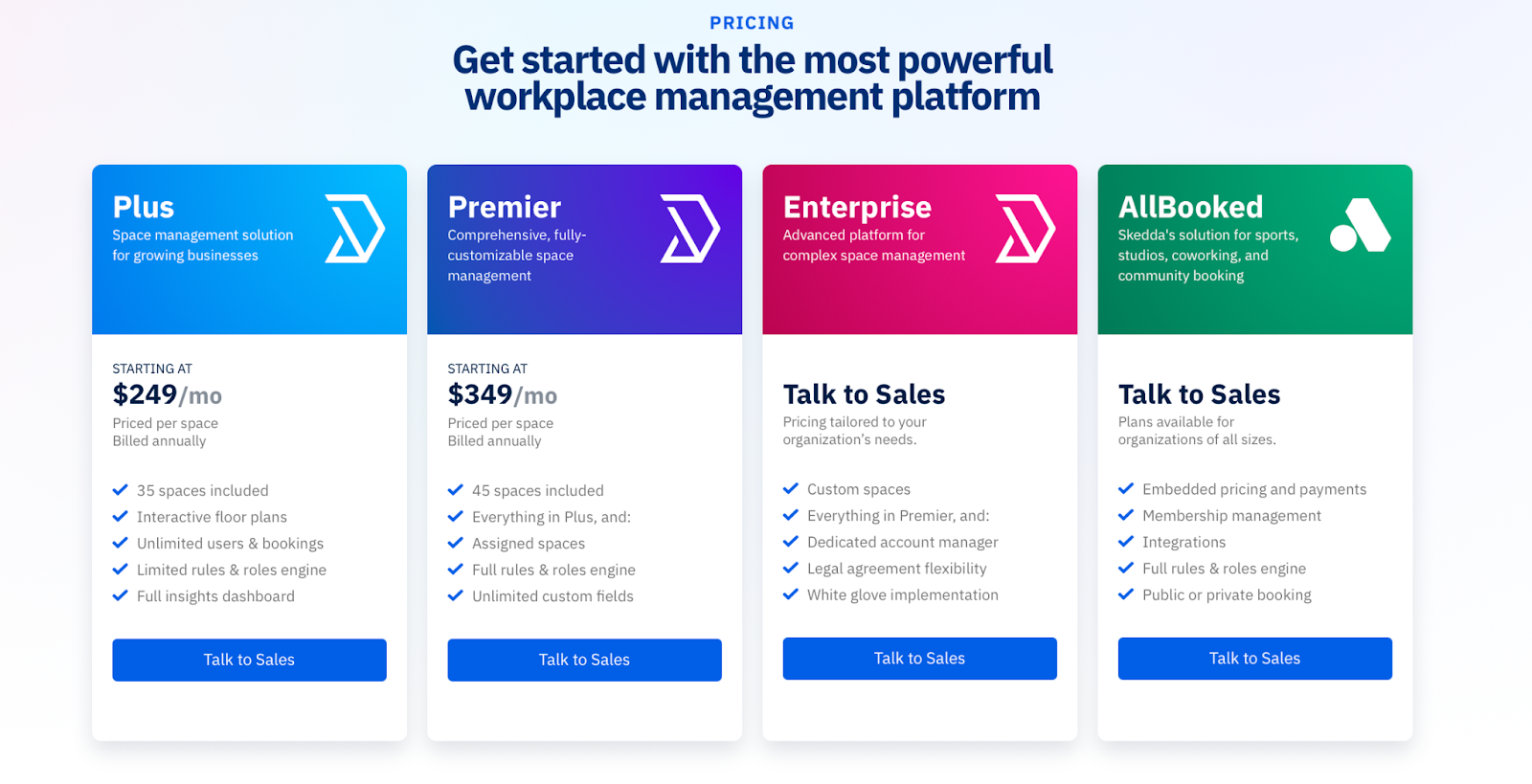
Skedda charges by space and bills yearly. Plus starts at $249 a month for 35 spaces. Premier is $349 for 45 spaces. Both with as many users as you need. Enterprise is custom, and there's a 30-day trial.
Visitor management is another add-on, $99 a month.
Source: Skedda
What people like
Simplicity. Look through reviews, and this one will be the top comment.
Rules. Offices with unconventional setups (say, teams that only allow their own corner), say Skedda made it work when other tools couldn't.
Support. They onboard well and reply fast, even giving you short videos showing you how to fix something.
Reports. There's an animation studio that looked at their booking numbers, realized they could condense their space, and cut their real-estate bill.
A few things I'd check
Floor plans. You can move and rearrange desks and rooms yourself, but you don't have full control over the underlying floor-plan graphic.
Scope. Booking is the center of it. You aren't getting lockers, requests, work orders, or health and safety alongside it. Visitor management is extra too.
Occupancy. Skedda can tell whether someone showed up on the network, but that's different from a sensor telling you that a particular desk or room was used.
3. Kadence, best for getting your team in on the same days
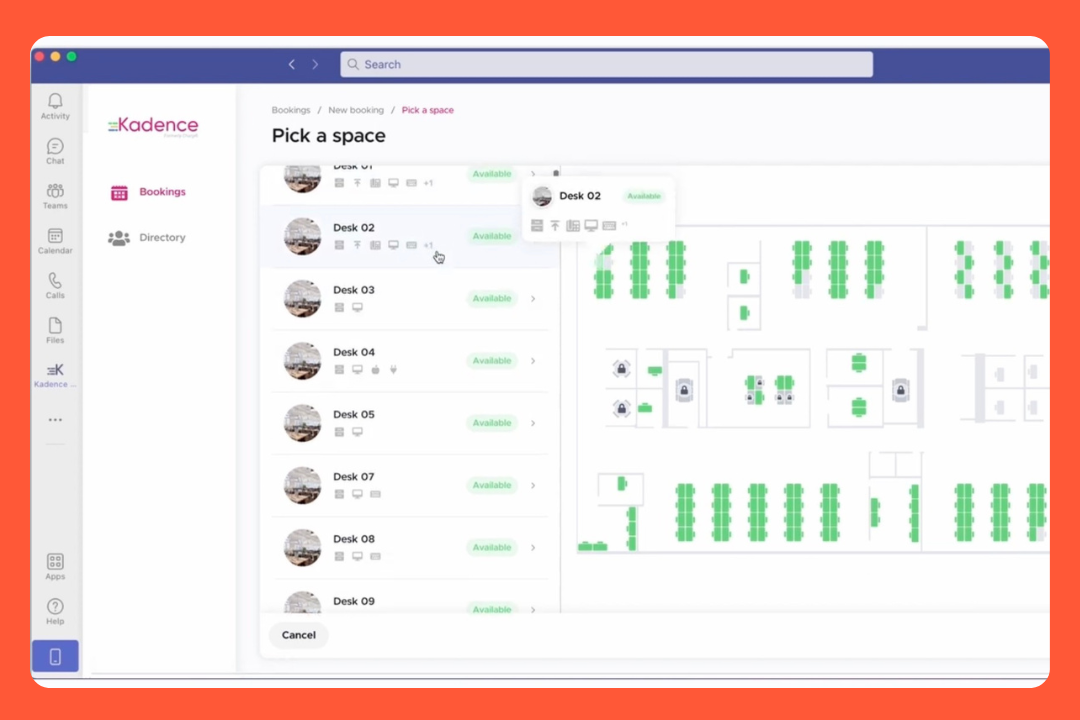
Kadence is into getting everyone in together. It does desk and room booking like the rest, but it kind of makes showing you who’s in its main event. You star the people you like, it gives you a heads up when they book, and you grab a spot next to them. There's also visitor check-in, space planning, occupancy, and an AI assistant that books a desk for you.
What I liked about it is that it can save you a wasted trip. If a teammate bails on their booking, it pings you, so you're not commuting in to sit on your own all day.
What it has
Desk and room booking. Find a desk or room from the map in Teams and book it. Or let Kadence AI do it for you.
Announcements. Send a workplace notice through Teams, schedule it, mark it urgent, and send it to one office. The check-in reminders live there too.
Space planning. There’s SpaceOps, for whoever's working out how much office to keep. Drag teams around the floor and play out a what-if before you commit.
Occupancy. Kadence can use Wi-Fi, badge data, check-ins and other signals to work out who's in. You can also add sensors when you need more direct occupancy data.
Visitors and events. It does proper visitor sign-in at a kiosk, badges and all, and it'll sort your parking and lockers too.
Integrations. Teams, Slack, your calendars both ways, your logins, your helpdesk.
Pricing
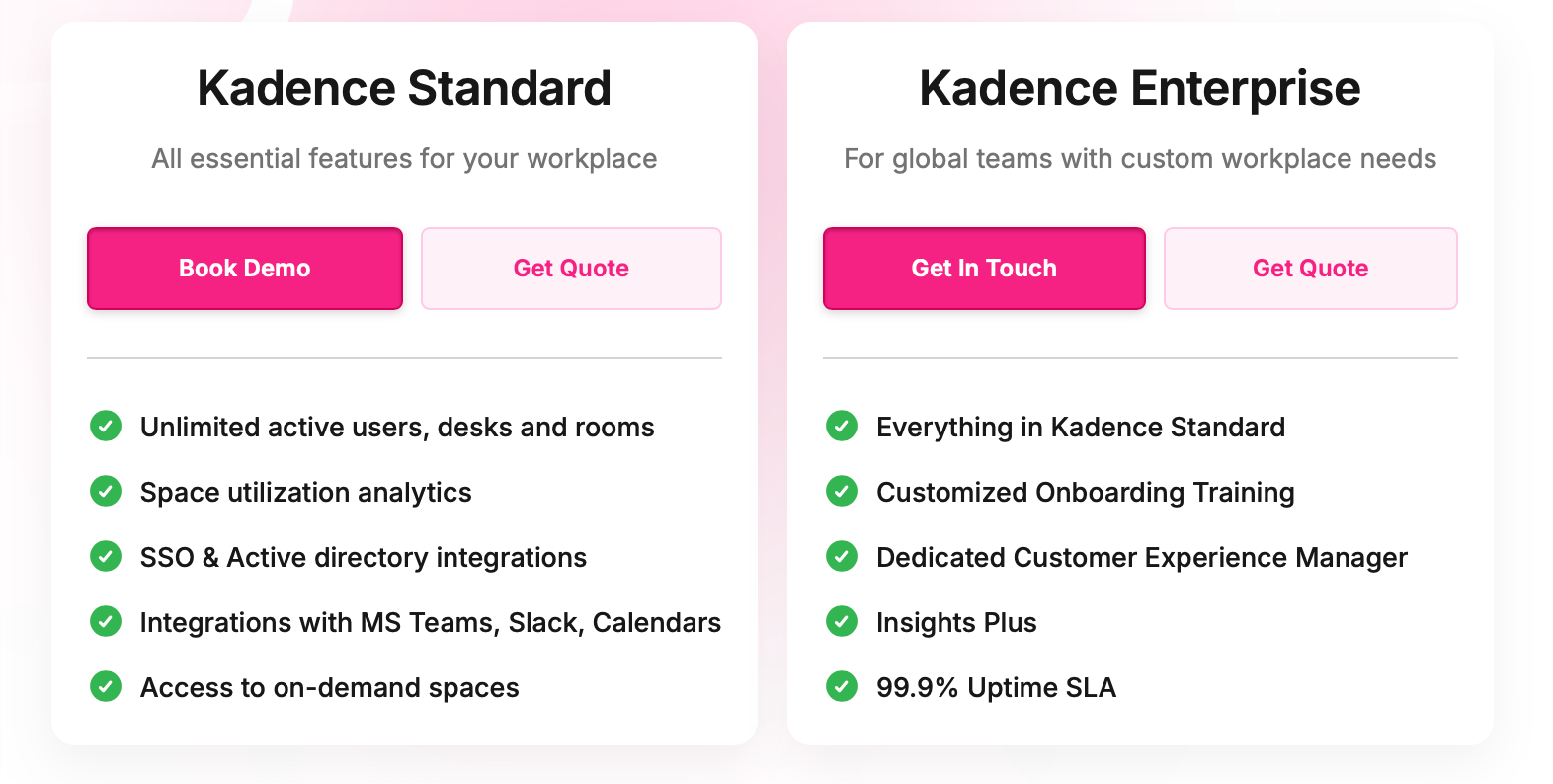
Kadence won't show you the price. You get two plans, a Standard one with all the everyday features and unlimited people on it, and an Enterprise one that piles on a dedicated helper and deeper analytics. But to see a number you have to book a demo and ask.
Source: Kadence
What people rate
No hand-holding. A lot of reviews say nobody needed training, you book a desk in a couple of taps and you're off.
Who's around. Being able to book right where their team's sitting is nice.
Support team. Same as a couple of others here, reviewers name their onboarding person and say they get quick answers when they need help.
Saving space. Karger cut its office footprint by 80%, and Wavex got everyone down to 18 desks.
A few catches
Price. Said it already, but you can't weigh it up on cost until you're on a sales call.
Auto check-in. Test this out before rolling out. A few reviewers mention a logout bug around the check-in, and another reviewer specifically wanted auto check-out.
Analytics. People like dashboards, but a fair few wanted more flexibility.
4. Dibsido, best for setting it up yourself on the cheap
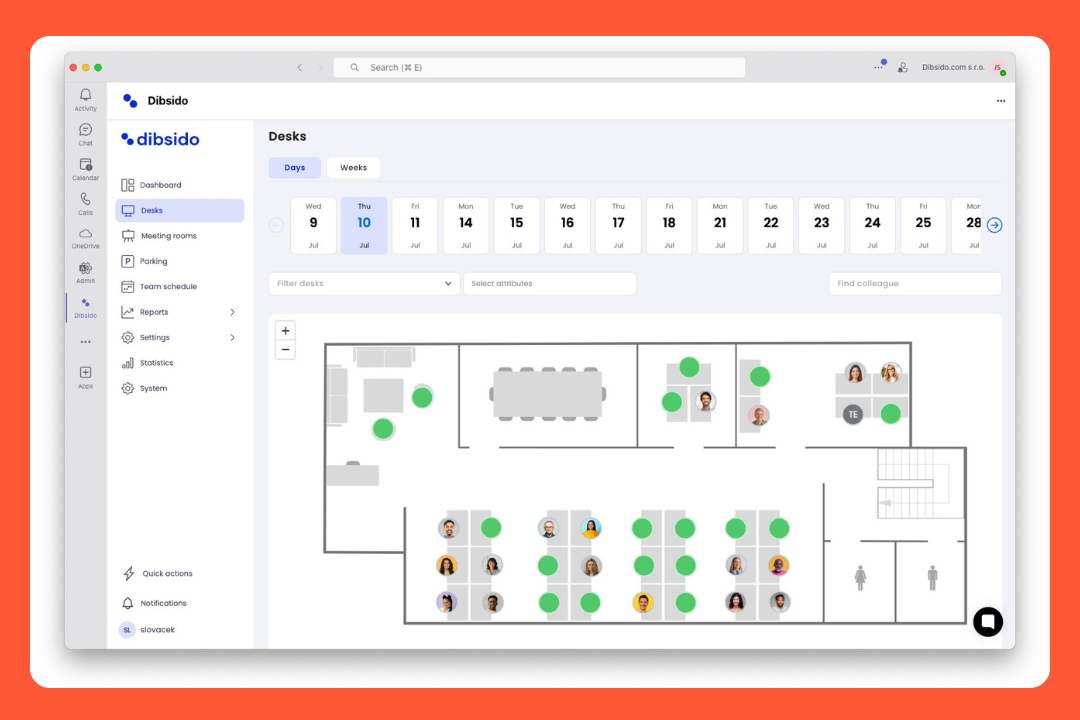
You can set up Dibsido yourself on a quiet afternoon. You sign up, upload your floor plan, drop the desks where they go, and you're booking. Parking is a part of it too, including carpools, and there's a reception side, like signing in visitors and logging parcels.
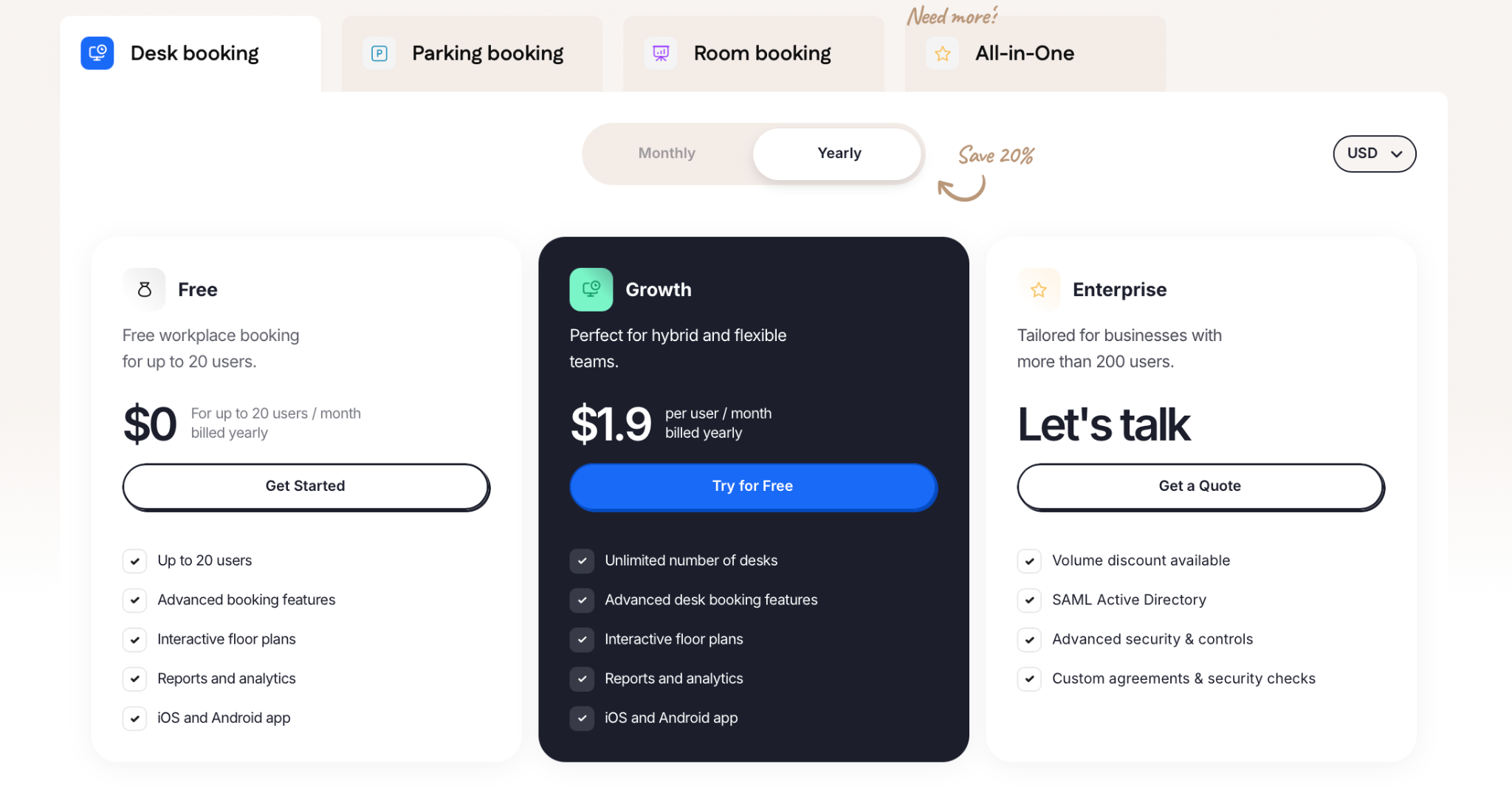
The price is another draw, and it's transparent, which I always appreciate. Free up to 20 people, then about the cost of a coffee per person a month.
One thing that'll save you some googling. Dibsido used to be called Ofisly. So if you see reviews under that name, it’s the same product.
What you get
You build the map. Upload your floor plan, add the desks, and that's your map. If you move a team next week, you can change it yourself.
Parking. Book car spots the same way you book desks. It even does carpools, so people sharing a ride can sort it out together.
Booking limits. Give people booking credits or a monthly cap so the same folks don't grab the good desks every single day. There’s a waiting list too.
Front desk. Sign visitors in with a guestbook and flag something that's broken. Not as deep as some, but it's there.
Lots of ways to use it. There's a web app, iOS and Android apps, and support for 12 languages.
Microsoft login. Log in with your Microsoft account, and it drops you straight in, so there's no separate password for people to set up.
Pricing
Pricing's public. Free up to 20 users. After that desks are $1.9 per user a month, parking's $4.5 a spot, and rooms are $6 each. Or you get the all-in-one Ultimate plan at $2.7 per user a month and get the lot.
Bigger companies can ask for a custom Enterprise deal, but most teams can pick a plan and pay by card.
Source: Dibsido
What people like
Price. After a few tools where you have to get on a sales call to find out what they cost, it's a relief to just see a number. Free for a little team.
Setup. There's no big implementation project. You can build the map and start booking on your own.
Reviews. 4.8 on G2 and 4.7 on Capterra, and the line they repeat is that it's easy and their employees took to it super fast.
Parking. If your headache is 40 people wanting 20 car spots, the credits and waiting list help share them out.
Watch out
Microsoft integration. It's a real app now, but there are still some rough edges in reviews, so I'd give it a quick test with your setup.
Rooms. Meeting-room booking came later, and the room calendar sync with Outlook refreshes every 10 to 15 minutes rather than instantly.
Support. The team's in central Europe, so if you're a few time zones over, you might have to wait for a response.
5. Clearooms, best for getting everything without an enterprise tier
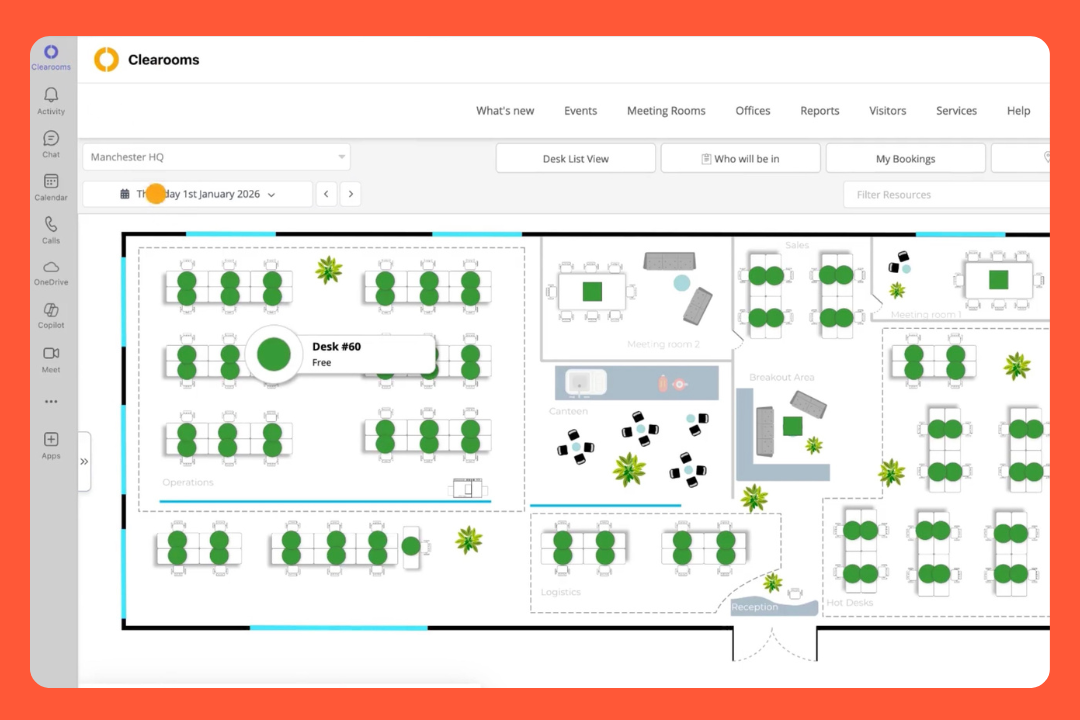
Ok, Clearooms, out of the UK. Many tools lock visitor sign-in and single sign-on behind a pricier tier, but here it comes as standard.
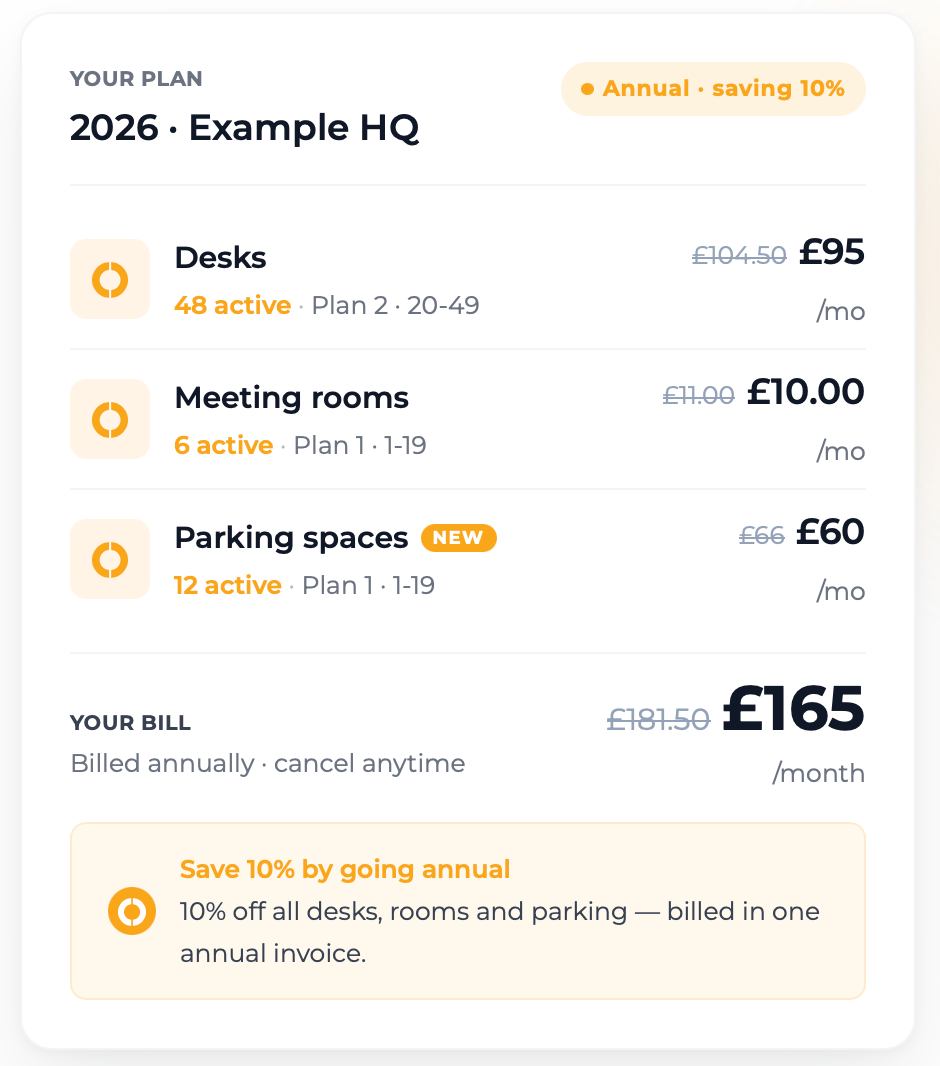
Which brings me to how you pay, because it's not one flat plan, it's bit by bit. You pick the products you want, and each is priced by how many you're looking after. So you could stick the whole company on the desks and the headcount wouldn't cost you a thing. Want meeting rooms on top? That's its own line...
There's also an add-on called OpenSpaces where you list your spare desks for outsiders to book and pay for.
What it comes with
Inclusions. Visitor management, SSO, door screens. There's no big enterprise tier.
You pay for spaces. It counts desks, rooms and parking bays you're looking after, so a growing team doesn't cost you a penny more.
Parking. Book a parking spot alongside your desk, set up permits for the Blue Badge and EV lot. Same per-space pricing as everything else.
Rooms. Hang catering, the AV kit, and how the room's laid out onto a booking. The room screens are included too.
Visitors. They sign in on a tablet or you pre-book them in, the host gets a nudge when they arrive, and they sign out on the way so you've a live list if the alarm ever goes off.
Teams. You can book desks and rooms from Teams, with bookings syncing with Outlook. IT can manage access through Microsoft 365/SSO.
Pricing
Desks go in bands, so 1 to 19 of them is $80 a month, 20 to 49 is $125, and it climbs from there. Rooms are their own thing, from $13.50 a month for the first handful, and parking works the same way as desks.
Pick GBP, dollars, euros… It's rolling monthly with no setup or cancellation fees, and there's a 30-day free trial to poke about first. If you need a floor plan drawn, that's a one-off charge on top, but you can skip it and upload your own.
Source: Clearooms
What keeps people happy
Simplicity. The thing reviewers say again and again is nobody needed showing how.
No drama. Best compliment in the reviews, weirdly. It gets on with its job and stops bugging IT once it's up.
Pricing. No per-head sums and every number's on the site before you have to speak to a soul. For a smaller office, it can stay pretty inexpensive.
One login. Desks, rooms, parking and visitors live together. It's hosted in the UK too, with the security boxes IT wants ticked.
What you should know
Reporting. You get your numbers, but if you're looking for detailed occupancy analysis or heatmaps, I'd test it against your requirements.
The look. A few said it does the job fine, it's just a bit dated next to the newer tools.
Reminders. A couple of reviewers had booking notifs land behind time, or a sync that took a minute to catch up.
6. OfficeRND, best for offices that double as flex spaces
OfficeRnD is a little different from the others because it came out of coworking, so it leads a double life. Half of it is for the money side: billing members and selling memberships. Then there's the workplace half, the hybrid-office bit, sitting on top.
So who's it for? If your building is purely a staff office, plenty of the tools here will do the job with less to wade through. But if part of your place is let out, a few floors going to other companies, some hot desks sold to freelancers, OfficeRnD does both the office and the letting side from one spot.
What it can do
Coworking. Memberships, automated invoicing, an online store. There's an AI sales agent that answers enquiries and books tours for you.
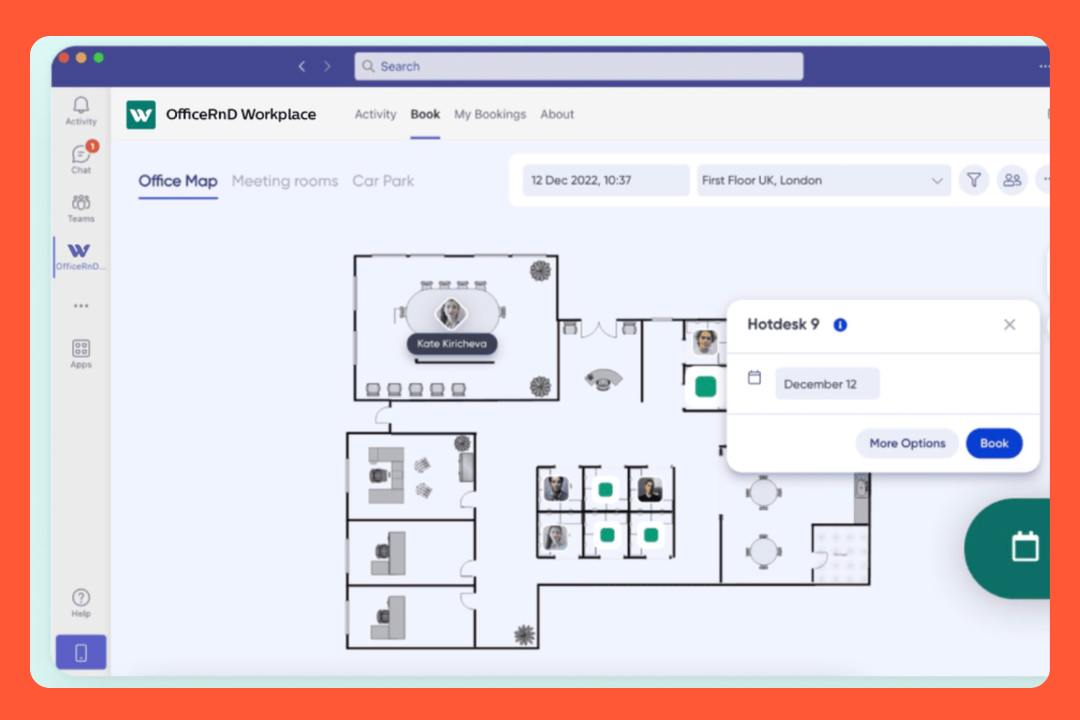
Desks and rooms. Book off the floor plan and set up neighbourhoods. You can book from Teams, Outlook, Slack or your phone.
No new app. If you're a Microsoft or Google shop, people can stay in the tools they already use. Book in Teams, and it shows up in Outlook.
Parking. Book regular parking or EV spots, and the workplace team can set rules around who gets which spaces.
Helpdesk. Someone's chair is broken or the projector isn't working? They can put in a request from the same place they're booking their desk.
Visitors and reporting. Guests pre-register and sign in on a tablet, hosts get pinged, and the reporting side is good, with proper dashboards on how your space gets used.
Pricing
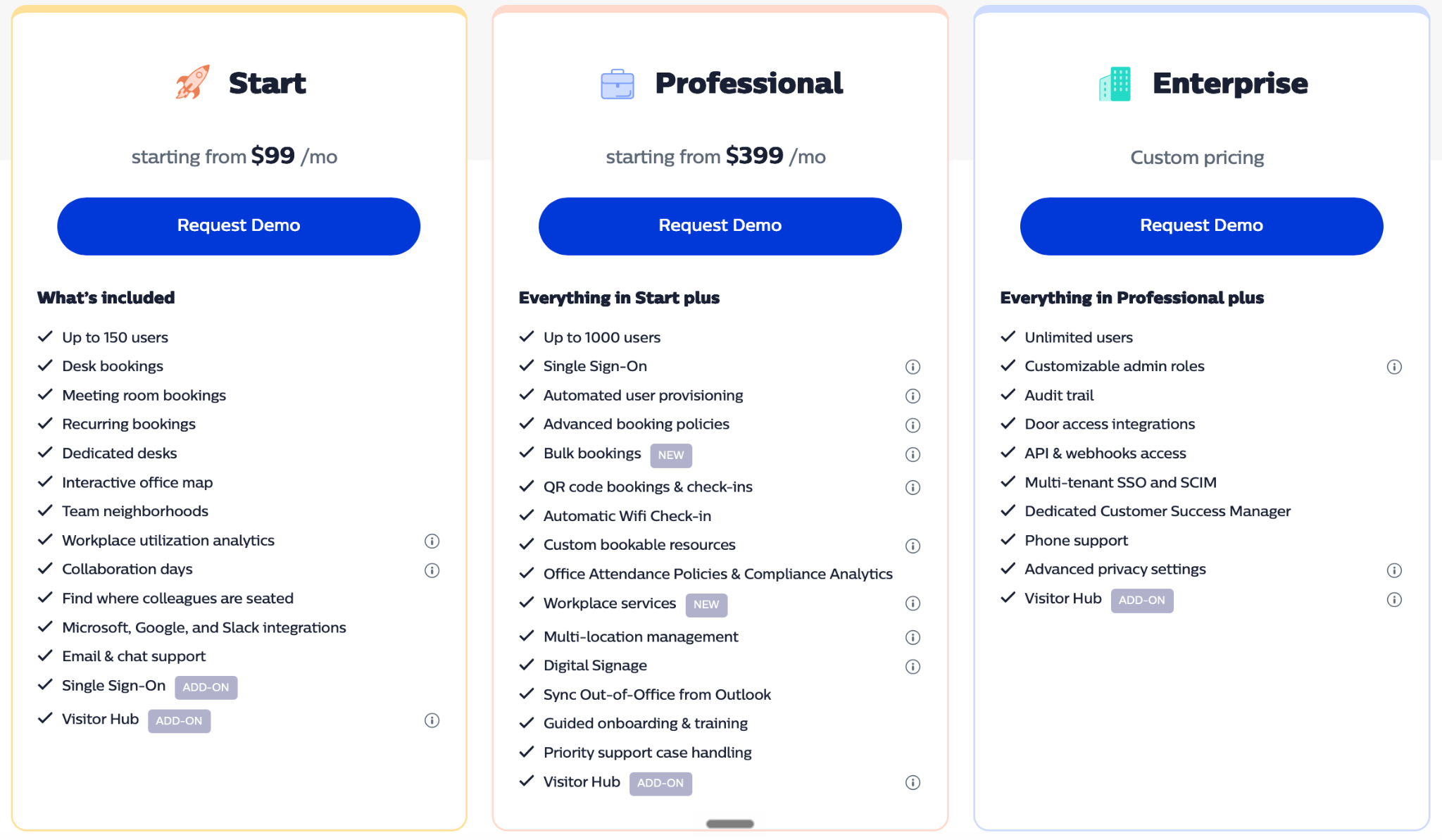
The workplace product starts at $99 a month for up to 150 people, and that covers desks, rooms, the map and the analytics. Jump to Professional, from $399 a month, and you unlock single sign-on, booking policies, multi-location and digital signage.
Proper enterprise kit like SCIM and door access is a custom quote. Visitor sign-in is an add-on.
The coworking Flex product is priced separately again, from $165 a month by member count.
Source: OfficeRnD
Why people pick it
Flexibility. People with odd setups say they got it configured exactly how they wanted, where stiffer tools had said no.
Two sides. The staff side and the letting side both exist in one place, so a building that's part office, part rented doesn't need two systems duct-taped together.
Reporting. Where some of these go thin on data, OfficeRnD's dashboards get a shout-out.
Security. SOC 2 and ISO 27001 are there.
The flip side
It's a lot. Because half of it is for coworking businesses, a plain office can find there's more here than they'll ever touch. A few reviewers called it busy.
Pricing. Single sign-on and the visitor hub sit in the pricier plans or come as paid add-ons.
A few rough spots. There are some complaints about meeting rooms showing as a list rather than on the map, and the occasional QR-code issue with parking.
A few honorable mentions
I kept the main list to six, but there are a few others that came up in the research. They all work with Teams, so if the six above aren't quite right, check out these next:
deskbird is simple, and it has a nice feature that turns a rough sketch into a floor plan. It's also EU-hosted.
Robin plugs into the physical panels on the meeting-room door (Logitech Tap Scheduler and the like), with meeting-room analytics.
Yoffix is Microsoft-native, it works inside Teams with no separate app, syncs Entra ID and Exchange rooms.
Yarooms has a carbon dashboard that estimates your workplace's CO2 from office days and commutes.
Archie has door-access integrations (Kisi, Salto), so the desk-booking app also unlocks the building.
So, how do you choose one?
No single winner here, it comes down to your office and who you want in charge of it:
If all you need is rooms and desk pools booked inside Microsoft, Places is hard to argue with, and it's mostly paid for already.
If some of your staff are on on-prem Exchange. Every tool here works regardless of where a mailbox lives, so a standalone platform sidesteps it entirely.
If you just need booking, as cheap as possible. Desks and rooms on a map inside Teams, nothing fancy, price front of mind: Dibsido. Free for small teams, with the number sitting right on the website.
If you need occupancy data you can trust. Making real-estate calls off the numbers means you can't lean on people remembering to check in. elia has its own always-on sensors feeding the same platform.
If you want the whole workplace in one system. Once you're past desks and rooms, Places has you bolting on a separate tool for each. elia does the lot in one place, in your workplace team's hands. Robin and OfficeRnD are the next names to look at.
If elia sounds like the closer fit, you can see how it works or book a demo when you're ready.
Tamara Zhostka
is a Content Marketing Specialist at elia. With 10+ years in content marketing, she writes about workplace trends and the tools that help teams work smarter. Part strategist, part storyteller, Tamara brings equal amounts of data, creativity, and a little Moon Prism Power to every piece she creates. 🌙✨
Share
Contents
Subscribe to our newsletter
Subscribe to the elia newsletter for exclusive product updates and industry best practices. You can unsubscribe at any time.
Thank you! You're subscribed.
Oops! Something went wrong while submitting the form.
Frequently Asked Questions
Answers to Your Common Queries
What are the best Microsoft Places alternatives?
Is Microsoft Places free, or do I need a Teams Premium license?
Can you do desk booking and room booking inside Microsoft Teams?
Which alternatives include visitor management, parking, and occupancy sensors?
Do these work with Google Workspace, or only Microsoft 365?