Contents
Subscribe to our newsletter
Subscribe to the elia newsletter for exclusive product updates and industry best practices. You can unsubscribe at any time.
Thank you! You're subscribed.
Oops! Something went wrong while submitting the form.



So the decision's been made. Someone's set the number of days, and now you're the one who has to make it work: making sure you have enough desks for everyone you've called in, crafting a policy that doesn't freak people out, getting comms right so it doesn't spark a fight, and keeping attendance up by week three.
If that's roughly your situation, this RTO mandate implementation guide is for you, usually a workplace or facilities lead, working alongside HR. Most articles about RTO argue about whether you should do it, but this one skips all that and gets straight into the how:
An RTO mandate is basically an employer telling people to be on-site a set number of days a week, taking back the choice they had under remote and hybrid work. The mandate sets the floor: three days, four, or full-time. Deciding the number is easy, but making it work and keeping your people while you do lands on you.
And the numbers have changed pretty fast. A majority of Fortune 100 companies, 54%, now want five days in the office. That’s up from just 11% back in 2024. About 34% of all US firms are full-time on-site. And 69% of employers now track office attendance, up from 45% last year.
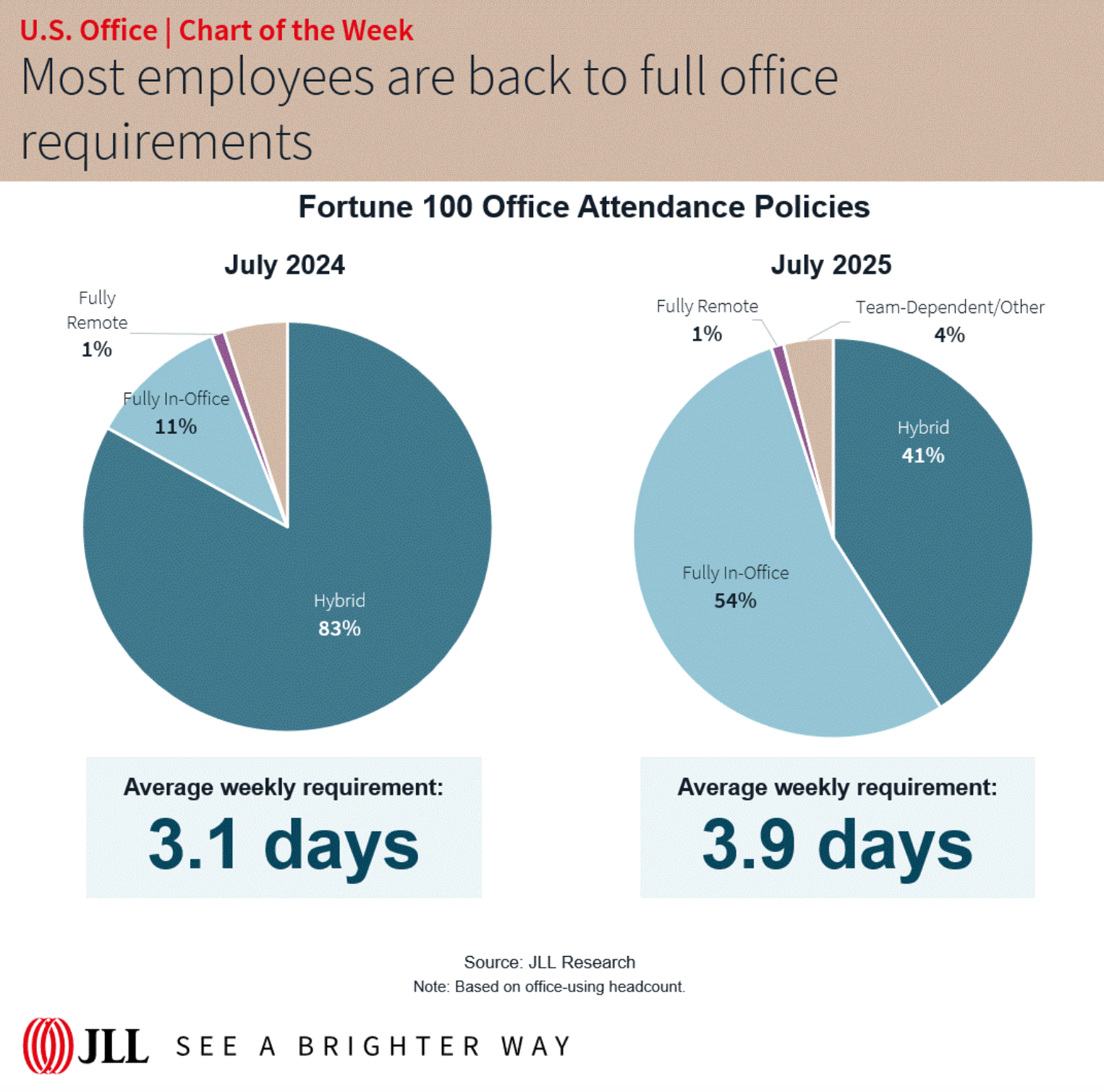
So counting who shows up is just normal now, which is exactly what raises the privacy questions.
You don't need to win the philosophical argument to run a good rollout, but it helps to know what you're getting into. Leaders usually give three reasons for bringing people back:
There's a lot of debate whether mandates deliver any of them, though. In a Wharton panel on RTO, management professor Peter Cappelli is pretty skeptical that the "I'll quit" surveys mean much. He puts the gap between people who say they'll leave and actually do at about 8%. Worth keeping in mind before you panic about the scary stats.
But here's the part that gets skipped in most discussions, and it comes from the same panel. Cappelli calls it:
"The big problem that companies don't want to talk about. Most of them reduced their office space, so they literally can't bring people back five days a week. They no longer have a space for them."
And his colleague Matthew Bidwell says the mandates "keep hitting obvious barriers, such as a shortage of office space and parking for everyone."
That's the whole game. The one thing that's going to kill almost every mandate is just physical capacity: whether there's a desk and a parking spot when people show up.
So that's where this guide starts.

Before you announce anything, work out whether your office can physically hold the mandate. I know, this is the boring part, but it's also the single most important thing you'll do.
Start with the desk-sharing ratio: total headcount divided by total available desks. Most hybrid orgs land somewhere between 1.4:1 and 1.8:1. So a 400-person office with 250 desks sits at 1.6:1, comfortably in range. On paper you have enough.
But that might break, depending on your mandate.
The ratio works when attendance is spread across the week. A mandate does the opposite: it pushes everyone onto the same days. Tell 400 people to come in four days a week and they don't spread out, they pile onto Tuesday, Wednesday, and Thursday. So your real peak might be 80% of headcount on a Wednesday. That's 320 people chasing 250 desks, and you're 70 short on your busiest day even though the average looked fine.
So here’s the rule: size for your peak day, not your average. The more days you mandate, the closer to 1:1 you need to get, because a heavier mandate means a higher midweek peak.
Run your own numbers in the calculator below:
To sanity-check yourself, there are a few numbers you need to keep an eye on:
The fix is rarely signing a bigger lease. Usually it’s just about getting the sequencing right: stagger which teams come in on which days, so the peak flattens out, and use the data to scale back later.
Most rollouts that go sideways do so because the announcement went out before anyone had a handle on the logistics. So get these sorted out first:
Here's a sequence that works, roughly 8 to 12 weeks depending on how big you are and how many sites you have.
Done badly, a mandate tends to lose you the exact people you'd most want to keep. A University of Pittsburgh study of over 3 million tech and finance workers found skilled employees are 77% more likely to leave after a mandate than less-skilled ones, with senior staff walking at higher rates too.
It's the commute, work-life balance, and the mental hit of losing a routine that was working fine. Replacing someone isn't cheap either, often pegged at 6-9 months of their salary by the time you've hired and ramped a replacement.
So how do you avoid losing too many people?
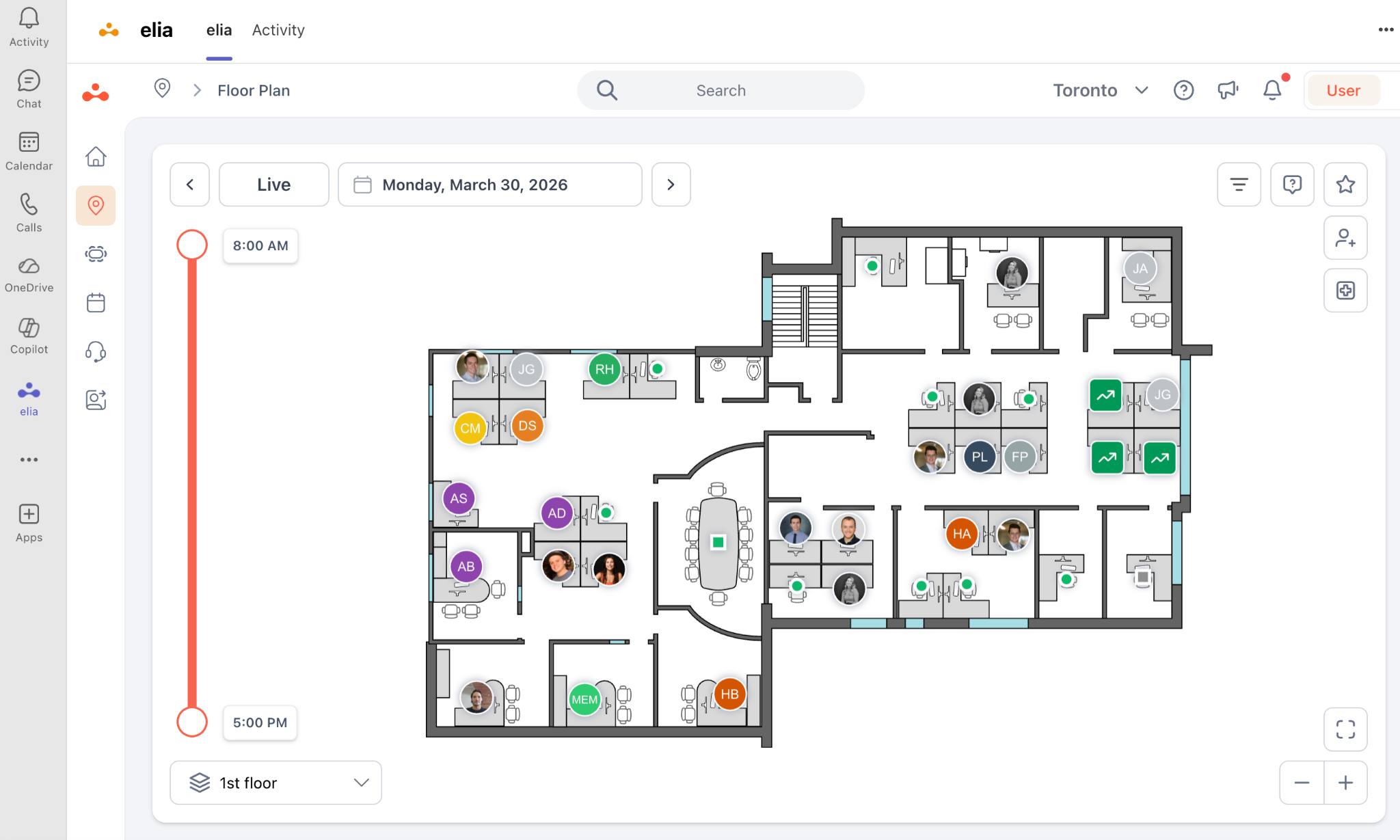
Let's talk about the software side of things. The thing to remember is that no software is going to save you from a mandate that doesn't have enough desks. So if that's your biggest problem, get enough desks before you mandate attendance. Once that's sorted, the tooling falls into four categories, and most teams will need the first one and then grow into the others.

The market is crowded and most demos look the same. So here are a few things that genuinely set the tools that get used apart from the ones that end up getting abandoned:
The real value comes from the tools talking to each other. A booking should write to Outlook or Google Calendar so people see it where they work. It should fire a reminder in Slack or Teams. Ideally it updates floor access so a booked desk also gets someone through the door.
And the sensor data should land in the same dashboard as the bookings, so you're not stitching together three sources. When these are disconnected, you create more manual work than you removed, and people notice.
A few teams try to run a mandate on a spreadsheet and a shared calendar. It'll work just fine until it hits its first snag, usually around the second floor or the first time someone needs occupancy for a lease conversation. Most orgs between 50 and 5,000 people, find that a real tool ends up paying for itself fast.
The other choice is one platform versus several point tools. You can set up a desk booking app, a separate visitor tool, and a separate sensor vendor, but then you have to worry about the integrations and the data living in different places. One platform is simpler to run and gives you one set of numbers, whereas the trade-off is flexibility if you've already got a tool you love in one category.
Here's a map of the category by what you're mainly solving for:
Cost-wise, dedicated workplace platforms end up in the low-to-mid four figures a year for a mid-sized office, with sensors as a per-unit hardware add-on. To be honest, the software is rarely the expensive part of a return-to-office program. Your lease costs far, far more than any tool will.
Canada's biggest RTO story is its own federal public service, where the change affects tens of thousands of federal workers across dozens of office locations. As of late June 2026, executives in the core public administration are already required to be on-site five days a week, effective May 4, 2026.
All other core federal employees must be in the office a minimum of four days a week starting July 6, 2026, up from the three-day prescribed presence in place since September 2024. Separate agencies, including the Canada Revenue Agency at four days, are strongly encouraged to follow suit.
It hasn't gone smoothly, and that's the useful part to watch. The Public Service Alliance of Canada called the four-day order "a slap in the face," and unions pointed out the government changed working conditions mid-bargaining, which they've flagged as possible grounds for legal action.
Even if you're nowhere near the public service, there's a lot to learn from this:
The second you start tracking attendance in Canada, privacy law is suddenly a major deal. Badge swipes, Wi-Fi logs and desk-booking records are treated as personal information, just like credit card numbers or your medical history. For federally regulated private employers (banks, airlines and all the rest), PIPEDA, the Personal Information Protection and Electronic Documents Act, sets the rules for collecting and using that kind of info.
It gets a bit messy by province… Some don't have their own law that covers private businesses handling employee data, so places like Ontario and Nova Scotia, you have to fall back on a patchwork of employment standards, common laws, contracts, and collective agreements to keep everything above board. British Columbia, Alberta, and Quebec have their own statute. So step one is just knowing which rules apply to you.
I'm not a lawyer, so you should really have a chat with one if you want to know the details. But the gist from the Office of the Privacy Commissioner is reasonable: any monitoring has to serve a real purpose, and you should always reach for the least intrusive way to get the job done. You don't need consent if the data is necessary to manage the workplace, but you have to be upfront about what you're collecting and why.
If you do one thing this week, count your desks against the days you've been told to mandate. That single number tells you whether you have a communication job or a construction job ahead of you.
From there the order is simple: fix the space, pick a booking tool people will use, give real lead time, and adjust as you learn. The compliance pieces matter most if you're in Canada, so loop in Legal early if that's you.
If you'd rather not run all of this out of a spreadsheet, elia handles the desk-to-mandate math for you, from booking to occupancy data. The best way to see whether it fits your setup is to walk through it with your own floor plan and headcount, so if you're curious, that's the place to start.
Help teams find the right space, right when they need it.

Answers to Your Common Queries
![Return to Office Policy Template: Complete Guide + Free Template [2026]](https://cdn.prod.website-files.com/64f88f68249f7cafe071d150/6904cddc5762e4cdd787a51b_blog%20images%20-%20elia%20(34)%20(1).png)

%20(1).png)