OfficeSpace Alternatives: The 6 I'd Point You to in 2026
Tamara Zhostka
Content Marketing Specialist
–
Last updated on Aug 20, 2026
If you’re comparing OfficeSpace to other workplace tools right now, I hope this might help.
OfficeSpace is a biiiiig, well-liked name here, and it's having a busy year (more on that in a second). There’s a lot to like, but it won’t necessarily be the right fit for every team, and there are a few others you'll want to see before you sign anything.
This guide looks at the things that make OfficeSpace alternatives different from one another:
how they're priced, and whether the number's even public
how much tool it is: simple booking, an all-in-one platform, or a full IWMS
how far they go past booking into space and move planning
what you get for occupancy
and more
And yeah, elia is one of them, so I'll be straight about where we're a good fit and where we're not.
TL;DR: OfficeSpace alternatives at a glance
Tool
Best for
Why it stands out
elia
All-in-one, own sensors included
Good mix of booking and everyday operations, like visitors, requests, and occupancy from its sensors, hosted in Canada
Tactic
Booking that grew into ops
Keeps booking simple but gives workplace teams more to work with, including moves and space planning
YAROOMS
Booking plus an AI colleague
Yarvis books through Microsoft Teams and email, and the full pricing sits public on the site
Eptura
Big, complicated companies
The most complete here on space planning, moves, assets, maintenance, and leases, a full IWMS
Gable
Mostly remote teams
Office booking plus on-demand access to coworking spaces across 900+ cities
deskbird
Adoption and EU privacy
Booking people keep using, native in Teams, with EU data residency and works-council-ready setups
What is OfficeSpace?
OfficeSpace is workplace management software for bigger companies with a few hundred employees, more than one office, and usually a facilities or workplace team looking after it. It’s been around since 2006 (quite a veteran!), and 1,650+ teams use it today.
Lately, the product has been moving hard into AI. OfficeSpace bought an AI company called Dojo in October 2025 and rebranded as an AI operating system. It rolled out AI Canvas for space planning and Ossie, an assistant that lets people find desks and coworkers by asking. It also made G2’s 2026 Best Software Awards for the second year in a row.
Here’s what it does
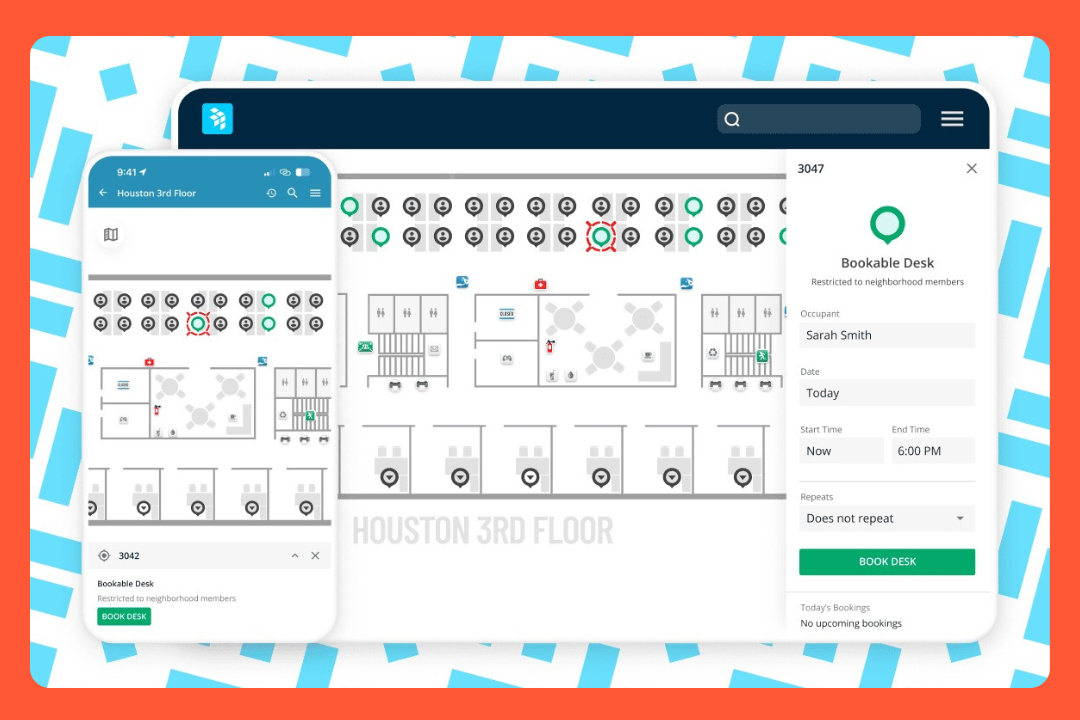
Space and move planning: Floor plans, stack planning, what-if scenarios, and drag-and-drop moves for shifting people between desks and buildings.
Desk and room booking: People can book from the web, mobile, Teams, Slack, or their calendar. There’s also check-in and automatic release for no-shows.
Occupancy and workplace analytics: You can see how spaces are being used, along with things like cost per seat and per square foot.
Visitor management: You’ll need a separate tool called Greetly, which OfficeSpace bought in 2023.
Facility requests: Request Manager is the ticketing side of OfficeSpace, and facilities teams really like it.
Assets: You can track equipment and inventory and keep an eye on depreciation.
OfficeSpace software pricing
OfficeSpace doesn’t put its pricing online, and there’s no free trial, so you’ll need to talk to sales.
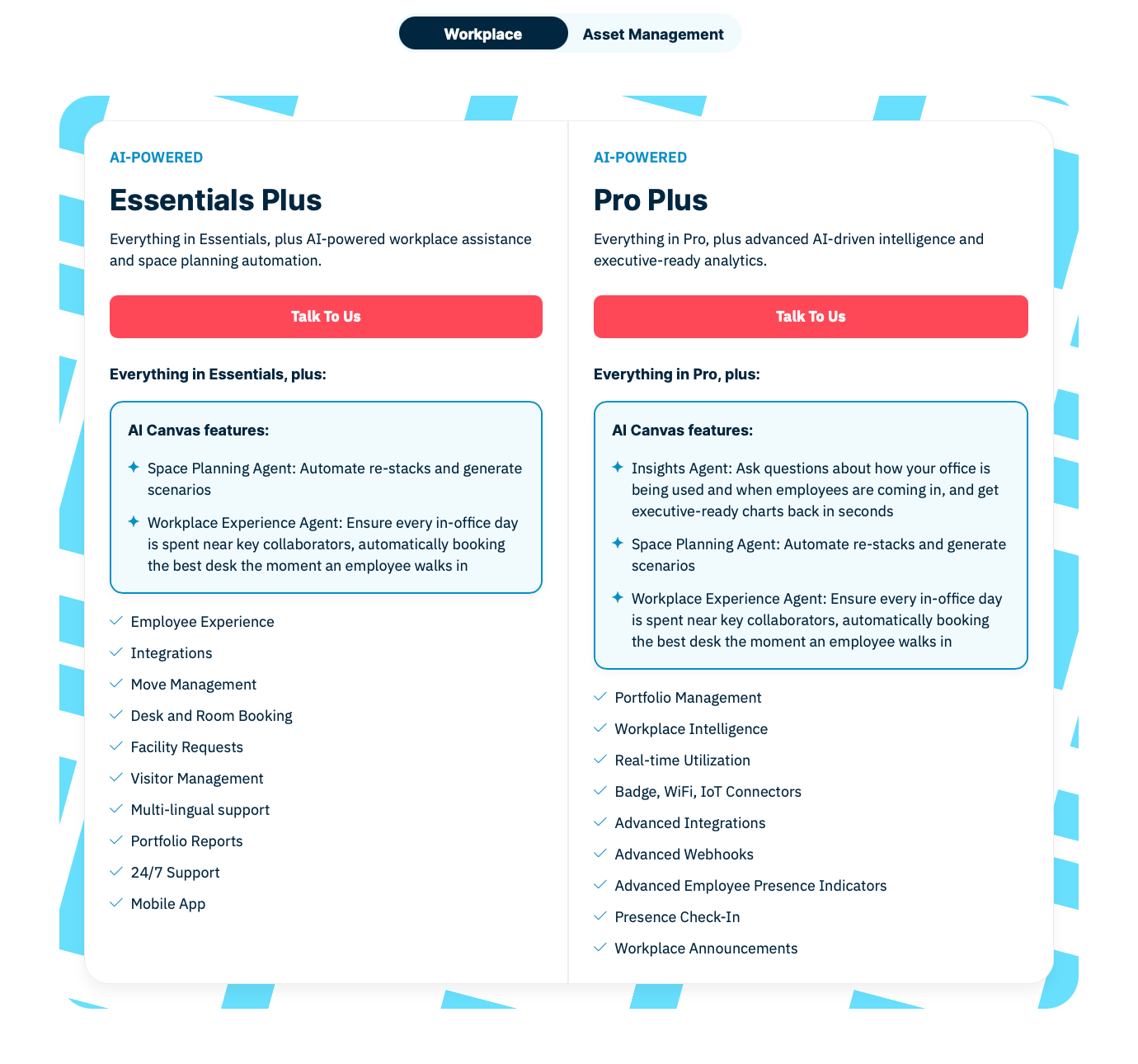
On the Workplace side, there are two plans now, both with the AI baked in:
Essentials Plus is the everyday one: booking, moves, facility requests, visitors, reports, and the agents that do re-stacks and desk-matching.
Pro Plus adds real-time occupancy, sensor and badge connectors, workplace intelligence, and the Insights Agent for exec-ready charts.
There’s also a separate Asset Management plan.
Each plan has a base fee and includes a set number of employees. Add more people and you pay extra.
For a rough idea of what companies pay, Vendr puts the typical deal around $21,000 a year, with most between $10,000 and $54,000.
Setup usually takes about a month.
Source: OfficeSpace
What people like
Quick to get the hang of: Most people get it right away, barely any training. A few reviewers even called it appleesque.
Good support: People like being able to reach an actual person, and they often mention that OfficeSpace listens when customers ask for something.
All your offices in one view: Useful if you’re spread across cities, you can jump between floor plans and see what's happening across all of them.
Ticketing: Request Manager makes the workplace team’s day easier. Fewer dropped requests, faster fixes.
Quick setup: Most are up and going in a couple of weeks, with help from the OfficeSpace team.
Where you might want to look around
A few things I’d keep in mind before choosing it:
Real occupancy starts with Pro Plus: Bookings tell you what got reserved. To see who showed up, that's the top plan plus sensors.
Takes a bit to learn: It does a lot, and some reviewers say it takes time to get comfortable with everything. There are lighter options out there.
Visitor management is separate: It's built on the check-in tool OfficeSpace bought, and a few teams wish it felt more built-in. Some also find the badges a little dated.
Asset tracking is its own product: It’s priced separately, and if you're tracking tens of thousands of items, it can get expensive. Some teams keep a dedicated asset tool.
Pricing is per employee: Plans include a set number of people, then you pay more for anyone over that. If you’re big and hybrid, with lots of employees in only a couple of days a week, compare that with a platform priced by desk or space.
It's US-based: Data’s hosted in the US and billing’s in USD (which is obviously not a problem for plenty of teams). Still, if you'd rather work with a local provider or need your data kept in your own country, it’s something to look at.
How I compared OfficeSpace alternatives
I looked at these the way I would if I were actually buying: their product and pricing pages, help docs, integration docs, customer stories, and recent G2 and Capterra reviews. Then I lined those up against each other and looked at what people say when they move away from OfficeSpace.
I also set a high bar. OfficeSpace does a lot more than desk booking. It gets into space planning, analytics, operations, and AI, so an alternative needs to do more than just give you a nicer booking screen.
Here’s what I looked at for each OfficeSpace alternative:
Space and move planning: Floor plans, block-and-stack, scenarios, and moves. Can you plan and manage space, or is it mainly a booking tool?
Desk and room booking: The everyday essentials. How people book, check in, release no-shows, and move between desks and rooms.
Occupancy and analytics: What you can see about how your space gets used. Booking data, sensor data, dashboards, reports, exports.
Workplace operations: Everything around the desks, visitor management, service and facility requests, assets, wayfinding.
AI and automation: OfficeSpace has put a lot into AI, so I looked at what the alternatives are doing too. Booking assistants, suggestions, occupancy insights, automations, and whether any of it is useful.
Setup and admin: How much work it takes to get started and whether you need IT every time something moves.
Pricing: Public or quote-only, per employee or per space or per active user, and how fast the number drifts once you add people or modules.
Integrations and data: Microsoft, Google, Slack, SSO, SCIM, HRIS, multi-site support, and where the data’s hosted.
Reviews: What people like and which types of teams are happiest with each tool.
There’s no one winner for everyone. A 3,000-person company managing dozens of offices has very different needs from a 40-person team in one office.
So here’s the list.
Best OfficeSpace alternatives: comparison
Tool
Best for
Pricing
Space planning
Booking
Operations
Occupancy
AI
Pricing clarity
OfficeSpace
Space & move planning
Quote only
Strong
Strong
Strong
Strong
Strong
Basic
elia
All-in-one ops
Free / from $500/mo
Basic
Strong
Strong
Strong
Good
Strong
Tactic
Booking that grew into ops
Free trial / from ~$3k/yr
Good
Strong
Good
Good
Good
Strong
YAROOMS
Booking + AI colleague
From $99/mo
Basic
Strong
Strong
Good
Strong
Strong
Eptura
Big, complex enterprises
Quote only
Strong
Strong
Strong
Strong
Good
Basic
Gable
Mostly remote teams
From $2/resource/mo
Strong
Good
Good
Good
Good
Good
deskbird
Adoption & EU privacy
Free / per user/mo
Basic
Strong
Basic
Good
Basic
Good
1. elia: best for putting the whole office on one platform
elia is a workplace platform from Canada, built by GPHY. It’s an all-in-one kind of tool that keeps most of your office operations in one place: desks and rooms, seeing who’s in, visitors, service requests, work orders, health and safety, and actual occupancy data from sensors. It makes hardware too, so sensors, room screens, and smart locks all work with the same platform.
It sits somewhere in the middle. You get a lot more than desk booking, but you’re not taking on some massive enterprise system that needs months of setup and a huge team behind it. And it's a young company that moves fast, always adding new things.
What’s in it
Interactive floor plans: Pick a desk or room right from the map. You can do it on the web, mobile, or in Teams. Save your favorite desk and rebook it in a second.
Office visibility: Check who's coming in and when and plan your office days around the people you work with.
Visitors: Check-in, badges, host notifications, visitor history, all in the same place as the rest of your workplace. Reception doesn’t need another system.
Requests and work orders: Someone reports a problem, it goes to the right person, and they can track it through to completion. It stays connected to the floor plan.
Health and safety: See where the first-aiders are sitting and keep on top of compliance.
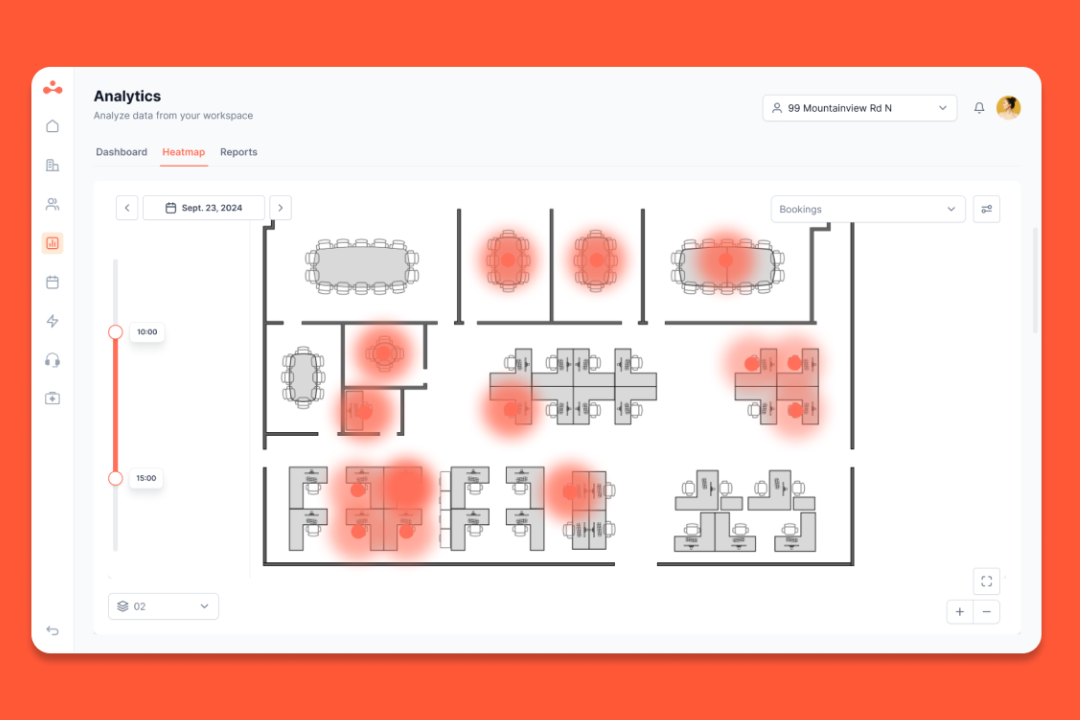
Occupancy data: Add optional desk and room sensors if you want to know what happened in the office. You get heatmaps and dashboards on top of that data.
Admin you can do yourself: Add desks, remove them, change booking rules, pull reports, and make other day-to-day changes without opening a support ticket.
Pricing
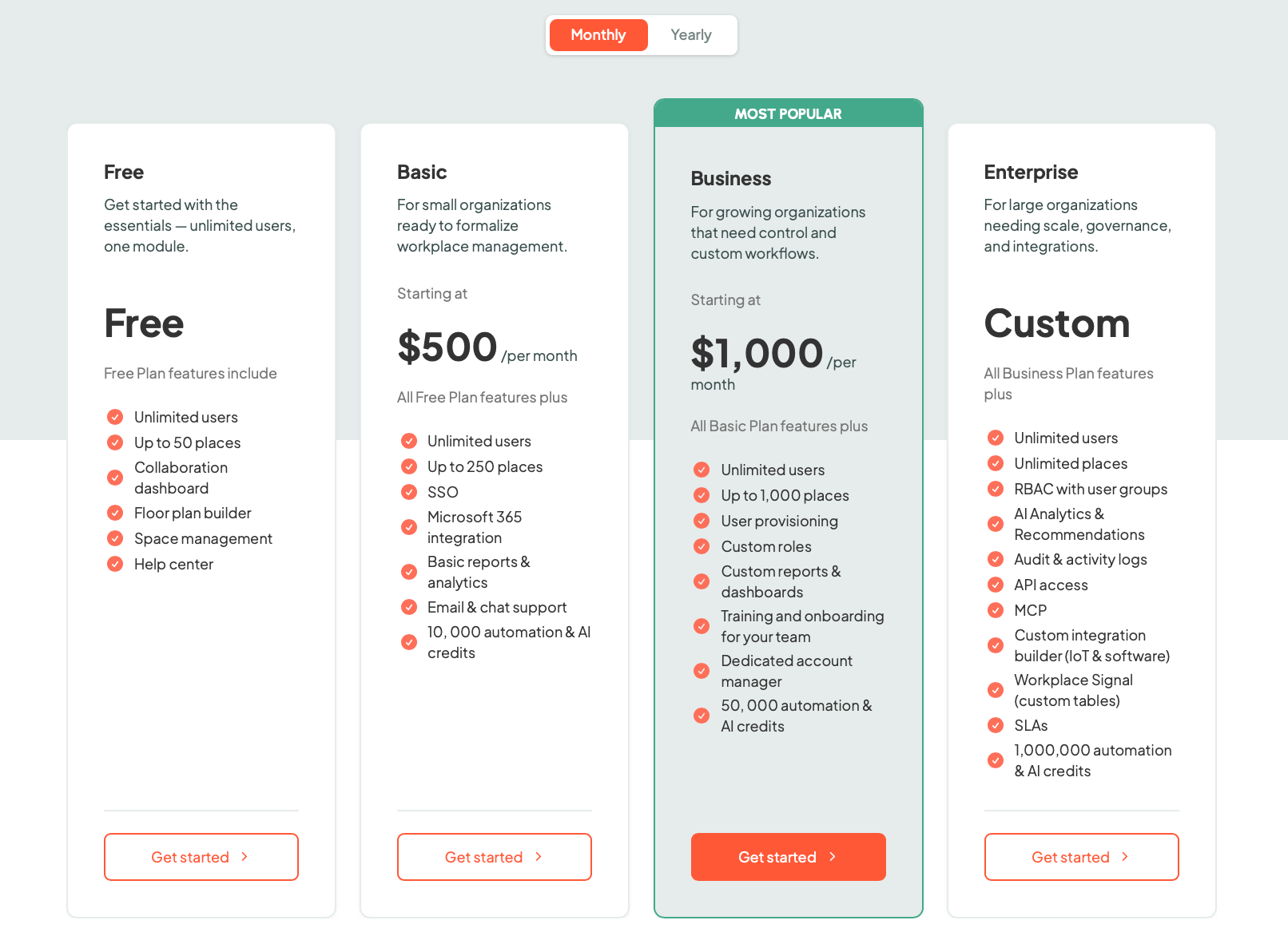
The nice part is that you can see the prices. For smaller companies, plans start at $500 a month, with a higher tier above that. Every plan comes with unlimited users. You pay by how many spaces you put in, so a big team that only books a handful of desks isn't paying for everyone.
Once you get into enterprise, it’s custom, so you’ll need to talk to sales. The hardware is optional too.
Source: elia
What people love about it
Booking without training: People book a desk off the floor plan on their own, even the least techy ones (speaking from the experience here).
Better office coordination: Knowing who’s going to be in makes planning office days easier.
Less manual work: No-show desks free themselves up and requests get sent to the right team without someone sorting them out manually.
Responsive support: Fast, human help, same-day Teams calls, and the team ships the features customers ask for.
Fits nicely with Microsoft: If your company’s in Teams and Outlook, it fits right in. You sign in with your work login, and your bookings show up on your calendar.
A few honest notes
Not for heavy space-planning: If your day involves block-and-stack or big office moves across lots of floors, OfficeSpace has more depth there.
Simple AI, for now: OfficeSpace has gone much further with AI agents. elia has the search assistant and useful automations, but it’s not at the point where AI is redesigning your floor plan for you.
Canada-first: Built and hosted in Canada. Great if you want a local partner and your data at home, and something to know if you specifically need a big global footprint.
Feature
elia
OfficeSpace
Platform
Connected workplace ops
Space-planning-led workplace platform
Best for
All-in-one ops
Space & move planning
Starting price
Free, or from $500/month
Quote only (~$21k/year)
Pricing model
Tiered by space, unlimited users, + hardware
Per employee, quote-only, + add-ons
Space & move planning
Everyday floor changes
Full: block-and-stack, scenarios, moves
Desk booking
Yes
Yes
Room booking
Yes
Yes
Floor plans
Yes
Yes (Studio, CAD import)
Visitor management
Built in
Add-on (Greetly)
Requests & work orders
Built in
Built in (Request Manager)
Safety workflows
Built in
Limited
Occupancy tracking
Sensor-backed (own)
Bookings + sensors (top tier)
Analytics
Strong
Strong
AI
Search assistant + automations
AI agents (Canvas, Ossie)
Hardware
Native ecosystem
Third-party connectors
Admin controls
Good
Strong
Integrations
Strong
Strong
Data hosting
Canada
US
Mobile app
Yes
Yes
2. Tactic: best for easy booking that grew into a full workplace tool
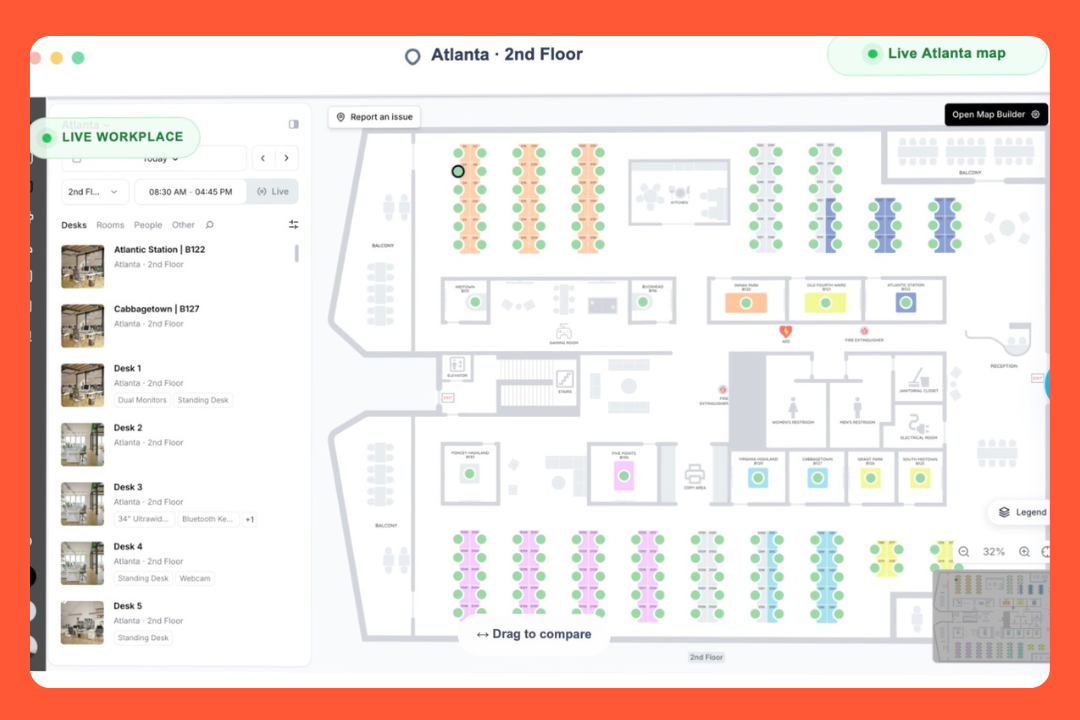
Tactic basically puts your whole workplace onto one live map. It started out mainly as a desk and room booking tool, but it's grown quite a bit since then.
There are three main parts, and you can use whichever ones you need: Engage is the employee side, so booking and visitors. Operate is more for workplace teams, with things like tickets, room services, moves, and space planning. And Connect is for integrations and the AI side.
There's also an AI assistant called Tessa. You can use it to book a desk, answer workplace questions, file a ticket, or put together a draft move plan.
What it can do
Booking: Desks, rooms, parking, lockers, and equipment. Employees can book from the map, mobile, Slack, or Teams. There's also check-in and automatic release.
Visibility: It pulls bookings, check-ins, badge swipes, wifi, and calendars into one view of planned versus actual attendance, no new hardware needed.
Workplace requests: There's a proper ticketing system for facilities, IT, AV, and catering. Requests can be routed to the right person and set up as recurring tasks.
Managed rooms: You can connect catering and room setup to a meeting booking, so the team knows what needs to be ready before the meeting starts.
Moves and space planning: You can try out different office layouts before moving anyone. You can also compare your current setup with a future one.
Space management: Upload your PDF or CAD floor plans and use the usage data to figure out how much space you need.
Pricing
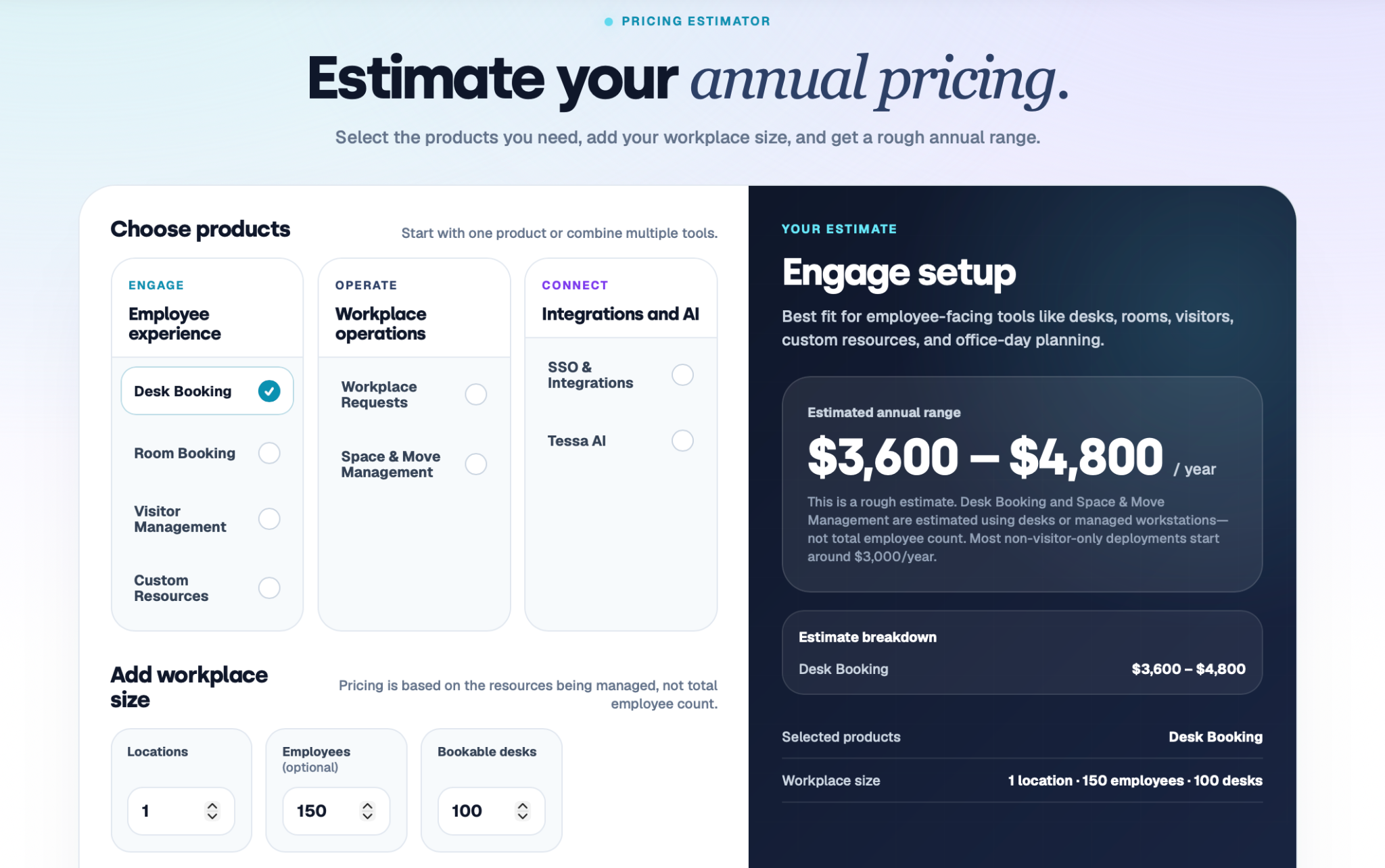
Tactic's modular. You pick the parts you need and pay based on what you're managing, desks, rooms, and so on, not headcount.
They actually have a pricing calculator on their website, which is nice because you can get a rough idea without having to talk to anyone first. For example, one location with 100 desks comes out to around $3,600 to $4,800 a year, and most setups without visitor management start at about $3,000.
There's also a free trial, so it's fairly easy to test it out before committing.
Source: Tactic
Why people like it
Book from Slack or Teams: People reserve a desk inside the chat app they already have open.
Workplace operations: It started with booking, but you can now have visitors, workplace requests, moves, and space planning in one place too.
Attendance data: It brings together bookings, check-ins, badge data, Wi-Fi, and other signals.
AI assistant: Instead of clicking through the platform, you can ask the AI to book a desk or pull up information for you.
Support: Users often mention that the team is quick to respond and helpful when something comes up.
What to keep an eye on
Facilities management: Tactic has moved far beyond basic booking, but it's not trying to be a full facilities management system like Eptura.
Performance: Some users have mentioned occasional lag, and the mobile experience isn’t as smooth as the desktop version.
Booking accuracy: A few users have run into availability not being quite right, including the occasional double-booking.
Occupancy data: Tactic doesn't make its own sensors, it reads the badge and sensor data you already have.
3. YAROOMS: best for best for booking with an AI colleague
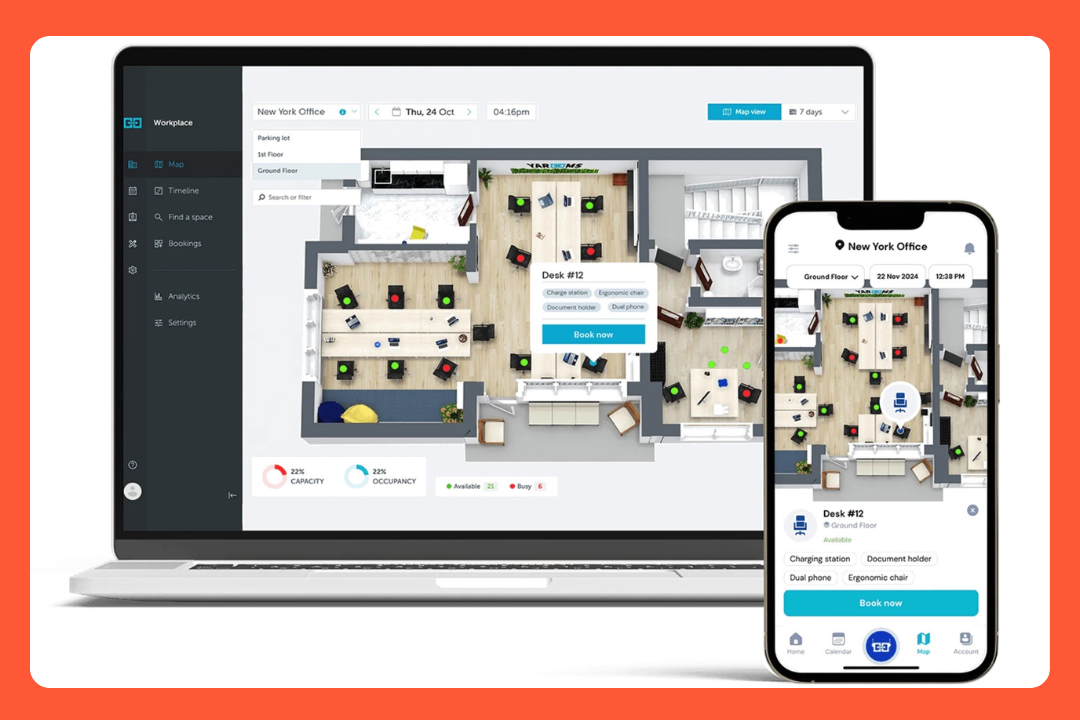
YAROOMS is a workplace platform from Romania. It has all the usual workplace features, but AI has become a much bigger part of the product recently. Their AI assistant is called Yarvis. It works through Teams and email, so you can just ask it for what you need instead of opening another workplace app.
The regular booking side is simple too. You can open the office map, find a desk, see who's coming in, and choose a spot near your coworkers. It's Microsoft-friendly to the core, and you get to keep your data in the EU or the US, which for teams outside America is a plus.
What YAROOMS packs in
Desk and room booking: You can book from the web, mobile, a room display, or ask Yarvis in Teams or Slack.
Yarvis: It works in Teams and email. You can ask it to book a desk or room, find a time that works for everyone, register a visitor, or check you in.
Hybrid scheduling: One calendar showing who's in, who's off. People set their own week, and managers can set the whole team in bulk.
Visitor management: Sign-in flows, notifications over email, Teams, or Slack, branded check-in, visitor photos, and analytics are included. Priced as its own add-on.
Workplace services: Need catering or AV for a meeting? You can add those requests to the room booking, and they go straight to the person or team handling them.
Tickets and maintenance: There's a simple "report a problem" option from a booking. You can also put a room or desk into maintenance mode so nobody can book it.
Pricing
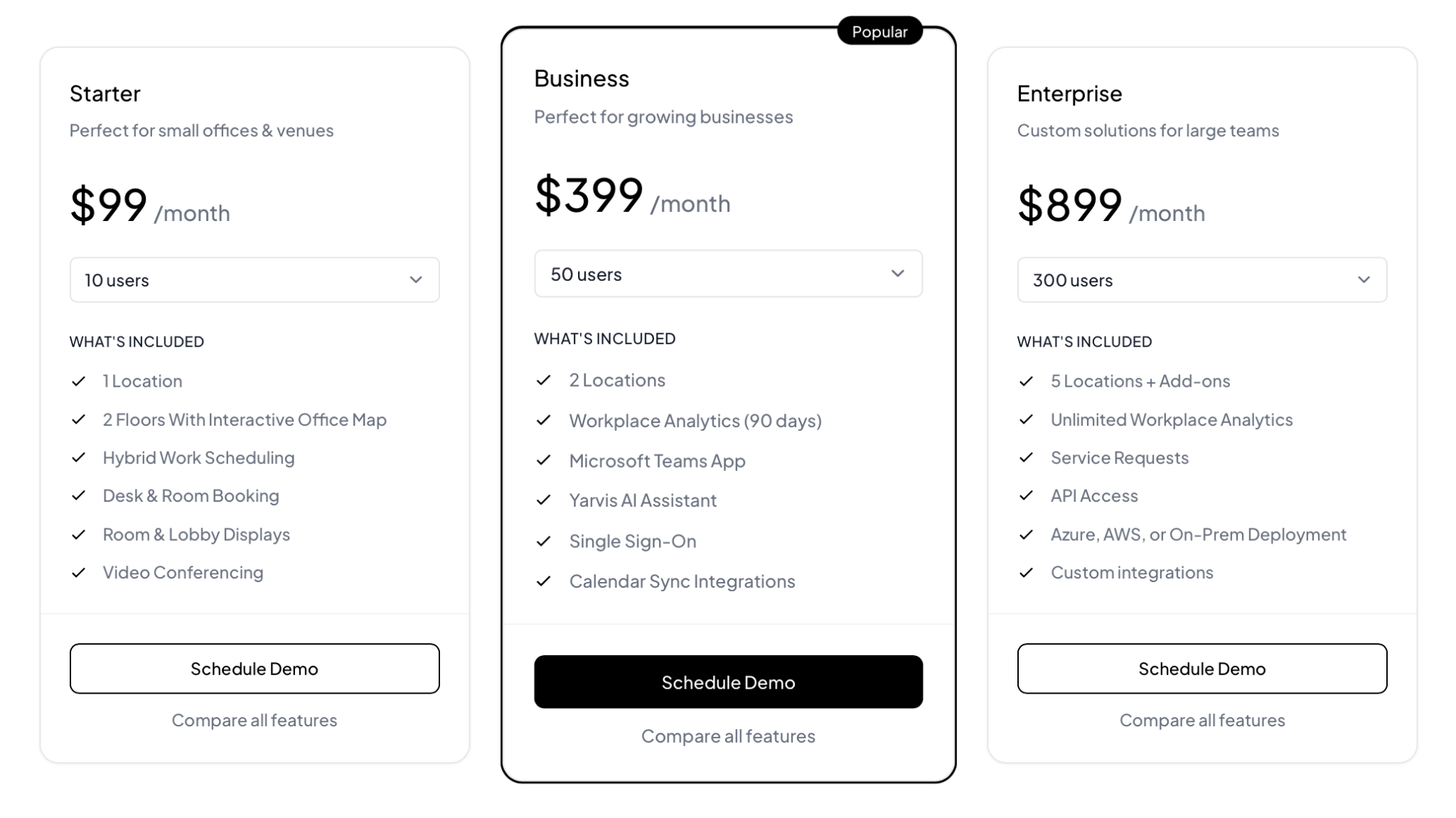
YAROOMS is actually nice about it because they put the numbers right on their website:
Starter is $99 a month for a small office, 1 location and up to 20 people.
Business is $399 and adds Yarvis, the Teams app, SSO, analytics, and calendar sync.
Enterprise is $899 for the big setups, 5 locations plus add-ons, unlimited analytics, service requests, API access, and your choice of cloud or on-prem.
Visitor management is a separate $99 a location. If you pay yearly, you get 20% off.
Source: YAROOMS
Where it wins people over
Map view: Free desks and who's sitting where, at a glance, gets mentioned again and again.
Room photos: You can see what a room looks like before booking it, which sounds small but is a useful touch.
Team proximity: You can see where your coworkers are and pick a desk nearby instead of ending up on the other side of the office.
Outlook integration: Book from the calendar people use every day.
Support: The team is quick to respond and helpful when you're getting things set up.
A few snags
Space planning: You get maps and maintenance mode, but not block-and-stack or big restacks. If that's your day, OfficeSpace or Eptura fit better.
Mobile experience: Some reviewers find changing a booking on the phone a bit harder than it should be.
Recurring bookings: The feature's there, people just find it less straightforward.
Asset tracking: If you also want to keep track of equipment and inventory, you'll need another system for that.
4. Eptura: best for big, complicated companies
Eptura is probably the most full-featured option on this list. It brings together a bunch of products that used to be separate, including Condeco for room booking, Serraview for space and real estate, and Archibus for facilities and asset management. They're all part of Eptura now (though you can still feel the seams in some places).
There's a lot in here!! You can book desks and rooms, plan office space, manage moves, track leases and properties, manage work orders, maintain equipment, track assets, and more. If you have facilities, real estate, maintenance, and workplace teams working across multiple buildings, Eptura can cover most of what they need.
Key features
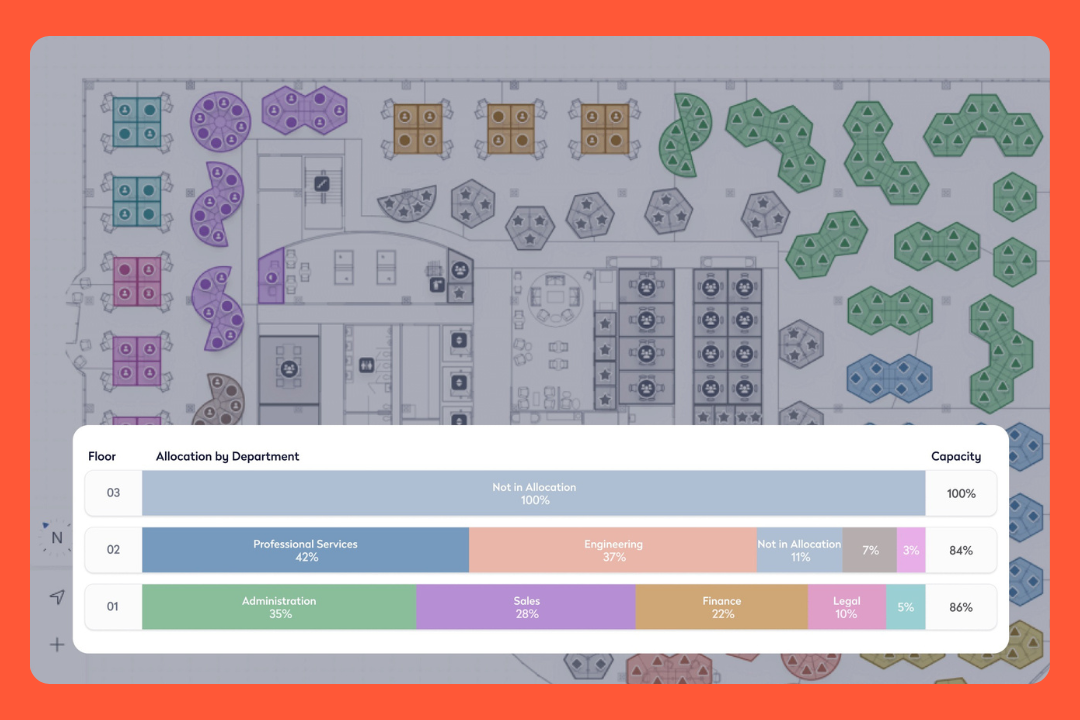
Space and move planning: Big part of what Eptura does. You get floor plans, block-and-stack, what-if scenarios, move management, and real-estate portfolio tools.
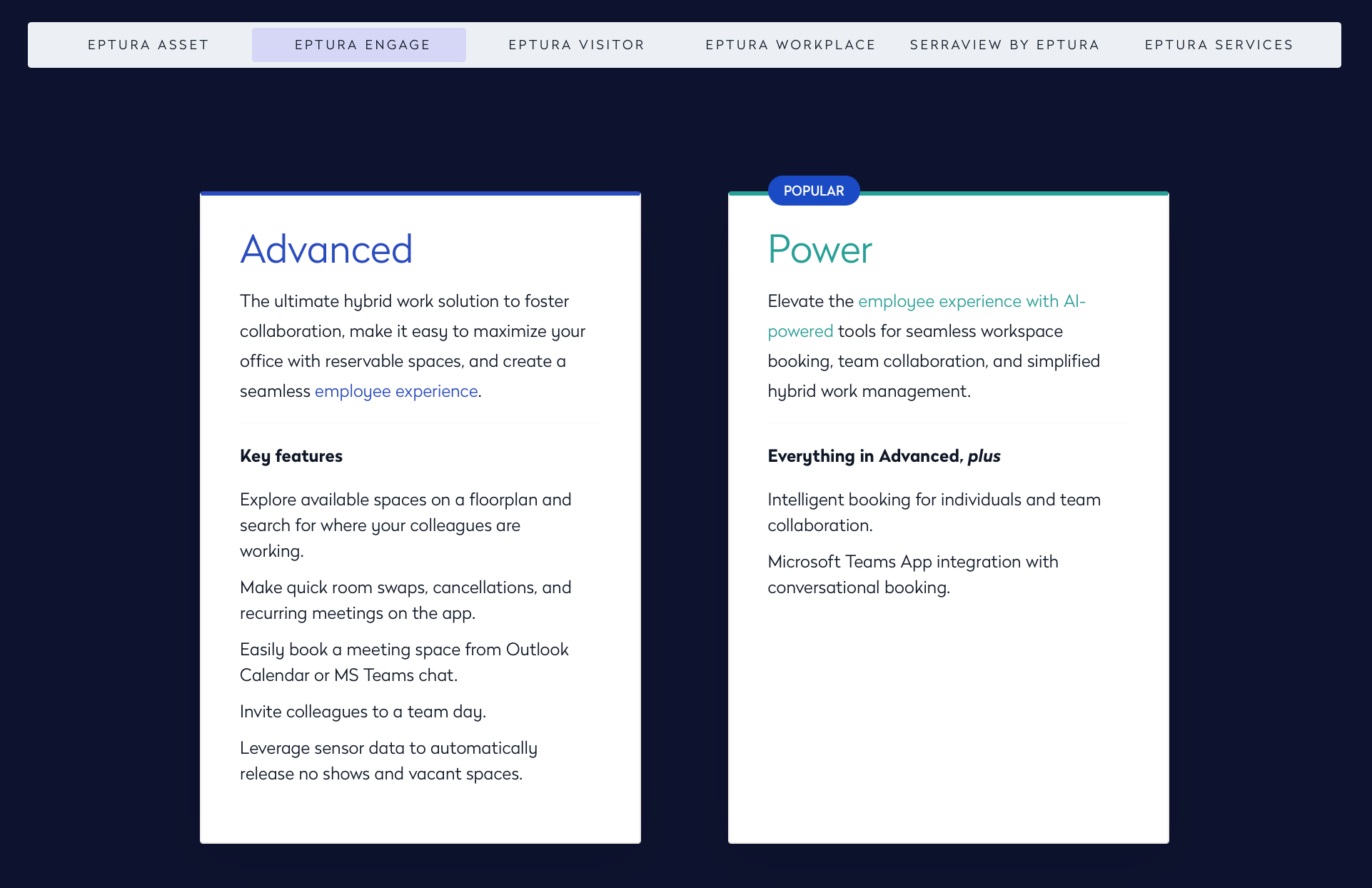
Desk and room booking: The old Condeco product, now Eptura Engage, with AI helping people pick the right days and desks.
Assets and maintenance: You can manage work orders, preventive maintenance, inspections, purchase orders, vendor invoices, the whole facilities-and-asset side.
Visitor management: It includes check-in, badges, host notifications, and access-control tie-ins.
Occupancy and analytics: Eptura can show which desks are being used and which ones aren't through tools like SVLive. You can also bring in data from sensors and Wi-Fi.
Real estate and leases: You can keep track of leases, properties, building projects, and other real estate information. It also connects with tools like Autodesk.
Pricing
You won't find a price on the website. You have to talk to Eptura or one of their partners and get a quote based on what you need.
And I wouldn't expect it to be cheap. It’s aimed at bigger companies, and if you start adding things like space planning, maintenance, assets, real estate, and all the other modules, the bill is going to grow with it. There’s also some implementation work involved, and depending on how much of Eptura you're using, that could take a few weeks or a months.
Source: Eptura
The good parts
All-in-one tool: Desks, rooms, space planning, moves, visitors, assets, maintenance, leases... For a big company, having all of that in one place is huge.
Space planning: The floor plans and move tools give facilities teams a lot of control over how they use their space.
Asset and maintenance: Work orders, servicing equipment, and inspections go well past what booking apps do.
Built for big companies: Multiple offices, lots of employees, different teams, security requirements.
One view across all your sites: You can see and manage every office from the same place.
The catch
Setup and complexity: It’s powerful and heavy. Setup takes time and IT help, and the day-to-day can feel complex if all you wanted was desk booking.
Product integration: It's built from several products merged together, and since then reviewers mention support getting harder to reach and some glitches.
Pricing: Quote-only, on the pricey side, and the modules add up. A few reviewers said it's not very negotiable.
Not a simple, quick pick: If you're looking for something simple that employees can pick up quickly, there are easier options.
5. Gable: best for remote-heavy teams
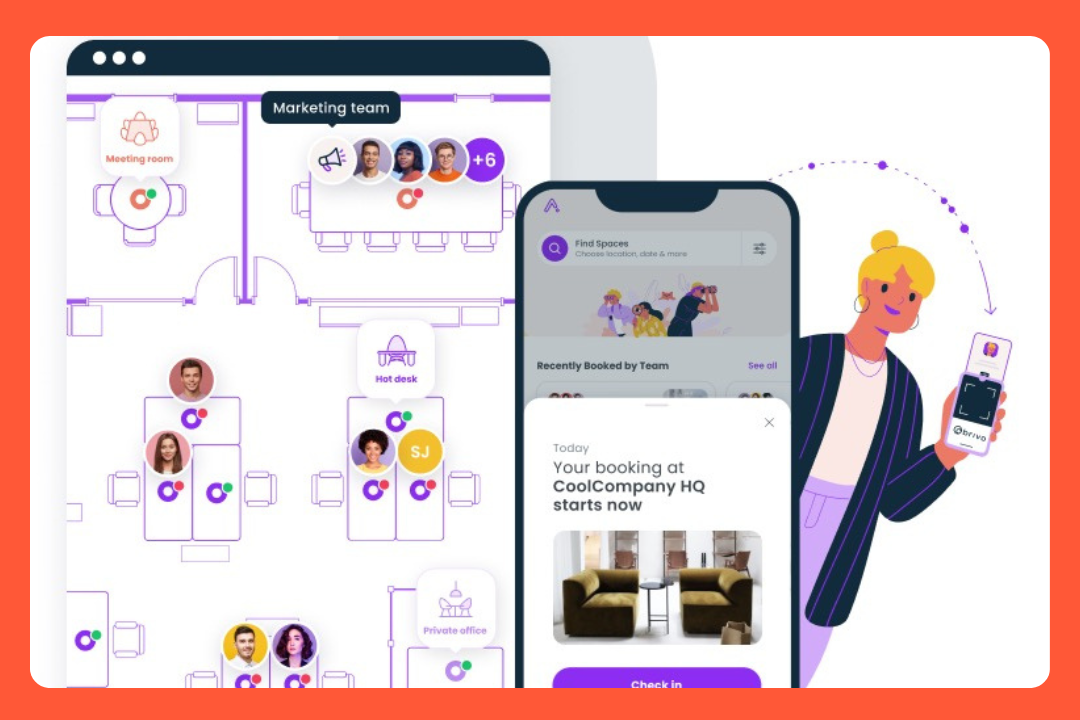
I'd look at Gable if you’re mostly remote or your people are spread across different cities. If that’s you, you might like their On-Demandfeature. Instead of keeping an office for everyone, employees can book coworking spaces or private offices through Gable's network of 20,000+ spaces in 900+ cities. You only pay for what your people use.
On top of that, Gable does the more traditional workplace stuff: desk and room booking, visitor check-in, packages, events, and so on. There's also a big focus on spending, with budgets and an AI tool that can answer questions about office usage.
What Gable brings
On-Demand coworking: Someone spending the week in Lisbon pulls up what's near them and books a desk or a room for the day. You pay for that day, and nothing else.
Desk and room booking: For your own offices, you get the usual booking tools, interactive maps, neighborhoods, check-in by badge, sensor, or wifi, and auto-release.
Visibility: People can spot when teammates are coming in, at the office or a coworking spot, and join them.
Visitor management: You get visitor check-in, badges, NDAs, and pre-registration. There's also a mailroom feature for keeping track of packages.
Events: Gable can help with offsites and team events too. You can find venues, send invites, keep track of the budget, and use their concierge service.
Cost controls: You can set budgets and limits around who can book certain spaces and how much they can spend.
Pricing
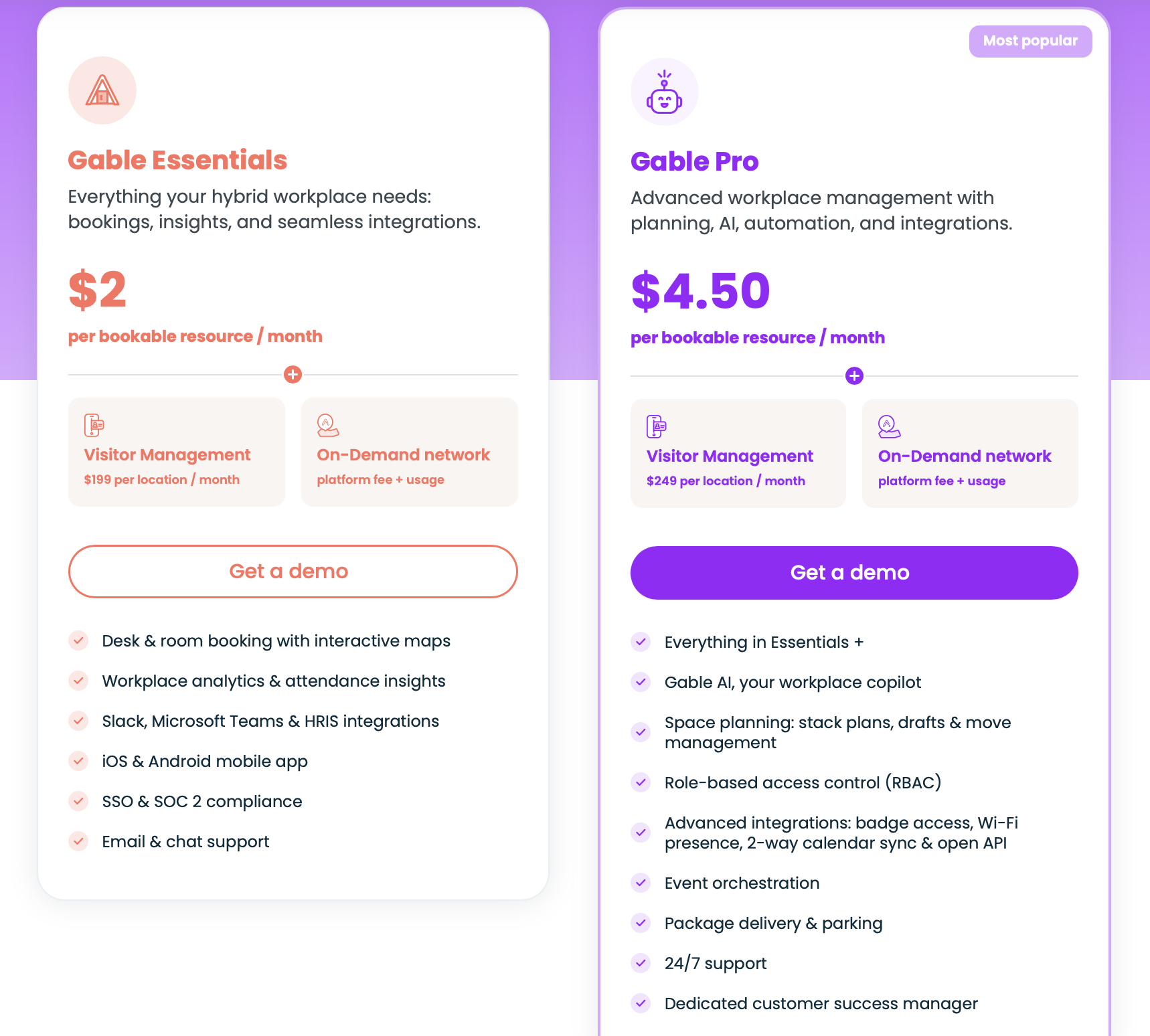
Gable charges based on the desks and rooms you're making available. There are two plans:
Essentials is $2 per resource per month, which gets you booking and the main integrations.
Pro is $4.50 per resource per month and adds stack plans, move management, Gable AI, event planning, badge and Wi-Fi presence, and 24/7 support.
Visitor management is extra, at $199 per location on Essentials or $249 on Pro.
Then there's On-Demand, which works differently. There's a platform fee, and then you pay as people book coworking spaces. So if nobody uses it, you're not paying for a bunch of unused coworking space.
The thing I'd watch is the usage. If people start booking coworking spaces all the time, you can end up spending quite a bit on those individual bookings. Some reviews also mention that a space can occasionally cost more through Gable than it would if you booked directly.
Source: Gable
What's good about it
Coworking network: Employees have a lot of options when they're working from somewhere other than the main office.
Cost savings: Companies like Upwork and Checkr cut workspace costs by around half.
Controls and data: Budget caps and reporting make it easier to see who's spending what and where.
Support: The team's responsive and will tailor things for you.
Integrations: Slack, Teams, Google, Outlook, Okta, and the common workplace systems are all covered.
Rough edges
Facilities and maintenance side: Once you get into work orders, maintenance, asset tracking, and looking after the building, something like OfficeSpace goes further here.
Booking features: There's no recurring or bulk booking, no favorites, and canceling takes a few too many clicks.
On-Demand costs: Pay-per-use is great until people book a lot, then the per-visit costs climb.
Feature development: A few users have mentioned that new features can take a while to arrive.
6. deskbird: best for hybrid teams that want EU-grade privacy
deskbird is a hybrid workplace app from Switzerland, and its focus is getting people to book. Desks, rooms, parking, visitors, and tickets, in one app people open on their own. You book a desk in 2 taps, or zero if you use deskbird Dock, which checks you in when you arrive.
Then there's the other side of it, which is the data you get from those bookings and check-ins. You can see how much your office is being used and use that when you're looking at your lease.
And it's built for European rules first, with setups ready for German, French, and Dutch works councils.
What deskbird covers
Desk booking: You can book from an interactive floor plan in a couple of taps or let deskbird Dock check you in when you arrive.
Visibility: The app shows who's coming and where they're sitting, so you can book the desk right next to them.
Week planning: Everyone sets their in-office and remote days in one feed, with team days and events people can RSVP to.
Meeting rooms: Book from the app, Outlook, or the door panel, with color-coded displays showing what's free.
Parking and visitors: Employees can book parking the same way they book desks, and visitors can check in without the usual paper sign-in sheet.
Ticketing: Flag a workplace issue or a cold meeting room, and track it without chasing anyone.
Pricing
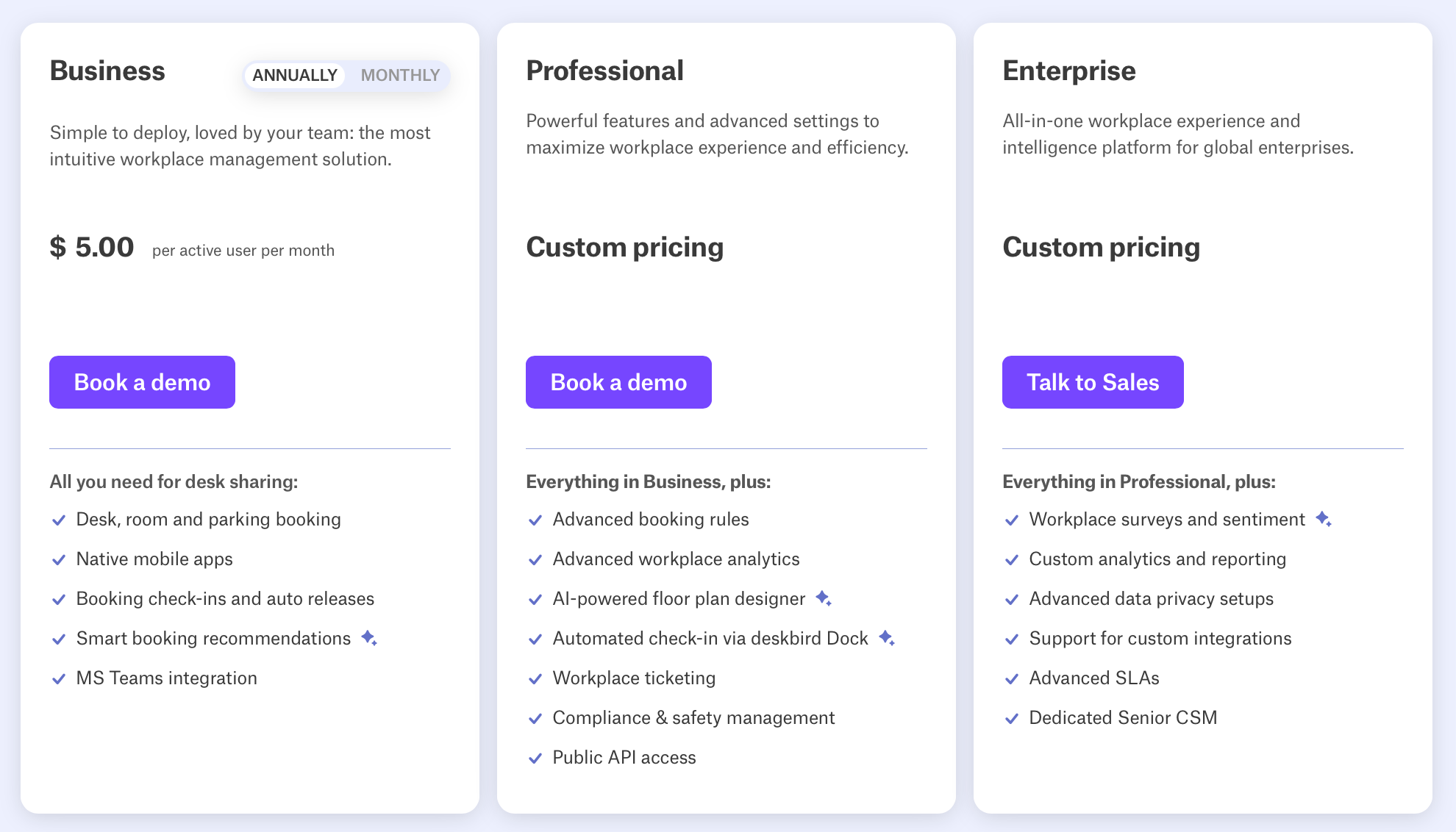
There's a free Starter plan for small teams, up to around 15 people. After that, you move into Business or Professional, which are priced per user each month. Enterprise is custom.
Rooms, visitors, and the advanced admin controls come as paid add-ons, so the number moves with what you switch on. You can also pay in different currencies, including EUR, GBP, USD, and CHF.
Source: deskbird
What people rate
Adoption: Employees pick it up quickly and keep using it without needing much training.
2-tap booking: Desks and rooms take a couple of taps, or Dock can do the check-in for you when you arrive.
Teams integration: People can book without having to jump into another app, which helps when Teams is already where everyone spends their day.
EU privacy: Data stays in the EU and employees aren't individually tracked, which is a big plus for companies with stricter privacy requirements or works councils.
Support: When something goes wrong, clients get an answer pretty quickly.
Where it comes up short
Check-in rules: Forget to check in and your desk auto-cancels, and the reminder notifications can get naggy.
Booking flexibility: People want more give, partial days like mornings only, looser windows.
Mobile app: There are reports of it being slow to load and occasionally crashing when things get busy, and the Teams integration is weaker on mobile.
Space and facilities management: deskbird does the everyday workplace well, but it doesn't go deep into space planning, moves, assets, or maintenance.
How to choose the right OfficeSpace alternative
You won't get very far with the basics. Most of the tools on this list let you book a desk, book a room and look at a floor plan. But they differ in what happens around the booking and whether you need a big platform or something lighter.
Work out how much tool you need
Don’t skip this step.
Some teams just want to know who's booked a desk, others need to sort out visitors, room scheduling, parking, requests and keep track of space data across multiple offices. OfficeSpace is at the heavy end of the scale, so the question is whether you need to pay for all of that or go for a smaller tool.
The lighter tools here roll out faster, but the broader ones give workplace teams a lot more to work with.
Be honest about your space planning
OfficeSpace is built around space and move planning, block-and-stack, scenarios, big multi-floor moves. If that's your day, only a couple on this list do. If you don't do that kind of planning, it's the easiest place to stop paying for something you'll never touch. So before anything else, ask how often you really shuffle people around.
Look at how it's priced, and whether you can see the price
Pricing is a major reason why people leave Office Space, so have a close look. Some tools charge per employee, some per space or resource, some a flat fee. Some put the price right on the page, others make you book a call before they tell you what it will cost.
A per-employee model can get expensive if you have a lot of people who are in the office only a day or two a week, so do the maths on how you use the office,.
Think about rollout, and where your data lives
The tool that looks simplest in a screenshot isn't always the fastest to launch. Some need real setup around floor plans, directory sync, room calendars, and permissions; others go live quickly because they sit inside Slack or Microsoft Teams and ask less of IT.
And if you're outside the US, check where your data is hosted, since some of these keep it in Canada or the EU.
The short of it
OfficeSpace is a strong platform. The right alternative depends on what you want more of: simpler booking, tighter admin control, better space utilization data, or the whole office on one platform.
If you want something broad and practical day to day, elia puts desks, rooms, visitors, requests, and real occupancy in one place, and it's built for teams that don't want to glue separate tools together. If you want to see it for yourself, book an elia demo.
Tamara Zhostka
is a Content Marketing Specialist at elia. With 10+ years in content marketing, she writes about workplace trends and the tools that help teams work smarter. Part strategist, part storyteller, Tamara brings equal amounts of data, creativity, and a little Moon Prism Power to every piece she creates. 🌙✨
Share
Contents
Subscribe to our newsletter
Subscribe to the elia newsletter for exclusive product updates and industry best practices. You can unsubscribe at any time.
Thank you! You're subscribed.
Oops! Something went wrong while submitting the form.
Frequently Asked Questions
Answers to Your Common Queries
Does OfficeSpace share its pricing publicly?
What's the best OfficeSpace alternative for a mid-market team with multiple locations?
Which OfficeSpace alternatives are strongest for space utilization reporting?




.png)
.png)